How Your KDP Ad on Amazon Might Be Better than You Think

AMS Ad

AMAZON MARKETING SERVICES

I love that Amazon now lets indie authors advertise with Amazon Marketing Services (AMS) through KDP Select.

Think about this: Traditionally published authors can’t find a self-service, low-cost advertising option on Amazon.

But if you’re enrolled in KDP Select, you can.

How cool is that?

Anyway… If you try one of these ads, you might just get 1 click for every 1000 impressions or so, and you might get a few sales for every 100 clicks.

If you also bid high to get more impressions, you might see a small short-term return on investment (ROI).

However, things may be better than they seem—i.e. better than the sales column in your AMS ad report might suggest.

Here are 14 ways that your Amazon ad might be more effective than it seems:

  1. Non-clicked sales. Clicking on your ad isn’t the only way to reach your product page. If a customer sees your name or the title of your book, the customer might search for it later. Or the customer might see the ad on his/her pc or laptop, but get out a Kindle to search for your book (instead of clicking on your ad). Thus, you might get a couple of sales that don’t show up on your ad report.
  2. Kindle Unlimited. Customers who click on your ad might download your book through Kindle Unlimited. These won’t show on the sales column of your ad report.
  3. Audio sales. Customers who click on your ad might see your audio book linked to your Kindle product page. A few customers may prefer the audio format.
  4. Print sales. Customers who click on your ad might see your print book linked to your Kindle product page. Some customers prefer print. (I tend to sell more print books than Kindle books, so this is significant for me.)
  5. Add to cart. The customer was busy buying something else when he/she saw your ad. So after clicking on your ad, if the customer likes your book, the customer might simply add your book to his/her shopping cart and revisit your book several weeks later. If the purchase isn’t made within 14 days, the sale won’t show on your ad report.
  6. Delays. Sales reporting on the ad report can be delayed. First, there can be a payment processing delay of a few days. The ad report itself says that sales reporting may be delayed by 2-3 days. The customer might not buy the book immediately after clicking the ad, too. The ad report will allow a customer 14 days from the click date to make the purchase, and still report the sale on the ad report.
  7. Series. If your ad succeeds in selling the first book of a series, some customers will also purchase the second book, third book, etc. Each sale can potentially be several sales.
  8. Similar books. A customer who clicks on your ad might check out your other books, too. In fact, the customer might buy one of your other books instead of the one you advertised. Or the customer might purchase multiple books.
  9. Multiple books. Authors of multiple similar books have a distinct advantage. One ad might result in multiple sales. But you only see sales of the advertised product in your ad report.
  10. Future sales. A customer who reads your book today might buy more books from you in the future. Including books you haven’t even published yet. When you release your next book, each fan you add today may impact your new release.
  11. Sales rank boost. If your ad succeeds in generating any sales or Kindle Unlimited downloads, this sales rank boost has the potential to generate additional sales.
  12. Branding. Anyone who sees your ad or reads the title has learned that your book exists. The next time they see your book, this improves the chances that they will buy it. Branding has good long-term potential. Even though the thumbnails are small and the ads only show a few words, people are clicking on the ads occasionally, so there is some branding effect in play.
  13. Recommendations. Any customers who buy your book as a result of the ad and who enjoy your book may recommend it to others. This can be a very long-term effect, but if you can get recommendations, they can have a big impact on sales many months down the road.
  14. Feedback. If nothing else, the ad report gives you some data that may be useful. For example, if your sales-to-click ratio is around 1% or less, it’s a good sign that you can improve (A) the marketability of your product page, (B) the targeting of your ad, or (C) your thumbnail or title so that they better attract your target audience through the ad.

Here are a few advertising tips that I’ve learned from my preliminary data from my KDP ad campaigns:

  • Product targeting appears to be much more effective than interest targeting.
  • Try to get into the mind of your target audience. Think of the people most likely to purchase, read, and appreciate your book. Which other books and products are they very likely to be shopping for now?
  • About 50 to 150 highly relevant products can work well, if you select them wisely.
  • It’s not just the popularity of the other product, but also how receptive those readers may be to your book.
  • It may be okay to add a highly relevant movie (on DVD or Prime, for example). This might help you break free of competition for ad placement.
  • It’s presently hard to make impressions with lower bids, say around 10 cents or less. Wise product targeting can help to make impressions.
  • Bid competitiveness is showing a few signs of possibly coming down in some categories. Patience may get your better return on your investment.
  • Here’s a new KDP Select tool that appears to reward higher-priced books. With a $100 budget and pay-per-click, earning a 34-cent royalty on a 99-cent book will have a really tiny short-term ROI. That doesn’t mean this can’t be useful to advertise a lower-priced book, just that doing so carries greater risk and requires much better long-term results to be worth it.

Chris McMullen

Copyright © 2015

Chris McMullen, Author of A Detailed Guide to Self-Publishing with Amazon and Other Online Booksellers

  • Volume 1 on formatting and publishing
  • Volume 2 on marketability and marketing
  • 4-in-1 Boxed set includes both volumes and more

Follow me at WordPress, find my author page on Facebook, or connect with me through Twitter.

Comments

Click here to jump to the comments section:

https://chrismcmullen.wordpress.com/2015/02/08/how-your-kdp-ad-on-amazon-might-be-better-than-you-think/#comments

How to Get 100,000 Views of Your BLOG (21 Blogging Tips)

Blogging Tips T

BLOG SUCCESSFULLY

I first began blogging actively on WordPress in December, 2012.

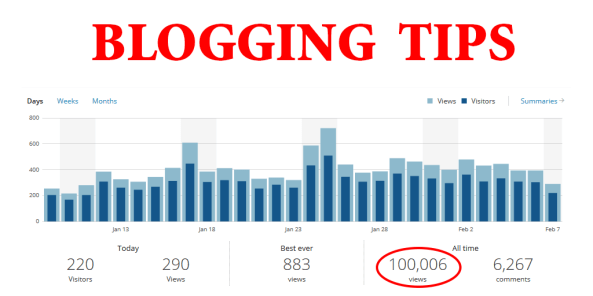
Only a little over 2 years, and my blog has reached 100,000 views and nearly 4,000 followers. My blog averages over 400 views per day presently, and the viewing frequency steadily accelerates.

If I can do it, you can, too. I believe it.

It’s not rocket science. (Just ignore the fact that I have a Ph.D. in physics. I didn’t use any physics to make my blog.)

In fact, I’m sharing my blogging ‘secrets’ today to help you do the same.

It’s not just me. I meet many other WordPress bloggers with many more views and followers than I have.

If you’re not there yet, don’t worry. You can get there, too.

I’ve created multiple blogs and webpages with WordPress, BlogSpot, GoDaddy, etc. By far my most successful blog or webpage is this WordPress blog. We’re fortunate that WordPress helps with visibility in search results. I find that the WordPress community is also very helpful, interactive, and positive. It’s a great place to be.

WORDPRESS BLOGGING TIPS

Here are 21 simple tips for better blogging at WordPress.

At the end of this article, I also reveal my two best tips for better blog traffic, and discuss those two tips in detail.

1 Readability

You can’t afford to lose any potential readers, right? They’re so hard to come by.

So your blog needs to be as readable as possible.

Black text on white is easiest to read. Use this for body text.

2 Skimmability

People read books. But they skim blogs.

Use headings, bullets, boldface, color, quote blocks, indents, images, etc. to make your blog skim-friendly.

Help the reader identify main points and see which parts of the article have relevant content.

3 Who Are You?

Setup your Gravatar. Check it periodically to ensure that it’s current.

Look for Users on either your dashboard or on My Sites.

Manage your photo through the Gravatar service. This will be your visual brand when you comment, for example.

Complete your profile. Be sure to add other links. For example, authors might add an Amazon Author Central page and a Goodreads page.

4 Publicize

Look for Settings > Sharing from your dashboard (click WP Admin from My Sites).

Add your Facebook, Twitter, Google+, and other social media sites here. This will allow you to feed your WordPress blog directly to those sites.

(But check out my previous article about how Amazon uses Facebook and Twitter, and also check out the comments section in that post. That only takes a minute and it’s a better way.)

5 Sharing

More important, add the sharing buttons in Settings > Sharing.

This allows people who read your articles to share them via Twitter, Facebook, etc.

(If you include a hashtag in your title here at WordPress, that will help if anyone shares your post on Twitter.)

Remember to add the Print and Email options. Some people who read blogs actually like to print the articles out.

Be sure to scroll down and check the boxes for the posts and pages where you want these buttons to show.

6 Twitter & Facebook Widgets

Here is a little secret: Your Twitter and Facebook following adds to your WordPress following, so they actually help make your blog seem a little more popular than it really is.

Go to Appearance > Widgets from your dashboard.

Add the Twitter Timeline and the Facebook Like Box. Just drag them over to a sidebar. Then click the dropdown arrow to open a menu and customize them.

7 Interaction

Let your readers like your page, comment on your page, and perhaps even reblog your posts.

The likes and comments make your blog appear more interactive, and help your page stay fresh longer.

Some people try to look “pro” by removing the likes. The idea is that if there are a mere 13 likes on a post, you’re not really so popular, huh?

Who are we trying to fool? If I don’t even see the like button as an option, my first thought is that the number of likes must be really tiny.

Or, in some cases, the idea may be to encourage Facebook interaction instead. Ah, but I loathe to have to login with so many different accounts. Look, I’m already here with my Gravatar. Let me use that.

Make it simple, encourage interaction. It’s hard to get, so take what you can get.

Turn likes and reblogs on under Settings > Sharing and discussion options under Settings > Discussion.

8 Can Your Spam

Nobody wants to see that junk on your blog.

Go to Settings > Discussion to adjust comment permission settings.

I like the option where a previously approved commenter can comment again another day.

Do you really want your most loyal followers to be pending moderation? No.

But you don’t want to give the spammers a free reign either, so it’s a good idea to manually approve those who are new to your blog.

But then you better remember to check for comments that need to be approved. Don’t make them wait in limbo for days.

9 Tags & Categories

Choose tags and categories for each post. Choose just a few of each.

Specific tags likely to actually be searched for are best.

Categories should be somewhat broader than tags, but still, specific is better.

Example: I recently wrote some articles on Amazon’s new advertising tool for KDP Select authors.

Good categories may include Amazon, KDP Select, and advertising, with more specific tags of advertise on Amazon, KDP Select advertising, and Amazon Marketing Services.

Narrower tags are better. Suppose someone is searching for the keyword “advertising” on Google. My post specifically on advertising books through KDP Select isn’t going to be relevant for most searches on “advertising,” so what’s the point of that broad tag? My specific tags make this more relevant for search engines.

Categories can be somewhat broader. While “advertising” may be too broad for use as a tag, if I have other posts in the category of “advertising,” then search engines can see how relevant my website overall is to that topic.

It’s more effective to have just a few categories and a few specific tags. Piling these on or using broad tags doesn’t help.

Tip: I start typing searches at a search engine, and it pulls up popular matches as I search. You can get more detailed analysis from Google, for example, but this is good enough for me. I want a specific tag that’s actually searched for enough to show as a popular match, but not so general as to be too popular for me to ever achieve reasonable visibility.

10 Search Engine Visibility

The tags that you add should naturally fit into your article. If indeed they are relevant, it should be natural to work them into the text and headings.

Don’t overdo it. Google will smell a rat. Don’t just string keywords together. That will be very obvious, not only to Google but to your readers, too.

Your article needs to read well, but also signify what the content is about.

11 Branding & Straying

You want to develop your own brand as a blogger. This way, readers know what to expect in the way of content from you. And as your website begins to attract visitors through search engines, you want those search terms to be relevant to your blog.

But you don’t want to post 100% within the same topic, even if it’s a broad topic. It’s okay to write occasionally about other things, or to post something more personal and show that you’re human. You don’t have to give out personal info, but you might once in a blue moon relate an experience. You can make your blog a little personal without giving away personal info.

A little variety is actually good. You may actually attract more followers that way. You can balance some variety.

But you want your brand to be clear through the variety.

When I browse through my WordPress reader, I see some posts and the style of the photo or the style of the beginning clearly reveals whose blog it is. Those blogs have a definite brand in terms of appearance or style. Brand recognition. But you also want the content of your brand to show through, even if your blog has some variety.

If you want referrals, recommendations, and links to your home page, it should be clear what people should expect from your blog. What is your brand? No, don’t tell it. Show it.

12 Don’t Lose Traffic

Every extra click loses internet travelers along the way.

If it takes 2 clicks to reach your website instead of 1, you’ll lose traffic.

In Settings > Reading, you can choose to display the full article or a summary.

If you choose summary, this creates an extra click that some followers must click to reach your article from the WordPress reader.

(Some know that they can get there in 1 click. But those hoping to read your post in the reader will waste a click realizing that wasn’t possible.)

Some won’t make the trip. It’s just an internet fact.

But the WordPress stats can be misleading.

If you switch from showing the full article to showing a summary, your view stats may actually increase. But this can be misleading.

Here’s what might happen. Someone who likes your blog might add your home page to their Favorites toolbar. So they visit your home page to read your articles. If you’re showing the full article, they can read 5 articles on your home page without any clicks at all. They read 5 articles, but you only get 1 view.

Now you switch to showing only a summary. Now this reader visits your home page, but has to click the Read More link 5 separate times to view those 5 articles. Suddenly, your view stats go up. But really, your pages aren’t being viewed more than they had been. It’s just counting different now that someone has to click the link to read the rest of the article.

But this may be a bad thing, forcing those clicks to up your views. Because some people won’t make those clicks. Some people who could have read 5 articles without a single click now won’t read 1.

However, there is another consideration: upload time. Let’s say that you have a lot of high-resolution images in your posts, most of which would show after the Read More point. This could slow down the load time of your home page. Then people might visit your blog and close it out because it takes too long to load. In this case, switching to summary may help more than it hurts. You have to weigh the pros and cons (and maybe test your website out from several different computers and devices).

13 Writing

If you use the WordPress.com dashboard and if you write in Visual mode instead of Text (for HTML)—find the option at the top right when you’re writing the post—click the Toggle Toolbar icon at the top right of the icons on the top toolbar to open up other options, including an option to change from Paragraph to Headers, change the font color, indent a block, or insert a special character, for example.

WP Toolbar

(Can you imagine not knowing that these other options are available?)

Use the headings (with the icon in Visual, or using HTML in Text) for headings in your blog post. The words in your headings, or in the text divided by the headings, may help to show search engines how your content is organized, for example. Headings also aid in skimming versus reading.

14 Images

You have many options when it comes to images, even without using HTML, just with the Visual menu writing a post at WordPress.com.

Click the Add Media button. You can upload a file, or insert an image from a url, which lets you display an image from another site (but check the image use guidelines first). Find the image, right-click, and copy image location. The link often ends with .jpg or .png, for example, when you paste it in. This may not work with images on some sites, like Facebook.

If you’re not using an image that you made yourself, check the image use guidelines for that image. You don’t want to be in violation of content theft.

When linking to an image through an image url, click the button for alignment. You can also link the image to a website with the bottom option.

For example, you can find your book on Amazon, copy the image url (right-click the image and copy image location), paste it in when adding an image url at WordPress, then copy the url of the book’s product page at Amazon and link to that. When someone clicks on your thumbnail in your post, it will then take the reader to your product page.

You probably don’t want to feature your own book (or other product or service) visually at the end of every post. You don’t even need to link to your book’s product page in every post. You could use your sidebar to feature your book (or author page). Look: Your followers already know about your book. You don’t need to shove your book in their face constantly. People finding your blog for the first time will see your sidebar and discover your book that way. I do mention one of my books in plain text at the end of each post, which has some branding value, and helps for those visitors who ignore your sidebar.

When adding your own image, you can set the size, edit the image in WordPress, add a caption, etc. It pays to explore your options.

Returning to the issue of content theft, some immensely popular blogs, especially those that are image rich and feature incredible images, often don’t allow reblogs. If someone reblogs your post, your images show up in their media history at WordPress. (Crazy, huh? Maybe it’s so that those images will stay on their reblog even if your blog goes south… I dunno.) But unless your images really are such a prized possession, you may need the reblogs if you can get them. At least, post a notice regarding copyright and image use on your sidebar or at the end of your posts. (It doesn’t prevent abuse, but at least you’re asserting your rights.)

15 Don’t Play Hard to Get

Go to Appearance > Widgets from your dashboard.

Add the Follow button to your sidebar. Choose Follow Blog: Follow Blog via Email. (If you choose to show your followers, it will include Twitter and Facebook followers if you add these through sidebars, too.)

Some people prefer to follow by email, so include this as an option. WordPress users will also see a Follow button at the top of the page to add your blog feed to their reader. For others, you can also add the RSS Links button to your sidebar, so they can subscribe to your blog feed.

Here’s one benefit of the follow by email option. Once people follow hundreds of bloggers, their WordPress reader becomes jam-packed. They have to be really selective to keep up with those posts, or just read the most recent posts. It just becomes too much.

So how do you, as a reader, following hundreds of blogs, make sure that you read 100% of the posts by your favorite bloggers? The answer is simple: Follow your favorite bloggers by email.

Follow many blogs in your WordPress reader, but only your favorites by email. (Actually, you can do both for a given blog, and I believe it will count you as two followers.)

Also, follow yourself! Not for the stats. But this way you can see how your own blog looks in the WordPress reader and in email. Follow yourself both ways.

But don’t like your own posts. That would be vain. 🙂

16 Why Are my Main Headings in CAPS?

I now begin all of my posts with an image followed by a heading (using h2) in CAPS.

For example, this post begins with the heading, BLOG SUCCESSFULLY.

Why is it in caps, instead of just capitalized like Blog Successfully?

That’s because your blog post looks different on your website, in the WordPress reader, when fed into your Author Central page, when fed into Goodreads, in the emails of those who follow by email, etc. When I put the headings in caps, the excerpt for my post looks okay across the board, but if I just capitalize it, I’m not happy with how the excerpt looks in some cases.

On my website, my heading and the first paragraph show up on different lines.

However, when my blog feeds into my Author Central page, the heading and first paragraph run together.

So if I don’t use caps, here’s how my excerpt would look to shoppers viewing my author page:

Blog Successfully I first began blogging actively on WordPress in December, 2012. Only a little over 2 years…

It looks grammatically incorrect. What kind of IDIOT (that would be me!) starts a sentence with, “Blog Successfully I first began blogging…”

So in an effort not to look like a fool, I put my headings in caps. Here’s how it looks at Author Central with that subtle change:

BLOG SUCCESSFULLY I first began blogging actively on WordPress in December, 2012. Only a little over 2 years…

Still not perfect in this case (it works better when the first word has more than one letter), but the caps provide some helpful separation.

You don’t even have to start your post with a heading.

But you should see how your posts look everywhere they might be read and on different devices.

17 Feed Your Blog

I feed my WordPress blog into my Amazon Author Central page and into Goodreads.

This is easy with WordPress. Just take the url for your WordPress website and add /feed/ to it. For example, my blog is https://chrismcmullen.wordpress.com, so my blog feed is https://chrismcmullen.wordpress.com/feed/. I just paste this feed url into the appropriate fields at Author Central and Goodreads.

My most successful website or blog is my FREE WordPress.com blog, which includes .wordpress. in the url. I actually own the domain http://chrismcmullen.com, housed by GoDaddy, but all the traffic is presently over here with the free WordPress site. Everybody and their uncle and their uncle’s uncle will tell you that it’s better to buy the domain (which I did, but for me, that’s a different author site than this one, with far less traffic).

(Certainly, that looks more professional, right? But I wonder. When I see a link I’m not familiar with, I’m reluctant to click on it. Sorry, but even if I know John Doe, I don’t want to go to JohnDoe dot com. There’s a lot of stuff floating around on the internet that I’d like to avoid. But when I see a url ending with .wordpress.com, I trust that site because I trust WordPress. I’m not saying you shouldn’t get your own domain. Remember, I have one, too. Just maybe it’s worth rethinking this “common knowledge” that it’s better to use your own domain than to have the “wordpress” in it.)

18 Blog vs. Website?

Some people think it’s more professional to have a website than a blog. But you know what? If you feed your blog into your home page, it keeps the content on your website fresh. Fresh content is good for search engines, right?

The truth is that a website can have a blog, and a blog can become much more of a website than just a blog.

I started out with just a blog, and now my website has several pages. But my homepage features my blog.

Remember, you don’t have to build Rome in a day. You can start out with a blog, and once in a blue moon you can add a page, and eventually you’ll have a professional site with both a blog and pages of helpful content.

What you really want is a content-rich hub that will attract your target audience. You want to attract search engine traffic with a content-rich website. But all those weekly (or so) blog articles that you post will become the content for your content-rich website, provided that you post relevant content sometimes. And that blog will keep your content-rich website fresh.

The other pages will also have helpful content, so that people will want to add your website to their Favorites and revisit your site periodically.

Content is king. See my BEST TIP #2 at the end of this article.

19 Your Image

Be professional. You can add a personal touch, and that’s a good thing, but still cast yourself as someone who behaves professionally.

Try to avoid stirring controversy where it’s not necessary.

Try to avoid using your blog for public complaints that might not seem professional, like authors complaining about reviews.

Remember that your blog is public, not private, and the internet has an elephant’s memory.

20 Why You?

There are many great blogs to read.

Many blog readers follow hundreds of blogs.

So… the post you’re writing right now… why should people read it?

No, don’t tell. Show.

The beginning should hook the reader. It should make the expectations clear. It should create interest; not give it away.

The supporting image should help attract interest, too.

A striking, relevant image can snap the reader alert, creating interest in your post.

Even after the reader visits your page and begins reading, there is no guarantee that the reader will stay.

So you must work to engage the reader throughout.

21 Back-up

You’d hate to blog for months, posting dozens of articles, to one day wake up and find it all gone.

So periodically back-up your blog.

It’s amazingly simple. And quick. I thought my blog was enormous and would take an eternity to download, but it just took a moment.

Go to Tools > Export. Then click export. Simply download a file and save it to your computer or jump drive (maybe both, just in case).

BEST TIP #1 PATIENCE

The first key is patience.

You start out with one post, no views, and no followers.

It can be agonizingly slow in the first few months. That’s normal.

I averaged over 400 views per day this week. But I was averaging in the single digits per day my first few months. It wasn’t until my 5th month of active blogging that I finally surpassed 300 views per month. I now average more views in 24 hours than I averaged in 30 days back then.

If you blog effectively, your stats can really accelerate months down the road.

The good news is that it often isn’t linear.

I remember those early days.

You do calculations like:

After 1 month of blogging, I have 200 views, 30 likes, and 10 followers.

At this rate, if I blog for 10 years, I’ll only have 24,000 views, 3600 views, and 1200 followers.

That wouldn’t be much to show for 10 years of hard work.

But it doesn’t work that way.

Why not?

  • As your following grows, so do your initial views.
  • As your following grows, you tend to get more reblogs, retweets, and Facebook shares.
  • As your following grows, the likes and comments make your newer posts appear more active.
  • As you write more posts, you improve your chances of generating search engine traffic.
  • It can take several weeks for your blog posts to gain visibility in search results.
  • As you write similar posts, this may help your visibility with search engines, too.
  • As you write similar posts, you develop a brand as a blogger.
  • As you mention your blog’s url in all of your other marketing (e.g. bookmarks, author page in your book), this slowly adds more traffic to your blog.

Hence, things tend to accelerate.

So don’t sweat the early numbers.

See if you can make the numbers grow from one month to another. Do this consistently, and you have great long-term potential. Be patient.

BEST TIP #2 CONTENT

Content is king.

You don’t have to write 5,000+ word posts. In fact, shorter may be better, say around 1,000 words.

It depends on what you’re writing. Some bloggers build much traffic posting a poem every few days. There are some photoblogs that mostly post an image a day that have impressive numbers. Posting an inspirational note every day can gather a following.

But who is your target audience? And what will attract that audience?

Look beyond the views, likes, and follows. But I’m not saying these numbers aren’t important. They are: Your active followers provide the interaction that you need for your blog to feel worthwhile. They provide the support your need to be patient and the feedback to help you improve. And their likes and comments make your content appear interactive when latecomers arrive to the scene.

But there is another highly significant number that can signify excellent long-term potential.

Look at the number of views you’re getting from search engines. Look for older posts to show in the list of your 10 most popular posts of the day. Look at the search terms used to find your blog.

If you write content-rich articles, WordPress gives you good prospects of building significant traffic from search engines.

Search engine traffic pulls in new people from your target audience (if you choose your content wisely). These are visitors who didn’t already know about you, your blog, or your products or services. Hundreds of visitors find my blog each day from search engines. You can do it, too.

In the beginning, you’ll have no search engine traffic. This starts out very slow and can take months to really gain traction.

It also takes good content, and a wise choice of tags and categories (see tips #9 & 10 above).

Once you get any regular search engine traffic to some of your posts, your blog views can accelerate tremendously in the coming months.

Study the posts that are generating search engine traffic and try to figure out what you did right. That will help you when you write future posts.

Without search engine traffic, you write a post, it receives several views and likes for a few days, and then that post drops off the map completely.

If that post later starts finding regular traffic in search engines, that post adds many more views to your blog over the course of a year than your most popular posts generate in their first week (unless you have the good fortune for a post to go absolutely viral).

If your content is good enough to generate search engine traffic, it will also be good enough when it’s fresh to help please and add to your following.

Focus on creating helpful content for your target audience, at least with some of your posts, and good things are likely to happen.

FREE RESOURCES

The WordPress help pages have plenty of helpful information.

Every blogger should check out One Cool Site’s Blogging Tips. This site is packed with valuable blogging tips for using WordPress effectively. I’ve learned much from this site.

http://onecoolsitebloggingtips.com

If there is something specific you’d like to know about blogging at WordPress, try using Google to find your answer. Or try asking experienced bloggers. In my experience, WordPress is a helpful and friendly community, happy to share knowledge and tips.

Follow experienced and effective bloggers. You’ll probably learn some helpful tips seeing how they manage their blogs. Occasionally, bloggers even share their blogging tips right on their blogs.

LAST WORDS

Blog from your heart.

Write what you enjoy.

Enjoy what you write.

But also consider what’s effective and what your audience wants.

Because you’ll enjoy your blog more when you develop an active audience.

Ideally, what you want to write and what your audience wants you to write would be one and the same.

If that’s not quite the case, you could do both—just mix it up.

Chris McMullen

Copyright © 2015

Chris McMullen, Author of A Detailed Guide to Self-Publishing with Amazon and Other Online Booksellers

  • Volume 1 on formatting and publishing
  • Volume 2 on marketability and marketing
  • 4-in-1 Boxed set includes both volumes and more

Follow me at WordPress, find my author page on Facebook, or connect with me through Twitter.

Comments

Click here to jump to the comments section:

https://chrismcmullen.wordpress.com/2015/02/07/how-to-get-100000-blog-views-21-blogging-tips/#comments

DON’T DELAY – BACKUP TODAY!

Wouldn’t you just hate it if one day you woke up and all your WordPress posts had vanished? You don’t have to worry. Take a minute to backup your blog (all your hard work, blood, sweat, and tears), following the simple step-by-step instructions at the Storyreading Ape’s blog. It could be a life-saver. 🙂

Chris The Story Reading Ape's avatarChris The Story Reading Ape's Blog

Because you never know what the day may bring

So Stay Safe – Not Sorry

BackUpCartoon

AUTHORS

PROTECT YOUR WIP’s

Backup cartoon

BLOGGERS

PROTECT YOUR BLOGS

(For WordPress Users)

ADMIN

TOOLS

EXPORT

EXPORT (again)

Set it to ALL CONTENT then press

DOWNLOAD EXPORT FILE

414515

View original post

How does Amazon Tweet & post to Facebook?

Tweeting

POSTING TO TWITTER & FACEBOOK EFFECTIVELY

One way to learn how to do something effectively is to find someone else who is doing it well.

Amazon knows a thing or two (!) about marketing. So let’s see how Amazon uses Twitter and Facebook.

Obviously, Amazon has a huge advantage when it comes to building a following. People seek out Amazon because the company is famous.

But… just like everyone else, Amazon must tweet and post to Facebook effectively in order to engage that audience.

So what we might learn from Amazon is how to engage an audience with Twitter and Facebook.

Let’s look at two examples from Amazon. If you’re an author, these pages are actually relevant. They post a lot of helpful publishing tips, so it’s worth following these particular Amazon pages.

AMAZON KDP’S TWITTER & FACEBOOK PAGES

First, we’ll look at Amazon KDP.

You can check out Amazon’s Twitter page here:

https://twitter.com/AmazonKDP

Here is the Amazon KDP Facebook page:

https://www.facebook.com/KindleDirectPublishing

CREATESPACE’S TWITTER & FACEBOOK PAGES

Next, check out CreateSpace.

Here is CreateSpace’s Twitter page:

https://twitter.com/CreateSpace

Find CreateSpace’s Facebook page here:

https://www.facebook.com/CreateSpace

HOW AMAZON TWEETS

At both Amazon KDP and CreateSpace, look at their recent tweets.

Here are a few things that I notice:

  • About 25% of the tweets include images.
  • Both KDP and CreateSpace post 1-2 times per day.
  • The images in the tweets are consistent in size. They are 1024 x 512 (or 1024 x 576).
  • The way the images are spread out and the same size gives a nice appearance.
  • Most of their images feature writing or reading, consistent with the brand. These are publishing services.
  • The images look nice. They also include a small quote or a little text, just large enough to read, but not imposing, out of the way of the foreground.
  • The tweets provide links to relevant and helpful content for their target audience, i.e. the content relates to authorship or publishing.
  • The tweets usually include a single, but highly relevant hashtag.
  • Many of the tweets link to other helpful sites, e.g. articles, contests, or posts appearing on author’s blogs. (KDP actually linked to one of my blog posts a few weeks back, and CreateSpace did this with a different post of mine more recently; you can still find the link to my name readily at CreateSpace.) That’s pretty cool that they link to authors’ blogs.
  • Most of the tweets going to other sites (i.e. not Amazon) specify “via” and include the @ to designate the author’s Twitter handle.
  • The information found in the links is often very useful to authors. Content is king.

DIFFERENCES WITH FACEBOOK

Now look at the Facebook pages for CreateSpace and KDP.

I notice much of the same as noted above, but there are a few differences:

  • The images are more square. They are usually about 940 x 748. Amazon knows which size works best for each.
  • Every post has an image, instead of just 25% of the posts.
  • Amazon makes its own image and uploads that image for the post. If you click on the links, you’ll see that the images on those pages are different. (If you simply insert a url into a Facebook post, Facebook automatically finds an image to show, if available. Amazon inserts its own image instead, and Amazon’s image is the one that shows.) Using their own images helps Amazon achieve a consistent brand on their site, and ensures a uniformity in size, too. (Plus, then there is no question about image use rights.)
  • The Facebook posts appears to engage the target audience over a much longer period of time. I still get a few referrals from a link to one of my articles (about the use of color in cover design) that was posted by CreateSpace on Facebook over a week ago, whereas the referrals from Twitter dropped off after just a few days.
  • Although KDP and CreateSpace post the same url links at Facebook and Twitter, they don’t simply feed the posts from one to the other. They actually take the time to post separately to both Facebook and Twitter. The wording is different. The photos are sometimes the same, but cropped differently so that Twitter’s photo is 1024 x 512 and Facebook’s photo is 940 x 748. (Don’t simply change the aspect ratio to do this. Crop them differently.)

WORDPRESS TO TWITTER & FACEBOOK

So we shouldn’t auto-feed our posts from WordPress to Twitter and Facebook. (I’ve been guilty of that. But now I’m seeing the light.)

Why not?

  • The image size that works best isn’t the same across all platforms. Amazon uses 1024 x 512 (or 1024 x 576) at Twitter and crops it to 940 x 748 for Facebook. The squarer look appears better at Facebook; the more rectangular look appears better at Twitter. Amazon has a uniform look on both sites by feeding separately.
  • The auto-feed to Twitter doesn’t show the photo from WordPress. Note that Amazon only includes a photo with about 25% of their posts at Twitter, but 100% at Facebook.
  • Amazon changes the wording of the posts from one site to the other. This way, people who follow you at both Twitter and Facebook get a little variety, even when both posts link to the same article.

Chris McMullen

Copyright © 2015

Chris McMullen, Author of A Detailed Guide to Self-Publishing with Amazon and Other Online Booksellers

  • Volume 1 on formatting and publishing
  • Volume 2 on marketability and marketing
  • 4-in-1 Boxed set includes both volumes and more

Follow me at WordPress, find my author page on Facebook, or connect with me through Twitter.

Comments

Click here to jump to the comments section:

https://chrismcmullen.wordpress.com/2015/02/04/how-does-amazon-tweet-post-to-facebook/#comments

“$EN$IBLE” ADVERTISING

Sensible Advertising

Images from Shutterstock

SENSIBLE ADVERTISING

Authors can now advertise their Kindle Select books on Amazon.com.

But is it worth it?

The minimum KDP ad campaign budget is $100 and the minimum bid is 2 cents.

You can also advertise on Facebook, Twitter, or Goodreads.

Or you can advertise a promotion with BookBub, E-reader News Today, and a host of similar sites.

Will this be money well spent?

Or would it be better sitting in your pocket?

CONTENTS

  1. Temptations
  2. Advertising Goals
  3. Advertising Budget
  4. Short-term ROI Expectations
  5. Other Considerations

1. TEMPTATIONS

If you try an ad with bidding options, you may find yourself tempted to make potentially foolish decisions.

Here’s what might happen. You might place an ad with a 2-cent bid, but when you check your reports, you might see very little activity.

So you might raise your bid to 5 cents. You might see a little more activity, but still very little.

Then you might try 10 cents.

You want to see something happen, right? This is the age of instant gratification, after all.

So the natural tendency is to keep raising the bid until something happens.

And when it finally does, you might suddenly get thousands of impressions and hundreds of clicks.

And before you realize it, your $100 is all gone.

With little to show for it.

Amazon Marketing Services is new to KDP, so thousands of KDP Select authors are playing with it. Many are bidding higher and higher just to see some activity in their reports.

Also, there may be delays, stalls, or bugs in the reporting. It may not be instant feedback.

Before you make a rash decision, you want to think this through. Try to make a wise and informed decision, with specific goals in mind.

Be patient. Especially with Amazon Marketing Services, since it’s new, if you just wait days or weeks, eventually things will settle down and a lower bid will get you more impressions for your money.

Thus, waiting may get you more bang for your buck. Remember, Amazon recommends a CPC (cost-per-click) bid of 5 cents, so in the long run, lower bids are likely to make many more impressions than they appear to be making right now.

2. ADVERTISING GOALS

The first step is to identify and rank your advertising goals.

Unfortunately, most advertisements do not pay good short-term returns when it comes to books.

So if your primary goal is to make a quick buck, advertising probably isn’t the tool you’re looking for.

You might take a sizable short-term loss when you advertise.

That’s the risk you take, with the hope that other benefits will outweigh the short-term loss.

But the short-term return is also worth figuring when weighing benefits against risks. Look later in this article for help figuring this.

Here are examples of goals that you might have with your ad campaign:

  • branding your book
  • exposure for a new book, series, or author
  • help promote a short-term discount
  • landing on a hot new release or bestseller list
  • initial sales
  • improved sales rank
  • long-term sales, recommendations, reviews
  • establishing a reader base

The hope is that if you take a short-term loss with paid advertising, there will eventually be long-term gains to make up for it.

If paid advertising always returned your initial investment, everyone would do it.

Here are some of the possible long-term benefits:

BRANDING

The ad itself is likely to create impressions. These impressions help with branding.

People who see your book multiple times over a long period are more likely to recognize it. People are more likely to buy products they feel familiar with.

Branding can lead to long-term sales, sometimes several months down the line.

SALES & RECOMMENDATIONS

Advertising tends to bring very many impressions, some clicks, and few sales.

The short-term sales may seem dismal. If so, you hope that branding makes up the difference several months later.

If you have a hot promotion going on, an ad may be somewhat more successful. But then you earn less royalty on the short-term sales.

Some authors actually pay for ads to promote freebies, often hoping to help build buzz for a new book and to generate word-of-mouth recommendations and reviews from early readers.

If your ad is successful at generating sales, long-term if not short-term, eventually those sales can add to your reader base, post reviews (only a tiny percentage though), recommend your book to others, buy more books you’ve written, follow you online and buy your next book, etc.

Every follower you add may potentially buy several of your books (but your book has to really merit this).

3. ADVERTISING BUDGET

How much can you afford to invest in advertising?

You’re obviously limited by the finances you have on-hand.

But even if you have money to invest, you should also ask yourself:

How much do you currently net in monthly royalties?

It’s a lot easier for an author earning $1000 or more per month on royalties to invest 10% of that in advertising than it is for an author earning $50 per month to part with $100.

Spending a fraction of your royalties on advertising is a reasonable investment. You have something substantial to show at the end of the month even if it’s a bust.

Spending more than your monthly royalties on advertising is risky. You might face a net loss, for all your hard work to write the book.

But you’re hoping to advance from low monthly royalties to medium or high monthly royalties, right? You’re hoping that the investment will help you move on up.

So consider my next question.

Do you have compelling reason to expect significant growth in your royalties (aside from the possible benefits of advertising)?

Will you be writing more similar books? If so, are you getting some consistent sales (even if it’s a very low frequency) with your current book?

Are you presently seeing an overall trend of growth in sales over a long period of time?

Ideally, you’d like some sort of evidence to suggest that your future royalties will help cover a possible investment today.

If not, it might be worth starting out with free marketing and publishing more books, to help build consistent sales.

Once you see evidence that future royalties may be enough to warrant your advertising expense, then you’re in a better position to try it.

But there are a few authors who really do their research (comparing similar books in the beginning), who have some marketing experience, etc., and who launch their books with a bang and have the confidence that it’s going to work out. Advertising is a risk, but if you have done your homework and you have such confidence, you must decide if you an afford this risk. The worst-case scenario is that it’s a bust. Can you afford that?

What are your book expenses?

Some authors invest a large sum of money on editing, cover design, formatting, and other publishing expenses.

(Maybe I should have written a post on $en$ible publishing expenses before writing this one…)

It’s tempting to think, “I’ve already spent several hundred dollars, so what’s another $100 on top of that?”

Well, if your book will make a $2 royalty, for example, that’s an extra 50 books that you have to sell to recover your expenses.

Especially, if it’s your first book, knowing that many stand-alone books don’t sell too many copies, that’s making an already big risk even bigger.

If you have more modest expenses, you still must factor them in when setting your advertising budget.

Your goals may factor into this, too.

Some authors invest a lot of money into their books and honestly don’t care about royalties.

A few authors actually donate their royalties to charity. A few don’t need the money, write merely as a hobby, and just want the readers, however they may come.

Most authors want or need those royalties for one reason or another, and so the financial aspect is significant to them.

But if you have unique goals, that can change your perspective on setting an advertising budget. (But at least consider things like living expenses, income, retirement, etc., i.e. make sure that you can afford to invest in advertising.)

Investing a fraction of your net monthly royalty income on advertising is reasonable.

The more consistent your monthly royalties have been and the more compelling reasons you have to expect growth, the better you can afford to invest a higher percentage of your monthly royalties.

4. SHORT-TERM ROI EXPECTATIONS

Short-term return-on-investment (ROI) can sometimes be quite low for book advertising.

For this reason, it really helps if you have other strong goals besides quick sales. You might not get any extra sales from your ad, and if you do, they might be fewer than you’re hoping.

Here are two typical numbers to be aware of:

  • 0.1% ctr (click-through rate). You may average 1000 impressions per click. Some ads do better, some worse, but this is fairly common.
  • 1% closing rate. You may average 100 clicks per sale. This figure can vary quite a bit, but 1% is respectable.

So if you run an ad and it creates 100,000 impressions, for example, you might get 100 clicks and 1 sale (on average).

Ideally, if you’re investing $100 or more, you’d like to create several hundred thousand impressions so that you might receive hundreds of clicks and hopefully a few sales.

The impressions and clicks help you with branding and exposure, so the hope is that these numbers will help in the long run, even if the short-term ROI is quite low.

Or, for authors running hot promotions, trying to climb onto hot new release or bestseller lists, those few extra sales, if they can get them, may make the difference.

With KDP’s ad campaign through Amazon Marketing Services, you only pay for clicks.

In this case, if you aim for a 1% closing rate (sales divided by clicks), with a $100 budget, here is how your short-term ROI relates to your average CPC (cost-per-click) bid:

  • An average 2-cent bid gives an estimated ROI of 50 times your royalty.
  • An average 3-cent bid gives an estimated ROI of 33 times your royalty.
  • An average 4-cent bid gives an estimated ROI of 25 times your royalty.
  • An average 5-cent bid gives an estimated ROI of 20 times your royalty.
  • An average 10-cent bid gives an estimated ROI of 10 times your royalty.
  • An average 20-cent bid gives an estimated ROI of 5 times your royalty.
  • An average 50-cent bid gives an estimated ROI of 2 times your royalty.

So if your book royalty is $2, if you can achieve a 1% closing rate, you could actually break even. Not all books will achieve a 1% closing rate though.

Amazon’s recommended CPC bid is 5 cents. If your average bid is 5 cents, you earn a royalty of $2, and you achieve a 1% closing rate, your estimated short-term ROI would be about $40. That’s a $60 short-term loss, with potential long-term gains. If your ad runs its full course and you get all 2000 clicks, you might make a couple hundred thousand impressions, which may help with branding.

If you earn a higher royalty, like $3 or $4 per book, this allows you to bid somewhat higher, or you can go with the recommended bid with higher hopes for returns.

Especially, if your book normally sells on its own. If not, you’re probably less likely to see that 1% closing rate. Advertising probably isn’t the answer to, “Why isn’t my book selling?”

If you can achieve a higher closing rate, like 3% to 5%, this nets you a higher short-term ROI, or you can afford to bid more. But you won’t know what your average closing rate is until you’ve run ads and have received several hundred clicks. If you get a lower closing rate, like 0.1% to 0.5%, this will give you a much lower short-term ROI.

Bidding higher will probably help your ad make impressions faster and get clicks faster, which means that your ad will be over sooner. You also get fewer clicks overall with higher bids, which means a much lower short-term ROI.

If you have a hot short-term promotion to advertise, it might be worth bidding high enough to make all of your impressions while your book is on sale. But remember, you get fewer clicks and a much lower short-term ROI by doing so. More of your hope is on long-term dividends.

If you earn a small royalty, like 34 or 70 cents, your ROI is much less. Your ad is much more likely to have a dismal short-term ROI. But if you succeed in getting many extra sales, albeit at lower royalties, there could be some long-term benefit. Your lower price won’t necessarily net you significantly more sales, though. You really need to supplement freebies and Countdown Deals by free marketing (e.g. relevant bloggers helping to spread the word) or other directed paid marketing (like BookBub and E-reader News Today) to get the most out of a free or sale price. In this case, a KDP ad campaign should just be one of your promotional strategies.

High bids, like 20 cents and up, are very risky. These eat up your clicks faster and pay much smaller ROI’s. You really need a compelling reason to take this large short-term loss. Maybe if you have a large following, the next book in your series has good prospects of hitting the hot new release or bestseller lists, and you want to go all out for every last sale in case it makes the difference.

5. OTHER CONSIDERATIONS

There are many factors involved in advertising, including:

  • more books: The more similar books you have, the more potential benefit there is. Customers might buy more than one book.
  • current sales: Books that sell on their own are more likely to benefit from advertising. Spending money on ads isn’t likely the magic cure.
  • reviews: Do you have enough to attract readers and to minimize the risk from one bad review?
  • targeting: Advertising tends to be more effective when you reach your specific target audience. On the other hand, if your targeting is too narrow, you might not make a significant number of impressions. It pays to do some research.
  • cover: A cover that clearly signifies the genre and attracts your specific target audience (even in the tiny ad thumbnail) has a distinct advantage.
  • product page: The better your blurb and Look Inside, the better impact these will have on your closing rate.

Monitor your ad. You can pause your ad if things aren’t progressing as desired. You can even terminate your ad, if necessary. If you’re not happy with the results, try editing your ad (though not every option may be editable).

Keep an eye on your product page and on your ad stats. You might see the money vanishing rapidly without results to show for it, for example. If you catch this early on, you can at least try changing your ad up or pausing it, rather than just let your entire budget run its course.

SICK OF AD ARTICLES YET?

I’ve been fascinated with this new option to advertise KDP Select books with Amazon Marketing Services, and so I’ve now written several articles on the subject.

You’re probably sick of reading about it on my blog.

Well, don’t worry.

I have some different topics coming up. 🙂

Though eventually when I have a good statistical sample of data, I’ll probably report it. It will be a while before that day comes, however.

Chris McMullen

Copyright © 2015

Chris McMullen, Author of A Detailed Guide to Self-Publishing with Amazon and Other Online Booksellers

  • Volume 1 on formatting and publishing
  • Volume 2 on marketability and marketing
  • 4-in-1 Boxed set includes both volumes and more

Follow me at WordPress, find my author page on Facebook, or connect with me through Twitter.

Comments

Click here to jump to the comments section:

https://chrismcmullen.wordpress.com/2015/02/03/sensible-advertising/#comments

How Do You Target an Ad with Amazon Marketing Services?

Images combined from Shutterstock.

Images combined from Shutterstock.

TARGETING YOUR AMAZON AD

KDP Select authors can place an ad on Amazon.com with a minimum ad campaign budget of $100 and cost-per-click bid of 2 cents.

The ad is placed through Kindle Direct Publishing via Amazon Marketing Services.

Placing an ad on Amazon won’t likely provide an easy fast-track to success.

Advertising isn’t likely the magic answer to your marketing woes.

But paid advertising can be used effectively.

  • If your ad makes thousands of impressions to your specific target audience, it helps with branding. (The branding is not as good as one could hope for, as the thumbnail and author name are tiny, but there is still a branding impact.)
  • If your ad generates hundreds of clicks to your specific target audience, this helps with branding much more. On your product page, they see a larger image of your cover, may read your description, and may peak inside.
  • If your ad results in a few sales to your specific target audience, and if they really enjoy the read, you might get some valuable recommendations. Plus, this may improve your sales rank, which can have benefits of its own.

The key words here are specific target audience. You want to show your ad to people who are most likely to want to read your book. They are more likely to buy your book, now or months down the line, and they are more likely to recommend the book if it’s really, really good.

Note that authors with multiple similar books have a distinct advantages with long-term branding, and authors who supplement their paid marketing with free marketing strategies also have a distinct advantage.

AMAZON MARKETING SERVICES

KDP lets you target an ad campaign with Amazon Marketing Services.

Wise choices help you best reach your specific target audience.

Visit your KDP bookshelf. Under the KDP Select column, click the Promote and Advertise link to get started.

There are two ways to target an audience:

  • target by interest
  • target by product

It’s a choice; you can’t do both with the same ad. You won’t be able to switch later (except by terminating the ad and starting a new one).

Either click to target by interest or click to target by product, and then you will be able to select your options.

TARGET BY INTEREST VS. PRODUCT

You must choose between interest targeting and product targeting. You can’t have both (not with one ad).

You also can’t edit this later. (You can edit your bid, budget, or the duration, and for product targeting only, you can edit the list of products.)

  • Interest targeting lets you choose broad categories, like Mystery, Thriller & Suspense (but you can’t narrow interest targeting down, like just Mystery).
  • Product targeting lets you select specific products at Amazon to target.

Each has its advantages:

  • Interest targeting is generally wider, and you have the same targeting list as any other author who selects the same category.
  • Product targeting allows for more directed targeting, but takes time and research to use effectively.

Is targeting necessary? We don’t pay for unclicked impressions, only for clicks. So if readers outside of your subgenre see your ad and ignore it, you really haven’t lost anything.

But if people outside of your subgenre see your ad, click on it expecting one thing, but then find another thing on your product page, that wasted click will cost you.

The more effectively your tiny thumbnail and first few words of your title clarify your precise subgenre—not to your specific audience, familiar with the subgenre, but to other shoppers who aren’t familiar with it—the less you need to worry about precise targeting. Extra impressions that aren’t clicked don’t cost you money.

On the other hand, you don’t want your targeting to be too broad no matter how effective your ad sends its message about the content. If you want to find your readers, you need to apply some targeting.

A niche audience may be reached better through specific product targeting.

TARGET BY INTEREST

If any of the categories are a pretty good fit for your book, interest targeting may work well.

Update: I’m getting better results, presently, through product targeting. I suggest targeting at least 50 books (with product targeting, not interest targeting) where readers who enjoy those books are likely to appreciate your book. You really need to think about your specific audience.

Here are some fiction categories that are likely to work well for books that fit into them:

  • Romance
  • Science Fiction & Fantasy
  • Mystery, Thriller & Suspense
  • Comics & Graphic Novels

But if you have a subgenre where people outside that subgenre aren’t likely to be receptive to your book, you may want more directed targeting that product targeting offers.

The Teen & Young Adult category is interesting. If you have a novel for this audience, you may actually want to select two target audiences, if one of the above categories is also a good fit.

The Literature & Fiction category is kind of like the “not listed above” category. It can work well for some books, but will be too broad for others. Product targeting is the alternative.

In hot genres, there are likely to be many competing ads going in those categories. Product targeting may not help evade that competition though.

Here are some nonfiction categories that are likely to be good fits for many books:

  • Parenting & Relationships
  • Biographies & Memoirs
  • Cookbooks, Food & Wine
  • Health, Fitness & Dieting
  • History
  • Religion & Spirituality
  • Science & Math
  • Travel
  • Sports & Outdoors

The following nonfiction categories seem much broader:

  • Nonfiction
  • Humor & Entertainment
  • Education & Reference
  • Professional & Technical
  • Arts & Photography
  • Business & Investing
  • Computers & Technology
  • Crafts, Hobbies & Home

But remember, in some cases, it’s okay if the category is somewhat broad. It really depends on how people outside the audience may interpret the ad (you don’t want wasted clicks from people who didn’t realize what they were getting). It helps to know how well your cover signifies the content.

TARGET BY PRODUCT

You can achieve more directed targeting with product targeting.

However, it may take a very large list of hundreds of books to get many impressions.

Update: I’m getting better results, presently, through product targeting. I suggest targeting at least 50 books (with product targeting, not interest targeting) where readers who enjoy those books are likely to appreciate your book. You really need to think about your specific audience. It’s okay to select other products, like movies, that are likely to be a great fit for your book.

If you spend too much time assembling your list, your page could time out. If so, you’ll have to start over.

Alternatively, you can add several books now, then edit your list after your ad is approved. When you proceed to edit your ad, look for the Target Products Management tab.

Check the box at the bottom of the list (once it appears) to expand your targeting to closely related products if you’d like to increase how many impressions your ad makes.

Or uncheck that box to better focus your targeting. This box automatically checks itself every time you load a new page of keyword results, so if you really want this unchecked, you’ll have to frequently uncheck it.

Choose wisely: That checkbox won’t be an option after you submit your ad. (But you will have the option to edit your list of products targeted.)

You enter keywords (or titles or ASIN’s) and Amazon will show you the top 146 matches.

If you’re seeing many other products in your list (some aren’t even books), you could try adding the word “Kindle” to the keyword, as in “gothic Kindle” instead of just “gothic.” But the more you restrict your targeting, the fewer impressions you make.

It might be okay to target non-book products. Those customers may have related interest (like golf products for a book related to golf). You can always cross your fingers that they won’t actually click on your ad unless they actually own a Kindle (which seems logical, so it might just work).

Click the link “Add all on this page” to select up to 30 products at once. You might need several hundred similar products to create many impressions.

I select all of the first page, and sometimes all 146 matches. When I get to the next page, I decide how many of those matches are relevant. If most are, I take the whole page and check the next.

Think of all the relevant keywords:

  • Start with the subgenre, like “paranormal” or “space opera.”
  • Think of places where you book is set, like “Egypt” or “Paris.”
  • Think of subjects that relate to your book, like “chess” or “mythology.”
  • For historical books, include the period, like “Victorian,” “Hundred Years War,” or “ancient Rome.”
  • Think of similar keywords. For example, if your sci-fi book involves alien abductions, keywords like “aliens,” “alien abductions,” “extra terrestrials,” “ufo’s,” “ufology,” “ancient aliens,” “ancient astronauts,” “spaceships, “starships,” or “Martians” may be relevant. At some point, if the keyword isn’t finding any books that you haven’t already added, it’s time to think along other lines.
  • Think of the interests of your specific audience, such as “feminism,” “video games,” “jewelry,” or “knitting.” It helps to know your audience well. But also think of interests in your book.
  • Search the bestseller lists at Amazon. You may find that you’ve already grabbed many of these in your keyword searches. But if not, you could always copy/paste ASIN’s.
  • Check out your customers-also-bought lists. If you know your subgenre well, you’ll already know highly similar books. Be sure to target these, too.
  • You can also enter the names of popular authors or series. You can’t do that for the 7 keywords when you publish, but in advertising, you are trying to identify similar products. But realize that popular books are likely to be targeted by many other ads, so it will be competitive. (If it’s not a very similar book, you’re just wasting your time and money.)
  • There are probably many other kinds of relevant words for your book and audience, like “short reads,” “tenth grade,” “tween,” “Christian,” “literary,” etc. But you’re not entering keywords, you’re selecting the products. What matters is if the products that show on the list are likely to attract the same readers as your book because they share similar interests.

Go onto your blog and ask people to list all of the words they can think of that relate to your book. People are generally helpful, and this might turn into a fun game. Then you can use some of the results for your product targeting.

Remember, you can always edit your product targeting later (but if you instead select interest targeting, you can’t edit that nor can you switch to product targeting; and if you select product targeting, although you can edit the list, you can’t switch to interest targeting), so it’s okay to test things out or think of better ideas later.

WHAT TO EXPECT

Advertising costs money, so it carries risk.

Results aren’t guaranteed.

Advertising isn’t an easy fast-track for success.

It’s not the simple solution to your marketing woes if your book isn’t selling on its own.

It’s not a substitute for learning how to market. But it can supplement effective free marketing strategies.

It doesn’t always provide a good short-term return on investment. But it can provide long-term benefits. And it can give added exposure for a hot promotion.

There are effective ways to advertise. And it partly depends on your goals, like branding or exposure rather than immediate sales.

You might only get 1 click for every 1,000 impressions, and you might only get 1 sale for every 100 clicks. You might not even get that. It’s a risk.

The more you bid, you’re more likely to lose money short-term, perhaps a lot of money. The more you bid, the fewer clicks you get (since you pay per click) and the faster your money runs out. But if you have a hot promotion going on, it may be worth it for that.

The less you bid, the smaller your short-term risks, but the fewer impressions, clicks, and early sales you’re likely to get.

Advertising tends to be more about branding than immediate sales. Or for short-term promotions, it’s more about exposure.

The more similar books you have, the better. The more your cover and product page appeal to your specific target audience, the better.

Thousands of other authors are trying this new advertising tool out. Thus, in the beginning, many authors are raising their bids impatiently, just wanting to see something happen. So it will be harder to get good numbers early on. Patience may have some merit.

Chris McMullen

Copyright © 2015

Chris McMullen, Author of A Detailed Guide to Self-Publishing with Amazon and Other Online Booksellers

  • Volume 1 on formatting and publishing
  • Volume 2 on marketability and marketing
  • 4-in-1 Boxed set includes both volumes and more

Follow me at WordPress, find my author page on Facebook, or connect with me through Twitter.

Comments

Click here to jump to the comments section:

https://chrismcmullen.wordpress.com/2015/02/01/how-do-you-target-an-ad-with-amazon-marketing-services/#comments