Kindle for Kids Just Got Better!

Kids BooksKDP FOR KIDS

Amazon just announced the new KDP Kids website:

  • Visit Amazon’s PR page, http://amazon.com/pr, to read Amazon’s press release about KDP Kids and the Kindle Kids’ Books Creator tool.
  • Visit the new KDP Kids website, https://kdp.amazon.com/kids, to explore the new program and to check out the new Kindle Kids’ Books Creator.

Or keep reading here and I’ll introduce you to them. I might even mention a few things that you can’t find through the above links. 😉

KINDLE KIDS’ BOOK CREATOR

The main thing that I see so far is the new Kindle Kids’ Book Creator tool.

This tool is designed to help children’s authors prepare illustrated books for Kindle.

There are some very convenient, cool features:

  • You can upload a multi-page PDF file. Usually, PDF’s don’t convert well to Kindle, but this is different. This tool was designed to convert children’s paperback PDF files to Kindle-friendly files.
  • Kindle text pop-ups are designed to make the text more readable across all available devices (Kindle Fire tablets, iPads, and cell phones).
  • In addition to PDF, you can upload JPEG, TIFF, PNG, and PPM files. Most of these formats are to upload images.
  • Basically, you can add images, add text, and make the text interactive through pop-ups.
  • The idea was to simplify children’s e-book formatting for Kindle. Rather than work with HTML or CSS, you just conveniently add images and text.
  • You can specify facing pages to improve readability. For example, sometimes a print book is designed so that two facing pages create one larger image.

The Kindle Kids’ Book Creator is available for Windows and Mac. Check to make sure that your computer meets the system requirements.

  • Visit the KDP Kids website (I gave the link above).
  • Click the Get Started button.
  • You can download the tool here, or you can click the Learn More link. This link gives you additional options (e.g. downloading without the previewer) and also includes FAQ’s.

MARKETING POTENTIAL

It’s not just good news for authors.

This is great news for parents, children, and educators, too.

KDP Kids solves the main problem:

  • Authors and publishers have struggled to make illustrated children’s books work well with Kindle. In the past, this either meant not making a Kindle edition at all, or not achieving optimal formatting. Now it’s much easier to properly format an illustrated children’s book, so there will soon be many quality illustrated children’s books on the market. This is your chance to ride the wave! Yes, the key word was quality (which includes editing). It’s not just about the visual design, but KDP authors now have an easy means to make the book interactive through pop-up text.
  • Many parents and educators have preferred print editions for the same reason: It’s been a challenge to find a selection of properly formatted children’s books. Now that it’s easier to make the images and text work better together, with interactive pop-up text, there will soon be many quality, interactive illustrated children’s books on Kindle and the reading experience will be much improved.

Children’s authors can help themselves by advertising these benefits to parents and educators. Show them how KDP Kids will benefit their kids. It’s a chance for you to advertise something other than your book directly, while still branding your image as an author. That is, you can get publicity through this without blatant self-promotion. That’s a nice marketing opportunity.

Let’s take this a step further: Kindle Unlimited is an amazing value for parents. Children get unlimited reading of 600,000 eligible Kindle Unlimited books for $9.99 per month:

  • bedtime stories
  • chapter books
  • early readers
  • homework help

Kindle Unlimited is like having an immense library at your fingertips, with no late fees. You can borrow up to 10 books at a time.

Check out A.J. Cosmo’s author picture on the KDP Kids page. That’s pretty cool, and shows you how even your author photo can do positive marketing. (But if everyone copies the same idea, it will cease to be effective. I’m not saying to copy this idea. I’m saying to let this idea inspire your own creativity.)

NOT JUST FOR CHILDREN

I expect to see new tools on the way, such as a textbook-friendly option for nonfiction.

KDP Kids is just one of 8 new pages that KDP has created. For example, there is KDP Non-fiction: https://kdp.amazon.com/non-fiction. At the bottom of the KDP Non-fiction page, you can find out what the other 6 new pages are.

Kindle is striving to make it easy (and FREE!) for authors to convert their books (even complex ones with images) to Kindle format, and to make it easy and convenient to achieve quality formatting.

The new Kindle Kids’ Books Creator is a giant leap in this direction. I expect to see more coming soon.

QUESTIONS

I received two emails this afternoon regarding KDP Kids. One was the automated announcement; the other was a personal email. I responded to the personal email and received a very quick, polite response. So I replied to that with some technical questions to try and clarify some important points that didn’t seem clear from the press release or FAQ’s. If any of my questions get answered, I’ll post that information on my blog.

I will also be testing this new tool out. If I discover anything valuable, I’ll be happy to share my ‘secrets’ on my blog, too.

So I may have another post or two about KDP Kids later this week.

Chris McMullen

Copyright © 2014 Chris McMullen, Author of A Detailed Guide to Self-Publishing with Amazon and Other Online Booksellers

  • Volume 1 on formatting and publishing
  • Volume 2 on marketability and marketing

Follow me at WordPress, find my author page on Facebook, or connect with me through Twitter.

Comments

Click here to jump to the comments section:

https://chrismcmullen.wordpress.com/2014/09/04/kindle-for-kids-just-got-better/#comments
Children’s Categories & Marketing @ Kindle

Kindle Age

INTRODUCTION

This is a two-part post:

  1. First, I will discuss a cool new feature that Kindle Direct Publishing (KDP) just introduced to help categorize children’s Kindle books.
  2. Next, I will share an idea to help market children’s Kindle books.

AGE & GRADE LEVELS

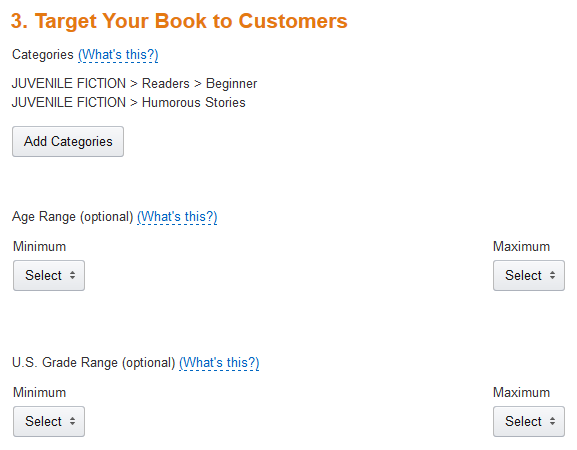
As of now, Step 3 of the KDP publishing process allows you to select an Age Range and a separate US Grade Range.

Tip: Open up your children’s, tween, and teen Kindle books on your Bookshelf and update Step 3. You’ll need to republish for this to take effect.

This will help give your juvenile book added visibility on Amazon:

  • Your book will show up when customers select one of the age group or grade level filters in Amazon search results.
  • You no longer need to waste a crucial keyword to get listed in the children’s age group categories. Tip: If you used a keyword to accomplish this in the past, you can now change that keyword to something else, if you wish.
  • These age group and grade level settings apply to the Schools and Teaching store.
  • These settings are supposed to apply to the Children’s Kindle Book stores for both Amazon.com and Amazon.co.uk.

What about CreateSpace paperbacks? Well, it wouldn’t hurt our chances if several authors suddenly made this request. Hint, hint.

KDP has a table with suggestions for the different age groups: Click here to view it.

I love these new age group and grade level options at Kindle. I’ve been hoping for this for years, and I’m probably one of many authors who’ve requested it in my interactions with KDP. It’s a great opportunity for children’s e-book authors.

MARKETING IDEA

As you may know if you follow my blog, I had the opportunity to talk to members of the Kindle Educational Team a few weeks ago.

They are hoping to see more educators and authors who would like to educate via books publish helpful educational content on Kindle. They have recently reached out to authors to hear our perspective from the publishing end. These new age group and grade level options are one step toward accomplishing this.

So here is my idea:

Education covers many topics. One subject relates to most juvenile fiction stories: English. This includes reading, reading comprehension, writing, vocabulary, grammar, and so on.

Suppose you have a collection of short stories, poems, novellas, novel, or other children’s fictional work for children, tweens, or teens. If so, there is a simple way to improve the marketability of your children’s book:

  • Create some teacher- or parent-oriented resources for your book. I’ll list a few examples below to get your brain churning.
  • You could include these in your book, or you could add a page to your book describing free educational resources available on your blog or website, which parents or teachers could use to get educational value out of your stories. The latter option has the advantage of giving readers a reason to visit your blog and follow you (plus it doesn’t make your book resemble a textbook for kids just looking to enjoy fiction).
  • Your stories are still marketable as stories, but now they are also marketable as educational resources to parents, teachers, homeschool instructors, libraries, and other educators. The free resources become an added marketing tool.

Here are a few ideas for creating educational resources to go along with your story:

  • Add vocabulary definitions and exercises relating to your content.
  • Write questions that assess reading comprehension for your story.
  • Come up with essay questions relating to your book.
  • Make creative writing questions stemming from your story or characters.
  • Create a grammar worksheet to go along with your content.
  • For historical novels, you may be able to add history lessons and exercises.
  • For science fiction novels, you might be able to come up with related science questions and exercises.
  • If your protagonist is bilingual, there is an opportunity for language lessons.
  • If you can find ways that your book relates to one or more school subjects, this gives you more opportunities.

READ TUESDAY

You may be aware that I launched an event in 2013 called Read Tuesday, which debuted in December. You can check out the website here: readtuesday.com.

Read Tuesday is a Black Friday event just for books. One big goal of the event is to help inspire reading.

In 2014, I would like to add a special page highlighting juvenile books that include educational resources (either in the book itself, or free resources that readers can find on the author’s blog or website). So if you have such a book and you’re willing to participate in Read Tuesday 2014 (which requires having your book on sale that day), in addition to listing your book in the Read Tuesday catalog, there will be a special page to showcase juvenile books with free educational resources available. I think this may be a good way for Read Tuesday to help promote reading.

Chris McMullen

Author of A Detailed Guide to Self-Publishing with Amazon and Other Online Booksellers

  • Volume 1 on formatting and publishing
  • Volume 2 on marketability and marketing

Follow me at WordPress, find my author page on Facebook, or connect with me through Twitter.

Comments

Click here to jump to the comments section:

https://chrismcmullen.wordpress.com/2014/06/03/childrens-categories-marketing-kindle/#comments

Chance to Improve a Kindle Pricing Issue

Change

When you run a Kindle Countdown Deal, if you have a paperback edition linked to the Kindle edition, the paperback product page shows the regular list price of the Kindle edition, and not the sale price.

Why not? Wouldn’t showing the sale price improve the chances of getting a sale?

Is Amazon trying to push paperback sales? Does Amazon figure that customers who have a Kindle will check out the Kindle page anyway, then when they see the even lower price, this will help stimulate a sale? Is Amazon hoping the customer will buy both editions, taking advantage of MatchBook? Or did Amazon simply overlook this pricing issue?

Would you rather have the paperback product page show the sale price of the Kindle edition?

If you’d like to see a change, the best way to proceed is to voice your opinion. Be clear and concise, and avoid triggering KDP’s auto-responses (e.g. if you mention that your paperback edition is published with CreateSpace, KDP might send you a message that you need to contact CreateSpace).

I contacted KDP to point out this issue and suggest changing it to show the sale price of the Kindle edition on the paperback page. Their response stated that the paperback product page shows the regular Kindle price because the CountDown Deal is not presently available for paperbacks. (What does that have to do with the price of tea in China?) KDP did say that they understand the issue and will forward my suggestion to their business team, who can make such decisions.

I’ve submitted dozens of suggestions to Amazon, CreateSpace, Kindle, and AuthorCentral over several years. A few of them have actually been implemented. To be clear, they didn’t implement my suggestion. Several other customers made a similar suggestion. That’s the key. One voice is likely to be lost in the wind. When changes have occurred, I’ve heard from many other customers who had submitted similar suggestions. So if you want to improve the chances of a change occurring, you must voice your own opinion.

Do you have other suggestions? If you keep them to yourself, they probably won’t make a difference. (Don’t make all of your suggestions at once. Spread them out here and there.) Here are a few other things that you might consider:

  • A total at the bottom of the KDP month-to-date sales report.
  • Consolidating KDP sales reports for other countries into a single report.
  • Showing the subtitle in the cart at CreateSpace so you can see exactly what you’re buying (if you have multiple books with similar titles and only the ending is different, you can’t tell which it is when checking out).
  • Give us the option of 35% or 70% on CountDown Deals without having to republish a couple of days in advance (if you have a large file size, you might actually draw a larger royalty from a CountDown Deal at the 35% rate).
  • Show us what the royalty will be while we’re scheduling a CountDown Deal (you’d hate to find out later that you only made one penny per sale, for example). (I love math, so this doesn’t bother me, but I’m thinking this would be convenient for some.)
  • Allow UK authors to order proofs from CreateSpace printed from the UK instead of the US (Amazon UK orders are fulfilled that way, so why not proofs?). (Again, this doesn’t affect me as I live in the US.)
  • Any other issues you come across and would like to see improvement. Tell others about the issue and encourage them to send in suggestions if they feel the same way.

Don’t flood Amazon with tons of suggestions all at once. Please don’t tell them that I sent you. 🙂 I didn’t. You have a mind of your own. Do what you feel is best.

Love books? Check out Read Tuesday, a Black Friday event just for books (all authors can sign up for free) on Tuesday, December 10: website, Facebook page, Twitter

Chris McMullen, author of A Detailed Guide to Self-Publishing with Amazon and Other Online Booksellers, Volume 1 (formatting/publishing) and Volume 2 (packaging/marketing), Facebook page, Twitter

Volumes 1 and 2 will be on sale on December 9 thru 11 as part of Read Tuesday on December 10. These books haven’t been on sale all year, so this is a rare opportunity. The Kindle edition of Vol. 1 will be $1.99 (60% off from $4.99) in the US and 1.99 pounds (37% off from 3.14 pounds) in the UK, while Vol. 2 will be $0.99 (80% off from $4.99) in the US and 0.99 pounds (70% off from 3.25 pounds) in the UK. The paperbacks will also be 40% off ($5.99 instead of $9.99) at CreateSpace:

Kindle Countdown Deals—Better than the Original KDP Select?

Countdown

Amazon’s Kindle Direct Publishing (KDP) sent out an email announcement today about the new Kindle Countdown Deals—a new promotional tool for KDP Select users.

This looks very promising. It will entice some authors who’ve left to switch back to KDP Select; and any who have been contemplating leaving KDP Select may be swayed to stay.

The drawbacks to the KDP free promo are well-known:

  • You don’t earn any royalties for your promotion.
  • The freebies affect your free rank, but not your paid rank. So your sales rank goes up while your book is free.
  • Changes in Amazon Associates’ policies have greatly discouraged sites from promoting the freebies.
  • People who loathe the KDP Select freebies can take out their frustrations by leaving one-star reviews, and they don’t even have to buy or read the book to do this and get it to show as an Amazon Verified Purchase.
  • Many customers from outside your target audience are attracted to the free price; since they aren’t familiar with your genre, they’re less likely to leave a favorable review.
  • When the book is free, many shoppers won’t bother to read the description and check out the free sample, so they are more likely to be disappointed with your book.
  • An abundance of freebies and 99-cent books makes it difficult to create the perception of value.

The new Kindle Countdown Deals solves these problems:

  • Your book won’t be free—but it will be at least $1.00 less than the list price. So you don’t have to worry about not earning royalties during your promotion.
  • You can even earn 70% if your sale price is lower than $2.99, but you do have to contend with the usual delivery fee. Your book must have the 70% option to begin with, of course, for this to apply.
  • Websites can promote your discounted book through Amazon Associates without having to worry about the penalty for linking to freebies.
  • You will have paid sales during the promotion, so this should affect your sales rank, unlike free promotions.
  • If anyone wants to slam your book, at least they’ll have to pay for it if they want it to show as an Amazon Verified Purchase.
  • Shoppers are more likely to read your description and check out the Look Inside, so they are less likely to be frustrated with a book that’s really not for them (provided that your packaging is clear).
  • Customers are more likely to be in your target audience since they actually have to pay for your book.
  • There won’t be as many free books because many authors who ordinarily use the free promotion tool will be using the countdown tool instead (you must choose one or the other for any 90-day period). Similarly, many of the books that are always 99 cents will now be $2.99 or higher for 83 out of every 90 days. Amazon has given everyone an incentive to choose a higher list price.

Here are some more notes about the new countdown tool:

  • You can use the tool for up to 7 out of every 90 days, with as many as 5 price increments.
  • You can only schedule one Countdown Deal per 90-day enrollment period. (You can schedule one in the US and another in the UK). Unlike the free promo, you can’t run two or more separate sales. The only way to use all 7 days is to use them all at once. See https://chrismcmullen.wordpress.com/2013/12/07/kindle-countdown-deal-limit-one-per-90-days/
  • The regular list price must be between $2.99 to $24.99 (or 1.99 to 14.99 pounds).
  • The promotion can be as short as one hour or as long as one week.
  • You must wait 30 days after joining KDP Select and since you last changed your regular list price.
  • It looks like you can schedule the promotion without having to republish (like you do for ordinary price changes).

Some people are infamous for complaining about too many free and 99-cent books. Some of these people are already talking about how the new countdown program will drive even more books to the bottom. But that’s crazy!

The new countdown program encourages the books at the bottom price point to move up!

The minimum regular list price must be $2.99 in order to be eligible. The books that participate in the countdown won’t be free. The books that are 99 cents through the countdown program will only be 99 cents for 7 out of every 90 days. Right now they are 99 cents for 90 out of 90 days.

Many authors are already doing special short-term promotions. Now there is a tool for this, they can earn 70% instead of 35% royalties during their promotions, and all customers will see the discount at Amazon, even if they hadn’t heard about the author’s promotion.

If you have several pictures and your book is on the 70% option, the delivery fee may be significant. What you want to determine is whether your royalty would be greater at 70% or 35% for the discounted price (because of the delivery fee, if the file size is large, it may actually be greater at 35%). Note that you can’t change the royalty plan during the promotion or for fewer than 24 hours prior to the promotion. So you must change this, if needed, 24 hours before the promotion (and then change it back afterward, if desired). This would be the case if you normally earn a greater royalty at 70%, but would earn a better royalty at 35% during the promotion. If you have several pictures, you should check into this.

You still need to promote your sale if you want the promotional tool to be effective. Just dropping the price won’t have nearly the impact as effectively marketing the promotion.

This also looks like a great tool for Read Tuesday—a Black Friday type of event just for books.

Click the following link to learn more about the new countdown tool:

https://kdp.amazon.com/self-publishing/help?topicId=201298260&ref_=pe_445910_34749920

Publishing Resources

I started this blog to provide free help with writing, publishing, and marketing. You can find many free articles on publishing and marketing by clicking one of the following links:

Chris McMullen, Author of A Detailed Guide to Self-Publishing with Amazon and Other Online Booksellers

  • Volume 1 on formatting and publishing
  • Volume 2 on marketability and marketing

Follow me at WordPress, find my author page on Facebook, or connect with me through Twitter.

Kindle MatchBook has Launched at Amazon (Updated)

Just Launched

Update: It looks like Amazon has updated Kindle MatchBook to display an advertisement about Kindle MatchBook on the top of the page for print books, where there is a corresponding Kindle edition enrolled in the MatchBook program.

Note: As of October, 2019, the Matchbook program has been canceled.

Today Amazon launched the new Kindle MatchBook program. There is an advertisement for it on Amazon’s homepage, presently, and a very brief email was sent out to authors who had already signed up for it.

The idea behind the MatchBook program is to allow customers who purchase a print edition of the book to receive a significant discount off the Kindle edition of the same book (it may even be free).

MatchBook only applies to books where the same edition is available both in Kindle and in print (i.e. paperback or hardcover).

Not all books are in the MatchBook program. The publisher (or author, if self-published) must manually enroll the book in the program. Some publishers may opt not to do this. The discount is also at the publisher’s discretion, provided that it is a minimum of 50% off the Kindle edition’s list price (and must be free, 99 cents, $1.99, or $2.99).

You can learn more about the new Kindle MatchBook program by clicking the following link, which goes to a Kindle Direct Publishing (KDP) page:

https://kdp.amazon.com/self-publishing/help?topicId=AVJCUBZXDNUM4

If the Kindle edition offers MatchBook, you’ll see one of three things near the top of the Kindle edition page:

  • Nothing at all if you already own the Kindle edition. Why frustrate you by showing you that you could have bought it for less by waiting for MatchBook to come out? If you want to see the MatchBook offer, log out of Amazon first.
  • An offer to buy the Kindle edition at the discounted MatchBook price if you already own the print edition of the same book.
  • A note that you could buy the Kindle edition at the discounted MatchBook price if you also purchase the print edition if you don’t already own the print edition.

There are a few important things to note here:

  • If you try to give the book as a gift, you must pay the full list price. Apparently, the MatchBook price doesn’t apply to gifting. That’s too bad, as it would be a nice incentive for someone to buy the print edition to keep and the Kindle edition to gift. However, you can keep the Kindle edition and give the print edition away as a gift (or try to resell it used, perhaps).
  • It looks like you can only buy one Kindle edition at the MatchBook price. This may help to prevent possible abuse.
  • The print edition page now includes an advertisement about the MatchBook program at the top of the page if the Kindle edition of the same book is enrolled in the MatchBook program.

A cool thing about MatchBook for authors is that if you ordinarily earn the 70% royalty rate on a sale, you still earn 70% if the MatchBook price is below $2.99.

Note that if you make the MatchBook price free, MatchBook sales won’t affect your book’s paid sales rank. Instead, they will affect your book’s free rank. This is what KDP told me after a week of research. If you discover otherwise, please share the news. 🙂 (It will be interesting if your book toggles between free and paid sales ranks with a free MatchBook price, since some customers will still be buying the book at the list price because they don’t own the print edition.)

It doesn’t look like the month-to-date sales report will help you see how many MatchBook sales you have, but you should be able to see it in the six-week report. Unfortunately, it will be a while before any MatchBook sales appear in a six-week report since the program started today.

Chris McMullen, author of A Detailed Guide to Self-Publishing with Amazon and Other Online Booksellers, Vol. 1 (formatting/publishing) and Vol. 2 (packaging/marketing)

MatchBook and Kindle Sales Rank (A Hard-to-Get Answer)

When I went to enroll my books in Kindle MatchBook—a new program from Kindle Direct Publishing (KDP); you can learn more about MatchBook by clicking this link—an important point occurred to me:

  • Will the MatchBook sales improve your Kindle sales rank?
  • If so, if you make the MatchBook price free, will that also affect your sales rank?

Note: As of October, 2019, the Matchbook program has been canceled.

Here’s why it’s important: If the MatchBook freebies would improve your Kindle sales rank, that would serve as an incentive to offer print customers a free Kindle edition.

I checked my email, the September KDP newsletter, and the information about MatchBook available from a link on my KDP bookshelf (which all boiled down to the same information), and this point wasn’t clarified. I then posted this as a question in the KDP community forum; there was some interest in the answer, but nobody there apparently knew the answer, either.

Next, I contacted KDP. They responded in a day, but only to tell me that they needed 5 more days to figure out the answer. (!) Today, KDP responded (yep, today was day number five).

If I was informed correctly, 99 cent, $1.99, and $2.99 MatchBook sales will improve your Kindle sales rank, whereas free MatchBook sales will instead count toward your free sales rank.

Wait a minute. Something seems strange here.

When you make an e-book free through KDP Select, the book is free all day. During this time, the e-book has a free sales rank. When the free promotion ends, the e-book returns to the paid sales rank.

But MatchBook won’t be free all day! People can buy your Kindle e-book at any time. So if one customer “buys” your e-book for free through MatchBook, three seconds later someone else might pay for it at the Kindle sales price.

What’s going to happen? Will the book have a free sales rank and a paid sales rank at the same time? Will your book be ranked among freebies and paid books simultaneously?

It seems it may be so, based on what I’ve been told. (Or your book could toggle back and forth between the free and paid sales ranks with every free or paid purchase.)

Chris McMullen, author of A Detailed Guide to Self-Publishing with Amazon and Other Online Booksellers, Vol. 1 (formatting/publishing) and Vol. 2 (packaging/marketing)