See the Benefits of an Amazon Giveaway at Digital Book World

Image from ShutterStock.

Image from ShutterStock.

DIGITAL BOOK WORLD

Today, Digital Book World published my article, “The Benefits of an Amazon Giveaway for Kindle.”

“There are several possible benefits to running an Amazon Giveaway for your Kindle ebook: • Increase traffic to your product page: On average, Amazon Giveaways bring more than a 40-percent increase in traffic during…” Click here to continue reading this article at Digital Book World.

Note: As of October, 2019, the Amazon Giveaway program has been canceled. However, Goodreads Giveaways are still available.

If you ordinarily enjoy reading my articles, I hope you will visit Digital Book World (at the link above) to check out this one, too.

In case you haven’t yet discovered Digital Book World, here is a brief sample of what you can find there:

  • The Expert Publishing Blog is packed with a variety of tips from multiple authors.
  • The DBW Daily (under News & Analysis) is a daily newsletter by Daniel Berkowitz. At the bottom of each, you can find helpful links to external articles.
  • The Digital Book Wire (also under News & Analysis) keeps you up-to-date with industry headlines.
  • Discover more helpful ebook publishing content under Features.

Write happy, be happy. 🙂

Chris McMullen

Copyright © 2016

Chris McMullen, Author of A Detailed Guide to Self-Publishing with Amazon and Other Online Booksellers

Click here to view my Goodreads author page.

  • Volume 1 on formatting and publishing
  • Volume 2 on marketability and marketing
  • 4-in-1 Boxed set includes both volumes and more
  • Kindle Formatting Magic (coming soon)

Follow me at WordPress, find my author page on Facebook, or connect with me through Twitter.

Kindle e-book Giveaways now at Amazon (#AmazonGiveaways for #ebooks)

Gift Kindle

AMAZON GIVEAWAYS FOR KINDLE E-BOOKS

I’m really excited about Amazon’s latest announcement: Amazon e-book giveaways. (I’ve already tested it out, too: I love it!)

Note: As of October, 2019, the Amazon Giveaway program has been canceled. However, Goodreads Giveaways are still available.

Every time I post information about Amazon or Goodreads Giveaways, I hear from authors who wish they could give e-books away through the contest.

Well, now you can. (On Amazon. Not Goordeads.) Amazon just expanded their giveaway program so that all KDP authors (even if you’re not in Select) can run Amazon Giveaways for their Kindle e-books.

You no longer need to run giveaways for print books. This makes the giveaway process much more affordable, since e-books are less expensive and there are no shipping charges.

WHY RUN AN AMAZON GIVEAWAY

I received a publicity email about this new feature (which went out to newsworthy sources), which included some helpful statistics. Let me quote a few:

  • Traffic to Amazon product pages increased by more than 40% during the week of an Amazon Giveaway. That’s quite a boost! (Only a fraction of that traffic will convert to sales.)
  • Over 300,000 Amazon followers of Author Central pages have been added as a direct result of Amazon Giveaways. My prediction: This number will shoot through the roof in the coming weeks, now that giveaways have expanded to include Kindle e-books.
  • Over 2,800,000 Twitter followers of authors have been added as a direct result of Amazon Giveaways.

So there are two reasons you should run periodic Amazon Giveaways:

  • Drive more traffic to your product page for increased exposure.
  • Grow the number of Amazon followers of your Author Central page. When you release a new Kindle e-book, you will receive an invitation to send an announcement through Amazon to your followers. You can require contest entrants to follow you on Amazon.

GIVEAWAY RECOMMENDATIONS

I’ve run several dozen giveaways in the past, and tested out this new e-book feature. Here are my recommendations for how to get the most out of your contest:

  • Sign up for Author Central and add your Kindle e-book, if you haven’t already done so.
  • Search the Kindle Store on your computer for one of your e-books. Open the product page. Scroll down toward the bottom of the page to find the giveaway option.
  • Choose Random (or Lucky Number). I prefer Random, but you have to give away more than one book to guarantee good exposure. I like to give at least 3 books away per contest.
  • Making the odds long, like 1 in 2000, offers greater exposure per dollar, but also reduces the likelihood of having a winner. Some contestants pay attention to the odds, and may not want to follow you unless the odds are compelling. If you offer better than average odds, like 1 in 150, it can be a selling point in your tweet, but greatly limits your exposure. Somewhere in between is a happy medium (not worth advertising in your tweet). Popularity also varies depending on the subject or genre. Make higher odds the first time, and if you don’t have a winner, choose the option to make a new giveaway, this time improving the odds.
  • Choose the option to require entrants to follow you on Amazon through Author Central. This way, you can send them an email through Amazon when you release your next Kindle e-book.
  • Include the front cover of your book when you create the giveaway. Scale it down somewhat to be safely under the 1 megabyte limit. You’ll receive an error message if it’s slightly under 1 MB; it needs to be well clear of the limit. Around 1200 pixels high usually works for this for jpeg format.
  • The “Sorry, you didn’t win” wording can generate interest, if you use this space wisely. (Tip: Enter several book giveaways to get ideas for how other authors use this space.)
  • Compose a tweet with the #AmazonGiveaway hashtag after your giveaway goes live. This spreads the news of your giveaway on Twitter.
  • Press the Twitter button in your (second!) email from Amazon (they send you two emails after your purchase), then edit Amazon’s default message to cater to your needs. It will automatically include a link to your giveaway page.
  • Don’t include an image as part of your tweet. Your cover will automatically show up on the giveaway page. In my experience, you get better exposure when you don’t add an image to your tweet.
  • You can delete the title of your book and replace it with a compelling description, strap line, keywords, hashtags, whatever you think will draw interest in your contest or book. You can delete the “See this,” the extra dots (…), etc.
  • Don’t delete the NoPurchNec part. This is required in your tweet. Don’t delete the #AmazonGiveaway hashtag. Don’t delete the link to your contest.
  • You can add hashtags (or change keywords in your book’s title to hashtags). The right hashtags can offer additional exposure for your giveaway. (Research done in the past suggested that tweets with two hashtags received better exposure on Twitter; this is not an Amazon stat, it’s a generic Twitter stat.)
  • You can also share your contest on Facebook.

CHANGES TO AMAZON GIVEAWAYS

Here is a brief summary of recent changes:

  • Contests can now last up to 30 days (used to be 7 days).
  • Readers who have already purchased the e-book are not eligible to enter the contest.
  • Any un-awarded e-books can be rolled over into new giveaways, or you can opt to distribute them directly.
  • E-books purchased for giveaways are non-refundable.
  • Redesigned layout and entry experience better highlights the book and author.
  • Every e-book entrant who doesn’t win will receive an offer of the free sample.
  • You can cancel a giveaway before it is launched.

HOW DOES IT LOOK

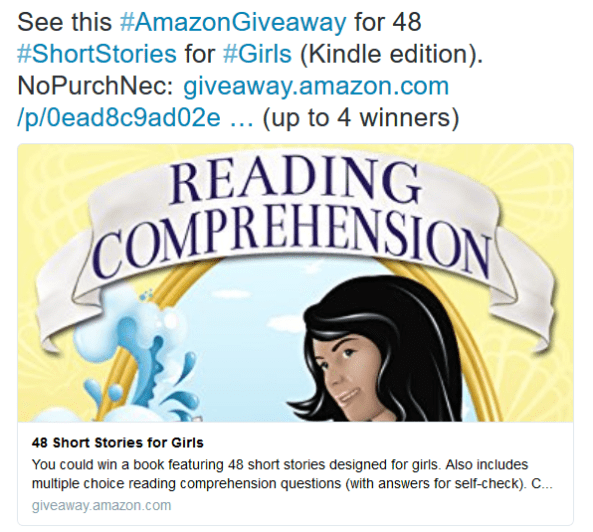
After you tweet about your giveaway with the #AmazonGiveaway hashtag, contestants can find your giveaway. Your tweet will look something like this:

Giveaway Ebook

Note that only the top portion of your book shows. If you design your book cover so it has appeal when only viewing the top portion of the front cover, you have an advantage with the giveaways.

Here is another example:

Giveaway Ebook 3

The contest page looks something like this:

Giveaway Ebook 2

HOW TO FIND GIVEAWAYS

First of all, you should enter the giveaway for my self-publishing book (volume 1). I’m giving away 10 free copies:

Chance to win 1 of 10 copies of A Detailed Guide to Self-Publishing with Amazon (Vol. 1)

Since I included an example of what Julie Harper’s giveaway looks like in a picture above (used with permission), let me also include a link to her giveaway:

Chance to win 1 of 4 copies of 48 Short Stories for Girls by Julie Harper

Find giveaways on these Twitter pages. The first link is handy, but not easy to find, and when you do find it, you need to click the Live button or you just see the most popular ones. But my first link below is special, as it goes straight to the Live feed. The second link is lacking the visual element, but is easier to find on your own.

https://twitter.com/hashtag/amazongiveaway?f=tweets&vertical=default&src=hash

https://twitter.com/GiveawayLinks

7 DAYS OF GIVEAWAYS

amazon.com/7days

Write happy, be happy. 🙂

Chris McMullen

Copyright © 2016

Chris McMullen, Author of A Detailed Guide to Self-Publishing with Amazon and Other Online Booksellers

Click here to view my Goodreads author page.

  • Volume 1 on formatting and publishing
  • Volume 2 on marketability and marketing
  • 4-in-1 Boxed set includes both volumes and more
  • Kindle Formatting Magic (coming soon)

Follow me at WordPress, find my author page on Facebook, or connect with me through Twitter.

Comments

Click here to jump to the comments section.

How Much Does Amazon Pay Kindle Unlimited ALL-STARS?

All Stars

KDP SELECT ALL-STARS

I researched what Amazon pays KDP Select All-Stars for pages read in Kindle Unlimited.

(My reason for doing this is to estimate how many Kindle Unlimited subscribers there are, but that will be the subject of a coming post.)

If you want to see the Amazon KDP help page where I found my information, it’s right here:

https://kdp.amazon.com/help?topicId=A2X66QXB12WV2

Amazon presently pays about one million dollars (perhaps a little more, depending on exchange rates) in KDP Select All-Star Bonuses based on KENP pages read during the month (books must be claimed through Author Central to be eligible):

  • $500,000 is awarded to the top 100 authors for US pages read: $25,000 to the top 10, $10,000 to the 11th thru 20th, $5,000 to the 21st thru 30th, $2500 to the 31st thru 50th, and $1000 to the 51st thru 100th.
  • $90,000 is awarded to the top 100 books for US pages read: $2500 to the top 10, $1000 to the 11th thru 50th, and $500 to the 51st thru 100th. (It pays better to be a top author than to have a top book.)
  • £77,500 is awarded to the top 100 authors for UK pages read: £2000 to the top 10, £1500 to the 11th thru 20th, £750 to the 21st thru 30th, and £500 to the 31st thru 100th. (The US pays much better bonuses than the UK.)
  • £20,000 is awarded to the top 100 books for UK pages read: £500 to the top 10, £250 to the 11th thru 50th, and £100 to the 51st thru 100th.
  • €310,000 is awarded to the top 100 authors for DE pages read: €7500 to the top 10, €5000 to the 11th thru 20th, €3500 to the 21st thru 30th, €2500 to the 31st thru 50th, €1500 to the 51st thru 100th, and €500 to the 100th thru 150th. (Germany pays very well, and even pays 50 additional authors.)
  • €50,000 is awarded to the top 100 books for DE pages read: €750 to the top 10, €500 to the 11th thru 50th, and €250 to the 51st thru 100th.
  • $31,250 is awarded to the top 100 illustrated kids’ books (as Amazon deems eligible) for pages read in the US: $1000 to the top 5, $750 to the 6th thru 10th, $500 to the 11th thru 30th, $250 to the 31st thru 50th, and 150 to the 51st thru 100th.
  • £2500 is awarded to the top 100 illustrated kids’ books (as Amazon deems eligible) for pages read in the UK: £100 to the top 25.

These books and authors are already earning good money for the pages read (many of these are in the millions of pages read per month), and that’s on top of sales.

Amazon obviously throws in this incentive to encourage the top authors to keep their books enrolled in KDP Select.

You’re probably wondering: If Amazon didn’t pay roughly one million dollars in All-Star Bonuses, what impact would that have on the per-page rate? In January, it would have raised the per-page rate from $0.0041 to $0.0043. It’s probably worth it to attract the most read indie authors and books into the program, as they help to attract customers to Kindle Unlimited.

Write happy, be happy. 🙂

Chris McMullen

Copyright © 2016

Chris McMullen, Author of A Detailed Guide to Self-Publishing with Amazon and Other Online Booksellers

Click here to view my Goodreads author page.

  • Volume 1 on formatting and publishing
  • Volume 2 on marketability and marketing
  • 4-in-1 Boxed set includes both volumes and more
  • Kindle Formatting Magic (coming soon)

Follow me at WordPress, find my author page on Facebook, or connect with me through Twitter.

Comments

Click here to jump to the comments section.

Kindle Unlimited KENP per Page Rate DROP January, 2016

Background image from ShutterStock.

Background image from ShutterStock.

KINDLE UNLIMITED KENP PAGES READ JANUARY, 2016

The KENP pages read rate has reached a record low, paying $0.00411 per page in the United States.

That’s a drop of 11% from the December payout. That’s a substantial change for just one month.

But it’s a drop of 29% from the first month of Kindle Unlimited v2 from July’s $0.0058 per page rate. That’s a much larger drop when put in the long-term perspective.

However, there was also a record high set in January, 2016, with the KDP Select Global Fund reaching $15 million.

That’s a rise of 11% over December’s Global Fund.

And it’s a rise of 30% compared to July. This means that Amazon is paying 30% more money in Kindle Unlimited (and Amazon Prime) royalties than when v2 started.

The KENP per-page rate has consistently dropped, while the KDP Select Global Fund has consistently risen, and by approximately the same percentages (one down, the other up).

Two are main effects going hand-in-hand:

  • More pages are being read through Kindle Unlimited (and Amazon Prime) every month. ← This is definitely a plus.
  • Amazon KDP is paying a little less for each page read every month. ← This is a minus.

NOT A BIG SURPRISE IN THE PER PAGE RATE

The numbers for January, 2016 actually make sense:

  • Amazon sold a record number of Kindle Fire devices on Black Friday.
  • Many customers took advantage of the free trial month.
  • Amazon included free Kindle Unlimited subscriptions during a few of their promotions.
  • Amazon discounted Kindle Unlimited subscriptions during some of their promotions.
  • Some promotions targeted Amazon Prime.

Therefore, we could have predicted:

  • an increase in the number of Kindle Unlimited (and Amazon Prime) subscribers
  • a large increase in the number of pages read
  • many more pages read where Amazon didn’t earn more money from the monthly subscription

Yes, FREE has benefits, but it also has a cost:

  • Those free trial months bring readers, but it costs Amazon money.
  • Those free subscriptions packaged with Kindles during rare promotions bring many more customers and pages read, but it costs Amazon a lot of money.
  • Those discounted subscriptions entice more subscribers, but cost Amazon a little money.

(Amazon ordinarily earns 30% or more on the sale of a KDP Select e-book. What percentage do they earn from borrows? We have no idea. It could be more than 30%. It could be less. Amazon could even take a loss with KDP Select, using it as a loss leader, expecting those regular Amazon customers to buy other products. We don’t know.)

The promotions worked: There were more subscribers and pages read. That’s why Amazon paid an extra $1.5 million compared to December.

But it’s probably not realistic to expect Amazon to absorb 100% of the cost. They passed some of that cost onto the authors, dropping the KENP per-page rate 11%.

Amazon has made Kindle Unlimited viable and substantial. Paying $15 million dollars in royalties each month, that’s a significant share of the e-book market.

And many of those Kindle Unlimited subscribers have taken a chance on indie e-books. This aspect is good for indies.

THE FUTURE OF KINDLE UNLIMITED

I doubt it’s a coincidence that KENPC v2.0 rolled out the month after the KENP per-page rate hit a record low.

Remember, KENPC v2.0 kicked in for February; it had no impact on January’s payout.

If you saw a significant decrease to your KENPC (but realize that actually increased for a few books), that drop on top of the 11% drop for January may seem scary.

Maybe the KENPC upgrade was put in place to help keep the KENP per-page rate from dropping further.

Maybe the per-page rate will actually go up somewhat for February. Probably, some of those free trial months won’t be renewed. The KENPC change may help a little.

Maybe, also, if Amazon is trying to help the per-page rate for the future, they are looking at ways that a few authors or publishers may have been trying to take advantage of the system. Maybe Amazon will help limit that: This could be part of the reason that the KENPC has changed. They might also change the way that KENP pages read are counted (to try to prevent anyone from gaming the system too much).

These are a lot of MAYBE’s. And even if it does rise in February, we will left to wonder if it will start dropping again after that. We are on a downward trend.

If the per-page rate drops too much, down to whatever your magic number is, the question you need to ask is whether you can do better outside of KDP Select than you can inside. It’s not an easy question to answer, and it varies from one author and even one book to the next. (Keep in mind that every borrow helps your sales rank, which is one thing you’ll lose if you switch to the other side.)

We haven’t reached my magic number yet. But I wouldn’t mind if we didn’t dip below $0.004…

Sure, I’d love it if Amazon would pay more per page. But Amazon didn’t ask for my opinion. They offered me a choice: Enroll in KDP Select, or opt out. I enrolled, and I still prefer this option for my books.

But I’m also glad that Amazon promoted Kindle Unlimited, offers free monthly trials, and promoted subscriptions and Kindle devices this holiday season.

If Amazon had given me a choice—do none of those things and leave the per-page rate at $0.0046 per page, or do all of those things and drop the per-page rate 11%—I would have happily accepted the 11% drop. Not everyone will feel that way. But I do.

On the other hand, it started at $0.0058 back in July, and now it’s 29% less, down to $0.0041. I sure would like to see it stop going down…

It will be interested to see how it pays in February and beyond.

KENP PAGES READ BY COUNTRY

Here are the pages read payouts for a handful of countries:

  • United States: $0.00411 per page (US dollars). That’s a drop of 11% from December’s payment of $0.00461.
  • United Kingdom: £0.00262 per page (British pounds). That’s also a drop of 14% from December’s £0.00306.
  • Canada: $0.00476 per page (Canadian dollars).
  • Spain: €0.00408 per page (Euro).
  • India: ₹0.1008 per page (Indian rupees). That’s nearly identical to December.

Write happy, be happy. 🙂

Chris McMullen

Copyright © 2016

Chris McMullen, Author of A Detailed Guide to Self-Publishing with Amazon and Other Online Booksellers

Click here to view my Goodreads author page.

  • Volume 1 on formatting and publishing
  • Volume 2 on marketability and marketing
  • 4-in-1 Boxed set includes both volumes and more
  • Kindle Formatting Magic (coming soon)

Follow me at WordPress, find my author page on Facebook, or connect with me through Twitter.

Comments

Click here to jump to the comments section.
The KDP Delivery Fee for Large Books: Is it really worth trying to reduce the file size?

Delivery Fees

DELIVERY FEE MATH

If you price your Kindle e-book between $2.99 and $9.99, you’re eligible for the 70% royalty option.

However, Amazon charges a delivery fee of 15 cents per megabyte (Mb) for US sales. (It’s £0.10 per Mb for UK sales. I will focus on US sales in this article.)

The delivery fee is subtracted from the list price before multiplying by 70%.

Example: List price = $2.99, file size = 6 Mb

Delivery fee = $0.15 × 6 = $0.90

Royalty = ($2.99 – $0.90) × 0.70 = $2.09 × 0.70 = $1.46

The only file size that matters is the converted .mobi file size that you see on page 2 of the publishing process at Kindle Direct Publishing (KDP). The size of the file that you upload isn’t the number to go by.

The delivery fee is most significant for books that include many pictures.

IS IT WORTH TRYING TO REDUCE THE FILE SIZE?

If you’re planning to set the list price of your Kindle e-book between $2.99 and $9.99, you know that a smaller converted .mobi file size results in a smaller delivery fee.

So it’s intuitive to assume that reducing the file size will lead to a larger royalty.

I had some fun with the math the other day, working through several examples. I observed that in many cases, reducing the file size wouldn’t have a significant impact on the royalty unless the file size was substantially reduced. But there are cases where a change in file size has a greater impact on the royalty.

One factor is that for a very large file size, the 35% royalty rate actually pays a higher royalty. The delivery fee only applies when you select the 70% royalty option.

It also depends on the list price that you set and the converted .mobi file size that you’re starting with (i.e. before you proceed to reduce the file size).

We’ll get to the math in a moment (and some handy tables that will do the math for you).

But there is one more point that you should consider: It may be better to delivery high quality pictures to the customer than to try to reduce the file size. (Besides that, Amazon KDP automatically compresses pictures in the file that you upload.)

So when we look at the math, remember that the quality of the pictures is important, too.

DELIVERY FEE MATH

Here is an example, illustrating whether or not it’s worth it to reduce the file size for a particular situation:

Example: List price = $2.99, file size = 12 Mb

Delivery fee = $0.15 × 12 = $1.80

70% Royalty = ($2.99 – $1.80) × 0.70 = $1.19 × 0.70 = $0.83

35% Royalty = $2.99 × 0.35 = $1.05

If you reduce the file size 30%, down to 8.4 Mb:

Delivery fee = $0.15 × 8.4 = $1.26

Royalty = ($2.99 – $1.26) × 0.70 = $1.73 × 0.70 = $1.21

You earn a whopping 16 cents more by reducing the file size 30%. (Ignore the $0.83 since the 35% royalty paid better at the original file size.)

However, if you reduce the file size 50%, down to 6 Mb:

Delivery fee = $0.15 × 6 = $0.90

Royalty = ($2.99 – $0.90) × 0.70 = $2.09 × 0.70 = $1.46

You earn 41 cents more by reducing the file size 50%. It takes a substantial change in file size to significantly improve the royalty in this example.

I had some fun with this and made several tables. The tables do the math for you.

KDP DELIVERY FEE TABLES

There are 8 tables below, one for each of the following price points: $2.99, $3.99, $4.99, $5.99, $6.99, $7.99, $8.99, and $9.99.

Each table shows you how much you would need to reduce your file size in order to see a significant improvement on your royalty.

Here is how to use the tables:

  • Find the table with your list price. The list price appears near the top left corner of the table.
  • Find your current converted .mobi file size in the left column. (You need to upload your file to KDP and continue onto page 2 of the publishing process to find out what your file size is. Don’t look at the size of your Word file or any other file on your computer.)
  • The next column over (the 0% column) shows you what your current royalty is. (Check this on page 2 of the publishing process. It may be slightly different, since your exact file size might not be listed.)
  • As you continue to the right, the row tells you what your royalty would be depending on what percentage you reduce your converted .mobi file size.
  • The cells in green (and the figure at the top of the table, near the left) correspond to the 35% royalty option. For these cells, the 35% royalty rate pays higher than the 70% royalty option.

Here is an example:

Example: List price = $3.99, file size = 18 Mb

Find the table with the $3.99 list price near the top left.

Scroll down to 18 MB in the left column.

The table shows that the 35% royalty option pays a higher royalty, which is $1.40.

Now scroll to the right: The royalty won’t increase unless the file size is reduced at least 30%, and even then it only pays 7 cents more.

Scroll further to the right: If you reduce the file size 50%, then the royalty would improve to $1.95, compared to $1.40.

Table 1: $2.99

Delivery Fees 299

Table 2: $3.99

Delivery Fees 399

Table 3: $4.99

Delivery Fees 499

Table 4: $5.99

Delivery Fees 599

Table 5: $6.99

Delivery Fees 699

Table 6: $7.99

Delivery Fees 799

Table 7: $8.99

Delivery Fees 899

Table 8: $9.99

Delivery Fees 999

TEST IT OUT

If you find that reducing your converted .mobi file size may have a significant impact on your royalty, the next step is to see if you can reduce the file size as much as you expect, and, if so, what quality output you get.

Usually, most of the file size comes from images.

Amazon already compresses images when you upload your book to KDP, so if you compress them yourself, they get compressed again.

If you have an idea for possibly reducing the file size, make a test book with a small number of images. Upload the test file with the original images, see what your converted .mobi file size is on page 2 of the publishing process at KDP, make a new test file using the method that you’re testing out, and see how much it reduced the converted .mobi file size (if at all).

If the file size reduced enough, preview the book carefully to see how well it came out. If you can sideload it onto a Kindle Fire with a large display size (in terms of pixels) and another device with a much smaller display size (in terms of pixels), that will help to see if the pictures are good enough.

(The Kindle Textbook Creator produces an efficient file size, maintaining quality images. It’s suitable for an image-heavy book, or a textbook. But the resulting e-book has fixed format, works with pinch-and-zoom, and the e-book won’t be available for purchase from some devices, like the Kindle Paperwhite. This is suitable for some kinds of e-books, but not others.

If you have a very large file size, and you have a e-book that might be suitable for the Kindle Textbook Creator, it might be worth testing Amazon’s free tool out.)

Write happy, be happy. 🙂

Chris McMullen

Copyright © 2016

Chris McMullen, Author of A Detailed Guide to Self-Publishing with Amazon and Other Online Booksellers

Click here to view my Goodreads author page.

  • Volume 1 on formatting and publishing
  • Volume 2 on marketability and marketing
  • 4-in-1 Boxed set includes both volumes and more
  • Kindle Formatting Magic (coming soon)

Follow me at WordPress, find my author page on Facebook, or connect with me through Twitter.

Comments

Click here to jump to the comments section.

Which Kindle Should You Buy? (Amazon 2016: Fire vs. Paperwhite vs. Voyage)

Kindle Devices

Kindle Paperwhite, Kindle Fire, and Kindle Fire for Kids.

WHICH KINDLE SHOULD YOU BUY?

Are you thinking about buying a new Kindle ereader, but aren’t sure which one to get?

(Now might be a good time to check them out. When this post was written, Amazon had some good deals. If you’re too late, keep an eye on the prices. They go on sale periodically.)

I own and use several Kindle devices, including three different Fires, a Paperwhite, and a regular Kindle.

I’ve compared different versions of the Fire, Paperwhite, and the Voyage several times—whenever I buy a new one.

My two favorites are:

  • The Kindle Fire HD 8.9″ (it’s a generation removed, but I love it)
  • The Kindle Paperwhite

It depends on what you’re looking for.

FIRE VS. PAPERWHITE VS. VOYAGE (TABLET VS. READING)

If you want color images, or if you want the features of a tablet, the Kindle Fire is the obvious choice.

I read books on my Kindle Fire HD 8.9″, and reading is very nice on that, too (but see below). However, the largest screen HD and HDX models are pricey.

I have a couple of the less expensive Fires, and don’t like them as much. But no doubt that’s because I have the really nice one to compare them to.

The first Kindle I ever bought was a basic Kindle Fire. Before I discovered the Kindle Fire HD 8.9″, I was very happy with it.

I read about 4+ novels per month, usually on my Kindle Paperwhite. Although I own the very nice Kindle Fire HD 8.9″ and enjoy reading on it, I still prefer to read most of my novels with the Kindle Paperwhite. I’d be very happy reading either way. But if I could only buy one device, and wanted it for reading, I’d opt for the Kindle Paperwhite.

Now that the Kindle Paperwhite is 300 PPI like the Kindle Voyage, it’s hard to justify the price of the Kindle Voyage. The Kindle Voyage has an adaptive lightscreen, for example, but it’s a huge jump in price. The Kindle Paperwhite is an awesome value right now, if you’re looking mostly to read.

You can save a bit with the basic Kindle 6″, if the Kindle Paperwhite is more than you’re looking to spend. All of the Kindles are touchscreen these days. The basic Kindle 6″ is 167 PPI, compared to the 300 PPI of the Kindle Paperwhite and Kindle Voyage.

SCREEN SIZE

Looking for a particular resolution in pixels?

One thing that drives me crazy when I shop for Kindle ereaders is that the comparison chart for Kindle Fire lists the display size in pixels, but the Kindle, Kindle Paperwhite, and Kindle Voyage list the PPI and make it difficult to figure out what the pixel count is. It’s also frustrating as an author or publisher, since you want to determine the display sizes when creating your images.

So I did some research and math to make the following chart. The following table shows the current Kindle ereader screen sizes in pixels.

Comparison of Kindle display sizes for Fire, Paperwhite, and Voyage.

Comparison of Kindle display sizes for Fire, Paperwhite, and Voyage.

The Kindle Fire HDX comes in at the top when it comes to the pixel count of the display size.

For reading, the Kindle Paperwhite and Kindle Voyage are high resolution (now with 300 PPI).

GREAT PRICE

For price, you have to go with the new Kindle Fire 7″ (not HD).

The price is incredible, and it’s a Kindle Fire. It’s more affordable than the basic Kindle 6″.

Though whether you would go with the basic Kindle Fire or the basic Kindle 6″ also depends on whether you’re looking mainly to read text (Kindle 6″ has a glare free screen), or whether you might either want to use the tablet feature or read books with color images (Kindle Fire).

FOR KIDS

The Kindle Fire Kids Edition:

  • comes with a kid-proof case (choose from blue, green, purple, pink, or red)
  • comes with a 2-year worry-free guarantee (even if your kids break it)
  • includes free 1-year of Amazon FreeTime Unlimited (no, it’s not Kindle Unlimited; it’s 10,000 books, shows, movies, educational apps, and games hand-picked to please both parents and kids)
  • lets parents limit screen time and manage what kids can access
  • is a full-featured tablet

The Kindle for Kids bundle:

  • is a good alternative if you don’t want a tablet
  • comes with a cover (choose from black, dark blue, green, pink, or purple)
  • includes 2-year accident protection
  • helps kids focus since it’s just for reading (no distractions, unlike the tablet)

BATTERY LIFE

All of the new Kindles have a great battery life (7+ hours), so it’s become less of an issue.

It hasn’t been a problem for me on any of the recent Kindles that I’ve purchased.

Write happy, be happy. 🙂

Chris McMullen

Copyright © 2016

Chris McMullen, Author of A Detailed Guide to Self-Publishing with Amazon and Other Online Booksellers

Click here to view my Goodreads author page.

  • Volume 1 on formatting and publishing
  • Volume 2 on marketability and marketing
  • 4-in-1 Boxed set includes both volumes and more
  • Kindle Formatting Magic (coming soon)

Follow me at WordPress, find my author page on Facebook, or connect with me through Twitter.

Comments

Click here to jump to the comments section.
How Video Games Can Transform Your Writing (Guest post by Author Allison D. Reid)…

Here is a cool and creative article for writers to check out.

Chris The Story Reading Ape's avatarChris The Story Reading Ape's Blog

No, I haven’t lost my mind, and I’m not a video game addict either—I am totally serious. I’ve been passionate about writing my whole life; participated in writing groups, gone to conferences, taken more classes on writing than I can remember, and even majored in writing in college. But it was through a video game that I learned to really be a story teller and develop characters that breathed a life of their own.

Find a game where you can roleplay with others.

I’m not talking about your standard shoot-em-up, follow the canned story line from point A to point Z until you defeat the big boss kind of game though. I’m talking about the open-ended kind. The games that give you an interactive world full of other players, and opportunities to challenge yourself by building skills and going on quests, either of the game’s making or your own. The…

View original post 1,405 more words

Sorting out your Amazon 1099-MISC forms from KDP and CreateSpace (Tax Year 2015)

Taxes

AMAZON KDP & CREATESPACE 1099-MISC TAX FORMS (YEAR 2015)

I received 12 different 1099-MISC forms for tax year 2015 from Kindle Direct Publishing (KDP), and 3 more 1099-MISC forms from CreateSpace. I obtained my KDP tax forms online, but received my CreateSpace forms in the mail (on February 5).

Check yours against my list below to see if you’ve received them all.

Also, my list below will help you check which international marketplace each form corresponds to.

Verify that the amounts are correct. Occasionally, a mistake is made. (One year, they issued replacements a few weeks after mailing the originals.)

Note that, contrary to rumor, there is NO limit of $600 for book royalties. For book royalties, the limit is $10, meaning that if you earned at least $10 in royalties, you should account for this in your tax return. Amazon will have sent the information to the IRS. Most authors can use Schedule C-EZ, but if you earned too much, you need Schedule C instead, and also if you earn enough, you need to file SE (in addition to Schedule C) for self-employment tax (but if you file SE, there is another place to deduct a little on the 1040). You can subtract reasonable business expenses. (If you feel that writing is a hobby, don’t go by your feeling: There is a chart on the IRS website that can help you determine whether or not the IRS will agree with you about this.) Note that I’m NOT an accountant or tax attorney, so I’m not qualified to advise you on your taxes. You should consult a qualified tax professional for help. I’m just trying to help you find all of your forms and get you pointed in the right direction, and if you do hire a tax professional, you should try to follow along to ensure that they aren’t making any mistakes.

Here are the 12 different 1099’s that I received from KDP:

  1. Amazon Digital Services (United States)
  2. AMEU – UK Digital Services (United Kingdom)
  3. Amazon Digital Services CA (Canada)
  4. Amazon Australia Svcs (Australia)
  5. Amazon Mexico Svcs (Mexcio)
  6. Amazon Media EU SARL (NL) (Netherlands)
  7. Amazon Media EU SARL (IT) (Italy)
  8. Amazon Media EU SARL (ES) (Spain)
  9. Amazon Europe Holding Tech (France and Germany)
  10. Amazon Servicos de Varejo (Brazil)
  11. Amazon Digital South Asia (India)
  12. Amazon Svcs International (Japan)

Here are the 3 different 1099’s that I received from CreateSpace:

  1. On-Demand Publishing (United States)
  2. AMEU – UK Digital Services (United Kingdom). It’s for print sales even though it says Digital, provided that you see CRTSPACE in the bottom left box.
  3. Amazon Europe Holding Tech (continental Europe)

You may have yet another 1099 if you use Amazon Associates, for example. This 1099 is designated ASSOC in the bottom left box.

How do I know which marketplace corresponds to which 1099? I visited KDP and CreateSpace and totaled up all the payments I received in USD from each marketplace in tax year 2015, and checked these numbers against my 1099’s. You should do the same, just to make sure there were no mistakes.

When you log into KDP, click Reports, then click Payments. Next, choose the appropriate marketplace from the dropdown menu. Be sure to look at the Date column, not the Sales Period, and look for 2015.

Write happy, be happy. 🙂

Chris McMullen

Copyright © 2016

Chris McMullen, Author of A Detailed Guide to Self-Publishing with Amazon and Other Online Booksellers

Click here to view my Goodreads author page.

  • Volume 1 on formatting and publishing
  • Volume 2 on marketability and marketing
  • 4-in-1 Boxed set includes both volumes and more
  • Kindle Formatting Magic (coming soon)

Follow me at WordPress, find my author page on Facebook, or connect with me through Twitter.

Comments

Click here to jump to the comments section.

Amazon Specifically Mentions Warnings Appearing on Product Pages

Warning

WARNING MESSAGES FOR KINDLE E-BOOKS

I posted more about this a few days ago:

https://chrismcmullen.wordpress.com/2016/01/31/warning-messages-for-errors-in-amazon-kindle-e-books/

The only direct evidence we have gleaned from Amazon is on their KDP help pages:

https://kdp.amazon.com/help?topicId=A1MMQ0JHRBEINX

This page appears to have updated in the past couple of days.

I and others had read this page carefully and thoroughly when we first noticed the updated KDP help page about a week ago.

But now there appears to be new information on the page:

“A moderate amount of Distracting or Destructive Issues can result in the book remaining available for sale, but with a temporary quality warning displayed on the detail page of the book on Amazon.com until corrections are made.”

There had been mention of Critical Issues previously, and there had been mention of possible removal of the book.

But there hadn’t been mention of Distracting or Destructive Issues. (I updated my post from a few days ago to reflect the new language.)

And there hadn’t been an explicit notice that a quality warning would be displayed on the book’s product page. (We had specifically searched for this language when the product page first updated.)

There has always been a KDP help page mentioning quality issues like formatting. But the page that had been there for years was much shorter and more vague. The current page is much more thorough, mentioning more specific details and consequences.

So it’s not so much a new KDP help page, as a greatly updated one. (Updated at least twice in recent days.)

If you read the recent KDP email newsletter, you will see specific mention that the KDP help pages have recently updated.

It’s not a public announcement from Amazon, describing new quality control practices and consequences, but finally we do have writing from Amazon clearly mentioning quality warnings displayed on product pages for Kindle e-books.

But it doesn’t answer all the questions that we have about this.

They do classify three kinds of issues:

  • Critical Issues result in the removal of the book from sale (until corrections are made). Critical issues render the book incomplete or unusable.
  • Destructive Issues (don’t you love the language?) “prevent the reader from understanding the author’s intended meaning.”
  • Distracting Issues “briefly remove the reader from the author’s world.”

If Destructive or Distracting Issues are deemed “moderate,” the book will remain available for sale, but with a warning message displayed on the product page.

If they are “excessive,” the book will be removed from sale until corrections are made.

Now for the big questions:

  • Exactly what is considered moderate, and what is considered excessive?
  • Exactly what constitutes a Destructive Issue?
  • Exactly what constitutes a Distracting Issue?

The KDP help page mentions a dozen possible issues, such as typos, formatting, duplicated text, problems with links, and even a vague Disappointing Content.

But it doesn’t come right out and say exactly when each of these issues will be deemed Critical, Destructive, or Distracting.

We hope that Amazon will be reasonable in assessing issues, deciding on a course of action, and considering an author’s possible explanation.

I have no reason to expect otherwise.

But it’s hard for writers, especially fiction writers, not to imagine several hypothetical scenarios gone wrong.

If there happen to be any issues with your book, you should receive an email from Amazon KDP, and you should have an opportunity to fix them. Hopefully, you’ll have an opportunity to respond with an explanation, if needed.

In the meantime, the best you can do is keep writing and keep marketing.

Write happy, be happy. 🙂

Chris McMullen

Copyright © 2016

Chris McMullen, Author of A Detailed Guide to Self-Publishing with Amazon and Other Online Booksellers

Click here to view my Goodreads author page.

  • Volume 1 on formatting and publishing
  • Volume 2 on marketability and marketing
  • 4-in-1 Boxed set includes both volumes and more
  • Kindle Formatting Magic (coming soon)

Follow me at WordPress, find my author page on Facebook, or connect with me through Twitter.

Comments

Click here to jump to the comments section.
Organic IS Better (for book marketing)

Image from Shutterstock.

Image from Shutterstock.

ORGANIC BOOK MARKETING

I take a long-term approach to book marketing.

My goal is to generate periodic sales over the course of several years.

I’m more interested in how well the book sells years after its release than how well it says when it makes its debut.

Granted, a book often gets its best traffic in the beginning, so anything you might do to improve that could be a significant boost.

But if you can get the book to sell consistently for years instead of tailing off, time can provide a huge boost of its own.

That’s the potential of organic book marketing, if you can pull it off effectively.

Organic book marketing also doesn’t tend to be depend as strongly on the latest marketing trends.

There are some fundamental marketing strategies that work long-term even in a dynamic market, whereas short-term strategies tend to be trendy.

We’ll consider several aspects of book marketing, and what it might mean to be organic.

BOOK REVIEWS

As a customer shopping for products at Amazon, if you read customer reviews, would you prefer to read organic reviews? I would.

What makes a review organic?

It can’t get any more organic than this:

  • A customer discovers a book.
  • The customer takes the initiative to review the book.
  • The customer leaves genuine feedback for the book.

Amazon considers a review to be more organic when the customer discovers the book on Amazon.com and the review shows the Verified Purchase label. Amazon’s new machine-learning algorithm, which determines which reviews get more exposure, favors a Verified Purchase.

The machine-learning algorithm looks at more than just whether or not the review is Verified. For example, it also looks at Yes vs. No votes. There are multiple factors. In general, most of these factors favor organic reviews.

Obviously, when a customer discovers a book in a bookstore, reads the book, and leaves a review on Amazon, it’s just as organic. Although it won’t have that Verified Purchase tag, potential customers will see an honest opinion to help them with their purchases.

Even if the customer discovers the book because the author employed effective interpersonal marketing skills, it’s still an organic review if the customer leaves unbiased feedback. In fact, customers are more likely to review a book having interacted with the author.

The problem, of course, is that customer book reviews often come at a very slow rate. It can take 100 to 200 sales, on average, to get a single review. (These numbers may vary considerably, depending on subgenre, for example.) And if the book is selling one copy every few days, that may very well seem like never.

And some book promotion sites, like BookBub, require a minimum number of reviews.

Thus, authors are tempted to look for less organic methods of seeking reviews.

Most customers think they can tell, to some extent, organic reviews from inorganic ones:

  • Suppose a book has a sales rank of 1,000,000, was released 30 days ago, and already has 20 reviews. It may seem suspicious.
  • Organic reviews tend to show a degree of balanced opinions, and a few tend to be off-the-wall. There is a certain variety of opinions and the expression of them typical of Amazon.
  • Checking out what else the reviewer has reviewed can also seem to tell a tale.

Amazon’s SEO can probably tell organic reviews from inorganic ones, to some extent. (Even if it doesn’t do this well now, it probably will in the future.)

If you can find effective ways to generate more sales, that will help to generate more organic reviews.

And then there is always review karma. This philosophy is to post reviews of books you have read, and hope that the universe returns the favor.

But that’s different from swapping reviews with fellow authors, which is not organic (and Amazon may choose not to support).

CONTENT MARKETING

The idea behind content marketing is to post valuable content for your target audience on a blog, website, or social media.

Organic content of high quality can generate significant traffic long-term, and is less susceptible to the latest trends in SEO.

In fact, SEO trends tend to adapt toward identifying organic content and eventually penalizing any SEO tactics that aim to “fool” search engines.

Also, organic content is more likely to please its target audience, and result in organic followers.

And no followers are better than organic followers.

An organic follower is someone who discovers your content, enjoys it or finds it helpful, follows you, and is actively aware of your future articles over a long period of time.

My free WordPress blog just passed 300,000 views. It generates about 1000 views per day, presently, with most of the visitors discovering articles through search engines. And if you look around, you can find many other sites far more successful than mine.

It takes months to make content marketing work, but if you deliver valuable content to your target audience, there is much potential to get 100+ strangers to organically discover your site every day.

UNKNOWN ADVOCATES

This is what organic book marketing is all about.

When several people you have never met advocate your book on your behalf, organic book marketing can pay big long-term dividends.

But while it can be the best kind of marketing a book can get, it’s extremely hard to generate.

To get valuable word-of-mouth sales, referrals, and recommendations, you have to approach book marketing backwards.

Short-term book marketing says you need a great cover, then you need a blurb that hooks, then a Look Inside that compels the customer to buy the book, and last on the list is the actual content.

Organic book marketing says that the most important part of the book is the content, and everything else revolves around this.

Fiction authors need storytelling talent. Nonfiction authors need compelling information.

All authors need to write in a way that pleases readers.

And the book needs to be well-edited and formatted in order to be worthy of a recommendation. But the content is still foremost.

True, nobody will enjoy the book unless they first discover it, so the Look Inside, blurb, and cover figure into this.

But the approach is to first develop compelling content that will pay long-term dividends, and then build the packaging around that.

AMAZON SEO

Organic book marketing also tends to be favored by Amazon SEO.

For example, many customers search for books by typing keywords into the search field at Amazon.com.

There are several factors involved in determining the order of search results.

Some of these factors specifically favor organic book marketing.

For example, when customers search for books by keyword, click on your book, and then purchase your book, that organic sale establishes relevance for your book with that keyword.

The more organic sales you generate through keyword searches, the more exposure your book gains this way.

That’s why it’s so important to research (by that, I mean type a variety of keywords into Amazon, to see not only what’s popular, but where you have a chance of standing out among the crowd) which keywords have the best potential to give your unique book exposure.

If your keywords also appear organically in the title, subtitle, and book description (especially in bullet points)–though repetition may not help (other than the keyword from your keyword list matching a keyword in your description)–this may help your book compete in keyword searches (but remember, there are other factors too).

A keyword dump in your title or description will backfire. That’s not organic at all, and customers see that something is fishy. If you want to sell books, your title and subtitle need to make sense, and the description needs to read well and hook the reader without giving the story away.

Amazon wants to have satisfied customers. Amazon’s algorithm can tell such things as:

  • How well does this book sell when a customer discovers it for the first time on Amazon?
  • How satisfied are the customers who buy this book?
  • How many customers who buy this book go onto buy more books like this one?
  • Maybe it can even differentiate among customers, i.e. which kinds of buying history appears to be a better fit for a given book.

When a customer is searching for a book on Amazon, obviously Amazon would prefer to show customers books that perform well in these areas.

For this, you want to have a good conversion rate, which means the cover > blurb > Look Inside need to correlate well and be quite compelling, but you also need good customer satisfaction, but delivering exceptional content.

An organic approach to book marketing oriented around these points can pay significant long-term dividends.

WHAT WRITERS REALLY WANT

Many authors say things like: “I’d rather spend my time writing than marketing.”

Organic book marketing places more emphasis on the writing.

For marketing, there are ways to go about it that appeal to writers, like preparing content-rich articles relating to the topic of your book or writing content-rich emails for a newsletter (which allows you to send an announcement for your next book when it comes out).

Much of organic book marketing consists of writing your next book and writing content for your site or email newsletter.

Not 100%, though. You also want to widen your marketing net. But you can devote a little time each week to this, while still putting most of your time into writing.

You also need to do a little personal marketing, especially in the beginning, as that personal touch can go a long way toward getting the ball rolling in the beginning.

Organic book marketing can start out very slow, with no guarantee that it will ever pick up.

If sales do start out very slow, it takes strong faith in your writing to keep believing that the content is compelling enough to pay off several months down the road, if only you can weather the storm, keep writing, and drive enough initial sales to eventually get there.

But this approach does let writers focus on what they love to do most: write!

Write happy, be happy. 🙂

Chris McMullen

Copyright © 2016

Chris McMullen, Author of A Detailed Guide to Self-Publishing with Amazon and Other Online Booksellers

Click here to view my Goodreads author page.

  • Volume 1 on formatting and publishing
  • Volume 2 on marketability and marketing
  • 4-in-1 Boxed set includes both volumes and more
  • Kindle Formatting Magic (coming soon)

Follow me at WordPress, find my author page on Facebook, or connect with me through Twitter.

Comments

Click here to jump to the comments section.