Cover Reveal

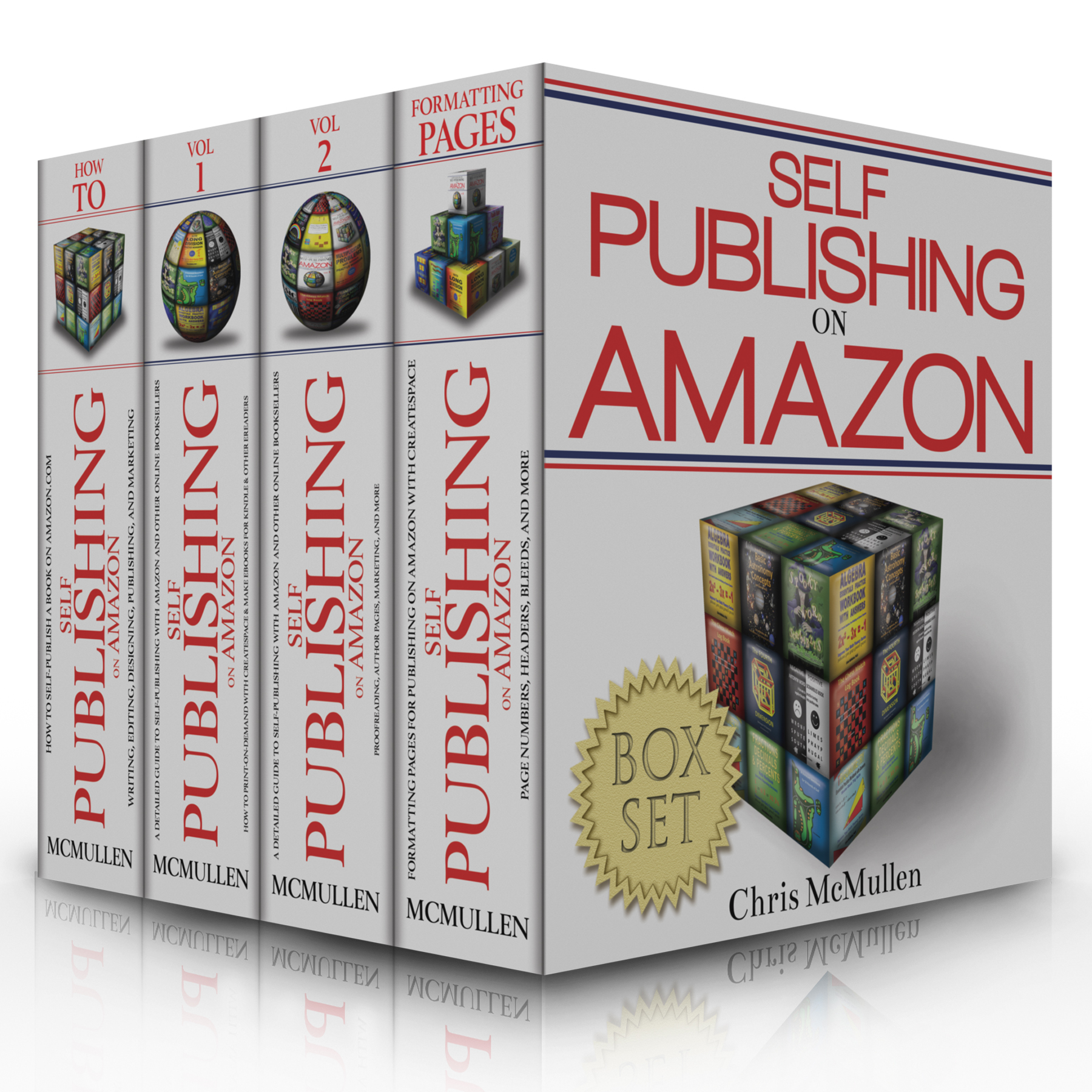
Boxed Set of SP Books 3d with reflection

As you know, I have a few books on self-publishing. The first was originally published in 2009. I designed the original covers myself, and felt they worked for nonfiction: The main point was that the titles were easy to read in the thumbnails.

The big problem for me was that my covers didn’t have a unified look. So I hired Melissa Stevens (www.theillustratedauthor.net) to make them more unified and to add an image that might help them pop. We settled on a geometric approach, arranging the covers of my books in a cube, spheres, and a pyramid.

She also designed a matching header (you can see it now at WordPress and Facebook), shaped like a cylinder.

The cover that impressed me most was the boxed set (coming soon) that I used for this cover reveal above. I like this perspective, which shows off the front cover while still allowing for ample detail on the spines.

Chris McMullen, Author of A Detailed Guide to Self-Publishing with Amazon and Other Online Booksellers

Follow me at WordPress, find my author page on Facebook, or connect with me through Twitter.


Educating Kindle Customers

eReaders

Motivation

Most Kindle owners don’t fully understand what their Kindle devices can or can’t do.

Some customers leave negative reviews, where if they had simply known how to best utilize their devices, this negative experience might have been avoided. (There are also Kindle e-books that could be formatted better. In this post, I’m focusing on the former, not the latter.)

Some customers have implausible expectations for what a book might do. If they had reasonable expectations, they might be more easily satisfied with their purchases.

Authors have three choices:

  • Blame Amazon. Customer buying and reading experiences with Kindle will remain unchanged.
  • Ignore it. Nothing improves this way, either.
  • Help educate Kindle owners. In your marketing and even in your books, you have the opportunity to improve prospects for customer satisfaction.

You don’t need to setup a class to help educate Kindle owners:

  • Mention relevant notes in your Kindle e-books or even in the description. For example, if you have pictures that may look better zoomed in, you could explain that many e-readers (don’t assume the customer is using a Kindle) have a zoom option, then as an example you might mention how to zoom in on the Kindle Fire.
  • Include a short Kindle tutorial on your website. It needn’t be comprehensive; it could simply highlight a few important points that many Kindle customers aren’t familiar with. Focus on points that relate specifically to your books.
  • If a point may be particularly important for Kindle customers who buy your book, when you mention your book, you could include a short tip that may help Kindle owners get the most out of your book. Then you’re not just advertising your book, you’re also providing free help.
  • Have you read a book or tutorial that shows you how to make the most of your Kindle Fire? Review the book on your blog. Post a link to the book or tutorial on your sidebar.

Examples

Here are a few examples of things that some Kindle customers don’t know:

  • You can download a free app, Kindle for PC, to read any Kindle e-book, even if you don’t own a Kindle device. Suppose you publish a book full of colorful images. You might mention in the description that it’s best read on a device that supports color, then suggest Kindle for PC (with brief instructions, or where to find them, for how to download this free app and read a book with it) for those with b&w devices.
  • Did you know that you can double-tap on an image in the Kindle Fire to enlarge it? Then you need to click on the X to resume reading.
  • It’s possible to enable automatic book updates. From Amazon’s homepage, when logged in, place your cursor over Hello, Your Name, Your Account near the top right. Click Manage Your Content and Devices. Find Automatic Book Update on the left. Note: This doesn’t provide an update whenever the publisher (who may be the author) uploads a revised file. The publisher must first contact KDP, then KDP must verify that improvements were made, and KDP must decide it’s worth notifying customers. If you update your book and succeed in persuading KDP to notify customers of the update, you might want to let your fans know about this and how to get the update.
  • Want to clear the furthest page read? Visit your Kindle Library (similar to setting automatic book updates, explained in the previous step—simply pick this option from the list instead). Use the Actions button at the right.
  • Try not to laugh, but some customers actually don’t know that you can return a Kindle e-book in 7 days if you’re unhappy with the experience. Authors see returns (sometimes, too many) in their KDP sales reports, and therefore assume that all customers know how to return e-books. Yet many don’t realize that this is possible. Is this something you wish to advertise? Good question! On the one hand, if you already have too many returns, you may feel reluctant to encourage more of them. On the other hand, think of those customers who review books based on the first few pages. A percentage of those reviews are from customers who didn’t realize that they could have returned the book (while many also are from customers who already did return the book, or, worse, didn’t even buy it). Note that there appears to be some threshold, where if you return “too many” e-books you may lose this returnability option.
  • I was reading a Kindle e-book once where all of a sudden every other page was blank. At first I wondered how anyone could publish a novel with intermittent blank pages. Then I deduced that it wasn’t actually formatted that way. I powered my Kindle off, then when it restarted, the book didn’t have blank pages anymore. It surely wasn’t the publisher’s fault, and the problem turned out to be easy to fix at my end.

Authors, Too

It’s not just readers who may benefit from some Kindle education. Many authors can use this, too.

Keep in mind that some authors don’t react well to unsolicited advice given specifically to them. But most don’t mind learning something that was posted on social media (so long as they don’t suspect that their book was the motivation for the post). Yet there are some authors who openly ask for advice.

Try to learn what your options are before you publish. For example, did you know about the Kindle Comic Creator (which might be relevant for picture books other than just comics)?

About Me

Chris McMullen, Author of A Detailed Guide to Self-Publishing with Amazon and Other Online Booksellers

  • Volume 1 on formatting and publishing
  • Volume 2 on marketability and marketing

Follow me at WordPress, find my author page on Facebook, or connect with me through Twitter.

Ratings and Reviews at Amazon, Suddenly?

Ratings 2

New Ratings

I noticed a new ratings number at Amazon today: http://amzn.com/1480250201 .

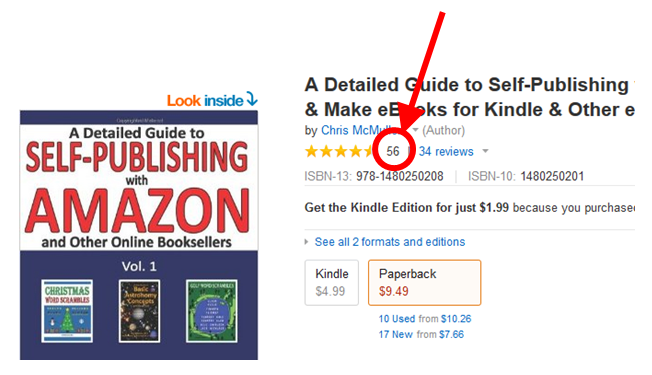
Look closely at the top of the page, below the author name. Between the gold stars and the 34 reviews tally, you see the number 56 (well, I suppose it’s subject to change before you read this post).

When I place my cursor over the 56, I see a gray rectangle near my cursor that says, “56 customer ratings.”

When I place my cursor over the 34 reviews link, it pulls up a chart showing all 56 customer ratings, averaging out to 4.3 stars.

Scroll down to the review section and the chart is different. That chart shows 34 reviews, averaging out to 4.4 stars.

I only see the non-review ratings on my paperback books. I don’t see any non-review ratings on my Kindle e-books at this time.

(By the way, if you click on the Kindle edition, you can see that the cover is changing. Melissa Stevens, http://theillustratedauthor.net, designed the new cover.)

Author Central is still only showing the reviews.

In case you’re wondering, I have a book that has one rating, but no reviews: http://amzn.com/1467970727.

If you have print books for sale on Amazon, I know what you’ll be doing for the next few minutes. 😉

Now we can speculate. Is this here to stay? Is Amazon just testing it out? Will it be coming for Kindle e-books, too? Time will tell.

You may be wondering how customers gave those ratings. Keep in mind, these weren’t from the end of a Kindle e-book, as the ratings are only showing on paperbacks presently. I had to go to my account at Amazon and explore to figure out how to rate books without reviewing them. I won’t be rating any books though; I much prefer giving reviews.

Has it occurred to you that ratings are anonymous? I’m not ready to think about the ramifications of that…

~ Chris McMullen ~

KDP now Supports HTML Descriptions

HTML pic

Amazon Book Description HTML

How it was:

  • Kindle Direct Publishing (KDP) didn’t used to support HTML for the book description.
  • In order to use boldface, italics, ordered lists, and unordered lists, it used to be necessary to visit Author Central (https://authorcentral.amazon.com).
  • Once you used Author Central for your Kindle e-book description, republishing the e-book at KDP wouldn’t have any effect. You had to return to Author Central to revise the blurb.

It’s changed:

  • KDP now supports HTML for your description. (I know this because I just tried it and it worked.)
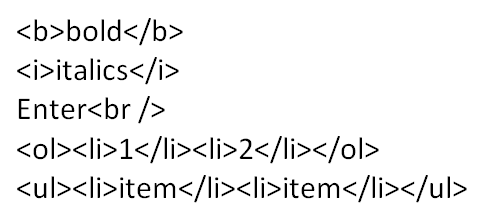
  • The HTML at KDP is the same as the Author Central HTML (e.g. there is a funny space in the linebreak tag, <br />).
  • If you republish your Kindle e-book, whatever description you have with KDP now overrides your Author Central description.

If there was any announcement regarding this, I missed it. I just discovered it by checking my product pages after republishing and hearing from others who’ve done the same.

Important notes:

  • Just a small change, like modifying your price, causes your Amazon book description to revert to whatever you have at KDP.
  • Before you republish at KDP, visit Author Central, edit your book description, select the HTML option, copy the description, save one copy in Notepad, and paste it into the description you have at KDP.
  • After your updated book goes live on Kindle, check your blurb at Amazon.

Good news:

  • This is better because now the Kindle description can include formatting when the book first goes live.
  • Although you can’t preview the description at KDP, you can edit the description with an existing book at Author Central and preview it there (then simply cancel the edit so it doesn’t affect your other book).

You don’t need the <p> tag to make paragraphs. Just use two consecutive <br /> tags; they work like using the Enter key twice to create a blank line between paragraphs.

Note that KDP respects the Enter key. Therefore, if you’re using <p> tags and using the Enter key, you may get much wider linespacing than you expect. Ordinary HTML ignores the Enter key. Author Central ignores the Enter key (in HTML mode). But KDP doesn’t.

Basic KDP Blurb HTML:

  • Place text between <b> and </b> to make boldface, as in <b>bold</b>.
  • Place text between <i> and </i> to make italics, as in <i>italics</i>.
  • Use <br /> at the end of a line to have the same effect as the Enter key.
  • Use <br /><br /> to create a blank line between paragraphs.
  • Don’t use the Enter key in addition to the <br /> tag.
  • If you use <p> tags, don’t use the Enter key in addition to the <p> tags. (Use <p> at the beginning of a paragraph and </p> at the end. Don’t press Enter between paragraphs.)
  • Use <ol> to start an ordered list (with numbers) and </ol> to end an ordered list.
  • Use <ul> to start an unordered lists (just bullets) and </ul> to end an unordered list.
  • Use <li> to create an item on a list and </li> to end that item.

You don’t actually need to know HTML to format your description with it:

  • Edit a book description for any book at Author Central.
  • Type the description with boldface, italics, the Enter key, bullets, or ordered lists.
  • Preview the description to see how it turned out.
  • Switch to HTML mode. (There is a little yellow rectangle for HTML and another called Compose. Click the HTML rectangle to switch to HTML mode.)
  • Copy the HTML for your book description into Notepad.
  • Cancel the edit at Author Central so it doesn’t affect the book’s actual description at Amazon. (That’s why it didn’t matter which book you used.)
  • Paste the HTML into KDP. (If you also want to use it at CreateSpace, remove the spaces from the <br /> tags. You can do a find and replace in Notepad.)

There is an important difference between KDP, Author Central, and CreateSpace HTML: At Author Central and KDP, the linebreak tag <br /> has a funny space, while at CreateSpace there is no space, <br/>. If you use the linebreak tag in your HTML, be sure to adjust the space between CreateSpace and the two other sites.

Also noteworthy is that KDP, CreateSpace, and Author Central all permit descriptions of 4000 characters (it used to be 2400 at Author Central).


About Me

Chris McMullen, Author of A Detailed Guide to Self-Publishing with Amazon and Other Online Booksellers

  • Volume 1 on formatting and publishing
  • Volume 2 on marketability and marketing

Follow me at WordPress, find my author page on Facebook, or connect with me through Twitter.

Models of Good Books: What to Look for

Models

Model Books

Indie authors must go way beyond writing the book. There is also editing, formatting, cover design, and marketing.

But self-publishers don’t need to invent the wheel. When it comes to formatting and cover design, there are many effective models available to help serve as guides.

Look at books as models for what can be done.

It’s important to realize that different books serve different purposes. Don’t take your favorite book and use it as a model for everything.

  • Paperback formatting: Look at books similar to yours by the big publishers. Money-saver: Visit your local library.
  • Cover design: Browse through top-selling indie books in your genre. (Note: Big publishers and popular authors can get away with lesser covers. When you see a popular book with a blah cover, it doesn’t mean that covers aren’t important.)
  • E-book formatting: Try to find professional e-book conversion services with a strong reputation or e-book formatters who appear very knowledgeable. Browse through books they’ve formatted. For example, KDP has a list of conversion services: https://kdp.amazon.com/help?topicId=A3RRQXI478DDG7. One of these is Book Nook Biz, which has a gallery of books: http://www.booknook.biz/bk_books.
  • Blurb: Best-selling indie books often have great blurbs. Look for popular indie books in your genre. (Note: Big publishers and popular authors don’t need the best blurbs to sell books.)
  • Price: Look for books that are very similar to yours to see what price range is common.
  • Categories: Search for popular books similar to your book on Amazon. See which categories they are listed under.
  • Marketing: Find successful indie authors in your genre and see what kinds of marketing strategies they are employing. Their social media pages may give you some clues. Many top indie authors have Author Central pages at Amazon, and very often their blogs or tweets feed into Author Central. Click on a blog post or tweet to find these authors online.

For any single aspect, such as formatting, don’t limit yourself to just one book. Look at a variety of books in your genre.

Your goal isn’t to copy what someone else has done, but to sample a variety of quality books that show you what some of your options are. You can also develop a feel for design by studying well-designed books. The more you study, the better (provided that they were designed well).

What to Look for

Here is a sample of specific things to look for when studying models.

Paperback formatting:

  • Are the books justified or ragged right? Are all the pages like this, or are there exceptions in the front or back matter?
  • What size font is used? What style font is used? Research suitable fonts for your genre that are available for free for commercial use. Print out a sample paragraph in a few different font sizes and compare your sample paragraph to what you see printed by the big publishers. You can learn a lot about book design by trying to recreate a page that you see. (Recreate the page only as a test. You don’t want to copy the design of any book, but want to develop your own style from studying these models.)
  • Measure the linespacing. Chances are it’s close to single spacing, but not quite. Google how to measure font leading. You can set the linespacing to Exactly a pt measure (font sizes being measured in terms of pts).
  • Measure the page margins. Also measure the distance between any headers and footers to the body text.
  • Do the lines of text line up at the top and bottom of all the pages? Are there exceptions, like the first or last page of each chapter?
  • Which pages have page numbers? Which pages have Roman numerals?
  • Which pages have page headers at the top? Study the style of the page headers. What text appears on different page headers? Note that the publisher name or author name are less relevant for indie books.
  • Study the chapter heading and subheading styles, including the font size, font style (e.g. bold), numbering, and space before and after the headings. Do the first-page chapter headings drop down from the top of the page?
  • Does the book use hyphenation? How frequent are the hyphens? If the book is justified, are the gaps between words ever noticeable?
  • Do you find any widows (a single line of a paragraph that appears on a page by itself)? Do you see orphans (a word or short phrase all by itself on the last line of a paragraph)?
  • Is there a single space after a period and before the next sentence starts instead of two spaces? Look closely.
  • Look for bullet points, footnotes, citations, and any other kinds of formatting that you plan to use in your book and study the formatting.
  • Does the book have a drop cap at the beginning of each chapter? Is the first paragraph of each chapter non-indented?
  • How are the front and back matter organized? Which sections are included?
  • Examine the copyright page closely. Formatting is important. You need to prepare a professional copyright statement and, if you write fiction, a fictional works disclaimer. Your print-on-demand book won’t have a Library of Congress number or printing numbers like traditionally published books do.
  • Study the formatting of other front and back matter sections, like the table of contents, references, index, glossary, and about the author section.
  • Look for little design marks that improve the feel of the book. Are they small? How do they look? Where are they used?

E-book formatting:

  • Most of the bullet points listed above for paperback formatting apply here, too, except that you may prefer to look at indie e-books converted by professional e-book formatters. If so, it’s also worth comparing these to traditionally published e-books.
  • Look for differences between e-book and paperback formatting.
  • Do e-books tend to give you the freedom of font size, font style, linespacing, and other user options?
  • Do the images fill the width of the screen when reading on a pc? Would you be able to make out the detail in the images on a cell phone? How do they look on a black or sephia background? Are there some images, like glyphs, that don’t appear full-width? Do the images look nice? If they are in color, how do they look in black and white? (Obviously, if you have the chance to sample some of these things on a few different devices, that will help.)
  • Does it seem like some front matter sections are missing? Is the table of contents in the front or back?
  • Study the way the e-book begins, especially the formatting and order of the title page, copyright page, contents, introduction, and how the book starts.
  • Does the end of the book include a short sample from one of the author’s other books?
  • Examine the chapter headings closely. Study the formatting. Do they appear as text or as images? Do they come with images, or are they text only?
  • Is the first paragraph of each chapter non-indented? Are there any lines from the table of contents or copyright page that appear indented?
  • How large is the indent? Does the indent look the same size if you change the font size or view the book on a different device? (You can save a Word document as a filtered webpage, open the e-book in Notepad, and change the size of the indent to something like 2 em instead of a value in inches. That way, the size of the indent depends on the font size.)
  • Is the book justified or ragged right? Which text is centered (copyright page, chapter headings, etc.)? If the book is justified, do you see any large gaps between words?
  • Does any of the text appear in color?
  • Is the e-book reflowable, fixed layout, or comic book format?
  • Are there any or many long paragraphs? Or does it seem like the e-book has mostly short paragraphs to prevent a single paragraph from easily filling up a screen?
  • Does the Look Inside get into the action quickly or build slowly?
  • It’s worth skimming all the way through a well-designed e-book shortly before viewing your own e-book on the previewer. That will help you notice possible issues.

Cover design:

  • See how everything (i.e. the central image, background, and text) seems to fit together on the best book covers. You don’t want your cover to look like separate pieces slapped together.
  • Can you immediately guess what the book is about by glancing at the cover? Compare the thumbnail image to the full cover.
  • What are readers in your genre accustomed to seeing on covers?
  • How many images do you see on the best covers?
  • Do the people on the covers have blank stares, bored looks, or appropriate expressions? Do you see the same stock images on many of the top sellers?
  • How many main colors are there? What kinds of colors are common in your genre? Which color combinations seem to work well together?
  • Do the fonts fit the genre? Are the fonts plain, fancy, or somewhere in between? Are the fonts easy to read? Is the title easily read on the thumbnail? Is the text horizontal? Do you recognize popular fonts like Times New Roman, Arial, and Comic Sans, or did the designer spend time browsing font sites like Font Squirrel (http://www.fontsquirrel.com) and FontSpace (http://www.fontspace.com) to find the one that works best?
  • Although you should study top-selling indie book covers, traditionally published books reveal an important point: They don’t mention the cover designer on the front cover, but instead mention the designer in small print on the back cover and on the copyright page.

Blurb:

  • Is it short or long? If it’s long, is there space between paragraphs? Does it have bullet points? Does it use italics or boldface? (You can do these things from Author Central: https://authorcentral.amazon.com.)
  • Does it grab your attention right away? Does it hold your attention throughout?
  • Can you tell right away what the book is about?
  • How does the text flow? Is it easy to read? Does sentence structure and length vary? Is the writing simple or complex? How strong or plain is the vocabulary?
  • Is it written in the third person or something else? What tense is used?
  • Are there review quotes in the description? If so, what are the sources?
  • Also study author pages, including biographies and author photos.

About Me

Chris McMullen, Author of A Detailed Guide to Self-Publishing with Amazon and Other Online Booksellers

Follow me at WordPress, find my author page on Facebook, or connect with me through Twitter.
You READ – but do you leave REVIEWS?

Read any great books lately? What a wonderful way to convey to those authors your wish for them to write more, and to tell them what great things they should keep doing right. 🙂

Chris The Story Reading Ape's avatarChris The Story Reading Ape's Blog

66d5ad99b798ba6027bffa79777b0979

If not, why not?

I don’t have time

The author probably spent a heck of a lot more time writing the story than you took to read it, no matter how slow you think you are, so why not take a few minutes to record your feelings about it.

I can’t write long fancy reviews like those I see on book review blogs

You don’t have to, Amazon, for example, only ask you to use a minimum of 25 non repeating words.

I can’t express myself very well

No-one is asking you to produce a literary masterpiece, start off with things you liked, didn’t like or a mix of both about the book, e.g.,

I liked this book because –

it reminded me of –

it made me think about –

it made me so scared I couldn’t sleep for –

it made me feel homesick for –

it made…

View original post 505 more words

Authors, You Are Amazon

Me yes you

Why You

Because your book is available for sale at Amazon.

Amazon does sell many other products, but most customers think of books when they think of Amazon.

Millions of customers will buy other books besides yours, but some will (hopefully) buy your book.

When those customers read your book, your book—for that period of time—represents Amazon.

If the customer enjoys the shopping and reading experience that your book provides, the customer doesn’t just think highly of your book and you, but Amazon, too.

A poor buying or reading experience produces the opposite effect.

Of course, you have your own reasons for wanting to create a positive reading experience: You want the customer to recommend your book to others and to look for more of your books.

You want other authors’ books to create positive reading experiences. The more customers who enjoy shopping for books at Amazon and reading those books, the more likely those customers are to buy more books from Amazon and recommend Amazon to their friends, which improves the sales potential of your own books.

So it’s in your interest to support your fellow authors when they need and ask for help. (Offering unsolicited advice isn’t always received well, though.)

It’s also in your own best interest to help brand a positive image for Amazon, Kindle, and CreateSpace. The more customers who shop on Amazon, the better for all authors.

It’s even in your best interest to have good things to say about books similar to yours because those books are likely to appear on your customers-also-bought lists, and even if they don’t, most customers buy multiple books that are similar, not just one of them. Similar books can thrive together (or they can sink together).

When you hear negative things about Amazon, Kindle, or CreateSpace, take a moment to calmly and concisely say something good—and then let it be. Don’t get into a confrontation. Brand a positive image for yourself, too.

If you ask a customer what Amazon is, he or she will probably mention that it’s a huge website with an enormous selection of well-priced books.

But that’s not how the customer feels about Amazon. How the customer feels depends on shopping experiences and reading experiences. Each sale of your book contributes to a customer’s perception of Amazon.

You are Amazon.

We are Amazon.

Even the customer is Amazon. Anyone who enjoys the great selection, convenience, and prices benefits from helping to brand a positive image for Amazon.

Of course, indie authors must be thankful for the opportunities that Amazon has created.

Indie authors account for a significant share of Amazon’s book sales.

Indies are Amazon, too.

And the best indie books have shown that they can create wonderful reading experiences.

Beyond Amazon

You’re more than Amazon.

If you sell books on Nook, Kobo, Sony, Smashwords, etc., you’re all of these.

Wherever your book is sold, your book represents that retailer.

You want to brand a positive image for all of these outlets, and for whatever publishing service you use.

Chris McMullen, Author of A Detailed Guide to Self-Publishing with Amazon and Other Online Booksellers

Follow me at WordPress, find my author page on Facebook, or connect with me through Twitter.
Can You Be too Professional?

Pro Am

Amateurish!

There are many ways that a book or author may be perceived as amateurish.

Many of these correspond to doing what seems intuitive or convenient:

  • Commenting on reviews.
  • Not realizing that the cover is a visual representation of what quality to expect.
  • Including the word “by” before your name.
  • Using the default settings in Microsoft Word.
  • Creating indents with the spacebar or using the Enter key to pagebreak.

Others are more subtle:

  • Not seeking editorial reviews to earn buyer confidence.
  • Typing two spaces after a period.
  • Poor font selection.
  • Not using Word’s style functions and First Line Indent from the Paragraph menu.
  • Getting a free .wordpress.com site instead of buying a domain or using .org.

Add to this at least 90% of the things done in the name of “marketing.”

Too Far?

If it’s not professional, does that make it amateurish?

Unfortunately, I see comments about other books and authors of the sort:

  • “That’s so amateurish!”
  • “You need to enroll in Publishing 101.”
  • “What a newbie!”
  • “Nothing says ‘amateur’ like Times New Roman.”
  • “Didn’t you preview your book first?”
  • “That book is in bad need of editing help.”

In a moment, I will come to an alternative to professional and amateurish.

First, let’s consider some of these points:

  • If there is something reasonable that you can do to improve the formatting of your book, you should do it. A better-formatted book makes a better impression. It’s certainly harder for readers who enjoy a story to recommend a poorly formatted book. A better-looking Look Inside is more likely to close the sale. However, once the book looks pretty good, for most buyers who support indie publishing, there will come a point where the formatting is good enough to earn the sale.
  • Some of the people who are avidly complaining about grammar, spelling, and writing style, and who are pointing out editing issues, are themselves editors. They want to advertise the importance of editing to drum up business. If they love editing books, naturally editing will be quite important to them. But it’s also important to readers. Frequent mistakes will lose reader interest. Not just in spelling and grammar, but using a vocabulary and style that suits the audience, having the book flow well, even improving the storyline and characterization. There are many different kinds of editors, and all editing is important. However, like formatting, customers who support indie books have some degree of tolerance. The important thing is to be on the safe side of where this line is drawn for the majority of your target audience.
  • A lousy cover suggests a lack of effort. Who wants to read a book where little effort was put into it? If the cover reflects much effort, the cover should, too. The cover is also a valuable visual tool. Customers searching on Amazon see the thumbnail among many others before deciding which books to check out. Most of the thumbnails don’t receive any attention. The cover is also a valuable branding tool. An effective cover makes the genre and content immediately clear to strangers in the target audience and appeals to the target audience. In nonfiction, sometimes large keywords can be effective with little imagery. If you interact with people personally, this can offset not having a great cover. But a fantastic cover opens many doors, and is a must for selling fiction through discovery online.

Option 3

If not professional nor amateurish, what else?

Stephen King is a professional author. Sold millions of books, traditionally published, famous.

You don’t expect to see Stephen King use his children’s school artwork for his cover. You don’t expect to see him commenting on many of his reviews. You expect his books to be professionally edited and formatted. You probably have really high expectations for the quality of his stories. Stephen King can easily get a ton of editorial reviews, famous authors to write forewords, professional book reviews, etc. His author site is stephenking.com, which looks very professional.

You’re not Stephen King. (If you were, why on earth would you be reading this blog?)

But you don’t need to be.

In fact, you can do some things that you wouldn’t expect Stephen King to do. (I’m not saying he doesn’t do them, just thinking what average expectations are.)

Personalization.

It’s your asset. You can interact with your fans, your target audience. Stephen King can interact personally with fans, too, and probably does. You can easily interact personally with a much larger percentage of your fan base. By the sheer numbers, Stephen King is pretty limited percentage-wise.

The Personal Touch

I see some authors with an AuthorName.com website without a blog. I’ve even see a few authors switch from the free WordPress .com site to .org, and I’ve seen the Likes and Follows disappear to be replaced by Facebook and Twitter options only.

I perceive this as an attempt to appear more professional (and .org may also offer more flexibility, although .com has everything I feel that I need). Also, displaying a tally of views, likes, and follows might show that a website isn’t too popular, so perhaps some aim to hide this data.

But it seems less personal.

In addition to personalization, humility may be another factor.

We like to discover the small guy, with a humble book that tells a great story, that we can support.

By the way, WordPress.com is huge and may help, rather than hurt, with search engine traffic compared to .org. See here: http://onecoolsitebloggingtips.com/2014/05/05/no-metadata-required-for-good-seo/. There is a lot of helpful info there; for this point, look at the end of the first paragraph under “Keyword Use in Branding.” I have .com (with the WordPress extension in it) and draw in over 100 views per day from search engines, so .com seems to work well for me.

Readers who want a professional, impersonal reading experience can already find that with traditional publishing. One of the advantages of self-publishing is the opportunity to provide a more personal experience to a larger percentage of readers. There are disadvantages, too, so it’s important to take advantage of the benefits.

Readers can also choose a personal experience, with a perhaps more humble book and author. I’m not saying to not worry about being professional. Get the formatting, editing, and cover to look as good as you can. Marketing-wise, think personal. That’s your advantage.

An interactive blog, where it’s easy to interact and follow however the fan prefers (WordPress, Facebook, Twitter, Google, Pinterest, email, etc.), with the convenient option of commenting from WordPress without having to sign into Facebook or Twitter, encourages participation. A simple Like while logged into WordPress offers a quick and easy show of support.

Think of ways to find and interact with your target audience. Readers who personally interact with an author, online or in person, and who enjoy the experience are more likely to buy the book, and to recommend the book to others if they enjoy it.

Many of the ways that books are bought are inaccessible to new authors: bestseller lists, showing up high in a category, professional reviews, name recognition, etc. But one of the big ways that books are purchased is following personal interaction with the author. Every indie author has this opportunity.

How about editorial reviews and advance review copies? This is very common among traditionally published books. Should indie authors be copying what traditional publishers do? I know, there are some incentives to reviews, as some sites that promote indie books set a bar to reach.

Some customers don’t like to see numerous reviews show up shortly after a book is published: It can create buyer suspicion. Some disregard all those quotes of how wonderful a book is. At the same time, customers want to see an assortment of neutral opinions. Ah, what is neutral? Are all those glowing remarks inside a top-selling book really “neutral”?

Is it possible for a humble book with a personal touch, along with a possible personal experience, to have more appeal than a book that seems “too” professional? Food for thought, perhaps.

Chris McMullen, Author of A Detailed Guide to Self-Publishing with Amazon and Other Online Booksellers

Follow me at WordPress, find my author page on Facebook, or connect with me through Twitter.
Kindle Educational Content: Calling Authors

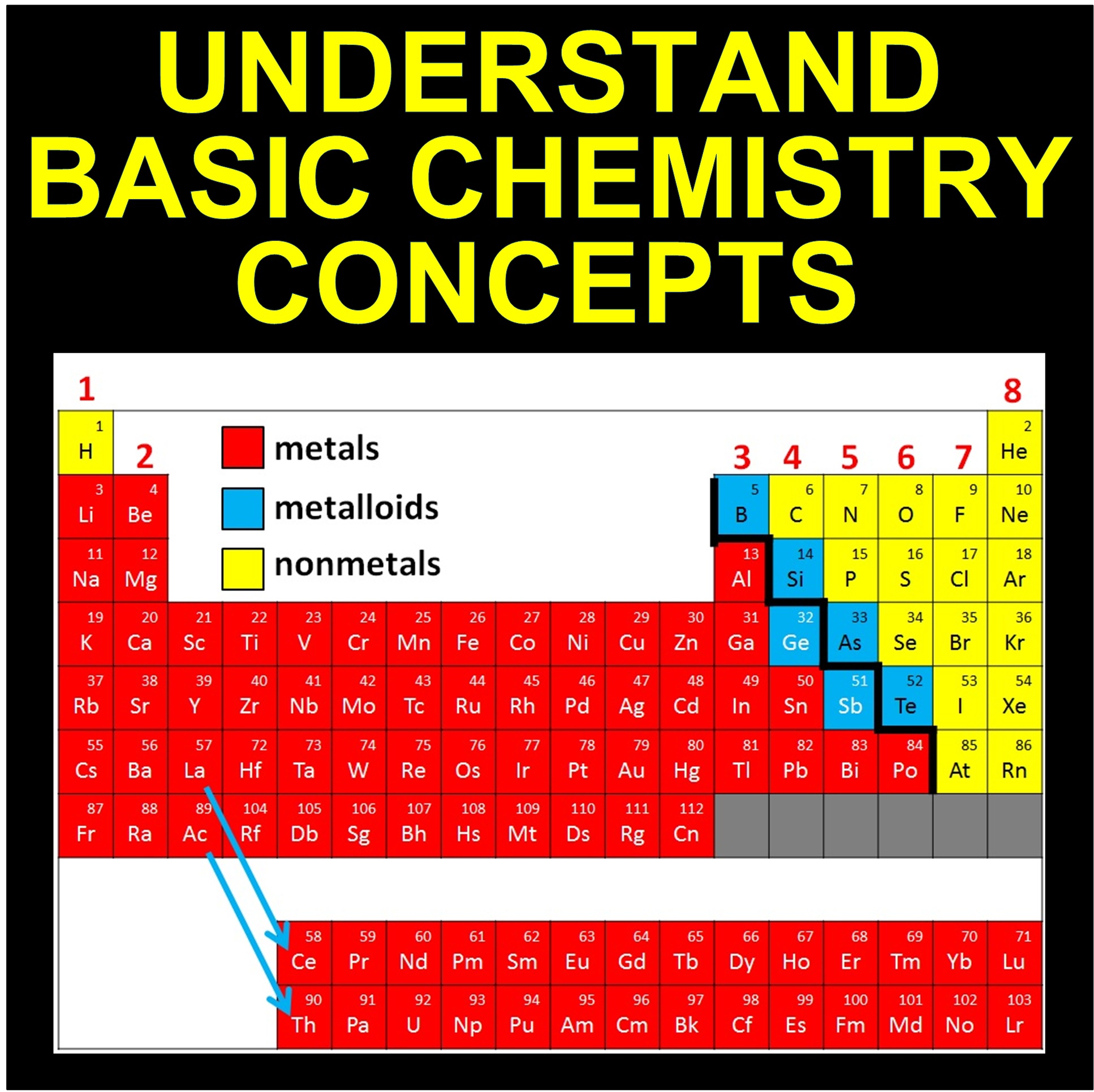
Chem Basics Cover

Educational Authors

Do you write educational books? Any age. College material, high school, middle grades, elementary, kindergarten, preschool. Doesn’t matter.

Or have you been thinking about writing educational books?

Have you had any troubles or concerns with writing or publishing educational content for Kindle?

If so, I would like to hear from you. Not just me. Maybe even Kindle will talk with you.

Kindle Educational Team

A couple of weeks ago, I received an email from the Kindle Educational Team.

Wow!

Personal service. Kindle Direct Publishing (KDP) is a self-service website. Amazon is huge. The number of authors is huge. Personal service is a real treat. As you might expect, the Kindle Educational team’s role doesn’t ordinarily consist of contacting authors.

Kindle has plenty of fiction. They are looking for ways to make more quality educational content available to Kindle customers.

Evidently, they asked CreateSpace to identify some authors who have published educational material in print and who have opted to receive emails from Amazon. Lucky me, my name came up.

A few days following the email, the Kindle educational team actually called me. I was able to speak with two representatives on the phone.

They were interested in my concerns about publishing on Kindle. I mentioned such things as formatting challenges, difficulty with visibility on Amazon (I’ve gotten specific, like mentioning that if a customer goes to Amazon, clicks children’s books, and then clicks the K-12 Teachers link, CreateSpace and Kindle books rarely show up there), and category issues.

It looks like the Kindle educational team wants to help with visibility on Amazon, and it looks like they are thinking about long-term self-service options that can aid in formatting and publishing educational books.

Note that fixed-layout currently has features that might help with children’s book formatting and technical textbook formatting: http://www.amazon.com/gp/feature.html?docId=1000729511. Hopefully, this will become easier for the average self-publisher to implement. The Kindle Comic Creator looks promising.

Are You Interested?

At the end of the telephone conversation and in a follow-up email, I’ve been asked if I know other educational authors.

Do you write educational books?

If so, let me know. I can pass along your interest.

Maybe Kindle will speak with you, too.

(Of course, nobody asked me to write this post. I took this upon myself.)

Chris McMullen, Author of A Detailed Guide to Self-Publishing with Amazon and Other Online Booksellers

Follow me at WordPress, find my author page on Facebook, or connect with me through Twitter.