KDP’s AMS Advertising now offers Subcategories… Finally

Image from ShutterStock.

Image from ShutterStock.

ADVERTISING IMPROVEMENT WITH AMS AT KDP

Kindle books enrolled in KDP Select can be advertised on Amazon via AMS through KDP.

There have always been two targeting choices:

  • product targeting. Select specific products to target.
  • interest targeting. Select a category to target.

Until now, the category choices for interest targeting were very broad.

But now, after you select a category, you can select a subcategory.

Some of the subcategories are still themselves quite broad.

  • For example, for a math or science book, I must choose the category called Other.
  • Then the appropriate subcategory is Math and Science. But that includes very many different subjects.
  • It would be better if the subcategories were further divided. For example, I might choose astronomy, if available.

However, it is an improvement. Interest targeting is better now. It’s a nice step in the right direction.

If you want more precise targeting, the obvious solution is to choose product targeting instead.

KINDLE ADVERTISING TIPS

  • I used to recommend product targeting. I still favor that, but I just tested out the refined interest targeting so that I can compare. It has some merit.
  • Set the end date as far in advance as possible. It lets you go about six months ahead.
  • Choose to display your ad as quickly as possible. Generally, it’s not easy to make impressions unless you overbid. This option helps if you bid reasonably.
  • Make a catchy headline that’s likely to help create interest in your book, and which is quite relevant for your content.
  • Bid low to begin with. It’s okay to underbid.
  • Wait 3 days before raising your bid. Sometimes reporting is significantly delayed. See how it’s going before you ‘fix’ it.
  • Try expanding your targeting before raising your bid to see if that helps make more impressions.
  • If you do raise your bid, just raise it a little. And wait 3 more days before raising it again.
  • You’re not obligated to invest the whole $100. You can pause or terminate your ad at any time.

With my strategy, I have several affordable bids. Sometimes, I’m able to generate 100,000 to 400,000 impressions in one month with less than $10 spent. I have multiple ads where I spent about $12 to generate $24 in sales (at 70% royalty).

I observe some nice indirect effects on similar books and on my print books. (I tend to sell more print books to begin with, so that makes sense for my books.)

Write happy, be happy. 🙂

Chris McMullen

Copyright © 2015

Chris McMullen, Author of A Detailed Guide to Self-Publishing with Amazon and Other Online Booksellers

  • Volume 1 on formatting and publishing
  • Volume 2 on marketability and marketing
  • 4-in-1 Boxed set includes both volumes and more
  • Kindle Formatting Magic (coming soon)

Follow me at WordPress, find my author page on Facebook, or connect with me through Twitter.

Comments

Click here to jump to the comments section.

Follow Authors at Amazon (Hear all about it)

Amazon Follow

FOLLOWING AUTHORS AT AMAZON

A really cool thing happened to me recently.

I received an email from Amazon a week or two ago.

I almost deleted it. At first, I thought it was an advertisement for a book. I get those a lot.

But I noticed the subject line and realized it was different.

The email subject was: A Question about Your Book “Learn or Review Trigonometry: Essential Skills.”

My first thought was to wonder what was wrong. But it was good news, not bad.

The question was, “Would you like to share this release with your Amazon Followers?”

You bet I would! (Too bad I don’t have that many Amazon followers. But I’ll take what I can get.)

The email included a picture of my book cover, the title, and Yes and No buttons. I clicked Yes.

I published this book on June 10. I received the email from Amazon on June 26, a little over two weeks after the publication date. I responded Yes on the 26th.

According to Amazon, “…you may be invited by Amazon Follow to share a personal message about an upcoming release to your followers.”

It’s available by invitation only. I’ve published dozens of books, and this was my first invitation. (Maybe I deleted a few others!! At least, this was the first invitation that I noticed.)

If you receive an invitation, when you click the Yes button, you must compose a message for your followers.

At 1:07 a.m. this morning, I received an email from Amazon. That’s about a week after I clicked Yes.

The subject states that I have 1 new update from people I follow on Amazon. Inside the email, there is:

  • One of my pictures from my author page, but not the default main image. How and why they chose the image, I have no idea.
  • Text: “Chris McMullen released and wrote a personal message about Learn or Review Trigonometry: Essential Skills.”
  • A See More button.

When I click the See More button, I come to an Amazon page with:

  • the same author page picture
  • my name as a hyperlink (click on it and you visit my author page)
  • the message I had composed
  • the cover thumbnail
  • the title of the book as a hyperlink (to visit the product page)
  • the list price
  • and the review count (0 reviews as of now)

One thing I regret is that the Look Inside still hasn’t activated, even though the book has been out for a few weeks. Usually, the Look Inside shows up quickly, but this time it seems to be stuck. It’s odd that Amazon didn’t check this out and either delay my message until it was resolved or speed up the Look Inside process. (The Kindle edition doesn’t have a Look Inside because I used the Kindle Textbook Creator, but if the print Look Inside shows up, that should show up with the Kindle edition, too.)

FOLLOW AUTHORS ON AMAZON

First, if you’re an author, whether you’ve self-published or traditionally published, you should follow yourself at Amazon.

That way, if you ever get the chance to send a message to your followers, you’ll get to see firsthand what it looks like from the other side.

Next, you should visit the author pages of your favorite authors at Amazon and follow them.

Amazon might let you know when their new books come out.

Visit the author’s Author Central page. From any of the author’s books, if the author has an Amazon author page, you can find a link to it with their picture and biography on the book’s product page.

Once you reach the author page, click the large yellow Follow button under the author’s picture.

LEARN OR REVIEW TRIGONOMETRY

Paperback: http://amzn.com/1941691021

(Has a #1 new release tag, though the sales rank is around 300,000 right now. Nice thing about some nonfiction categories is that you don’t have to sell dozens of books per day to get extra exposure, though there was a magical day a couple of weeks back where it sold 15 copies.)

Kindle: http://amzn.com/B0106X7NL4

Write happy, be happy. 🙂

Chris McMullen

Copyright © 2015

Chris McMullen, Author of A Detailed Guide to Self-Publishing with Amazon and Other Online Booksellers

  • Volume 1 on formatting and publishing
  • Volume 2 on marketability and marketing
  • 4-in-1 Boxed set includes both volumes and more
  • Kindle Formatting Magic (coming soon)

Follow me at WordPress, find my author page on Facebook, or connect with me through Twitter.
Comments

Click here to jump to the comments section.

Nice Exposure for Countdown Deals on Amazon

Countdown Amazon

COUNTDOWN DEALS: HOW WILL ANYONE FIND THEM?

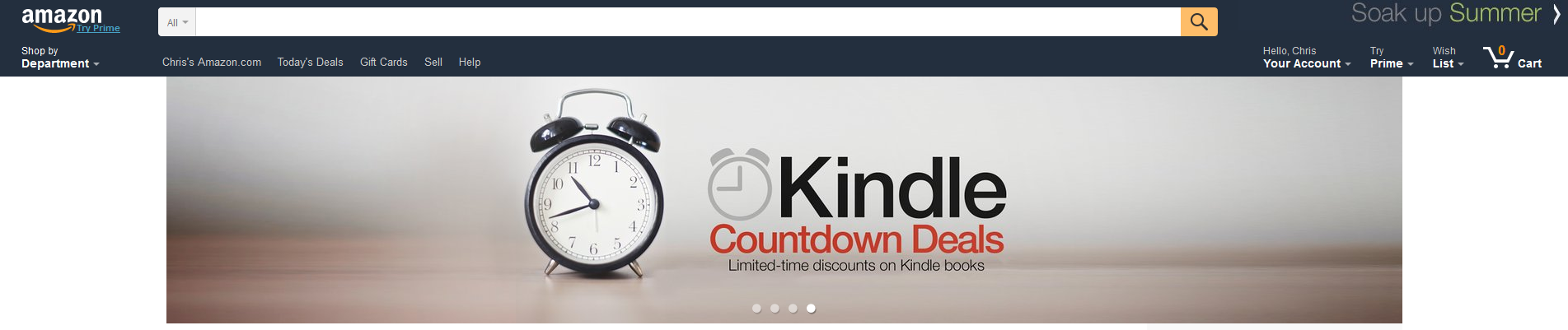
Yesterday, I saw this cool banner on the top of Amazon’s homepage, advertising Kindle Countdown Deals.

When I clicked on it, I was taken to the Countdown Deal homepage.

I thought this was pretty cool. It’s a small step (not too small—advertised on Amazon’s homepage) toward helping publicize Kindle Countdown Deals.

This is good news for authors with books in KDP Select.

I noticed that 6 of the books on the first page of the Countdown Deals had the #1 bestseller tag. Obviously, some authors are making effective use of this promotional tool.

And the top selling books that happened to have Countdown Deals running yesterday probably received a nice boost from Amazon’s ad.

It’s a nice step in the right direction. I actually sent a suggestion into Amazon about this about a week ago.

Countdown Deals need more publicity. How does anyone find them?

Well, you could find the book itself, then you see it’s on sale and maybe feel more compelled to purchase the book.

But you’d really like to attract customers who wouldn’t have otherwise discovered the book. That’s the goal.

Of course, it helps if you advertise it on BookBub, E-reader News Today, or one of several other similar services. See a list here.

Yet Amazon is where you really want your Countdown Deal advertised. KDP advertises that one of the benefits of KDP Select is that the Countdown Deals are advertised on Amazon.

They are, just not as well as they could be.

Where are they? Visit Amazon’s homepage. Hover over Shop by Department, hover over Books & Audible, and click Kindle Books.

Look under Kindle Book Deals. You’ll usually find Countdown Deals on the list.

But here’s the problem. Imagine you’re a customer who has no idea what a Countdown Deal is. Here are the options that you see:

  • Kindle Daily Deals. (Sounds good, right?)
  • Monthly Deals, $3.99 or less. (Low prices, sounds good, too.)
  • 50 Kindle Books for $2 each. (Great price, that’s enticing.)
  • Kindle Countdown Deals. (What on earth is that?)
  • 30 Kids’ Books for $1. (Great price again.)

You see the problem: Kindle Countdown Deals has the least compelling name on the list. It doesn’t mention price, % off, and it doesn’t sound like a good deal.

But many of the Countdown Deals are 99 cents or $1.99, with discounts of 50% to 90% off. The deals are a lot better than the name suggests. So what’s to attract Kindle customers to this option?

I feel like it could be merchandised better. I think Amazon wants to help KDP Select books (at least, those with better potential to engage readers), and wants to attract indie authors into KDP Select. So why not merchandise this better? There is an opportunity here.

This advertisement on their homepage is a good sign. It shows that Amazon wants to help merchandise KDP Select books and make the program more compelling for authors.

If you want to check out some Kindle Countdown Deals, click here to visit Amazon’s Countdown Deal page.

Write happy, be happy. 🙂

Chris McMullen

Copyright © 2015

Chris McMullen, Author of A Detailed Guide to Self-Publishing with Amazon and Other Online Booksellers

  • Volume 1 on formatting and publishing
  • Volume 2 on marketability and marketing
  • 4-in-1 Boxed set includes both volumes and more
  • Kindle Formatting Magic (coming soon)

Follow me at WordPress, find my author page on Facebook, or connect with me through Twitter.
Comments

Click here to jump to the comments section.

How Much Will Amazon Pay for Kindle Pages Read?

Background image from ShutterStock.

Background image from ShutterStock.

KINDLE UNLIMITED PAGES READ

How much will KDP Select authors earn for KU/KOLL pages read?

According to Amazon, nearly 1.9 billion (1,900,000,000) Kindle Edition Normalized Pages (KENP) were read during June, 2015 through Amazon Prime and Kindle Unlimited.

If the same number of pages are read during July, KDP Select authors will earn 0.58 cents per Kindle Edition Normalized Page (KENP) read.

Update: Amazon paid $0.005779 per KENP page read for July, 2015, almost identical to the forecast.

A little more than half a penny per page.

Or $1.00 for every 173 pages read.

How does Amazon calculate pages read?

Amazon keeps track of how many pages the customer has viewed.

So if the customer simply jumps to the last page of the book, that only counts as one page. They have to open every page for all of them to count.

Amazon starts counting from the start reading location.

Each KDP Select book has a KENPC (Kindle Edition Normalized Page Count), which may be different from the actual page count of the print edition and may also be different from the estimated page count.

It can be much different.

How do you find out what your KENPC is?

  • Visit your KDP Bookshelf.
  • Click the Promote and Advertise button.

How do I know how many people borrowed my book?

You don’t. You only know how many pages have been read.

If you have multiple books, click on the Month-to-Date Units Report to see a breakdown by book.

It would be helpful to know how many people borrowed our books. That way, we can figure out how many pages are read on average. This could be valuable data. Perhaps if KDP receives enough requests for it, they will supply this data…

DON’T PANIC!

Everybody’s pages read should be low on the first day.

Why? Because it takes time to read the books.

You know how many people usually borrow your book in one day.

You can’t expect everyone to read your entire book on the first day that they buy it.

So it’s silly to add up the pages read for day one, compare it with the number of borrows you normally get, and decide whether to opt out of the program.

Here’s my advice:

  • See if the number of pages read increases tomorrow, the day after that, and so on.
  • If the pages read per day (you’ll have to keep track—see the example below) is improving, this is a good sign.
  • Eventually, the number of pages read per day should stabilize. It might happen in a week, a few weeks, or months.
  • When the pages read per day stabilizes, compare that to how it was in the past. Use 0.58 cents per page to figure out what you’re making per day now, and compare that to the average number of borrows times $1.35 from previous months.

Don’t forget to check your KENPC. Your book might have more pages than you realize. I have books where the KENPC is 2-3 times the actual print page count. Things might be better than you realize.

EXAMPLE

  • July 1, 200 pages read.
  • July 2, 600 pages read. That’s 400 pages read on the 2nd.
  • July 3, 1200 pages read. That’s 600 pages read on the 3rd.
  • July 4, 2000 pages read. That’s 800 pages read on the 4th.
  • July 5, 3000 pages read. That’s 1000 pages read on the 5th.
  • July 6, 4000 pages read. That’s 1000 pages read on the 6th.
  • July 7, 5000 pages read. That’s 1000 pages read on the 7th. It has stabilized. This book is getting 1000 pages read per day now.

1000 pages per day yields an estimated $5.80 per day (multiply 1000 pages read by 0.58).

If this book averaged 4 borrows per day in the past, it was making about $5.40 in previous months. We want to compare the new estimated $5.80 per day to the old estimated $5.40 per day, but don’t do this until your number of pages read per day stabilizes, or you’ll be disappointed.

If you had based this off the 200 pages read on the first day in my example, it would have looked like this book was losing money in the new system, but that’s not how it looked after it stabilized.

On average, about half of the books will see improvement to some degree, while about half of the books will see a loss to some degree. It will be good for some, bad for some.

But you have to wait until your data stabilizes before you can tell how it’s working out for you. Good luck.

Write happy, be happy. 🙂

Chris McMullen

Copyright © 2015

Chris McMullen, Author of A Detailed Guide to Self-Publishing with Amazon and Other Online Booksellers

  • Volume 1 on formatting and publishing
  • Volume 2 on marketability and marketing
  • 4-in-1 Boxed set includes both volumes and more
  • Kindle Formatting Magic (coming soon)

Follow me at WordPress, find my author page on Facebook, or connect with me through Twitter.
Comments

Click here to jump to the comments section.

Lending & Borrowing mean different things at Amazon

Image from ShutterStock.

Image from ShutterStock.

LENDING ≠ BORROWING

Amazon has two completely unrelated Kindle programs which use similar words.

  • borrowing: readers can borrow Kindle e-books through Amazon Prime or Kindle Unlimited.
  • lending: the Kindle Book Lending program allows customers to lend one book to someone else for up to 14 days.

These two programs have absolutely nothing to do with one another.

To make matters potentially more confusing, Amazon uses the word lending in KOLL: Kindle Owners’ Lending Library. In this abbreviation, ‘lending’ does actually refer to Kindle Unlimited and Amazon Prime. But in Kindle Book Lending, the word ‘lending’ means something entirely different.

Both options—borrowing as it relates to Kindle Unlimited and lending as it relates to Kindle Book Lending—appear in different places when you publish an e-book with KDP (Kindle Direct Publishing).

  • The top of the first page of the publishing process has the option to enroll in KDP Select. This includes your book in Kindle Unlimited and Amazon Prime (which are two separate programs).
  • The bottom of the second page of the publishing process has the option to participate in Kindle Book Lending. This has nothing to do with Kindle Unlimited (or Amazon Prime).

KINDLE BOOK LENDING

This allows a customer to lend the Kindle e-book to one friend or family member for up to 14 days:

  • Each customer can only lend the e-book one time only.
  • The original customer can’t read the book until it’s returned.
  • It can only be loaned for up to 14 days.

Authors have no control over this if they choose the 70% royalty option.

If authors choose the 35% royalty option, then can choose to opt out of Kindle Book Lending.

Since each customer can only loan the e-book to a single person, any possible loss through lending is severely limited.

The Kindle Book Lending option doesn’t affect Kindle Unlimited or Amazon Prime in any way.

KINDLE UNLIMITED

Customers can subscribe to Kindle Unlimited for $9.99 per month in the US (the fee is different in the UK).

A monthly subscription to Kindle Unlimited entitles customers to borrow as many Kindle Unlimited e-books as they would like.

Not all e-books participate in Kindle Unlimited. All KDP Select books are included in Kindle Unlimited, plus about 100,000 traditionally published books.

Approximately 1,000,000 of over 3,000,000 Kindle e-books are included in Kindle Unlimited.

Customers can borrow up to 10 books at a time. After that, the customer must return one of the 10 books before borrowing another.

Kindle Unlimited is unrelated to Amazon Prime.

(While Kindle Unlimited now pays authors by the page, customers are not charged by the page. Customers pay $9.99 per month and can then read as many pages of Kindle Unlimited e-books as they would like with no additional charge.)

AMAZON PRIME

Customers pay an annual fee to join Amazon Prime.

Amazon Prime offers many benefits, such as free two-day shipping of many eligible products, instant streaming of Amazon Prime videos, and borrowing up to one Kindle e-book per month.

There are about 100,000 Kindle e-books which are available to Kindle Unlimited customers, which are not available for Amazon Prime customers.

Unlike Kindle Unlimited, Amazon Prime customers can only borrow one Kindle e-book per month.

Customers must browse for Amazon Prime e-books using a Kindle device registered to the Prime account. (Before Kindle Unlimited, Amazon Prime customers could shop for Kindle e-books from their pc, mac, or laptop, but now they must shop for Amazon Prime books using a registered Kindle device.)

(In contrast, you don’t need to own a Kindle device to use Kindle Unlimited.)

Write happy, be happy. 🙂

Chris McMullen

Copyright © 2015

Chris McMullen, Author of A Detailed Guide to Self-Publishing with Amazon and Other Online Booksellers

  • Volume 1 on formatting and publishing
  • Volume 2 on marketability and marketing
  • 4-in-1 Boxed set includes both volumes and more
  • Kindle Formatting Magic (coming soon)

Follow me at WordPress, find my author page on Facebook, or connect with me through Twitter.

Comments

Click here to jump to the comments section:

https://chrismcmullen.wordpress.com/2015/06/26/lending-borrowing-mean-different-things-at-amazon/#comments

Changes to Amazon Customer Reviews

Image from ShutterStock.

Image from ShutterStock.

AMAZON CUSTOMER REVIEW CHANGES

Amazon is implementing changes to the customer review system in the US.

News of this change was recently announced in this c/net article.

The new customer review system uses a machine learning platform.

What does a machine learning customer review platform mean?

  • The system will gauge which customer reviews are most helpful.
  • The customer review system will be dynamic.
  • The average star rating will be weighted by helpfulness.
  • Verified reviews will have an edge toward helpfulness.
  • Newer reviews will also count more toward helpfulness.
  • Customer voting still impacts helpfulness.

So, exactly, how is this different?

  • Average star rating may change, since it will be weighted by helpfulness. The most helpful reviews will carry more influence.
  • Customer voting isn’t the only factor that affects helpfulness. Newer reviews and Verified reviews will carry more weight. There are probably other factors entailed in the “machine-learning.”
  • Reviews deemed most helpful will have greater visibility on Amazon.
  • The placement of reviews and average star ratings may change more frequently with the new system.

It will probably take time for the new Amazon customer review system to fully roll out and for the machine-learning to make an impact.

Amazon hopes to make the customer review system more useful through these changes.

The emphasis on newer reviews is to keep the information up-to-date. For example, if a product is improved to reflect criticism, newer reviews may reflect those changes, and thus should be more visible.

The emphasis on Verified reviews is in-line with Amazon’s recent lawsuit against alleged fake review websites. Amazon is striving to sustain customer trust in the review system.

KINDLE REVIEWS ARE SPECIAL

Machine-learning may have far-reaching consequences with regard to Kindle book reviews.

That’s because Amazon has more data to analyze:

  • How many pages did the customer read?
  • How much time did the customer spend reading the book?
  • How does the customer’s behavior with this book compare to the customer’s behavior with other books?
  • How many customers return this book?

Changes to customer reviews and to sales rank may both be related to recent changes announced for Kindle Unlimited.

Kindle Unlimited will now pay royalties based on how many pages customers read, effective July 1, 2015.

Royalty reports for Kindle Unlimited will show the number of pages read instead of the number of borrows.

Kindle sales rank may soon be impacted by the number of pages that customers read.

Similarly, machine-learning may look at the number of pages read and related data to help judge which reviews are more helpful.

If so, this would affect all Kindle e-books (not just those in Kindle Unlimited).

Write happy, be happy. 🙂

Chris McMullen

Copyright © 2015

Chris McMullen, Author of A Detailed Guide to Self-Publishing with Amazon and Other Online Booksellers

  • Volume 1 on formatting and publishing
  • Volume 2 on marketability and marketing
  • 4-in-1 Boxed set includes both volumes and more
  • Kindle Formatting Magic (coming soon)

Follow me at WordPress, find my author page on Facebook, or connect with me through Twitter.

Improved Amazon Subcategory Rank

Rank Subcategories

AMAZON SUBCATEGORY RANK

Subcategory ranks at Amazon now extend beyond the top 100 bestsellers in the subcategory.

This is a nice improvement, I think.

Customers see a Kindle sales rank of 500,000 at Amazon and wonder why it’s not selling much.

But how many of the better selling books are completely unrelated to the type of book that the customer is shopping for?

Maybe the book is in a special niche.

A book that ranks 500,000 overall might rank 150 in its subcategory.

When a customer sees 500,000 overall, it can deter sales a bit.

When a customer sees 1,000,000 overall, it can deter sales a lot. In fact, a book can sell once a week or so on average, but as soon as it reaches 1,000,000, often its sales diminish significantly, unless and until it gets a much-needed sale to return to the low 100,000’s. It’s the same book, same cover, same Look Inside, same description, same reviews… but that different sales rank changes some customers’ perceptions.

Not all. Some customers ignore sales rank. Some don’t know what it means. But some do understand sales rank.

But if the customer sees that the book ranks 150 in its subcategory, that has appeal.

So this is a nice change.

It’s one of many improvements that Amazon has made to product pages recently. Amazon has even improved Kindle Unlimited recently.

Amazon could take this a step further:

  • Don’t even show the overall rank unless it’s more likely to drive sales than deter sales.
  • Only show subcategory rank (and possibly category rank) unless overall sales rank will help with sales.

Authors can see overall sales rank from Author Central, so this really isn’t needed on the product pages.

Suppose a book is ranked 500,000 overall and 150 in its subcategory.

Until recently, it only looked like this on the product page:

Amazon Best Sellers Rank: #500,000 Paid in the Kindle Store

Now it looks like this:

Amazon Best Sellers Rank: #500,000 Paid in the Kindle Store

#150 in Books > Category > Subcategory

I propose that it should look like this instead:

Amazon Best Sellers Rank: #150 in Books > Category > Subcategory

In my opinion, this is more likely to drive sales.

Amazon has kind of shot itself in the foot with sales rank.

It used to be that a book selling once a day on average had a sales rank around 50,000.

This number is going up. It could have a sales rank around 200,000 now. Pretty soon, 500,000 might be selling once a day.

But people remember how it used to be. They remember that 500,000 used to be bad. It was bad when there were 1,000,000 Kindle books. But it’s pretty good now that there are 3,000,000 Kindle books.

Amazon doesn’t just want to sell the top 50,000 books. Amazon could improve its sales of books ranked 50,0001 to 3,000,000 by not showing its overall sales rank at all.

Just show the subcategory rank only, unless the overall rank is good enough to help sales. Don’t show customers ranks that are more likely to deter sales.

Yes, if they adopt my idea (doubtful, unless perhaps several others—maybe you—take the time to contact Amazon with the suggestion), customers would learn that if there is no overall rank, that book isn’t one of the top sellers. But they will see the subcategory rank and realize that it’s selling fairly well in its subcategory. They won’t know if the overall rank is 50,001 or 3,000,000 (but the subcategory rank will make it seem more like 50,001 than 3,000,000).

Anyway, it’s just a thought.

I’m a fan of the new subcategory ranks.

Amazon used to show subcategory rank only if the book was in the top 100 in its subcategory. Now subcategory extends way past 100.

I think this is a cool change.

You can probably expect to see continued changes to the product pages as Amazon further tests out ideas that may improve sales.

Write happy, be happy. 🙂

Chris McMullen

Copyright © 2015

Chris McMullen, Author of A Detailed Guide to Self-Publishing with Amazon and Other Online Booksellers

  • Volume 1 on formatting and publishing
  • Volume 2 on marketability and marketing
  • 4-in-1 Boxed set includes both volumes and more
  • Kindle Formatting Magic (coming soon)

Follow me at WordPress, find my author page on Facebook, or connect with me through Twitter.

* Kindle Unlimited is on FIRE *

Images from ShutterStock.

Images from ShutterStock.

KINDLE UNLIMITED IMPROVEMENTS

Kindle Unlimited has me excited:

  • Amazon is implementing major improvements (depending on your perspective) to how the program works for authors.
  • The KDP Select Global Fund continues to grow. The current amount and Amazon’s projections for the next two months are looking nice.
  • Amazon released some favorable news about how Kindle Unlimited is doing so far in 2015.

CHANGES TO HOW KINDLE UNLIMITED PAYS AUTHORS

Amazon is changing how authors are paid for Kindle Unlimited borrows.

The new policy goes into effect July 1, 2015. June, which is already underway, won’t be affected by these changes.

How is Kindle Unlimited policy changing?

  • Authors will now be paid based on the total number of pages read through Kindle Unlimited (evidently, Amazon Prime, too).
  • Authors will not be paid based on the total number of borrows.
  • The magic 10% mark will become irrelevant.
  • Beginning July 1, every book will have a Kindle Edition Normalized Page Count (KENPC), which may differ from the estimated page count that you see on your Amazon product page.
  • The KENPC will be used to count how many pages a Kindle Unlimited customer reads. It will count from the start reading location when the customer opens the book.
  • The KDP Select Global Fund for the month will be divided by the total number pages read through the Kindle Unlimited program.
  • Every book enrolled in Kindle Unlimited will be paid based on this ratio.
  • You can see an example here, worked out by Amazon. (The numbers are probably not quite realistic.)
  • All-Star books and KDP Select authors will be awarded based on the total number of pages read through Kindle Unlimited.

Of course, this has no bearing on ordinary sales, only books borrows through Kindle Unlimited and Amazon Prime.

What does this mean?

  • If one customer reads a 10-page short story and another customer reads a 500-page novel completely, they no longer pay equal royalties through Kindle Unlimited. In my example, the 500-page novel will receive 50 times as much royalty as the 10-page story.
  • If a customer only reads 5 pages of your book, you get paid based on 5 pages, not based on the total length of your book.
  • You no longer have to worry about customers reaching the magic 10% mark. Well, you do have to worry about how many pages they read.
  • List price doesn’t factor into it. It doesn’t matter whether your list price is 99 cents or $9.99; it only matters how much the customer reads when borrowing through Kindle Unlimited.
  • Short books no longer have an advantage by getting customers to reach the 10% mark sooner (since the 10% mark no longer matters).
  • Authors of short books are likely to see a huge drop in their Kindle Unlimited royalties.
  • Authors of very long books for which customers tend to read most of the book are likely to see a huge improvement in their Kindle Unlimited royalties.
  • A page is a page is a page. Quality only factors into it insofar as it entices the customer to keep reading more pages. All pages (as determined through KENPC) pay the same in Kindle Unlimited.

THE KDP SELECT GLOBAL FUND

KOLL borrows paid $1.35 for May, 2015, which is right on target for how KOLL has paid in 2015.

However, moving forward, this really doesn’t matter. Starting in July 2015, KOLL will pay by the number of pages read through Kindle Unlimited, and so the payout will change dramatically.

But there is good news!

  • While the KOLL borrow didn’t change much, the KDP Select Global Fund continues to grow.
  • Amazon added a whopping $7.8 million to the $3 KDP Select Global Fund, bringing the payout to $10.8 million for May, 2015.
  • Amazon projects a KDP Select Global Fund in excess of $11 million for both July and August (when the new program terms take effect).
  • That huge $11,000,000 payout for July and August will be divided up based on page count, not the number of books borrowed.

MORE GOOD NEWS ABOUT KINDLE UNLIMITED

And that’s not all!

  • Guess how much KDP Select authors are making just from their Kindle Unlimited borrows for the first half of 2015? $60,000,000! That’s huge. KDP Select is a very significant share of the e-book market. (If you read any reports of how e-book sales are down, look closely to see if they are ignoring Kindle Unlimited. They shouldn’t be, but some companies like to do just that.)
  • Total royalties of KDP Select authors are approximately double compared to last year. Kindle Unlimited continues to grow.
  • Each month, at least 95% of the KDP Select books enrolled in Kindle Unlimited renew their enrollment. (I can confirm this independently, as I’ve checked on it myself.)

Kindle Unlimited isn’t for every book, and it requires giving up exclusivity, but it’s looking better and better. All of my books are enrolled in Kindle Unlimited. I’m a Kindle Unlimited subscriber myself and read several full-length novels per month.

Write happy, be happy. 🙂

Chris McMullen

Copyright © 2015

Chris McMullen, Author of A Detailed Guide to Self-Publishing with Amazon and Other Online Booksellers

  • Volume 1 on formatting and publishing
  • Volume 2 on marketability and marketing
  • 4-in-1 Boxed set includes both volumes and more
  • Kindle Formatting Magic (coming soon)

Follow me at WordPress, find my author page on Facebook, or connect with me through Twitter.
Amazon Bundles of Kindle Series: Noticed This?

Bundle

KINDLE SERIES BUNDLES

Amazon appears to be bundling some Kindle series now.

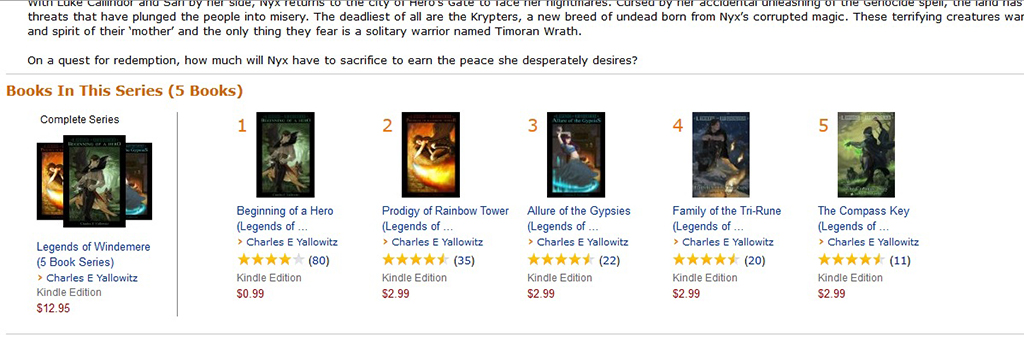
Please thank sword and sorcery fantasy author Charles E. Yallowitz for mentioning this, and for letting me use the image for this post.

If you want to check out how this looks at Amazon, you can see it in action with Charles E. Yallowitz’s Legends of Windemere series:

Legends of Windemere

(By the way, I’m a big fan of the storytelling and characterization of this series.)

Here is how it works:

  • On books 1-5, below the Amazon description, there is a heading called Books In This Series (5 Books), with thumbnails below the heading.
  • The left thumbnail shows 3 of the books. It’s called the Complete Series.
  • To its right, each volume is shown separately, numbered clearly 1 thru 5.
  • The price of the complete series appears to be exactly the same as buying each volume individually.
  • It’s automatic, if you complete the series info at KDP. However, not every series is showing like this. It may depend on how many volumes you have in the series or other factors.

It’s not perfect yet.

Here are a few issues that I see:

  • Where are the savings? Customers don’t appear to save 1 penny by buying the whole series.
  • Missing volumes. Charles actually has 7 volumes in this series, but only the first 5 are showing.

But there are benefits:

  • Finally, it’s easy to find the volumes of a series. As a customer who reads sci-fi and fantasy series, I have firsthand experience struggling to find all the volumes of a series and read them in order.
  • It looks cool.

This is new. So maybe it isn’t perfected yet.

Maybe Amazon will offer KDP authors the opportunity to offer the series bundle with incentive pricing.

That would be nice:

  • We wouldn’t need to create a separate omnibus edition.
  • If purchasing the bundle impacts the sales ranks of each volume individual (to be determined), this would be an improvement over the omnibus.

Have you seen this bundle yet?

What do you think about it?

Write happy, be happy. 🙂

Chris McMullen

Copyright © 2015

Chris McMullen, Author of A Detailed Guide to Self-Publishing with Amazon and Other Online Booksellers

  • Volume 1 on formatting and publishing
  • Volume 2 on marketability and marketing
  • 4-in-1 Boxed set includes both volumes and more
  • Kindle Formatting Magic (coming soon)

Follow me at WordPress, find my author page on Facebook, or connect with me through Twitter.
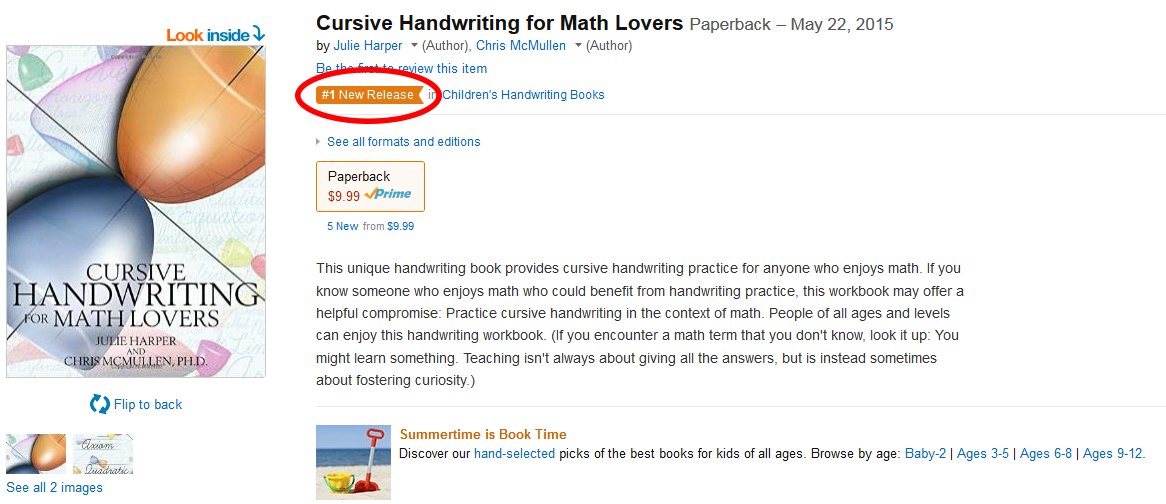
#1 New Release banner—is this new to Amazon?

New Release 2

#1 NEW RELEASE

Amazon has had bestseller rankings and new release rankings for ages.

But orange #1 bestseller banners in subcategories have appeared in recent months, showing both on product pages and in search results.

And now I see an orange #1 new release banner in subcategories showing on product pages.

In the hot fiction genres, it’s really hard to earn these tags in most subcategories.

I’ve actually seen the #1 bestseller banner on a handful of my nonfiction books in various subcategories, sometimes with a sales rank around 5,000, but occasionally with a sale rank closer to 100,000.

This is the first I’ve seen the #1 new release banner, and it really seemed odd finding it on a book that had only sold a couple of copies so far. Evidently, there aren’t many new releases in the same subcategory.

I like these orange banners. Though I wouldn’t mind if the extended them beyond just #1. As soon as you fall off to #2, you don’t have any banner at all. As if to say, who would want to read #2 in the subcategory?

Personally, I think Amazon should focus more on subcategory rank than overall rank. Customers see a book ranked 500,000 overall and immediately conclude it’s not selling (among print books, it could actually be selling 10 or more copies per month). Sometimes, a higher sales rank deters sales, which loses Amazon sales in niche markets where books might sell a few copies per month consistently.

If a book is ranked well overall, Amazon should show the overall rank. But if a book isn’t ranked well overall, Amazon should hide that rank and instead only show the subcategory ranks. Hey, in this subcategory, this book is #12. Sometimes Amazon shows both. However, Amazon always shows the overall rank, and doesn’t show the subcategory rank unless it’s very good.

That seems backwards to me.

Amazon’s own ranking algorithm may cost Amazon sales. Take the books that spend most of the time ranked 500,000 and up. Among millions of books, these sales add up considerably; it’s a significant amount for Amazon. But it could be higher. Several times, customers see books ranked 500,000 and up and pass on the sale. Maybe customers buy a better-ranked book instead; but other times, the customer may have bought both, or the customer may buy nothing at all.

Still, I think these new orange banners are a step in the right direction.

It’s pretty cool when you happen to find one on your book.

Take a screenshot as a souvenir.

Write happy, be happy. 🙂

Chris McMullen

Copyright © 2015

Chris McMullen, Author of A Detailed Guide to Self-Publishing with Amazon and Other Online Booksellers

  • Volume 1 on formatting and publishing
  • Volume 2 on marketability and marketing
  • 4-in-1 Boxed set includes both volumes and more
  • Kindle Formatting Magic (coming soon)

Follow me at WordPress, find my author page on Facebook, or connect with me through Twitter.