The Beauty of Marketing

Beauty

Book Marketing

There isn’t just one way to do it. The fact that there are many different book marketing strategies is your opportunity. Find a way to look at marketing in a way that you can enjoy it.

You want to be successful, right?

  • It’s not about embracing someone else’s idea of marketing and carrying it out with due diligence.
  • It’s about finding an effective marketing method that you can embrace with a passion and make it your own.

Most indie writers are artists at heart, not businesspeople. Yet self-publishing success, both on and off Amazon, depends on effective book marketing.

  • That doesn’t mean that you have to switch from artist to salesman to sell books. That’s like hammering a square peg through a round hole.
  • It means you have to view marketing as an art or craft to master, and pursue it with passion. That will fuel your self-motivation.

Look at this article. It’s about book marketing. I didn’t use $ signs for the picture. I left my artistic hat on and turned marketing into a rose.

You, too, can wear your artistic hat successfully both as a writer and an artist. Successful indie authorship is a combination of writing and marketing, both of which are driven by passion and feature creativity.

The business side of marketing books can seem dull and boring to writers. Many indie authors think of the following features when they first encounter marketing:

  • Advertising.
  • Self-promotion.
  • Screaming loudest.
  • Generating hype.
  • Judging a book by its cover instead of its content.
  • Salesmanship.

Actually, most of the things on the above list aren’t effective when it comes to book marketing.

If you approach marketing as something that’s dull or boring, you’re definitely not going to succeed at it.

  • Again, this doesn’t mean you have to get excited about something that you naturally feel is boring. That has inherent limitations.
  • Rather, it means that you have to find a way to look at marketing that makes you inherently passionate about doing it.

Fortunately, marketing does have highly artistic and creative elements that can appeal to writing artists:

  • Marketing is about sharing your passion with others.
  • It’s a chance to interact with others and let them discover your excitement about your book. (Let them ask you what you’ve done lately, rather than advertise what you’ve done. This distinction makes a huge difference.)
  • It’s an opportunity to put readers in a positive mindset before they open your book. People you interact with in person and who enjoy the interaction are more likely to look forward to your book with a good frame of mind.
  • You can wear your artistic and creative caps when you get involved in the cover design (a big part of marketing—it’s part of the packaging). Even if you hire a cover artist, you’re still involved in the design of your cover.
  • Blogging is a great match for marketing books. You love to write, right? Not only that, you get to interact with people who read your blog. You get to be creative coming up with ideas for posts and finding images to use.
  • Creativity is a great tool for catching the attention of your target audience and engaging interest in your book. When you talk to people, you have the chance to show your creativity in the conversation.
  • Imagination can also be a helpful marketing tool. Come up with a creative marketing idea and you’ll enjoy carrying it out; others may enjoy your creativity and check out your book.
  • Even your curiosity can be a benefit here, such as your curiosity for how to think of marketing in a way that doesn’t sound like salesmanship. Use your creativity to find other ways to think about marketing.
  • Branding is an art form. Pursue it as an art. Brand an image for yourself.
  • You can even approach marketing as a scientist. Come up with different hypotheses about marketing strategies and test them out.
  • Embrace book marketing as an art form and strive to master the craft.

If beauty truly lies in the eye of the beholder, then you have the power to see how beautiful marketing can be.

Chris McMullen

Want free information about book marketing? Find all my marketing posts by clicking here.

Copyright © 2014 Chris McMullen, Author of A Detailed Guide to Self-Publishing with Amazon and Other Online Booksellers

  • Volume 1 on formatting and publishing
  • Volume 2 on marketability and marketing

Follow me at WordPress, find my author page on Facebook, or connect with me through Twitter.

Comments

Click here to jump to the comments section:

https://chrismcmullen.wordpress.com/2014/07/08/the-beauty-of-marketing/#comments

One-Word Reviews at Amazon Now?

Reviews 1 Word

I saw a one-word review at Amazon today. So I’m guessing the 20-word minimum has been removed.

You might recall a couple of months ago that Amazon was testing out both ratings and reviews on print books. Those ratings disappeared after a few weeks, so perhaps the compromise was to remove the minimum word count.

The review forms have changed (but there is a tiny ‘here’ link below them that you can click if you prefer the old way).

My guess is that Amazon is trying to encourage more genuine customers to leave reviews. So now there is no ‘imposing’ 20-word minimum.

(In reality, what had been preventing a customer from writing the same word 20 times consecutively?)

We’re short on time now, so give me a one-word summary of the last book you read. 😉

Nerdy & Popular—What’s Wrong with That?

4D Reflection 2

For example, I enjoy the beat of popular music, but some of the lyrics…

Well, let’s face it, the lyrics could repeat, “Poopin’ on da pot-tee,” over and over, and if the beat is good, many people will dance to rhythm and enjoy the song. Slight exaggeration, you think? Come on, you can visualize this as YouTube sensation, can’t you? Ah, now you’re thinking about producing this video yourself, aren’t you?

To be fair, there are popular songs with meaningful or deep lyrics, even on the stations that play the same 40 songs all day long. I’m not saying it isn’t done.

I’m also not saying which songs do or don’t have good lyrics. I bet you can think of some where you would really question the source of the lyrics. We might not all agree on the list, but we might agree that there is room to improve the lyrics of some songs. That’s the spirit with which I wrote this article.

(We could just as well question t.v. shows, movies, books, blogs, etc. Doesn’t matter. I just picked lyrics to have some specific example in mind.)

I know there are other people out there who would enjoy listening to music with a hip beat and nerdy lyrics. Why should you have to sacrifice one or the other?

I have a vision for a popular music station with hip beats, but lyrics of this sort:

  • Talk nerdy to me
  • You think we’re on opposite sides of a plane, but I know we’re really on a Möbius strip
  • Faster than the speed of light, tomorrow turns into yesterday
  • I’m nerdy and I know it
  • mc² in da house!

If a nerdy t.v. show can make a Big Bang, why not nerdy lyrics, too? I’m sure it’s been done. But not at the same level.

How about, “I love big books and I cannot lie”? I’ve heard that one before. But it was a parody. It doesn’t have to be a parody to be popular, does it?

And you can probably think of a few popular examples.

Maybe such things will catch on. (Both pairs of fore- and index fingers crossed.)

There is an audience for it, is there not?

Improvements in technology are making it easier to target niche audiences, providing a more specialized experience for the audience and allowing the artists themselves to do more of what they want, and not feeling as compelled to cater to the needs of a mass audience.

Which brings me to self-publishing books. This is a great thing that the self-publishing revolution is doing for both readers and authors. It’s why self-publishing is booming.

Readers appreciate the specialization. Authors embrace it, too.

Which brings me to an important point.

When you start writing, you tend to write what you’re passionate about and you tend to write with your own unique style.

Then you start to learn things like show more and tell less, research what has been done because that’s what readers expect, justify full not ragged right, that looks amateurish, use an imprint to look professional, et cetera, et cetera.

You start to question your style.

If you make all those changes, you may become a small-time copy of traditionally published work. Is that what you want? Is that what readers want?

If they want traditionally published books, they’ll buy traditionally published books. (Duh! Yet we often overlook the obvious.)

If you’re self-published, you’re hoping to provide something they can’t get elsewhere. One advantage is to fill a need that’s not presently met.

Provide something new and wonderful, create a demand for it, and they won’t mind that it really is self-published, since they are getting something special in return for it. Plus, there is a tremendous level of support for self-publishing when you consider the number of authors plus their friends, family, and coworkers.

There are many tough decisions to make. You have to find your own style, yet you also need to find an audience. If you just do everything your own way, you might not have any audience at all.

You can get feedback. This can help you gauge whether or not you’re meeting a need. But you have to be careful. One loud complainer might not be typical of your audience.

If your current style is working, changing it carries some risk.

Chris McMullen

Copyright © 2014 Chris McMullen, Author of A Detailed Guide to Self-Publishing with Amazon and Other Online Booksellers

Follow me at WordPress, find my author page on Facebook, or connect with me through Twitter.

Comments

Click here to jump to the comments section:

https://chrismcmullen.wordpress.com/2014/07/06/nerdy-popular-whats-wrong-with-that/#comments

Master Page Numbers in Microsoft Word 2010

Page Numbers


Introduction

There are several problems that one must solve when numbering pages in Word, and this can be the source of much frustration:

  • You change the page number on one page, and it changes the style or numbering on one or more other pages.
  • You insert a page number on a page, but the formatting doesn’t match that of the other pages.
  • You try to make the front matter have Roman numerals, but all the page numbers switch from Arabic to Roman.
  • You discover that the same page number appears twice in a row.
  • You add page numbers and the file freezes on you. Worse, it won’t open back up.

WHY doesn’t it work? WHY can’t it just be easy?

Calm down. Take a deep breath.

It is possible to number the pages exactly how you want them. The problem is that the way to do it isn’t intuitive. You have to use section breaks, and you have to implement the page numbering a certain way.

If you follow the procedure that Word is looking for, you can master pagination in Microsoft Word.


Before We Begin

Microsoft Word is somewhat more prone to file freezing or corruption when making changes to page numbering.

What does this mean to you?

It means you should back up your file before you edit Word’s pagination.

Save your file with a new filename (like Book v2.docx) and save it in two different places (like jump drive and email). If you’ve already spent months typing hundreds of thousands of words for a book, the worst that can happen is that you have to start over… unless you wisely back up your file in multiple places.


Procedures

Follow these steps in Microsoft Word. This outline is specifically for the 2010 version, but 2007 and 2013 are nearly identical and 2003 follows the same ideas (but the toolbars are different).

A picture is worth a thousand words, right? At the end of the procedures you can find some screenshots of the key steps.

  1. Insert a section break anywhere you want the style of page numbering to change. For example, if you want to number your first page on the fifth page of your manuscript, you need a Next Page section break at the end of the fourth page. If you’d like to switch from Roman numerals (v, vi, vii, viii, ix, x) to Arabic numbers (11, 12, 13) on the eleventh page, insert a Next Page section break at the end of the tenth page. Remove the ordinary page break (if that’s what you have presently) and instead go to Page Layout > Breaks > Next Page to insert a section break instead of an ordinary page break. This section break tells Microsoft Word that you wish to change the header or footer style (your page numbers are either part of the header or footer, depending on where you place them).
  2. Press the Show/Hide button (it looks like ) on the Home toolbar. This will help you identify page breaks, section breaks, and blank lines, for example. (If your page numbers aren’t lining up between different sections, this will help you see if you accidentally pressed the Enter key while formatting the page numbers in one of the sections, for example.)
  3. Start at the very beginning of your Word document and work your way forward one section at a time. Very often, sections link to previous sections (though you can choose to unlink them), so if you make changes to one section, it often affects every section that follows (sometimes it also affects previous sections). Problems are best minimized by starting at the beginning and working forward one section at a time. After you make any change, immediately review all the previous sections to double-check that none of the previous page numbers have changed. You can save a great deal of frustration by nipping problems in the bud. It’s worth checking. It might seem like it’s a lot of extra work, but in the long run it might be much less work.
  4. If you don’t already have page numbers, go to the page where you’d like to add them and find Page Numbers on the Insert toolbar. Choose one of the options (it’s possible to customize it after inserting them); the simpler options are less likely to result in freezing or file corruption, but nothing is foolproof. Return to the same place and click Format Page Numbers. This gives you the option to change the starting number, continue from the previous section, or change the style from Roman numerals to Arabic numbers, for example. You can highlight the page number and change the font size or style. You can also place your cursor just before or after the page number and type characters (such as ~ to make your page numbers look like ~17~).
  5. You can remove page numbers the same way as you add them. Just go to Insert > Page Numbers > Remove Page Numbers.
  6. Remember to check the previous sections each time you add, remove, otherwise make changes to page numbers. You don’t want previous sections to change. It’s okay if following sections get changed; you’ll be able to correct that once you get to those later sections. If previous sections do change, hit the Undo button at the top of the screen (what a handy button!). Then you need to unlink the current section from the previous section before trying to make these changes. See the next step.
  7. The magic button is called Link to Previous. It’s actually a checkbox. Simply place your cursor in the page number area to open the Design toolbar for page numbers. Uncheck the box to remove the Same As Previous flag and that will allow you to modify the current page numbers without affecting previous page numbers. (Changes you make might affect page numbers in following sections, but that’s okay—you’ll be able to fix those when you get there. It’s the previous sections that you need to check on repeatedly. You don’t want previous sections to change.) Sometimes you do want the current section to follow the same style and numbering as the previous section. In these cases, you want the Link to Previous checkbox to be checked.
  8. When you want a new section to have different page number formatting from the previous section, remember to uncheck the Link to Previous box and verify that the Same As Previous flag disappears before making the changes. Otherwise, previous sections will change, too. It’s easy to forget. Remember also to go back and check all the previous sections anytime you make changes. Once in a while, a previous section (sometimes, it’s way back) changes even though the Link to Previous box is unchecked. So it pays to check. Also, remember to insert a Next Page section break (see Step 1) instead of an ordinary page break anywhere you’d like to make changes to the page numbering style. Not sure if you have a section break where you need it? See Step 2.
  9. Place your cursor in the page number area on a given page to open the Design toolbar. Two of these options can be quite useful. One is the option to have different page number styles on odd and even pages. For example, this helps you place page numbers near the outside edges, which would be the right side for odd-numbered pages and the left side for even-numbered pages. Another option is to have a different style on the first page of each chapter. Many books don’t number the first page of the chapter, so this option allows you to remove the page number from the first page of each section without disturbing the other pages. Well, if you suddenly remove the page number from the first page of the chapter, you may need to go in and reinsert the page numbering on subsequent pages of the same chapter (in addition to just checking the box for a different first page).
  10. Note that the two-page view in Word does NOT show you an actual book view. In a real book, such as one you self-publish at Amazon using CreateSpace, odd-numbered pages appear on the right-hand side and even-numbered pages show up on the left-hand side. Word shows it backwards. Just ignore the way that Word shows it; don’t try to adjust your page numbering based on Word’s incorrect two-page view. If you would like to see how your book will really look, save your file as a PDF file and open it with Adobe Acrobat Reader (you can get the Reader for free from Adobe’s website). Then go to View > Page Display > Show Cover Page in Two Page View, then View > Page Display > Two Page View.
  11. If you’re having trouble getting two different sections to display page numbers the same way, try clicking the Show/Hide Codes button (see Step 2) and comparing the formatting marks in both sections. Also check the settings in the Page Setup Dialog Box (click the funny-looking, arrow-like icon in the bottom right of the Page Setup group on the Page Layout toolbar to open this dialog box); check all three tabs there—Margins, Paper, and Layout. Especially, check the From Edge values in the Layout tab (which should be the same for every section if it’s applied to the Whole Document).
  12. You can change the position of page numbers relative to the body text using the From Edge values (see Step 11). The right combination of margins and From Edge values should allow you to get the body text and page numbers to look exactly how you want them to appear.
  13. Note that headers and footers are set differently. For example, if you unlink one section’s header from the previous section, the footer may still be linked to the previous section. So, for example, if you have both page headers at the top and page numbers in the footer below, unlinking the page numbers won’t unlink the page headers. This is important to keep in mind when you’re trying to format both headers and footers in the same document.
  14. If at first you don’t succeed, vent some of your frustration, get some rest and relaxation, and try again. See the suggestion in Step 15.
  15. Unfortunately, once in a while Word seems to go haywire. That is, you’re sure did everything right, but it doesn’t seem to be working. Sometimes, it helps to undo the last change, remove the section break, reinsert the section break, and then try again. It’s also possible for a Word file to become corrupt, in which case it’s best to start over with your back-up file. Didn’t back it up like I recommended? Ouch!
  16. If you just can’t hammer the square peg through the round hole, there is an alternate solution, which can really come in handy for self-published authors formatting books for print-on-demand services like Amazon’s CreateSpace. You can break your file up into smaller files. Before you do this, see if you can find a Word to PDF converter that allows you to join multiple PDF files together (e.g. Adobe Acrobat XI Pro offers a free trial period, and also offers a monthly subscription; Nuance PDF Converter Professional offers this feature; and there are also many free converters available on the internet). When you publish with CreateSpace or Ingram Spark, it’s best to submit a PDF anyway. If you’re able to join PDF files together, then you can break all the separate sections of your Word document into separate files. The trick is to ensure that all the page sizes, layout, and formatting is consistent across all of your files. Then you just need to get the page numbering right in each individual file, which is easier than getting it right in several different sections of a large file.
  17. If you’re also self-publishing an e-book, remember to remove page numbers (and all headers and footers) from the e-book version of your file.


Breaks

20140703_222956

Link to Previous

Show Codes Arrow

Page Setup Location

Page Setup

Page Headers, too

Headers and footers in general work the same way as pagination.

For example, if you would like to have even-page headers show chapter names and odd-page headers show the book title, you can do this by formatting the page headers the same way as page numbers are formatted. It’s also common to exclude the page header from some pages, such as some of the front matter and the first page of each chapter. It would be wise to see what header and page numbering styles are common for the type of book you’re publishing before you decide on the formatting.

Chris McMullen

Copyright © Chris McMullen, Author of A Detailed Guide to Self-Publishing with Amazon and Other Online Booksellers

  • Volume 1 on formatting and publishing
  • Volume 2 on marketability and marketing

Eradicate Negativity: Your Marketing Depends on It

Happy Sad

Negative vs. Positive

Reading should be a positive experience, right?

You want to create a positive shopping experience and a positive reading experience.

And writing is a positive experience, right?

(If not, why on earth are you doing it?)

So should publishing and marketing be positive.

But not everything and everyone you come across will seem positive.

And you will definitely encounter people and issues that will challenge you to stay positive.

  • Don’t let ’em bring you down.
  • Don’t let it make you negative.

You want to appear positive when you interact with potential readers. Even with fans.

The best way to appear positive is to be positive.

  • It’s easy to fall into a negative mindset.
  • It’s often not easy to stay positive.

But it’s so worth consciously working toward this. You can do it. 🙂

Author Branding

You’re striving to build a positive image as an author.

A critical review will challenge you to remain positive.

Cynics will challenge you.

Failed authors will challenge you.

Many people and occasions will challenge you to stay positive.

Don’t appear negative on your blog, in person, on social media, or anywhere.

  • What will readers think if they read about you complaining about a review on your blog?
  • What will readers think if they see you behaving negatively on a discussion forum?

You’re in the public eye now. Your image is at stake.

  • What will readers think if they meet you and you appear very positive about your book?
  • What will people think if you always come across as positive, even when you’re dealing with adversity?

Win your battles to stay positive. Build a positive reputation.

Each challenge is an opportunity to shine.

It’s not just your book and image that matter.

  • If authors complain about Kindles and readers hear this, why would they want to buy one?
  • If authors complain about Amazon and readers hear this, does it make them want to shop for books?

Positive Marketing

Staying positive has its rewards:

  • Visualize a positive outcome. It helps motivate you to work toward your goals.
  • When your positive mindset is challenged, think of it as an important battle toward long-term success. Win this battle by staying positive and making positive decisions. Don’t let this battle turn you negative and impede your chances for a bright future.
  • You’re more likely to show confidence when you stay positive.
  • You’re more likely to put your best effort into something when you feel positive about the outcome.
  • When readers see your positivity, it impacts their buying decisions.

But challenged your positive mindset will be.

And in some cases, it won’t be easy. You’re likely to feel, “Come on! Not again! That’s more than enough,” but you just have to be that much more determined.

Think to yourself, “Bring it on. Is that the best you’ve got?” When you get through this battle, things will start going your way.

Negativity definitely has its disadvantages.

Interact with positive people. Add positive authors to your circles. Avoid negativity.

Chris McMullen

Copyright © 2014 Chris McMullen, Author of A Detailed Guide to Self-Publishing with Amazon and Other Online Booksellers

Follow me at WordPress, find my author page on Facebook, or connect with me through Twitter.

Comments

Click here to jump to the comments section:

https://chrismcmullen.wordpress.com/2014/06/29/eradicate-negativity-your-marketing-depends-on-it/#comments

WHY I support and encourage Authors

Some great ideas here. 🙂

Chris The Story Reading Ape's avatarChris The Story Reading Ape's Blog

I’ve made no secret of the fact that I believe Sir Terry Pratchett may have had an excellent point when he surmised that OUR species of Hominid survived, while all the others didn’t, because we were Story Telling Apes, or at least better at telling, and learning through, stories!

I’m not the only one who thinks so, “Our brains are structured to make sense of the world in the form of narratives – stories. Not only that, we are primed to believe the stories we hear.” see the re-blogged post last Thursday HERE!

I concede that there are probably other factors involved as well, but storytelling was (and hopefully still IS) a significant part of our species survival strategy.

If we cease to tell and learn from stories, then we too may become extinct because without them we will have created our very own ELE (Extinction Level Event).

View original post 452 more words

Most Valuable Marketing Tools for Self-Published Authors

Tools

1 Word of Mouth

What it can do for you:

  • It can generate sales even when you’ve had a couple of recent unfavorable reviews. What a reader’s buddy tells them about your book carries more weight than what some random stranger writes on your Amazon product page.
  • It doesn’t rely on Amazon to sell your book through search results or customers-also-bought lists. Those can change over time. Word-of-mouth sales can yield traffic during times when Amazon’s marketing isn’t helping your book.
  • It helps your book get discovered. Instead of having to hunt your book down amongst thousands of others in that genre, your book is reaching readers’ ears directly.
  • It lends credibility to your book. Somebody that readers trust is recommending your book.
  • It gets readers interested in your book and puts them in a positive frame of mind at the outset. Readers discovering your book on Amazon often approach it with concern.
  • It can lead to a very long-term chain reaction. A few readers hear good things about your book. It may take weeks for them to buy and read your book. If each of them recommends it to their buddies, the number of readers and recommenders has grown. Many months later, what starts out small can lead to something much bigger.
  • It can build your reputation as an author. This helps not only to sell one book, but to generate interest in your full line of books.

Word-of-mouth sales can be the most valuable, but also the hardest to get.

How to earn them:

  • Your book has to have a wow-factor. When strangers pick up your book and feel impressed with the read, you really have something. Your book’s strengths need to compel readers to want more of that. Give readers more than they expect; much more.
  • Fiction books need to evoke strong emotions in readers; they need to also deliver on readers’ expectations for the genre. Nonfiction books need to fulfill the range and depth of information that readers want; they also need to be well-organized, communicate ideas clearly, and present the information at the right level.
  • You need to shore up your book’s weaknesses. Even if the storyline or characters are incredible, readers find it hard to recommend books with editing, formatting, or other issues. Their reputation is on the line, too, in the recommendation. Your book needs to earn it. You’re charging money for your book; it needs to appear professional.
  • If your book has that wow-factor, get it into the hands of readers. Run promotions, find bloggers who review books in your genre, and find and interact with your target audience. Find experts to read your book and politely request an editorial review or a quote that you can use in your book’s blurb—that’s a professional recommendation that carries weight with some customers.

When the author goes the extra mile to impress readers and produces a book worthy of word-of-mouth praise, this can have a huge impact on the long-term success of the book.

2 The Horse’s Mouth

What’s the next best thing to hearing positive things about a book from a trusted source?

Interacting directly with the author, of course.

Even in today’s world where millions of authors are getting books out there, it’s still a treat to meet and interact with the author.

Why does it matter? This personal interaction can do things that your product page can’t:

  • Show your passion and enthusiasm for your book.
  • Make the reader feel special. Don’t just draw interest in your book. Get interested in your readers, too.
  • There is greater potential to establish credibility as an author.
  • Answer any questions that the reader has.

Of the most common ways for books to sell, personal interactions with the target audience is the one big factor that is most accessible to self-published authors. (The other big factors include shopping the bestseller list, shopping by the name of an established author, browsing through the gigantic haystack of books on Amazon, professional book reviews, and bookstore recommendations.) When you aren’t dealt a good hand, you better play the one good card you do have. If you do play your cards right, you can eventually benefit from the other popular ways that books sell, too.

Think long and hard about where to find your target audience. Go out and interact with them. Charm your potential readers.

While you can reach greater numbers online, interactions in person are more likely to result in sales and reviews.

3 Flash It

Your book needs attention.

Shoppers will be browsing through hundreds of thumbnails in search results. Others will see your cover when they come across your marketing efforts.

Your cover needs to stand out.

It also needs to look the part. If it looks like a mystery, but it’s really a fantasy, your sales will be a bad romance.

A fantastic cover won’t provide long-term success for a lousy book.

But a fantastic cover can have a significant impact on the sales of a quality book.

For a highly marketable book (i.e. there is demand for the book and the content delivers on expectations), investing a modest amount toward a fantastic cover can pay nice dividends in the long run. And what you might lack in terms of financial investment, you can make up for in time. After all, time is money. Take the time to learn the how-to, get feedback, and get it right.

There are no guarantees in the publishing business, but most successful self-published authors credit their covers for being valuable players on their books’ sales teams.

4 Talk to Me, Baby

An effective cover grabs the attention of the target audience and brings shoppers to the product page.

Now it’s time for the only salesperson you have at the point-of-sale to close the deal.

“Who’s that,” you ask? It’s your blurb.

The description of your book isn’t a summary. It’s a sales tool.

The blurb needs to attract attention right off the bat. It needs to engage interest in the first line and hold that interest until the customer clicks to Look Inside.

Many effective blurbs are very concise, especially in fiction. Too much text there can be intimidating. If you’re exploring hundreds of books, you don’t want to read a long description for a book you might not even buy. In nonfiction, you can make important points easy to read by using bullet points (such formatting is possible through Author Central).

If the reader gets bored, it’s no sale. If the blurb doesn’t reinforce the genre depicted by the cover and title, it’s no deal.

Once the blurb generates a click to Look Inside, the Look Inside needs to wow the customer into making the purchase. Like the blurb, the Look Inside needs to engage interest immediately and keep it throughout. It must also look professional and read well.

Finally, the book must deliver on the promise made by the cover, blurb, and Look Inside. Otherwise, you get returns and frustrated readers.

5 Hunt ’em Down

Your book is out there, but who knows it?

You want to find your target audience. The word for this is marketing.

A great cover and blurb help, but first people must find your book. Recommendations are great, but first people must read your book. First, you need to get your book discovered.

Paid advertisements probably won’t be cost-effective for marketing a single book. Unless you have an amazing promotion going on and you supplement the paid advertising with much free marketing. In that case, a BookBub (click the link to learn more) or other type of promotion may come in handy.

There are many free marketing strategies, which are often more effective for books than paid marketing. Blogging, Twitter, Facebook, and other social media sites help you build a following and interact with your target audience. The key words here are target audience, which means posting content that will be relevant for them, using appropriate hash tags, and finding relevant Facebook groups.

Social media is a slow process. Now you go from just getting your book discovered to getting your social media pages discovered. You can do this through months of effective posts, interacting with people in your target audience, and directing readers to your social media pages in an About the Author section in your book. Then you’re kind of going in circles. But your social media helps two ways: You want people to discover you and your book, and you also want to attract fans so you can tell them about your next book when it comes out.

Don’t forget old-fashioned media: newspapers, magazines, television, and radio. Local papers often have column inches to fill and local radio stations may have minutes of air time to fill. Think about what can make you interesting to their audience. You’re selling yourself to sell your book. Learn how to prepare a press release package.

Remember, personal interactions are valuable to self-published (and all) authors. See if you can put together a successful reading or signing. Visit local libraries to see if you can get a paperback copy in circulation there or volunteer to read (appropriate material) to kids or senior citizens (visit a senior citizen center, too). Try to get stocked in local bookstores, and antique and other kinds of stores that sell books, but don’t specialize in books.

You need to work hard to find your target audience. But you can also help your target audience find you. Over time, turn your blog into a content-rich website with nonfiction material (even if you write fiction) that will attract your target audience through search engines. Your goal is to get 100+ visitors daily to your site through relevant search engine queries after a year of posts. That’s a lot of people discovering you and your book. It starts out very slow, but if you do it right, it can be very effective toward long-term success.

6 Can’t Get Enough

It’s easier to market several similar books than it is to market a single book.

It’s also easier to buy a book from someone who looks like a committed writer. When readers try out new authors, they’re looking for someone with the potential to provide a lifetime of good reading. If you just have a couple of books out, there isn’t much potential reward even if the book turns out to be good (i.e. comparing a reader who likes your book to a reader who likes a book by an author who has a dozen books out, this second reader will be enjoying many more books).

You also look like a professional writer when you have several books out.

And then each book that you sell helps to sell your other similar books. A hot promotion on one book helps to sell all your other books. More books, more readers, more recommendations, multi-book sales… If you’re looking to grow your sales, you need to publish a full line of books.

Don’t try to build Rome in a day. Take your time and get your books right. Just look ahead to the future. Your long-term goal is to have several good books that all help one another. It won’t help at all to have several books out unless readers enjoy them.

Chris McMullen

Copyright © 2014 Chris McMullen, Author of A Detailed Guide to Self-Publishing with Amazon and Other Online Booksellers

Follow me at WordPress, find my author page on Facebook, or connect with me through Twitter.

Comments

Click here to jump to the comments section:

https://chrismcmullen.wordpress.com/2014/06/22/most-valuable-marketing-tools-for-self-published-authors/#comments

6 Star Rating at Goodreads… Umm…

Rating GR

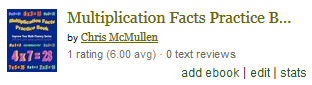
The picture says it all:

  • Look under the author name.
  • Next to 1 rating, in parentheses, it shows 6.00 avg.

However, the rating isn’t above 5 stars on the book’s page at Goodreads.

This anomaly only appears on my Goodreads author dashboard.

Just thought I’d share this quirk.

Certainly not complaining about it. 😉

Mirror Interviews: Authors Wanted

If only opportunity would knock…

Ionia Froment's avatarreadful things blog

So, I’ve been thinking about doing a Wednesday feature here on Readful again as I haven’t done one in a while. Usually the Wednesday feature is a guest blog, and I’d like to keep that tradition running…sort of.

See, there’s two things. First thing: I was talking to an author the other day who pointed out that all author interviews seem to ask the same questions over and over. Not a lot of people pay attention to them, and it gets rather monotonous answering the same boring things all the time.

second thing: I’m lazy.

So, here is my solution:

I am looking for a handful of authors who want to do a blog interview. The catch is, I’m looking for a handful of authors who want to interview–themselves. Yep. I won’t send you any boring, already answered questions. I won’t ask you boxers or briefs or who would play…

View original post 104 more words