Children’s Categories & Marketing @ Kindle

Kindle Age

INTRODUCTION

This is a two-part post:

  1. First, I will discuss a cool new feature that Kindle Direct Publishing (KDP) just introduced to help categorize children’s Kindle books.
  2. Next, I will share an idea to help market children’s Kindle books.

AGE & GRADE LEVELS

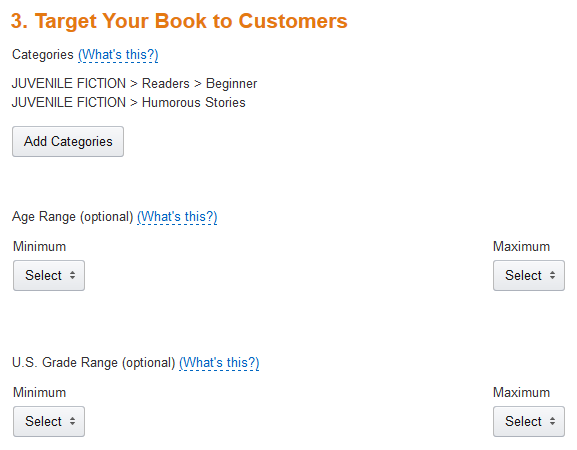
As of now, Step 3 of the KDP publishing process allows you to select an Age Range and a separate US Grade Range.

Tip: Open up your children’s, tween, and teen Kindle books on your Bookshelf and update Step 3. You’ll need to republish for this to take effect.

This will help give your juvenile book added visibility on Amazon:

  • Your book will show up when customers select one of the age group or grade level filters in Amazon search results.
  • You no longer need to waste a crucial keyword to get listed in the children’s age group categories. Tip: If you used a keyword to accomplish this in the past, you can now change that keyword to something else, if you wish.
  • These age group and grade level settings apply to the Schools and Teaching store.
  • These settings are supposed to apply to the Children’s Kindle Book stores for both Amazon.com and Amazon.co.uk.

What about CreateSpace paperbacks? Well, it wouldn’t hurt our chances if several authors suddenly made this request. Hint, hint.

KDP has a table with suggestions for the different age groups: Click here to view it.

I love these new age group and grade level options at Kindle. I’ve been hoping for this for years, and I’m probably one of many authors who’ve requested it in my interactions with KDP. It’s a great opportunity for children’s e-book authors.

MARKETING IDEA

As you may know if you follow my blog, I had the opportunity to talk to members of the Kindle Educational Team a few weeks ago.

They are hoping to see more educators and authors who would like to educate via books publish helpful educational content on Kindle. They have recently reached out to authors to hear our perspective from the publishing end. These new age group and grade level options are one step toward accomplishing this.

So here is my idea:

Education covers many topics. One subject relates to most juvenile fiction stories: English. This includes reading, reading comprehension, writing, vocabulary, grammar, and so on.

Suppose you have a collection of short stories, poems, novellas, novel, or other children’s fictional work for children, tweens, or teens. If so, there is a simple way to improve the marketability of your children’s book:

  • Create some teacher- or parent-oriented resources for your book. I’ll list a few examples below to get your brain churning.
  • You could include these in your book, or you could add a page to your book describing free educational resources available on your blog or website, which parents or teachers could use to get educational value out of your stories. The latter option has the advantage of giving readers a reason to visit your blog and follow you (plus it doesn’t make your book resemble a textbook for kids just looking to enjoy fiction).
  • Your stories are still marketable as stories, but now they are also marketable as educational resources to parents, teachers, homeschool instructors, libraries, and other educators. The free resources become an added marketing tool.

Here are a few ideas for creating educational resources to go along with your story:

  • Add vocabulary definitions and exercises relating to your content.
  • Write questions that assess reading comprehension for your story.
  • Come up with essay questions relating to your book.
  • Make creative writing questions stemming from your story or characters.
  • Create a grammar worksheet to go along with your content.
  • For historical novels, you may be able to add history lessons and exercises.
  • For science fiction novels, you might be able to come up with related science questions and exercises.
  • If your protagonist is bilingual, there is an opportunity for language lessons.
  • If you can find ways that your book relates to one or more school subjects, this gives you more opportunities.

READ TUESDAY

You may be aware that I launched an event in 2013 called Read Tuesday, which debuted in December. You can check out the website here: readtuesday.com.

Read Tuesday is a Black Friday event just for books. One big goal of the event is to help inspire reading.

In 2014, I would like to add a special page highlighting juvenile books that include educational resources (either in the book itself, or free resources that readers can find on the author’s blog or website). So if you have such a book and you’re willing to participate in Read Tuesday 2014 (which requires having your book on sale that day), in addition to listing your book in the Read Tuesday catalog, there will be a special page to showcase juvenile books with free educational resources available. I think this may be a good way for Read Tuesday to help promote reading.

Chris McMullen

Author of A Detailed Guide to Self-Publishing with Amazon and Other Online Booksellers

  • Volume 1 on formatting and publishing
  • Volume 2 on marketability and marketing

Follow me at WordPress, find my author page on Facebook, or connect with me through Twitter.

Comments

Click here to jump to the comments section:

https://chrismcmullen.wordpress.com/2014/06/03/childrens-categories-marketing-kindle/#comments

Review of Disney’s Maleficent (no Spoilers) plus Marketing Notes

Loved It

Disney’s Maleficent

I saw Maleficent with my daughter (six years old) last night. We saw it in 3D.

We both loved it. I’ll try to explain why without any spoilers (though if you read the comments below this post, I can’t guarantee that a spoiler won’t appear there).

I saw the animated Sleeping Beauty in theatres many years ago. Usually, I prefer a classic to its remake, but this time I enjoyed Maleficent much more than any other sleeping beauty story.

First, the story for Maleficent is different from any other Sleeping Beauty story that you might know. I enjoyed Maleficent‘s unique storyline. I actually like this storyline better than Disney’s animated Sleeping Beauty. It’s not just the story and characterization that has changed; even the perspective is different.

We loved the characters, especially Maleficent. Angelina Jolie pulled it off very well, in my opinion. I don’t believe you need to be an Angelina Jolie fan to enjoy this movie.

The imagery was amazing. Whether it was scenery, special effects, costumes, or motion, I enjoyed it thoroughly.

My daughter loves fairies and princesses, so the story turned out to be a real treat for her.

Sometimes I don’t like the 3D movies, but I really enjoyed this in 3D. It wouldn’t have been the same in 2D, and definitely wouldn’t have been the same in my living room.

Marketing Notes

You can learn a lot about marketing by studying what some of the professional marketers do effectively. In this case:

  • A single word in the title makes it easy to remember. This particular word is memorable, in that it’s not overused. It also fits the content to a tee. Even if you aren’t familiar with the word maleficent, you probably assume it’s similar to other words like malevolent, and so have some idea of what to expect. As a plus, the main character’s name happens to be the same, and a star actress is playing the role. The title is very important in marketing. It’s worth getting it right.
  • A striking marketing image. It follows the three-color rule with white, black, and a touch of red. There is very little red (just the lips), but it sure stands out effectively. The unique horns make it a very memorable appearance, and reinforce the title word. They didn’t make the mistake of adding red letters on black background, which would be hard to read. They didn’t make the mistake of using red text at all, which would detract from the red lips. That little touch of red is so effective by itself.
  • The previews I saw really built up my interest without giving too much away. I hate it when the preview gives too much away, and especially hate it when the only good parts of the movie are in the preview. A book’s blurb is very similar to a movie’s preview. You want to create interest without giving anything away. One of my favorite movie trailers was for Scooby Doo. That trailer looked like a preview for Batman, but wound up showing Scooby Doo as a surprise at the end of the preview. That trailer didn’t give anything away, but aroused my curiosity.
  • Of course, Disney could afford to market Maleficent on a grand scale. Spending money is easy when you have it; getting a good return on your investment isn’t. There are millions of people who have squandered money on advertising, only to discover how hard it is for advertising to pay dividends. Fortunately, Disney is also a well-established brand. But that also comes with high expectations, and the movie must deliver on those expectations or it can be squashed before it takes off. One of the great things I saw in the way of advertising was a billboard in Southern California with those distinct horns protruding out of the billboard. That sure stood out and caught attention.

Chris McMullen

Author of A Detailed Guide to Self-Publishing with Amazon and Other Online Booksellers

  • Volume 1 on formatting and publishing
  • Volume 2 on marketability and marketing

Follow me at WordPress, find my author page on Facebook, or connect with me through Twitter.

Comments

Click here to jump to the comments section:

https://chrismcmullen.wordpress.com/2014/06/02/review-of-disneys-maleficent-no-spoilers-plus-marketing-notes/#comments

Amazon’s Top Customer Reviewers

Stars

Amazon’s Top Customer Reviewers

Amazon ranks customer reviewers:

  • Click here to see the top 10,000 customer reviewers ranked in order.
  • Click here to see the Hall of Fame reviewers and their accomplishments.

The numbers are impressive. On the first page of the top reviewer rankings, I see:

  • Most have written 1000 to 2000 product reviews.
  • 10,000 to 60,000 helpful votes on their reviews.
  • 94% to 97% of the votes deemed their reviews helpful.

Amazon takes steps to help ensure fair play. For example, suppose you write 100 reviews and get your friends to vote Yes on all 100 reviews. Your friends’ votes won’t count toward your top reviewer rank. If someone votes Yes on most of your reviews, they are considered to be a Fan Voter and their votes don’t affect your reviewer rank.

Amazon Customer Review Badges

Top reviewers earn badges, which are displayed on Amazon.

Here is a list of badges that can be earned:

  • Top 1000 Reviewer. If you crack the top 1000 in review rankings, you receive a badge for it (for as long as you remain in the top 1000).
  • Top 500 Reviewer. This gives you an incentive to write more reviews once you crack the top 1000.
  • Top 50 Reviewer. It’s a large jump from 500 to 50, but puts you in elite company.
  • Top 10 Reviewer. Out of millions of reviewers, imagine being ranked in the top ten.
  • #1 Reviewer. At this moment in time, you are the very best.
  • Vine Voice. Amazon invites selected reviewers into a special program to review not-yet-released products.

Looking for Reviewers?

Many of the top reviewers allow themselves to be contacted by clicking on their Amazon handles. Click on a top reviewer’s name at Amazon and you may find an email address at the left side of their profile page. Many top reviewers make their email addresses publicly visible this way.

Why? Because they love to read books and write reviews. Books cost money. Publishers and authors want to get their new releases reviewed. So it’s a match made in Heaven. The publisher or author contacts prospective reviewers, politely asking if the reviewer is interested in receiving a free advance review copy in exchange for an honest review.

Here are some notes:

  • Browse through the reviewer’s product reviews at Amazon to see which kinds of books that reviewer likes to read. They are likely to turn you down if your book isn’t a good fit. You’re also more likely to get a critical review from someone who isn’t familiar with your subgenre, so it’s in your best interest to find reviewers who read books in your subgenre.
  • Top reviewers receive tons of requests from authors. If your book is a good fit and the nature of your request stands out in a good way, this may give you an edge. The higher their reviewer rank, the more requests they are likely to receive.
  • Be very polite. Be concise, yet provide all the pertinent info in your request. The last thing you want to do is offend someone who might actually read and review your book.
  • Don’t pester the reviewer with repeated requests, updates, etc. Make one polite request, send the free copy, and let it be. If they never review your book, let it go. (If that’s the case, you probably don’t want the review after all.)
  • What’s the best way to thank the reviewer? Vote Yes that the review is helpful. Ask your fans to vote on the review. (Some reviewers actually remove reviews if there aren’t enough helpful votes, and especially if the review draws unhelpful votes. Every vote of Yes is an incentive for the review to stay.)
  • The review may be critical. Expect an honest review. The reviewer just might not like your book. That’s the chance you take.
  • Read the critical reviews that the reviewer has left before making your request. See if any of that criticism may apply to your book.
  • If you’re a self-published author, see if the reviewer has ever reviewed other indie books, and, if so, if any are favorable.
  • When you give a free copy in exchange for an honest review, the review will not say Amazon Verified Purchase. Many of these may look suspicious.

Review Crazy

Amazon customer reviews are helpful in the sense that a large assortment of customer opinions can help shoppers decide which products may be right for them.

Unfortunately, people have abused the review system with both five-star and one-star reviews. Fortunately, Amazon has made great strides in preventing and removing suspicious five-star reviews, such as from close friends and family. However, many customers rightfully approach reviews with suspicion. Even one-star reviews, customers may suspect they were left by someone with an agenda.

An interesting phenomenon with reviews is that very often multiple reviews of the same product contradict one another.

Still, as shoppers, we do like to see an assortment of opinions, we like to decide which reviews to ignore and which to trust, and many of us have learned to check out the Look Inside before making the purchase.

Some authors have gone review crazy. If a book isn’t selling, the first thought seems to be that the book needs reviews. The reality is that if it isn’t selling, it’s probably something else:

  • The cover doesn’t depict the right subgenre or doesn’t appeal to the target audience.
  • The blurb isn’t engaging the reader’s interest and arousing the reader’s curiosity.
  • The Look Inside doesn’t look professional or doesn’t draw the reader in.
  • The book idea just doesn’t appeal to a significant audience.

If one of these reasons apply, recruiting several reviews isn’t likely to impact sales.

In fact, having several reviews on a newly published book that isn’t selling may look suspicious to customers:

  • Published 25 days ago.
  • 12 glowing reviews.
  • Sales rank 1,572,049.
  • Wait a minute: If the book hasn’t sold, how did 12 people review it? Must be friends and family.
  • (Now if the book has been out for a year, that’s different. Maybe it had sold well when it was first released.)

If many of your reviews are from top reviewers, it won’t be too hard for customers to deduce how you went about getting reviews.

Honest customer reviews can indeed be helpful. Just don’t go review crazy.

Thank You, Reviewers

Authors appreciate the time you take to provide honest feedback.

Other customers appreciate the time you take to provide honest feedback.

Whether you’re a top reviewer, or have just started leaving reviews, you are very much appreciated.

Thank You Pic

Chris McMullen

Author of A Detailed Guide to Self-Publishing with Amazon and Other Online Booksellers

  • Volume 1 on formatting and publishing
  • Volume 2 on marketability and marketing

Follow me at WordPress, find my author page on Facebook, or connect with me through Twitter.

Comments

Click here to jump to the comments section:

https://chrismcmullen.wordpress.com/2014/06/01/amazons-top-customer-reviewers/#comments

Self-Publishing Jokes

Whoops

1. How do you get an indie author to wash your dishes every day for a month?

Make a deal to buy his book at the end of the month.

Please, please, please.

I’m begging you.

Please buy my book.

2. Why did the self-published author cross the street?

To tell anyone and everyone about his book.

Extra, extra.

Read all about it.

I wrote a book.

3. What’s black, white, and slightly red?

Thousands of self-published books.

Does that book really have…

a typo in the title?

4. Why does an indie author use his phone a dozen times during dinner?

To check his stats.

What? No sales in the last 45 minutes?

Not even a view on my blog?

How can that be?

5. What causes a depressed indie author to jump up to cloud nine?

A great review.

I loved this book so much…

I wish I could marry it and

bear its children.

6. What sends an enthusiastic indie author into a state of depression?

A bad review.

This book would have been better if…

the author had taped pages from

a dictionary to a wall and thrown

darts at it to choose the words.

7. What kind of review does a self-published author feel is unfair?

One with fewer than three stars.

“** 2 stars. Would have been great, but…”

But, but, but…

Why does there always have to be a BUT?

That BUT stinks!

8. What takes months of hard work to build, yet can be destroyed by uttering a few stupid words at the wrong time?

An indie author’s reputation.

You obviously don’t know how to read a book!

9. Why do authors self-publish?

Because they can.

I think I can, I think I can.

See. I just did.

10. You might be an indie author if… you’re more likely to know your book’s current sales rank than the date of your anniversary.

Sorry, honey. You know I’ve been busy.

But look how many books I just sold!

Copyright © 2014 Chris McMullen

Seriously, though…

If you’re familiar with my blog, you know I’m an avid supporter of self-publishing.

Indie publishing is an art, but it’s also a business. Readers expect quality books for the money and time they invest in them.

Let us remember that there are, in fact, many excellent self-published books out there.

If we can’t laugh at ourselves, what gives us the right to laugh at anyone else?

So I offer this little dose of self-publishing humor, perhaps mixed with a bit of realism, so we might laugh at a few jokes, remember to smile when we get frustrated, and strive to improve while enjoying the experience.

Chris McMullen

Author of A Detailed Guide to Self-Publishing with Amazon and Other Online Booksellers

  • Volume 1 on formatting and publishing
  • Volume 2 on marketability and marketing

Follow me at WordPress, find my author page on Facebook, or connect with me through Twitter.

Comments

Click here to jump to the comments section:

https://chrismcmullen.wordpress.com/2014/05/31/self-publishing-jokes/#comments

Sell More Books

Fourth Quarter Pic

How to Sell Books

Perception marketing: A great book doesn’t just appeal to the target audience, but attracts the target audience.

  • A fantastic cover that the target audience loves. “Wow, look at that!” “That looks like a great read.”
  • A title that creates interest, is easy to remember, and indicates what to expect. Three words or less for fiction, but informative and including keywords for nonfiction.
  • A killer blurb that creates interest, flows well, has the right vocabulary and writing style for the target audience, and clearly shows what to expect, but doesn’t give away too much. Concise for fiction, separated into bullet points for nonfiction.
  • A look inside that looks professional, catches interest immediately and engages it throughout, and delivers on the expectations created in the blurb.

Delivering on the promise:

  • A great book that engages the reader’s interest throughout and exceeds the expectations created in the blurb and look inside.
  • A story that generates strong emotions, balances opposite emotions, and pleases the reader so much that the reader craves more. Nonfiction that provides excellent content and presents it at the right level for the target audience.
  • A book that goes beyond expectations so that it generates many word-of-mouth sales.

Word-of-mouth sales are critical toward building strong and lasting book sales.

Change Your Perception

You want to create a fantastic perception for your book. Start with the perception that you have when you are developing the concept, choosing the title, writing the book, editing, formatting, designing the cover, writing the blurb, perfecting the look inside, and marketing:

  • Don’t think: “I’ve seen books with worse covers sell,” or, “Don’t judge a book by its cover.” Think: “I want the target audience to drool when they see this cover.” Do: Spend time on your cover, tap into available resources, get feedback, get help if necessary.
  • Don’t think: “I’ll just get this book out there and see what people think.” Think: “I want to know that the target audience will love this book.” Do: Get feedback before you publish. Do you really want to risk selling just a few books after all your hard work? Isn’t worth the extra effort—whatever it takes—to ensure a positive, lasting success?
  • Don’t think: “I want everyone to see my book.” Think: “How do I find and interact with my target audience?” Do: Learn effective marketing techniques.
  • Don’t think: “I need to scream loudest to get my book discovered.” Think: “How can I get my target audience to discover my book?” Do: Build a content-rich website with content that will interest your target audience, and write more quality books.
  • Don’t think: “I don’t know if it’s worth investing in editing, formatting, or cover design because I might not even sell 100 books.” Think: “I want to write a book that people will love, which has a significant audience (it’s okay if it’s a niche audience; in fact, that may be a plus), which will sell enough to make an initial investment worthwhile.” Do: Your research on top-selling, self-published books similar to yours. Study covers, blurbs, titles, look insides, copyright pages, title pages, first pages, author pages, blogs, and marketing tactics.
  • Don’t think: “That reviewer is personally attacking me.” Think: “My book evoked a strong opinion,” and, “Is there anything useful I can take from this review?” Do: Focus on writing more books and marketing effectively. New sales will help to generate more reviews. Quality content will help achieve valuable word-of-mouth sales, which will help to offset any negative reviews.
  • Don’t think: “Let me try to summarize my book.” Think: “My blurb needs to generate interest, engage the reader, and make the reader curious.” Do: Study effective blurbs of similar books, especially top-selling self-published books.
  • Don’t think: “___ doesn’t matter as much as ___.” (Fill in the blanks as you please.) Think: “Let me excel at my strengths, shore up my weaknesses, and achieve good balance,” and, “Let me get it all right, not just part of the book.” Do: Assess your strengths and weaknesses, and strive to improve.
  • Don’t think: “This will do.” Think: “I want my book to be fantastic.” Do: Your best to make that happen.

Visualize an amazing book from cover to cover, and the packaging and marketing, too. Work hard to make your vision a reality.

Don’t settle. Put in the time, effort, and research to achieve a wow-factor.

Chris McMullen

Author of A Detailed Guide to Self-Publishing with Amazon and Other Online Booksellers

  • Volume 1 on formatting and publishing
  • Volume 2 on marketability and marketing

Follow me at WordPress, find my author page on Facebook, or connect with me through Twitter.

Comments

Click here to jump to the comments section:

https://chrismcmullen.wordpress.com/2014/05/28/sell-more-books/#comments

Golf Joke (featuring King Arthur, Merlin, and Tiger Woods)

Golf Hole

King Arthur is bored, so Merlin brings him to the 21st century for a round of golf.

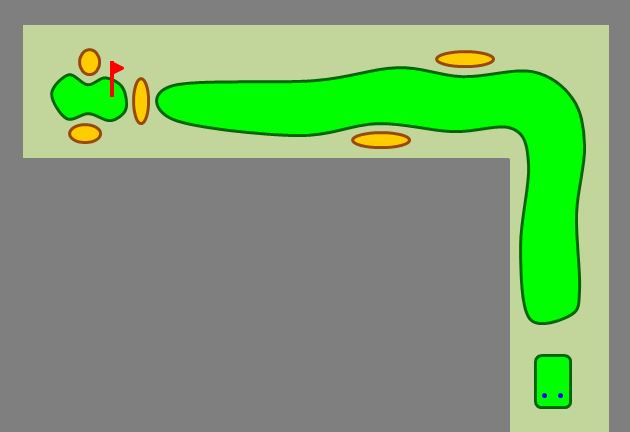
They come to a long par 5. It’s a dogleg left, wrapping around the driving range.

Merlin tees off first. He takes the safe route, hitting his ball right down the fairway.

Hoping to take a shortcut and reach the green in two, King Arthur aims his drive across the corner of the driving range.

Unfortunately, the shot comes up short and his golf ball winds up inside the driving range.

Merlin says, “Come on, Arthur, just hit a safe shot down the middle.”

“No way,” replies King Arthur. “If Tiger Woods can cut this corner, so can I.”

So King Arthur gives it another try. Again, his shot comes up short, ending up in the driving range.

Merlin repeats his advice to just play it safe.

But King Arthur insists that he can cut the corner just like Tiger Woods.

Once again, King Arthur’s drive winds up in the driving range.

Merlin hands King Arthur a suit of armor. He tells King Arthur to go retrieve his golf balls.

A golfer on an adjacent hole happens to pass by Merlin in search of his own golf ball, when he sees a knight in shining armor wandering through the driving range.

Upon seeing this ridiculous image of a knight walking through the driving range, the golfer asks Merlin, “Who does that guy think he is? King Arthur?”

Merlin promptly replies, “Nope. He thinks he’s Tiger Woods.”

Copyright © 2014 Chris McMullen

Notes: This is a little twist on a classic golf joke involving Jack Nicklaus, Jesus Christ, and Moses. I got the inspiration when I lost a ball in the driving range and my dad suggested that I could retrieve my ball if only I had a suit of armor handy.

What Is the Most Important Part of a Story?

Book Play Pic

That Depends

For someone who will definitely be reading the story, the most important part is likely to be something like:

  • the storyline
  • the characterization
  • the writing style
  • the way the words flow

But unless you’re an established author who already has a large fan base, you don’t have many people who will definitely be reading your story.

The problem is that nobody can read your story until the story is found.

And people who discover your story judge the story by many other factors besides the story itself.

Therefore, the most important part of the story could actually be something like:

  • a cover that attracts the target audience and visually indicates the genre
  • a very well-written blurb that captures the interest of the target audience
  • a professional-looking Look Inside and a really great beginning
  • an assortment of balanced, genuine reviews

It almost seems like today’s marketplace is saying that the story itself doesn’t matter at all.

But that’s not true:

  • A fantastic cover, amazing blurb, and stellar Look Inside will backfire if the story isn’t good. So the story will be critical.
  • Word-of-mouth recommendations are invaluable. It’s hard to find a good book. it’s not easy to gauge how good a book will be from the product page. But when someone you trust recommends a book, suddenly a good book is easy to find. But it takes more than just a “good” book to really thrive on recommendations.

Yet, an incredible story with a so-so cover, so-so blurb, and so-so Look Inside has major hurdles to overcome:

  • It doesn’t matter how wonderful the story is if people don’t discover it and decide to read it.
  • Sales rank counts against a book with a great story when it takes a long time for people to discover the book and start spreading the word. For a book with a history of slow sales, the growth to a stronger sales rank is harder to achieve than to maintain strong sales out of the box.

Therefore, the most important part of a story may very well be marketing.

Effective marketing (which is often free or very low-cost) can help a book get discovered, and can help to generate word-of-mouth referrals.

Marketing isn’t the answer for a lousy story. But effective marketing can help a great story get off to a good start and grow.

It’s kind of unfair, perhaps, but it is what it is:

  • Those few sentences you write in the blurb are in some ways more important than a hundred thousand words carefully strung together to craft a story.
  • The thumbnail image of the cover can impact sales more than the story itself.
  • Today’s marketplace in many ways favors traits that many gifted writers lack:
    • Social interactions to help spread the news about your book.
    • Publicity skills to help build a positive image as an author.
    • Marketing skills to build your book and author brands.
    • Business orientation (and more social skills) to put together and benefit from a focus group.
    • Financial investment to prevent editing and formatting from deterring sales.

There are some exceptionally gifted authors who are highly introverted, passionate but not business-minded, great at writing novels but not at writing blurbs, and focused on the story but not the cover, who could really write books very much worth reading.

The current market makes it tough for their books to get discovered and rise to the top. Even if you hire someone to help with marketing, much of the most effective marketing involves your personal interactions.

The current market rewards a book with a pretty good story that has a fantastic cover, killer blurb, and stellar Look Inside. The bestselling books should all have killer stories, right? The market should be structured in such a way as to promote the best stories.

There are some incredible stories at the top. But there are also many okay stories where the books thrive in other ways (including the author’s reputation or the publisher’s name). And there are some gems of stories hiding in the haystack.

(One way that writing multiple similar books helps is by generating your own fan base and reputation. Provided that your books get discovered and sell.)

Customer reviews could help with this, and many do, but in reality there is nothing in place to prevent a review from making a book seem much worse than it actually is. And there is nothing in place to guarantee that a favorable review is accurate.

Again, the story does matter. If it’s not good, it will ultimately become a sales deterrent. An exceptional story can generate valuable word-of-mouth sales… once it finally gets discovered.

But there is much more to success than crafting an excellent story.

Between the story, cover, blurb, Look Inside, editing, formatting, and marketing, if you could have one of these be good and all the rest outstanding, your best option might be to have the story itself to be the one that is merely good. That’s insane, isn’t it?

It’s easy to criticize the system, but not so easy to suggest an efficient, economical solution. The real problem is that you can’t properly judge the story without first reading it, so we’re trying to buy books based on other criteria.

Any gatekeeping system seems to introduce its own set of problems, and so doesn’t seem to be a practical solution. The current system works on free enterprise, and the worst tend to drop to the bottom (i.e. the lousiest books aren’t getting in the way of the best books, except for those rare excellent books that just aren’t getting discovered at all).

It’s not really about what it should be. We’re not in charge to make such decisions. (And whatever we would do might be worse. It’s easy to criticize, not as easy to solve the problem.)

It’s about understanding how the system works and making the most effective use of this knowledge.

Chris McMullen

Author of A Detailed Guide to Self-Publishing with Amazon and Other Online Booksellers

  • Volume 1 on formatting and publishing
  • Volume 2 on marketability and marketing

Follow me at WordPress, find my author page on Facebook, or connect with me through Twitter.

Comments

Click here to jump to the comments section:

https://chrismcmullen.wordpress.com/2014/05/22/what-is-the-most-important-part-of-a-story/#comments

Self-Publishing Is Like Golf

Golf

Self-Publishing Is Like Golf

Front Nine:

  1. Both seem easy until you try them. You think you’re gonna make a hole-in-one the first time out on the golf course. You think you’re going to sell 100,000 books your first year. Whoa! Where’s that easy button when you need it? Reality check in aisle three.
  2. One little mistake and you can look pretty silly. Great big swing… ball goes almost nowhere. Oops! Did I just do that? No, it was a practice swing. Honest! Misspelled the title. Three whole pages in italics. Paragraph gone missing. Page numbers out of order. Feel like crawling under a rock now?
  3. The easiest things can be the most frustrating. Miss a two-foot putt? Whiff the ball? Try not to break your club. Misspell your name? Accidentally upload the wrong file? Don’t smack your forehead too hard.
  4. There is always a silver lining. You can have 17 miserable holes, but if you get one birdie, it makes your day, it brings you back to the course. Even if you hit 100 miserable shots, you’re bound to have one good one, so that even your worst rounds leave something positive to provide encouragement. Whether your self-publishing venture seems like a success or failure, there must be something good you can take out of it. If nothing else, you’re a published author. You can see your book in print. Your first book is a learning experience. Kind of like being thrown into the deep end of a swimming pool. Infested with crocodiles. Hungry crocodiles.
  5. Mulligans are tempting. It’s easy to shank your teeshot on the first hole, and tempting to start over by taking a mulligan. It’s hard to nail that first book, too. Don’t worry too much. Pen names can help with that.
  6. You’re expected to observe proper etiquette. Don’t talk while your opponent is swinging. Don’t walk in your opponent’s line. Don’t spam your friends with repeated advertisements for your book. Don’t pester your ex-girlfriends for reviews.
  7. You can spend a ton of money that won’t necessarily help. Seven bucks for one ball that might not last more than one shot. A few hundred bucks on one club. Thousands on equipment. Hundreds more to dress like a golfer. The shot might look ugly, but you’ll look great on the course. You can spend hundreds on a cover, hundreds on editing, thousands on marketing. But if the content reads like a slice in the water hazard, it could be a book that looks great, yet doesn’t sell. Except to your mom.
  8. There is a ton to learn. It takes time and patience. Lessons can help, if the instructor knows what he’s doing. Even if you receive great advice, it’s easy and common to go against it. Because you’re the one newbie who isn’t going to make any mistakes, right?
  9. Out of bounds hurts. In golf, it costs you a stroke and distance (and a seven-dollar ball). There are boundaries in self-publishing, too. Like not commenting on all your reviews, telling your fans whether you wear boxers or briefs (maybe this is one time when telling is better than showing!), promoting your book on your competition’s blog, or reviewing your own book. You will get caught and the penalties will be severe. We’re talking tar and feathers.

Back Nine:

  1. You must clean up your mess. When you take a divot that goes further than the ball, you must repair the real estate. When it takes five shots to get out of the bunker, as an added bonus, you get to rake your mess. When you discover typos in your book, whether it’s selling or not, you fix them. It’s just the proper thing to do. Like covering a puddle with your new leather jacket so a woman you don’t know can walk across the street without getting her feet soaked.
  2. All golfers, golf-courses, books, and authors are not created equal. Some courses are much easier than others. Some golfers are much better than others. Some books have wider appeal than others. Some authors have more talent or experience than others. But it can still be fun for everyone to play the game. And when it isn’t fun, you get to exercise your vocabulary of four-letter words. All too often.
  3. There are rules to be followed. On the course, a marshal looks for signs of slow play, un-raked sand traps, and high heels on the greens. A rulebook dictates how to determine relief and penalties. Competitors attest your score. Retailers decide what can or can’t be published. Amazon determines what is or isn’t acceptable behavior. Yes, the rules do apply to you.
  4. Luck is involved. The ball doesn’t always bounce the way you’d expect. Sometimes it skips across the pond. Other times it hits a sprinkler in the middle of the fairway and rolls out of bounds. A great book can get a lousy review right off the bat. Or the right person can fall in love with your book and tell hundreds of people about it. Or your boss can discover you’ve been moonlighting as an author.
  5. Never fear, help is near. You can have a caddie carry your bag, help you choose the right club, walk off the yardage, tell you which way the putt breaks. Experienced authors can help you with formatting, publishing tips, marketing advice, which finger to pick your nose with.
  6. Practice can help. Hit a bucket of range balls. Spend time on the putting green. Write, write, and write some more. Read, read, and read more, too. And when nothing seems to help, maybe try some of that advice you’ve been ignoring. You know, the advice that requires doing hard work. But not that advice promising amazing results with super shortcuts. That’s the kind of advice where you pay hundreds of dollars for someone to toss you into a dumpster. And then you try it again because it didn’t work out the first time.
  7. Golf and self-publishing are both spectator sports. There is a gallery in golf to watch the pros, and millions of viewers on t.v. to support the sport. Authors have readers. A pro has a fan base in the crowd to support him. Authors have small followings, too. Whoa, dude! You’re, like, famous now!
  8. Starting out, you have a ton of anxiety for no good reason. On the first tee, you’re highly visible. People on the putting green, at the driving range, in the clubhouse, pulling up in the parking lot, or walking by can see your shot. Why do you have all those butterflies? It’s not like your name is Jack Nicklaus. You’re not expected to drive the ball 350 yards down the middle of the fairway. All those butterflies show up when you press that publish button, too. You don’t even have a gallery yet.
  9. Natural talent and years of hard work can pay off big time. You could become a scratch golfer. You could finally become a bestseller. Then, of course, you’ll meet that perfect someone and drift off into the sunset.

Nineteenth Hole:

  • Whether you finish a round of golf or a book, you deserve a little time to celebrate. If you make a hole-in-one or become a bestseller, the drinks are on you. Whether you can afford it or not.

Copyright © 2014 Chris McMullen

Comments

Click here to jump to the comments section:

https://chrismcmullen.wordpress.com/2014/05/19/self-publishing-is-like-golf/#comments

Formatting the Look Inside

Look Inside

Amazon’s Look Inside

Kindle Direct Publishing (KDP) offers previews for how your e-book may look on the Kindle, Kindle Fire, Kindle Fire HD, Paperwhite, iPad, iPhone… but not the Look Inside.

Yet prospective customers checking out your book on Amazon see your book’s Look Inside before making the purchase.

The Look Inside can significantly impact sales.

At the same time, Kindle authors tend to experience more formatting issues with the Look Inside than on the Kindle, Kindle Fire, and most other devices.

In fact, it’s not uncommon for a book to look great on a Kindle device, but format incorrectly in the Look Inside.

This problem plagues indie authors self-publishing their books on Kindle. Once they finally master Kindle formatting, the Look Inside is the last big hurdle.

In this article, we’ll explore how to format for the Look Inside. One example we’ll examine in detail is how to create non-indented paragraphs that don’t indent in the Look Inside.

Why Doesn’t the Look Inside Format Right?

Well, the technical answer involves a discussion about what is “right.” The Look inside is ultimately generated by a program following instructions. In the end, the Look Inside is “right.”

It often seems like the formatting is wrong when the author compares the original Word file with the Look Inside.

Some of the formatting that may look right in Word can get lost in translation on the way to the Look Inside.

The Look Inside sees a set of HTML instructions generated from the Word file.

Note: Even though you may submit a Word document to KDP, what the device reads is a set of HTML instructions that tell it what to display—ultimately, your submitted file is converted into a mobi file, which essentially contains a set of HTML instructions based on the Word file that you submit.

Often, what the Look Inside displays from reading those instructions differs from what Word displays on the screen.

What a Kindle, Kindle Fire, iPhone, iPad, Kindle for PC, and the Look Inside display on the screen can vary from the same set of HTML instructions generated from a Word file.

The Look Inside interprets the HTML more strictly, which is why the formatting is hardest to get right for the Look Inside.

From Word to Kindle

Kindle doesn’t see the Word document the way you do. It sees a set of HTML instructions.

The beginning of the HTML defines a set of styles used in your Word file. For example, there is a style for heading, subheading, titles, and a Normal style for the paragraphs of your body text.

Kindle (or iPad, or whatever device is being used) displays the different parts of your book according to these different styles.

If you highlight all or part of a paragraph and change the formatting of that text in Word, this carries over into the HTML.

Then the HTML says something to the effect, “Use the normal style, but change the indent size and add italics.”

This is where the Look Inside problems can begin. The Look Inside may format according to the style, and disregard some of those exceptions created by highlighting selected paragraphs. Other issues can arise from unclosed HTML tags.

The HTML generated from a Word file can get pretty messy, with all sorts of style exceptions built into the HTML, with <span> tags dispersed throughout, and with font settings redefined within the paragraph blocks. (You don’t want the file to define font size or style within the paragraph blocks. Not only can this cause formatting problems, but the device user expects to have control over these settings.)

Microsoft Word’s Styles

Much of the problem can be resolved by using Microsoft Word’s built-in style functions religiously. Modify the heading, subheading, title, and Normal styles to suit your needs.

Then make a new style that’s essentially a copy of the Normal style for paragraphs that need to be non-indented. I’m going to call this the NoIndent style just to give it a name.

When you’re modifying the styles, click on the Format button and adjust the Paragraph settings, too. Set the First Line indent for the Normal Style. It might be something like 0.2″ (since the common 0.5″ would be really large on a device with a small screen, especially an iPhone or the basic Kindle). Don’t use the tab key at all (and don’t use the spacebar to create indents). For the NoIndent style, set First Line to 0.01″.

Notes:

  • I specifically have Microsoft Word 2010 for Windows in mind. (Other versions may function similarly, though they can lead to important differences.)
  • If you set First Line to “none” or zero, it won’t work. Use 0.01″. (If you try to make it too small, it won’t take.)
  • Go to Special in the paragraph menu to find First Line, then set the By value next to it.
  • You see all the styles at the top of the screen, on the right side of the toolbar, in the home tab.
  • Right-click a style to modify it. When modifying the style, click the Format button to find the font and paragraph menus.
  • You can even build pagebreaks into the styles. Click Format, select Paragraph, then click the Line and Page Breaks tab. There is an option to pagebreak before. If you have pagebreaks that aren’t respected, try this (but realize that a Look Inside displayed as a single, scrolling page isn’t going to implement this).
  • To create a new style (for NoIndent, for example), click on the funny icon in the bottom-right corner of the styles menu on the home tab (the little icon is below the A’s where it says “Change Styles”). This will pull up a new window on the right side of the screen. Find the three buttons at the bottom of this window. Click the left button.

Apply the styles to sections of your document one by one. You can highlight a section and click the style, or you can place your cursor in a paragraph and click a paragraph style from the menu.

You want every block of text in your file to be associated with a particular style.

Except when you have to have different styles in the same paragraph (e.g. you wish to italicize, boldface, or underline specific text, or create subscripts or superscripts), you want the style to dictate the formatting. Go into the Font and Paragraph menus when modifying each style to create the formatting you want there. Don’t use the font and paragraph tools on the menu at the top of the screen to make these adjustments (except to adjust specific text, with something like italics, within the paragraph).

For example, set the linespacing in the paragraph menu by adjusting the style itself and applying the style to the text. Don’t do it by highlighting text and setting the linespacing.

Be sure to check the font menu when modifying each style (from the Format button). If you go into Advanced, you may find that Word’s defaults have adjusted the kerning for selected styles (you may or may not agree with these settings, so you should check them out). The font color should be automatic except when you need to apply a specific color to selected text.

You want to have a larger font size for headings and subheadings than the normal text, but you want to achieve this by setting the font size within each style. If you select text and apply a font size or style to the selected text, this causes problems when an e-reader interprets the HTML instructions for your file.

Check the “Automatically Update” box when modifying each style if you want changes to that style to be applied to text that has already been set to that style.

Word’s styles can get mixed up. What you want to do is start with a document as clean as possible (in the worst-case scenario, this can be achieved by cutting and pasting your document into Notepad and then back into Word). Then apply one style to every section to avoid any mix-ups.

Don’t select text and set specific font styles (e.g. Georgia). Don’t select whole paragraphs and set linespacing, indents, or other paragraph options. Instead, apply a specific style to those paragraphs. Make the paragraph adjustments in the style (for every paragraph of that style in your document), and apply the style to the paragraphs rather than modifying the paragraphs through the toolbar at the top of the screen (except by clicking the styles, like Title or Normal, found on that toolbar).

How to Create Non-Indented Paragraphs

Let’s work through a concrete example that plagues the Look Insides of many Kindle e-books.

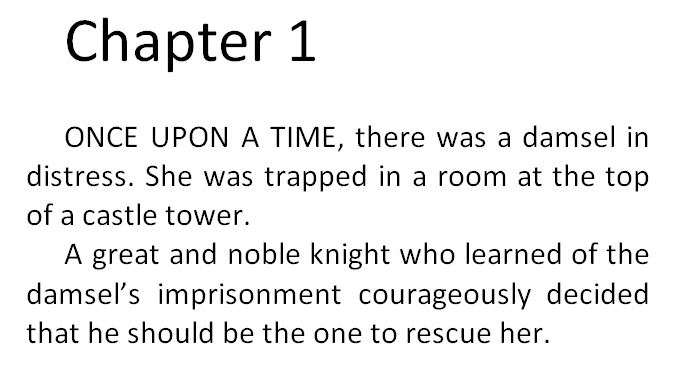
Most traditionally published books don’t indent the first paragraph of each chapter. Popular novels do indent paragraphs, but not usually the first paragraph of the chapter. Check out several popular traditionally published print books. If you understand what I mean by “not indenting the first paragraph of the chapter” (see the two pictures below) you should observe that this is very common among those books.

Examine the two examples that follow. The first example has all of the paragraphs indented. The second example doesn’t indent the first paragraph of the chapter. The second example is very common among traditionally published books. However, it can be a challenge to implement this on the Look Inside. (Many traditionally published books put the first few words in CAPS in e-books, instead of using drop caps, as drop caps can format improperly on some devices. Tip: If you write fiction where this is common, try putting the first few words of your blurb in CAPS, too. I’ve seen this done effectively in the blurbs of some popular traditionally published books.)
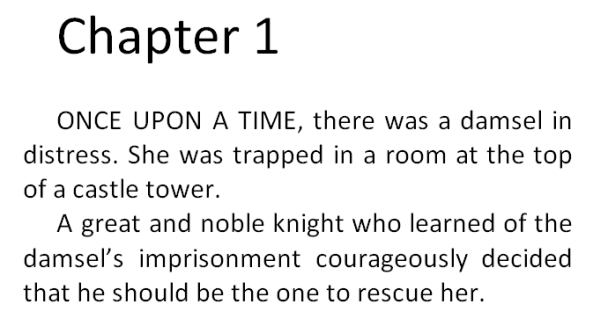
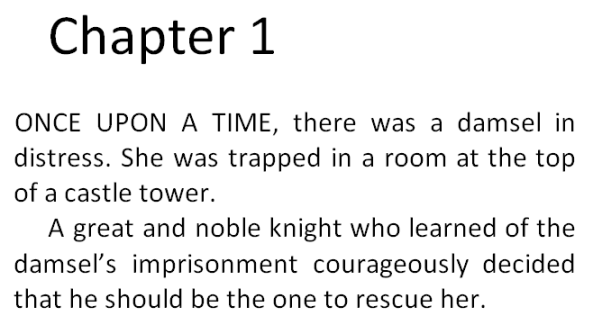
IndentedNot Indented

Even if the first paragraph appears non-indented on the Kindle device, it may still appear indented on the Look Inside. But there are ways to get this right.

Let me illustrate the wrong ways first. Definitely, don’t use the tab key to indent some paragraphs, thinking this will correctly distinguish between which paragraphs are or aren’t indented. This might seem intuitive, but it doesn’t work (there will be inconsistencies). Similarly, don’t use the spacebar to create indents; it doesn’t work either.

Here is another wrong way. Better, but still wrong. If you highlight the first paragraph, click on the funny little icon in the bottom-right corner of the paragraph group on the home tab, change Special to First Line, and set By to 0.01″, it might not work. It will work on the screen and may work on most devices, but may not work on the Look Inside.

Here’s the problem. You can see the problem firsthand by looking at the HTML. You don’t need to know anything about HTML to peek at it and learn what’s going on. If you want to see Word’s HTML, Save As a filtered webpage (you want the one called Webpage, Filtered). Click Yes to the question that pops up. Find this new file on your computer (e.g. it might be in My Documents; it will be wherever you just saved it to). Right-click this HTML file and Open With Notepad.

When I adjusted the first paragraph’s indent the wrong way, as I outlined two paragraphs ago, the paragraph tag for the first paragraph looks like this:

<p class=MsoNormal style=’text-indent:.7pt’>

Compare this with the second paragraph:

<p class=MsoNormal>

You don’t have to know HTML to see the difference. Each paragraph sets the style to Normal. The first paragraph says to indent 7 points (0.01 inches).

The style=’text-indent:7pt’ setting will tell some devices to ignore the Normal style and indent the first paragraph 7 points (very little).

But the Look Inside may not accept this override. The Look Inside sees that you’re using the Normal style, which was previously defined to indent 0.2″. There are two different sets of instructions.

The better way is to provide a single set of instructions. That leaves less to interpretation.

This time, instead of highlighting the first paragraph and changing First Line from the home tab, I’m going to define a NoIndent style. I’ll do this by creating a new style based on the Normal style, and give it the name NoIndent (the last bullet in the section above called Microsoft Word’s Styles explains how). Then I’ll modify the NoIndent style (again, look for the bullets in the previous section for instructions). While modifying the NoIndent style, click Format, choose Paragraph, and set First Line there.

Now I simply place my cursor anywhere in the first paragraph and click the NoIndent style from the home tab. Prest-o, Change-o!

This time, the paragraph tag for the first paragraph looks like this:

<p class=MsoNoIndent>

Now this paragraph only has one set of instructions. When Amazon’s Look Inside reads the Kindle e-book, the class=MsoNoIndent statement will tell it to indent the paragraph according to the previously defined NoIndent style, which says to indent just 0.01 inches.

You can improve on this. Find the style definition for the NoIndent style in the beginning of the HTML file. Change 7pt or 0.01in (whichever it says) to 0 (that’s the number zero, not the letter O). This doesn’t work in Word, but it does work in the HTML file.

Notes:

  • Don’t open the HTML file in Word. Use Notepad to examine and modify the HTML.
  • If you have images in your file, you want to create a compressed zipped folder as explained in Amazon’s free guide, Building Your Book for Kindle.
  • Also look for span tags that include font definitions. If you remove these, be sure to remove the closing tags, too, which look like </span>. The Find tool can help you locate these.
  • Search for text-indent with the Find tool to see if any paragraphs are indenting through this setting instead of through a style definition.
  • Seemingly endless italics, boldface, or underline that’s not intended to be there may be caused by unclosed <i>, <b>, or <u> tags. For example, <i>italics</i> makes the word “italics” appear italicized. If the closing tag, </i> is missing (or typed incorrectly), the italics will keep going and going and going…
  • Other things you might look for are images. For example, instead of specifying the width and height in pixels, for large pictures that you’d like to fill the screen, you might remove the current width and height statements and replace them with width=”100%” (don’t set both the width and height this way; just set the width; however, if you have really skinny pictures, i.e. skinnier than the Kindle Fire, you might prefer to set the height instead of the width).

Chris McMullen

Author of A Detailed Guide to Self-Publishing with Amazon and Other Online Booksellers

  • Volume 1 on formatting and publishing
  • Volume 2 on marketability and marketing

Follow me at WordPress, find my author page on Facebook, or connect with me through Twitter.

Comments

Click here to jump to the comments section:

https://chrismcmullen.wordpress.com/2014/05/18/formatting-the-look-inside/#comments

One Space or Two After a Period?

One Space or Two

One or Two Spaces?

It turns out that, in today’s world, the correct answer is almost always one:

Use just one space after a period.

Later in this article, I will show you how that extra little space can make a big difference in Kindle formatting.

If you want to learn why one space is better than two, why most educated people believe that “two” is the correct answer, when it’s really “one,” and how this misunderstanding has evolved, check out a really cool article called “Space Invaders” by Farhad Manjoo in Slate Magazine:

http://www.slate.com/articles/technology/technology/2011/01/space_invaders.html

If you self-publish, this becomes a practical matter:

  • Examine traditionally published books carefully. You’ll see that one space after a period is almost universal.
  • Two spaces after a period can exaggerate gaps in justified text. This is important for both print books and e-books.
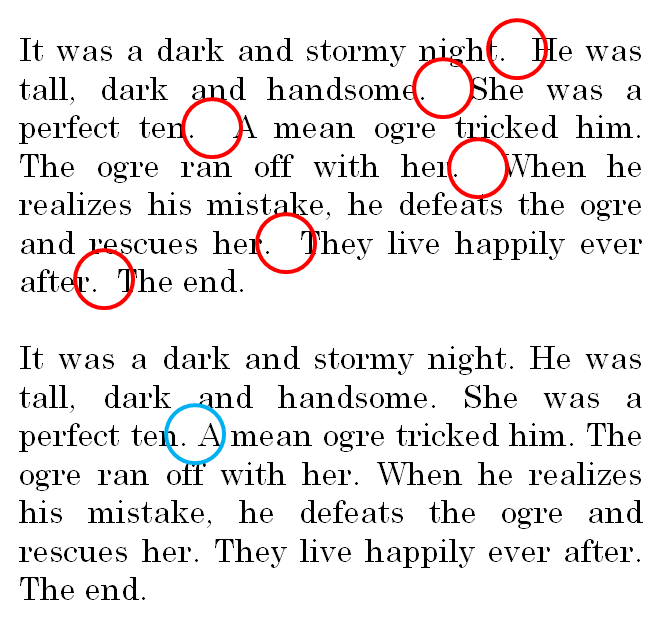
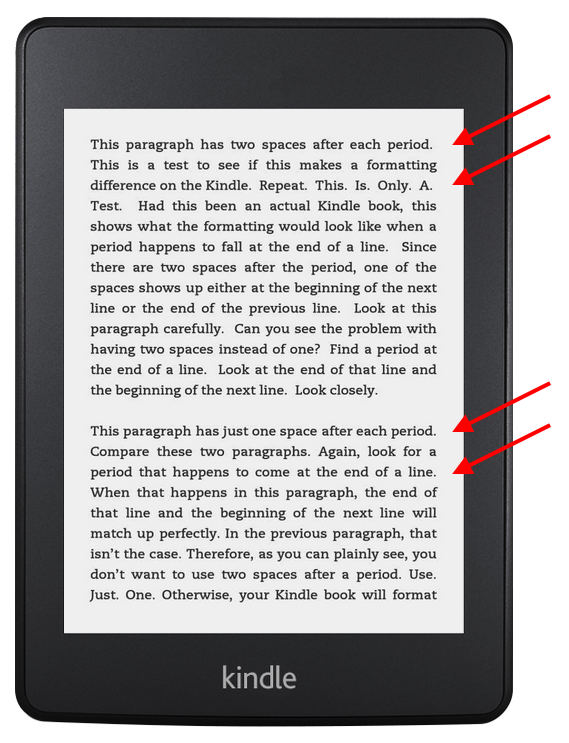
  • On Kindle e-books, that extra space can create a noticeable formatting problem (as I’ll demonstrate in the last picture of this article).

Study the following picture. The first paragraph uses two spaces after each period, while the second paragraph uses just one. In both cases, you can see large gaps in the justified text. But in the second paragraph, on any given line, the gaps are consistent across the line. In the first paragraph, there are very large gaps after the periods.

One Space Example

Tip: Activate Word’s hyphenation tool to help reduce the gaps in justified text.

  • In Word 2003, find this in Tools > Language > Hyphenation. In Word 2010, it’s under Page Layout > Hyphenation.
  • Go to File > Options (look below Help) > Advanced > Layout Options (it’s at the bottom, and doesn’t seem like something you can click, but you can click it) and check the box to hyphenate like WordPerfect in Word 2010.
  • Increase the hyphenation zone to avoid excessive hyphenation. Something like 0.4 may work well.
  • Manually hyphen by inserting a hyphen in a natural syllable break (consult a dictionary).
  • Manually override an automatic hyphen by placing your cursor at the beginning of the word and pressing Shift + Enter.
  • Don’t do any manual hyphenation until the book is virtually ready to publish. If you do any revisions to your book, you must inspect carefully for the impact those revisions may have on manual hyphenation adjustments (e.g. a small revision in a paragraph could cause a manually inserted hyphen to no longer appear at the end of a line).
  • Don’t do any manual hyphenation in your e-book. (But, of course, you should have hyphens in compound words that use hyphens, like self-published.)

If you use two spaces after a period in a Kindle e-book, this becomes noticeable whenever a period happens to fall at the end of a line. Look closely where the red arrows point in the picture below. The top paragraph uses two spaces, while the bottom paragraph uses just one, after a period. The bottom paragraph has better formatting.

Kindle Test Two Spaces Show

If you already have two spaces after each period, it’s easy to fix this mistake. Simply use the replace tool. Enter two consecutive spaces in the find field and a single space in the replace field.

Chris McMullen

Author of A Detailed Guide to Self-Publishing with Amazon and Other Online Booksellers

  • Volume 1 on formatting and publishing
  • Volume 2 on marketability and marketing

Follow me at WordPress, find my author page on Facebook, or connect with me through Twitter.

Comments

Click here to jump to the comments section:

https://chrismcmullen.wordpress.com/2014/05/17/one-space-or-two-after-a-period/#comments