Kindle Unlimited KENP per Page Rate DROP January, 2016

Background image from ShutterStock.

Background image from ShutterStock.

KINDLE UNLIMITED KENP PAGES READ JANUARY, 2016

The KENP pages read rate has reached a record low, paying $0.00411 per page in the United States.

That’s a drop of 11% from the December payout. That’s a substantial change for just one month.

But it’s a drop of 29% from the first month of Kindle Unlimited v2 from July’s $0.0058 per page rate. That’s a much larger drop when put in the long-term perspective.

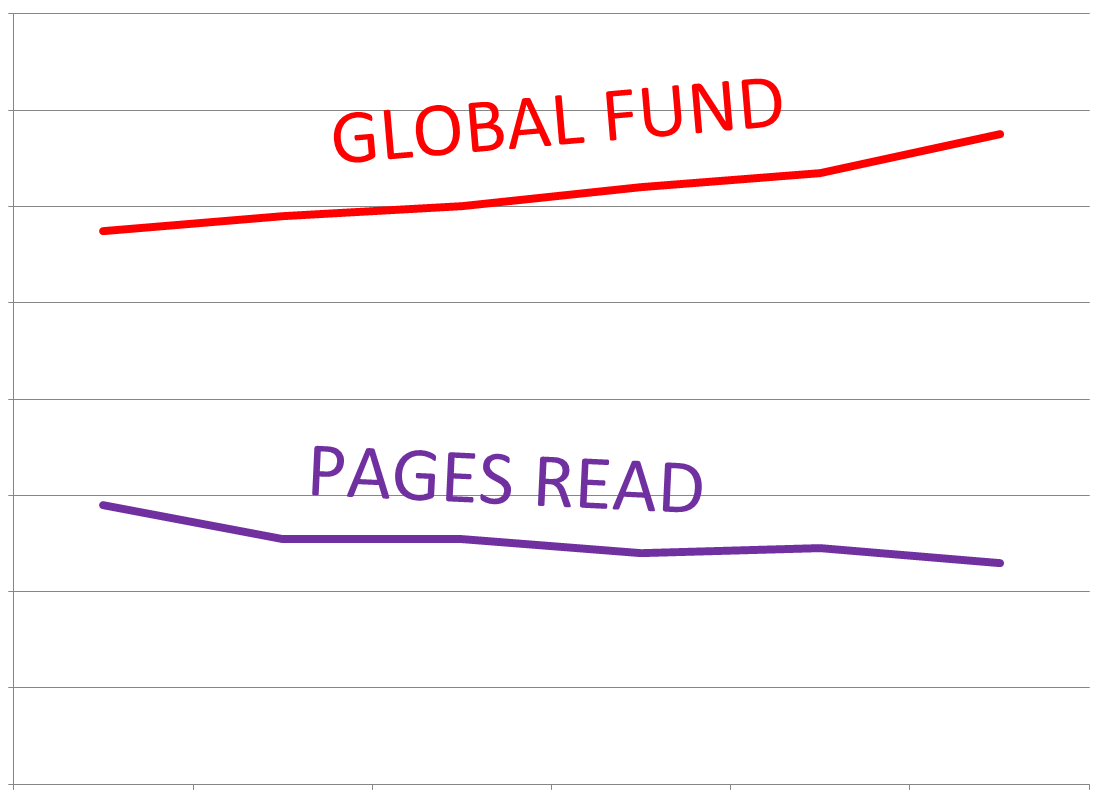
However, there was also a record high set in January, 2016, with the KDP Select Global Fund reaching $15 million.

That’s a rise of 11% over December’s Global Fund.

And it’s a rise of 30% compared to July. This means that Amazon is paying 30% more money in Kindle Unlimited (and Amazon Prime) royalties than when v2 started.

The KENP per-page rate has consistently dropped, while the KDP Select Global Fund has consistently risen, and by approximately the same percentages (one down, the other up).

Two are main effects going hand-in-hand:

  • More pages are being read through Kindle Unlimited (and Amazon Prime) every month. ← This is definitely a plus.
  • Amazon KDP is paying a little less for each page read every month. ← This is a minus.

NOT A BIG SURPRISE IN THE PER PAGE RATE

The numbers for January, 2016 actually make sense:

  • Amazon sold a record number of Kindle Fire devices on Black Friday.
  • Many customers took advantage of the free trial month.
  • Amazon included free Kindle Unlimited subscriptions during a few of their promotions.
  • Amazon discounted Kindle Unlimited subscriptions during some of their promotions.
  • Some promotions targeted Amazon Prime.

Therefore, we could have predicted:

  • an increase in the number of Kindle Unlimited (and Amazon Prime) subscribers
  • a large increase in the number of pages read
  • many more pages read where Amazon didn’t earn more money from the monthly subscription

Yes, FREE has benefits, but it also has a cost:

  • Those free trial months bring readers, but it costs Amazon money.
  • Those free subscriptions packaged with Kindles during rare promotions bring many more customers and pages read, but it costs Amazon a lot of money.
  • Those discounted subscriptions entice more subscribers, but cost Amazon a little money.

(Amazon ordinarily earns 30% or more on the sale of a KDP Select e-book. What percentage do they earn from borrows? We have no idea. It could be more than 30%. It could be less. Amazon could even take a loss with KDP Select, using it as a loss leader, expecting those regular Amazon customers to buy other products. We don’t know.)

The promotions worked: There were more subscribers and pages read. That’s why Amazon paid an extra $1.5 million compared to December.

But it’s probably not realistic to expect Amazon to absorb 100% of the cost. They passed some of that cost onto the authors, dropping the KENP per-page rate 11%.

Amazon has made Kindle Unlimited viable and substantial. Paying $15 million dollars in royalties each month, that’s a significant share of the e-book market.

And many of those Kindle Unlimited subscribers have taken a chance on indie e-books. This aspect is good for indies.

THE FUTURE OF KINDLE UNLIMITED

I doubt it’s a coincidence that KENPC v2.0 rolled out the month after the KENP per-page rate hit a record low.

Remember, KENPC v2.0 kicked in for February; it had no impact on January’s payout.

If you saw a significant decrease to your KENPC (but realize that actually increased for a few books), that drop on top of the 11% drop for January may seem scary.

Maybe the KENPC upgrade was put in place to help keep the KENP per-page rate from dropping further.

Maybe the per-page rate will actually go up somewhat for February. Probably, some of those free trial months won’t be renewed. The KENPC change may help a little.

Maybe, also, if Amazon is trying to help the per-page rate for the future, they are looking at ways that a few authors or publishers may have been trying to take advantage of the system. Maybe Amazon will help limit that: This could be part of the reason that the KENPC has changed. They might also change the way that KENP pages read are counted (to try to prevent anyone from gaming the system too much).

These are a lot of MAYBE’s. And even if it does rise in February, we will left to wonder if it will start dropping again after that. We are on a downward trend.

If the per-page rate drops too much, down to whatever your magic number is, the question you need to ask is whether you can do better outside of KDP Select than you can inside. It’s not an easy question to answer, and it varies from one author and even one book to the next. (Keep in mind that every borrow helps your sales rank, which is one thing you’ll lose if you switch to the other side.)

We haven’t reached my magic number yet. But I wouldn’t mind if we didn’t dip below $0.004…

Sure, I’d love it if Amazon would pay more per page. But Amazon didn’t ask for my opinion. They offered me a choice: Enroll in KDP Select, or opt out. I enrolled, and I still prefer this option for my books.

But I’m also glad that Amazon promoted Kindle Unlimited, offers free monthly trials, and promoted subscriptions and Kindle devices this holiday season.

If Amazon had given me a choice—do none of those things and leave the per-page rate at $0.0046 per page, or do all of those things and drop the per-page rate 11%—I would have happily accepted the 11% drop. Not everyone will feel that way. But I do.

On the other hand, it started at $0.0058 back in July, and now it’s 29% less, down to $0.0041. I sure would like to see it stop going down…

It will be interested to see how it pays in February and beyond.

KENP PAGES READ BY COUNTRY

Here are the pages read payouts for a handful of countries:

  • United States: $0.00411 per page (US dollars). That’s a drop of 11% from December’s payment of $0.00461.
  • United Kingdom: £0.00262 per page (British pounds). That’s also a drop of 14% from December’s £0.00306.
  • Canada: $0.00476 per page (Canadian dollars).
  • Spain: €0.00408 per page (Euro).
  • India: ₹0.1008 per page (Indian rupees). That’s nearly identical to December.

Write happy, be happy. 🙂

Chris McMullen

Copyright © 2016

Chris McMullen, Author of A Detailed Guide to Self-Publishing with Amazon and Other Online Booksellers

Click here to view my Goodreads author page.

  • Volume 1 on formatting and publishing
  • Volume 2 on marketability and marketing
  • 4-in-1 Boxed set includes both volumes and more
  • Kindle Formatting Magic (coming soon)

Follow me at WordPress, find my author page on Facebook, or connect with me through Twitter.
Comments

Click here to jump to the comments section.

The KDP Delivery Fee for Large Books: Is it really worth trying to reduce the file size?

Delivery Fees

DELIVERY FEE MATH

If you price your Kindle e-book between $2.99 and $9.99, you’re eligible for the 70% royalty option.

However, Amazon charges a delivery fee of 15 cents per megabyte (Mb) for US sales. (It’s £0.10 per Mb for UK sales. I will focus on US sales in this article.)

The delivery fee is subtracted from the list price before multiplying by 70%.

Example: List price = $2.99, file size = 6 Mb

Delivery fee = $0.15 × 6 = $0.90

Royalty = ($2.99 – $0.90) × 0.70 = $2.09 × 0.70 = $1.46

The only file size that matters is the converted .mobi file size that you see on page 2 of the publishing process at Kindle Direct Publishing (KDP). The size of the file that you upload isn’t the number to go by.

The delivery fee is most significant for books that include many pictures.

IS IT WORTH TRYING TO REDUCE THE FILE SIZE?

If you’re planning to set the list price of your Kindle e-book between $2.99 and $9.99, you know that a smaller converted .mobi file size results in a smaller delivery fee.

So it’s intuitive to assume that reducing the file size will lead to a larger royalty.

I had some fun with the math the other day, working through several examples. I observed that in many cases, reducing the file size wouldn’t have a significant impact on the royalty unless the file size was substantially reduced. But there are cases where a change in file size has a greater impact on the royalty.

One factor is that for a very large file size, the 35% royalty rate actually pays a higher royalty. The delivery fee only applies when you select the 70% royalty option.

It also depends on the list price that you set and the converted .mobi file size that you’re starting with (i.e. before you proceed to reduce the file size).

We’ll get to the math in a moment (and some handy tables that will do the math for you).

But there is one more point that you should consider: It may be better to delivery high quality pictures to the customer than to try to reduce the file size. (Besides that, Amazon KDP automatically compresses pictures in the file that you upload.)

So when we look at the math, remember that the quality of the pictures is important, too.

DELIVERY FEE MATH

Here is an example, illustrating whether or not it’s worth it to reduce the file size for a particular situation:

Example: List price = $2.99, file size = 12 Mb

Delivery fee = $0.15 × 12 = $1.80

70% Royalty = ($2.99 – $1.80) × 0.70 = $1.19 × 0.70 = $0.83

35% Royalty = $2.99 × 0.35 = $1.05

If you reduce the file size 30%, down to 8.4 Mb:

Delivery fee = $0.15 × 8.4 = $1.26

Royalty = ($2.99 – $1.26) × 0.70 = $1.73 × 0.70 = $1.21

You earn a whopping 16 cents more by reducing the file size 30%. (Ignore the $0.83 since the 35% royalty paid better at the original file size.)

However, if you reduce the file size 50%, down to 6 Mb:

Delivery fee = $0.15 × 6 = $0.90

Royalty = ($2.99 – $0.90) × 0.70 = $2.09 × 0.70 = $1.46

You earn 41 cents more by reducing the file size 50%. It takes a substantial change in file size to significantly improve the royalty in this example.

I had some fun with this and made several tables. The tables do the math for you.

KDP DELIVERY FEE TABLES

There are 8 tables below, one for each of the following price points: $2.99, $3.99, $4.99, $5.99, $6.99, $7.99, $8.99, and $9.99.

Each table shows you how much you would need to reduce your file size in order to see a significant improvement on your royalty.

Here is how to use the tables:

  • Find the table with your list price. The list price appears near the top left corner of the table.
  • Find your current converted .mobi file size in the left column. (You need to upload your file to KDP and continue onto page 2 of the publishing process to find out what your file size is. Don’t look at the size of your Word file or any other file on your computer.)
  • The next column over (the 0% column) shows you what your current royalty is. (Check this on page 2 of the publishing process. It may be slightly different, since your exact file size might not be listed.)
  • As you continue to the right, the row tells you what your royalty would be depending on what percentage you reduce your converted .mobi file size.
  • The cells in green (and the figure at the top of the table, near the left) correspond to the 35% royalty option. For these cells, the 35% royalty rate pays higher than the 70% royalty option.

Here is an example:

Example: List price = $3.99, file size = 18 Mb

Find the table with the $3.99 list price near the top left.

Scroll down to 18 MB in the left column.

The table shows that the 35% royalty option pays a higher royalty, which is $1.40.

Now scroll to the right: The royalty won’t increase unless the file size is reduced at least 30%, and even then it only pays 7 cents more.

Scroll further to the right: If you reduce the file size 50%, then the royalty would improve to $1.95, compared to $1.40.

Table 1: $2.99

Delivery Fees 299

Table 2: $3.99

Delivery Fees 399

Table 3: $4.99

Delivery Fees 499

Table 4: $5.99

Delivery Fees 599

Table 5: $6.99

Delivery Fees 699

Table 6: $7.99

Delivery Fees 799

Table 7: $8.99

Delivery Fees 899

Table 8: $9.99

Delivery Fees 999

TEST IT OUT

If you find that reducing your converted .mobi file size may have a significant impact on your royalty, the next step is to see if you can reduce the file size as much as you expect, and, if so, what quality output you get.

Usually, most of the file size comes from images.

Amazon already compresses images when you upload your book to KDP, so if you compress them yourself, they get compressed again.

If you have an idea for possibly reducing the file size, make a test book with a small number of images. Upload the test file with the original images, see what your converted .mobi file size is on page 2 of the publishing process at KDP, make a new test file using the method that you’re testing out, and see how much it reduced the converted .mobi file size (if at all).

If the file size reduced enough, preview the book carefully to see how well it came out. If you can sideload it onto a Kindle Fire with a large display size (in terms of pixels) and another device with a much smaller display size (in terms of pixels), that will help to see if the pictures are good enough.

(The Kindle Textbook Creator produces an efficient file size, maintaining quality images. It’s suitable for an image-heavy book, or a textbook. But the resulting e-book has fixed format, works with pinch-and-zoom, and the e-book won’t be available for purchase from some devices, like the Kindle Paperwhite. This is suitable for some kinds of e-books, but not others.

If you have a very large file size, and you have a e-book that might be suitable for the Kindle Textbook Creator, it might be worth testing Amazon’s free tool out.)

Write happy, be happy. 🙂

Chris McMullen

Copyright © 2016

Chris McMullen, Author of A Detailed Guide to Self-Publishing with Amazon and Other Online Booksellers

Click here to view my Goodreads author page.

  • Volume 1 on formatting and publishing
  • Volume 2 on marketability and marketing
  • 4-in-1 Boxed set includes both volumes and more
  • Kindle Formatting Magic (coming soon)

Follow me at WordPress, find my author page on Facebook, or connect with me through Twitter.

Comments

Click here to jump to the comments section.

Which Kindle Should You Buy? (Amazon 2016: Fire vs. Paperwhite vs. Voyage)

Kindle Devices

Kindle Paperwhite, Kindle Fire, and Kindle Fire for Kids.

WHICH KINDLE SHOULD YOU BUY?

Are you thinking about buying a new Kindle ereader, but aren’t sure which one to get?

(Now might be a good time to check them out. When this post was written, Amazon had some good deals. If you’re too late, keep an eye on the prices. They go on sale periodically.)

I own and use several Kindle devices, including three different Fires, a Paperwhite, and a regular Kindle.

I’ve compared different versions of the Fire, Paperwhite, and the Voyage several times—whenever I buy a new one.

My two favorites are:

  • The Kindle Fire HD 8.9″ (it’s a generation removed, but I love it)
  • The Kindle Paperwhite

It depends on what you’re looking for.

FIRE VS. PAPERWHITE VS. VOYAGE (TABLET VS. READING)

If you want color images, or if you want the features of a tablet, the Kindle Fire is the obvious choice.

I read books on my Kindle Fire HD 8.9″, and reading is very nice on that, too (but see below). However, the largest screen HD and HDX models are pricey.

I have a couple of the less expensive Fires, and don’t like them as much. But no doubt that’s because I have the really nice one to compare them to.

The first Kindle I ever bought was a basic Kindle Fire. Before I discovered the Kindle Fire HD 8.9″, I was very happy with it.

I read about 4+ novels per month, usually on my Kindle Paperwhite. Although I own the very nice Kindle Fire HD 8.9″ and enjoy reading on it, I still prefer to read most of my novels with the Kindle Paperwhite. I’d be very happy reading either way. But if I could only buy one device, and wanted it for reading, I’d opt for the Kindle Paperwhite.

Now that the Kindle Paperwhite is 300 PPI like the Kindle Voyage, it’s hard to justify the price of the Kindle Voyage. The Kindle Voyage has an adaptive lightscreen, for example, but it’s a huge jump in price. The Kindle Paperwhite is an awesome value right now, if you’re looking mostly to read.

You can save a bit with the basic Kindle 6″, if the Kindle Paperwhite is more than you’re looking to spend. All of the Kindles are touchscreen these days. The basic Kindle 6″ is 167 PPI, compared to the 300 PPI of the Kindle Paperwhite and Kindle Voyage.

SCREEN SIZE

Looking for a particular resolution in pixels?

One thing that drives me crazy when I shop for Kindle ereaders is that the comparison chart for Kindle Fire lists the display size in pixels, but the Kindle, Kindle Paperwhite, and Kindle Voyage list the PPI and make it difficult to figure out what the pixel count is. It’s also frustrating as an author or publisher, since you want to determine the display sizes when creating your images.

So I did some research and math to make the following chart. The following table shows the current Kindle ereader screen sizes in pixels.

Comparison of Kindle display sizes for Fire, Paperwhite, and Voyage.

Comparison of Kindle display sizes for Fire, Paperwhite, and Voyage.

The Kindle Fire HDX comes in at the top when it comes to the pixel count of the display size.

For reading, the Kindle Paperwhite and Kindle Voyage are high resolution (now with 300 PPI).

GREAT PRICE

For price, you have to go with the new Kindle Fire 7″ (not HD).

The price is incredible, and it’s a Kindle Fire. It’s more affordable than the basic Kindle 6″.

Though whether you would go with the basic Kindle Fire or the basic Kindle 6″ also depends on whether you’re looking mainly to read text (Kindle 6″ has a glare free screen), or whether you might either want to use the tablet feature or read books with color images (Kindle Fire).

FOR KIDS

The Kindle Fire Kids Edition:

  • comes with a kid-proof case (choose from blue, green, purple, pink, or red)
  • comes with a 2-year worry-free guarantee (even if your kids break it)
  • includes free 1-year of Amazon FreeTime Unlimited (no, it’s not Kindle Unlimited; it’s 10,000 books, shows, movies, educational apps, and games hand-picked to please both parents and kids)
  • lets parents limit screen time and manage what kids can access
  • is a full-featured tablet

The Kindle for Kids bundle:

  • is a good alternative if you don’t want a tablet
  • comes with a cover (choose from black, dark blue, green, pink, or purple)
  • includes 2-year accident protection
  • helps kids focus since it’s just for reading (no distractions, unlike the tablet)

BATTERY LIFE

All of the new Kindles have a great battery life (7+ hours), so it’s become less of an issue.

It hasn’t been a problem for me on any of the recent Kindles that I’ve purchased.

Write happy, be happy. 🙂

Chris McMullen

Copyright © 2016

Chris McMullen, Author of A Detailed Guide to Self-Publishing with Amazon and Other Online Booksellers

Click here to view my Goodreads author page.

  • Volume 1 on formatting and publishing
  • Volume 2 on marketability and marketing
  • 4-in-1 Boxed set includes both volumes and more
  • Kindle Formatting Magic (coming soon)

Follow me at WordPress, find my author page on Facebook, or connect with me through Twitter.

Comments

Click here to jump to the comments section.

Amazon Specifically Mentions Warnings Appearing on Product Pages

Warning

WARNING MESSAGES FOR KINDLE E-BOOKS

I posted more about this a few days ago:

https://chrismcmullen.wordpress.com/2016/01/31/warning-messages-for-errors-in-amazon-kindle-e-books/

The only direct evidence we have gleaned from Amazon is on their KDP help pages:

https://kdp.amazon.com/help?topicId=A1MMQ0JHRBEINX

This page appears to have updated in the past couple of days.

I and others had read this page carefully and thoroughly when we first noticed the updated KDP help page about a week ago.

But now there appears to be new information on the page:

“A moderate amount of Distracting or Destructive Issues can result in the book remaining available for sale, but with a temporary quality warning displayed on the detail page of the book on Amazon.com until corrections are made.”

There had been mention of Critical Issues previously, and there had been mention of possible removal of the book.

But there hadn’t been mention of Distracting or Destructive Issues. (I updated my post from a few days ago to reflect the new language.)

And there hadn’t been an explicit notice that a quality warning would be displayed on the book’s product page. (We had specifically searched for this language when the product page first updated.)

There has always been a KDP help page mentioning quality issues like formatting. But the page that had been there for years was much shorter and more vague. The current page is much more thorough, mentioning more specific details and consequences.

So it’s not so much a new KDP help page, as a greatly updated one. (Updated at least twice in recent days.)

If you read the recent KDP email newsletter, you will see specific mention that the KDP help pages have recently updated.

It’s not a public announcement from Amazon, describing new quality control practices and consequences, but finally we do have writing from Amazon clearly mentioning quality warnings displayed on product pages for Kindle e-books.

But it doesn’t answer all the questions that we have about this.

They do classify three kinds of issues:

  • Critical Issues result in the removal of the book from sale (until corrections are made). Critical issues render the book incomplete or unusable.
  • Destructive Issues (don’t you love the language?) “prevent the reader from understanding the author’s intended meaning.”
  • Distracting Issues “briefly remove the reader from the author’s world.”

If Destructive or Distracting Issues are deemed “moderate,” the book will remain available for sale, but with a warning message displayed on the product page.

If they are “excessive,” the book will be removed from sale until corrections are made.

Now for the big questions:

  • Exactly what is considered moderate, and what is considered excessive?
  • Exactly what constitutes a Destructive Issue?
  • Exactly what constitutes a Distracting Issue?

The KDP help page mentions a dozen possible issues, such as typos, formatting, duplicated text, problems with links, and even a vague Disappointing Content.

But it doesn’t come right out and say exactly when each of these issues will be deemed Critical, Destructive, or Distracting.

We hope that Amazon will be reasonable in assessing issues, deciding on a course of action, and considering an author’s possible explanation.

I have no reason to expect otherwise.

But it’s hard for writers, especially fiction writers, not to imagine several hypothetical scenarios gone wrong.

If there happen to be any issues with your book, you should receive an email from Amazon KDP, and you should have an opportunity to fix them. Hopefully, you’ll have an opportunity to respond with an explanation, if needed.

In the meantime, the best you can do is keep writing and keep marketing.

Write happy, be happy. 🙂

Chris McMullen

Copyright © 2016

Chris McMullen, Author of A Detailed Guide to Self-Publishing with Amazon and Other Online Booksellers

Click here to view my Goodreads author page.

  • Volume 1 on formatting and publishing
  • Volume 2 on marketability and marketing
  • 4-in-1 Boxed set includes both volumes and more
  • Kindle Formatting Magic (coming soon)

Follow me at WordPress, find my author page on Facebook, or connect with me through Twitter.

Comments

Click here to jump to the comments section.

If your KENPC dropped with v2.0, what should you do?

Background image from ShutterStock.

Background image from ShutterStock.

RECENT CHANGES TO KENPC

(Please also take the survey at the bottom of this post, regarding how your KENPC has changed. You can view the results after you take the survey.)

As of February 1, 2016, Amazon changed the way that they calculate KENPC for pages read for KDP Select books borrowed through Kindle Unlimited and Amazon Prime.

To check your KENPC v2.0, go to your KDP Bookshelf and click the Promote & Advertise button.

According to Amazon, on average the change is within ± 5%, but some books are outside of 5% (I’ve heard a couple upwards of 30%).

Many authors are reporting the changes in their KENPC on Kindle Boards, the KDP community forum, and all over the internet.

I have several books, and most of mine are virtually unchanged.

But while I’ve heard from others whose KENPC remained the same, only a few authors are reporting an increase, while several authors are reporting a drop of 5% or more (like 10% to 15%) or occasionally much more (like 20% to 30%).

Perhaps authors who see a large drop are more likely to show up to a community forum and provide feedback, or are more likely to blog about it.

It’s a general rule that people are more likely to take time to express a complaint than to take time to offer praise.

If we believe Amazon’s report that on average the change to KENPC is less than ±5%, then a drop of 10% or less shouldn’t happen to the majority of books.

If your KENPC remained the same, if anything it seems like KENPC v2.0 should help you out a little.

If your KENPC increased, you should jump for joy.

But…

IF YOUR KENPC DROPPED, WHAT SHOULD YOU DO?

You should look for a proactive solution to your situation. I will offer a couple of suggestions.

If complaining relieves a little stress, well I suppose there is a little good in that. But just complaining, that’s probably not going to solve your problem. (Discussing the problem with others and thinking about the issue critically, however, might lead to a helpful solution.)

If your KENPC v2.0 is exactly 1 page, but used to be multiple digits, it may be a mistake. At least two authors have reported that their novels’ KENPC were reduced to 1 page. That’s most likely just a glitch in the system. If that happened to you, contact KDP support and cross your fingers. (This is a good reason to check your KENPC. Make sure it didn’t happen to you.)

First, you should project what impact this change might make on your royalties.

  • Find the percentage change: (new KENPC – old KENPC) divided by (old KENPC) times 100%. Example: (380–400)÷400×100%=–5%. (The minus sign means it dropped. If your KENPC increased, then your percentage will be +, in which case you should be happy.)
  • How many pages were read in December for that book?
  • Multiply the percentage change by the number of pages read by that book in December and divide by 100%. Formula: (% change) × (# pages read) ÷ 100%. Example: –5%×8,000÷100%=–400.
  • Multiply by $0.0046 (based on the recent per-page rate in the US). Example: –400×$0.0046=–$1.84.

How significant is this number to you? (Suggestion: Compare it to your overall royalties.)

Realize that this projection is based on previous per-page rates. If the KENPC has dropped for most books, on average (that’s a big IF), it’s possible that the per-page rate will go up a bit. But it’s probably not realistic to expect the per-page rate for February to go up by more than 5% (unless other factors contribute to the change), since on average the KENPC hasn’t changed by more than 5%. But you can’t bank on the per-page to increase. It might not.

The main thing you can control is whether or not to uncheck the auto-renewal box for KDP Select (and then you must still wait for the enrollment period to end before you publish your e-book elsewhere). If you’re losing money because either (A) your KENPC has dropped significantly or (B) the per-page rates have dropped significantly (but remember, we don’t “know” what the per-page rates might look like following this change), then the big question to ask is…

Could you make more money by publishing with Nook, Kobo, Smashwords (or Draft2Digital), Apple, etc. than you are bringing from borrows through Kindle Unlimited and Amazon Prime?

That’s a tough question to answer, and varies from book to book. I know authors who have opted out and quickly returned, but I also know a few authors who found success outside of KDP Select. It helps if you have a marketing plan to reach customers who read books on Nook, Kobo, etc. (but it’s not easy to do).

A few other things to consider:

  • Every borrow through Kindle Unlimited or Amazon Prime helps your sales rank.
  • Most Kindle Unlimited customers probably won’t find and buy your book if it’s not in Kindle Unlimited.
  • The KDP Select Global Fund is currently $12M for February, and the pot has steadily increased every month. Kindle Unlimited does have a large reader base.
  • Kindle Unlimited customers are, in general, supportive to indie authors.
  • But there are also now 1.2M books in Kindle Unlimited, with nearly 50,000 added in the last month. It’s also getting more competitive. But there were also 96,000 books added to the Kindle Store last month, so sales are even more competitive.
  • About half the books added to the Kindle Store are exclusive to Amazon, so there may be reduced competition at Nook, Kobo, etc. (It may also be harder to break into some markets at those venues.)
  • Each audience is different. What you really want to know is whether you can successfully reach your audience beyond just Kindle.

I’m afraid the only surefire way to “know” how your book would do outside of Kindle is to try it out. It might work out, it might not.

But there probably is a magic number, where if your royalties for borrows drops too much, you’ll be willing to try it out.

If you had an extreme drop in KENPC, like 20% or more, and you really want out of KDP Select, you might consider contacting KDP support. Amazon usually provides an opt-out clause when there are significant changes to the terms. While most books are seeing smaller changes, if you experienced a steep change, you might be able to persuade support that you weren’t prepared for such a drastic change, and ask if you could please opt out immediately. Well, it can’t hurt to ask, if that’s what you want.

One other thing you might do is see if you can learn why your KENPC dropped. It may not be easy. You’ll need data from other authors. Besides just comparing KENPC’s, you’ll need to find out about the nature of the book. For example, are there many quotations or short paragraphs in books that saw a significant drop in KENPC (I’m not suggesting this is the case; I’m saying you would need to think of possible explanations and test them out; this is just one you would want to test). One trick is you also want data from authors’ whose KENPC increased, to see if the same theory will explain all of the data.

But even if you succeed in learning why the KENPC changed the way it did, it may not be possible to use this knowledge to increase your KENPC. There probably isn’t a simple solution, if KENPC v2.0 successfully prevents people from gaming the system. But if there happened to be some factor that penalizes books for some particular feature and you happened to learn what that was, well you could benefit from that.

Many books tend to see a drop in both sales and borrows once they reach a certain age on the market, and the solution is usually to keep writing and publishing, and learn effective marketing strategies. Whether or not you remain in KDP Select, writing and publishing more books as well as marketing are the keys to long-term success.

(My KENPC’s are almost identical to what they had been, so I feel fortunate. As I said, not everyone’s KENPC has dropped, and I’ve even heard of a few increases.)

DID AMAZON INCREASE ITS PROFITS BY REDUCING THE KENPC?

The KDP Select Global Fund for February is $12M.

No matter how Amazon calculates KENPC, determines KENP pages read, or how much Amazon pays per page in February, Amazon is still paying out at least $12M in royalties for books borrowed through Kindle Unlimited and Amazon Prime.

So this does not appear to impact profits for February.

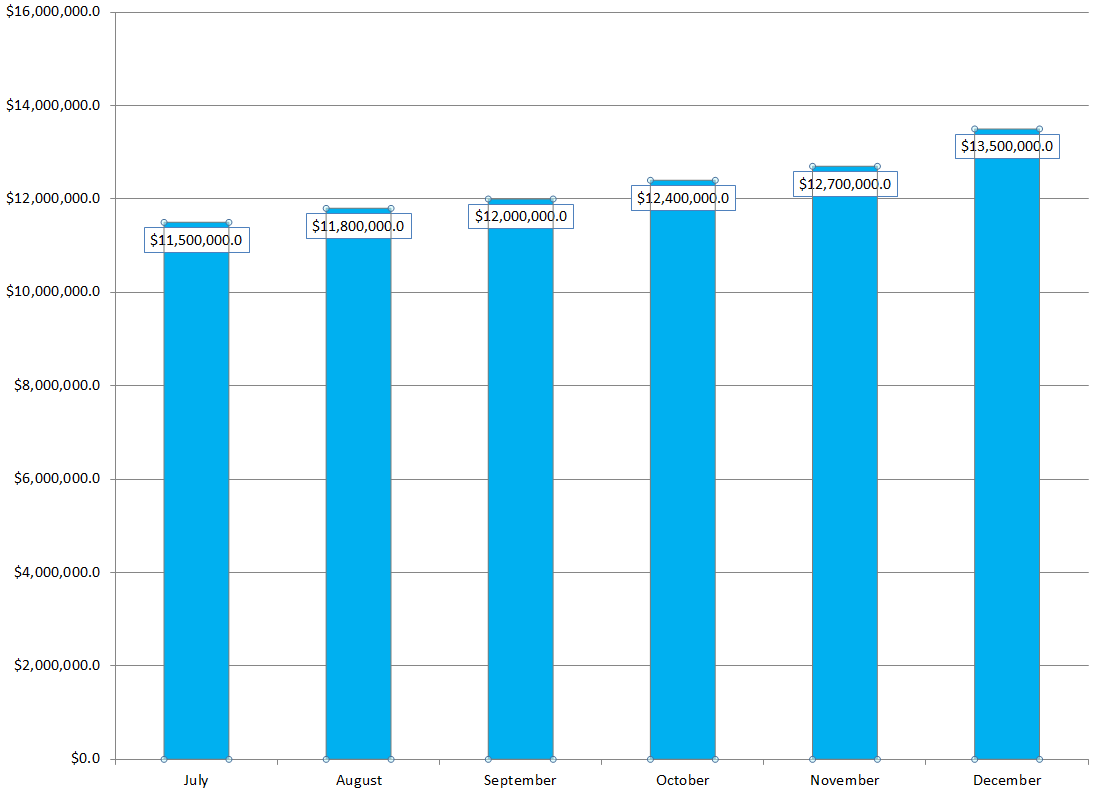
The KDP Select Global Fund has steadily increased from $11.5M to $13.5M from July thru December of 2015.

The KDP Select Global Fund has committed $12M for February, which makes sense, as December and January are likely to benefit more from holiday Kindle sales.

But there are some things that we don’t know:

  • We don’t know what the KDP Select Global Fund will do starting in March. It’s possible that the KDP Select Global Fund will start diminishing. But then again, that’s always been possible.
  • We don’t know how many customers subscribe to Kindle Unlimited. If Amazon is selling more subscriptions at a faster rate than the KDP Select Global Fund is increasing, then Amazon is increasing its profits. But they could have been doing that all along. How are we to know?
  • It’s possible that the KENPC has dropped a few % overall so that Amazon could prevent the per-page rate from dropping further (or maybe even increase it a little). But the number that affects Amazon’s profits is the KDP Select Global Fund. Whether they increase or decrease the KENPC, they are still paying $12M overall in February. Changing the KENPC just affects the per-page rate and how the $12M is distributed; it doesn’t impact Amazon’s share at all.

Here’s my own personal opinion: KENPC v2.0 was introduced to help prevent authors from gaming the system, and it unfortunately affects everyone’s books in different ways.

(It’s also possible that Amazon is losing money on Kindle Unlimited, at least directly. This program might be a loss leader. Once customers get in the habit of coming Amazon, they start buying other products at Amazon, too.

That’s an important consideration. The main thing Amazon probably wants to do with Kindle Unlimited is keep both readers and authors engaged. Amazon may make much more profits by getting both readers and authors in the habit of visiting Amazon regularly than it could make by adjusting KENPC or per-page rates.)

PLEASE TAKE THIS QUICK KENPC SURVEY

Have multiple books? You can take the survey once for each book.

Write happy, be happy. 🙂

Chris McMullen

Copyright © 2016

Chris McMullen, Author of A Detailed Guide to Self-Publishing with Amazon and Other Online Booksellers

Click here to view my Goodreads author page.

  • Volume 1 on formatting and publishing
  • Volume 2 on marketability and marketing
  • 4-in-1 Boxed set includes both volumes and more
  • Kindle Formatting Magic (coming soon)

Follow me at WordPress, find my author page on Facebook, or connect with me through Twitter.

Comments

Click here to jump to the comments section.

KENPC v2.0 Amazon KDP Changes Normalized Page Counts (February 1, 2016)

Images from ShutterStock.

Images from ShutterStock.

KENPC v2.0 February 1, 2016

Amazon KDP changed how it determines the Kindle Edition Normalized Page Count (KENPC).

This affects Kindle e-books enrolled in KDP Select, which can be borrowed via Kindle Unlimited and Amazon Prime.

KDP Select books borrowed through Kindle Unlimited or Amazon Prime pay by the page read, where a Kindle Edition Normalized Page (KENP) is determined based on the book’s KENPC.

(This has no impact on royalties earned through sales, just borrows.)

On February 1, 2016, the method that Amazon uses to compute the KENPC changed.

The new value of KENPC is called KENPC v2.0.

Visit your KDP Bookshelf and click the Promote and Advertise button next to a title to see what its new KENPC is.

According to Amazon, on average the KENPC has changed by 5% or less.

I checked several of my books, which had KENPC’s ranging from 170 to 2039, and the KENPC v2.0 was nearly identical to the original KENPC.

So my books were virtually unaffected by this. I’m curious about your experience with the KENPC change. Is it significant?

One notable change reported by Amazon is that books with a KENPC exceeding 3000 will now be capped at 3000. (When a customer reads 100% of those extremely long books, the author actually earns more from a single book read than the monthly subscription cost.) This only affects a few books, like encyclopedias (which could be broken down into smaller pieces…).

If you want to read the KDP help page describing KENPC v2.0, you can find it here:

https://kdp.amazon.com/help?topicId=AI3QMVN4FMTXJ

Write happy, be happy. 🙂

Chris McMullen

Copyright © 2016

Chris McMullen, Author of A Detailed Guide to Self-Publishing with Amazon and Other Online Booksellers

Click here to view my Goodreads author page.

  • Volume 1 on formatting and publishing
  • Volume 2 on marketability and marketing
  • 4-in-1 Boxed set includes both volumes and more
  • Kindle Formatting Magic (coming soon)

Follow me at WordPress, find my author page on Facebook, or connect with me through Twitter.

Comments

Click here to jump to the comments section.

Warning Messages for Errors in Amazon Kindle e-Books

Quality Control Amazon

KINDLE E-BOOKS WILL HAVE ERROR MESSAGES

This rumor has been going around for a week or so. When I first saw this rumor, my first thoughts were:

  • Where is the PROOF?
  • Why hasn’t Amazon provided any information about this?
  • Let’s get more information, preferably from Amazon itself, before we PANIC and WORRY.

This morning I learned that Amazon HAS provided much updated information about quality issues, right on their KDP help pages:

Click here to view the KDP help page describing error messages.

ACCORDING TO AMAZON KDP

A few quotes from this KDP help page are quite illuminating.

This new quote appearing on the KDP help page provides evidence that, in some cases, Amazon will, in fact, post error messages on the product page:

“A moderate amount of Distracting or Destructive Issues can result in the book remaining available for sale, but with a temporary quality warning displayed on the detail page of the book on Amazon.com until corrections are made.”

The KDP help page includes this quote in the opening paragraph:

  • “If readers tell us about a problem they’ve found in your book, we will make sure you know about it.”
  • So we see that Amazon will be contacting authors/publishers to notify them about problems that readers have reported.

Note that the same sentence also ends by saying that Amazon will “point you in the right direction to get the problem fixed.” This suggests that there won’t be instant action, but that Amazon KDP will contact the author/publisher, giving the author/publisher a chance to resolve the problem.

But if the author/publisher doesn’t resolve the problem, here is the worst-case scenario, also quoted from the KDP help page:

  • “Because Critical Issues significantly impact the reading experience, any Critical Issue will result in the book being removed from sale until the correction is made.”
  • This quote specifically refers to Critical Issues, as determined by Amazon.
  • Authors/publishers will want to communicate with Amazon and work to resolve any issues to Amazon’s satisfaction to avoid CFQI (customers facing quality issues) notices and to avoid having the book removed from sale.
  • Authors/publishers will also want to ensure that formatting, spelling, and grammar are correct before publishing.

I know there is much concern among authors regarding SPELLING mistakes. Take some comfort in this quote from the KDP help page:

  • “Sometimes improper or dialectic spellings are intentionally used by the author. These are not considered errors. Common examples would include character dialogue. Spelling differences which occur between US and British English are not considered errors.”
  • So we shouldn’t be worried about spelling differences between the US and the UK.
  • And we shouldn’t be worried about made-up names.
  • Note that it doesn’t say that a few typos will be considered a Critical Issue. Maybe there are, and maybe there aren’t, cases where typos may be considered a Critical Issue. But the help page doesn’t clarify this. It is clear that Amazon wants you to correct any known typos. But the help page doesn’t spell out exactly what the consequences will be for not fixing them. (Maybe a customers-facing-quality-issues notice. But that’s just speculation right now.)

Here is a sample of the kinds of errors that Amazon is looking at:

  • typos
  • unsupported characters
  • image quality (like unreadable text)
  • table issues (like content that goes off the page on some devices)
  • links (like those that don’t function properly)
  • even “disappointing content” is on the list
  • see the complete list here: https://kdp.amazon.com/help?topicId=A1MMQ0JHRBEINX

BUT WHAT AMAZON HASN’T SAID (YET)

This KDP help page doesn’t say:

  • that any notices will be posted on the product page (that could happen; it just isn’t mentioned on the help page at this point)
  • except for Critical Issues, what will happen (e.g. if there are a few typos, it doesn’t outline exactly what will or won’t happen)
  • whether or not things like typos can be construed as Critical Issues (maybe they can, maybe not; the help page does mention a few specific Critical Issues, but doesn’t clarify this with regard to spelling)

Will they post error messages on the product page? Under what circumstances will they do this? Under what conditions will they remove a book from sale?

This remains to be seen to some extent. It does state that Critical Issues will result in taking down the book until the issues are resolved. But otherwise, we are left to speculate.

It seems reasonable that Amazon would first contact the author/publisher, allow a reasonable period for the issues to be resolved, and allow for a possible response with a detailed explanation.

A few authors have reported receiving emails from Amazon regarding spelling mistakes. We know that Amazon has sent emails about spelling mistakes for the past few years, but a few authors who have received them recently seem to make it look like the nature of the email has changed recently. But I guess we won’t know for sure until (A) Amazon announces such a change publicly or (B) we happen to receive one of those emails.

ABOUT TYPOS AND SPELLING MISTAKES

Don’t panic yet over all the worst-case scenarios that might pop into your head.

Let’s see how it goes first.

If you’re a UK writer and you’re worried about American readers complaining about differences in spelling (and vocabulary), you shouldn’t be. It says very clearly on the KDP help page that these aren’t considered spelling errors.

If you’re a fantasy author and you’re worried about made-up names for monsters you’ve created, at this point I see no reason for you to panic.

This probably isn’t the same thing as the list of possible spelling mistakes that you receive when you upload your content file. Maybe Amazon will use an automated spellchecker to aid in their assessment, but it won’t be purely automated: The KDP help page specifically refers to mistakes that “readers tell us about,” so readers will be involved to an extent.

It also appears that a human being will be involved from Amazon’s end, to verify the issues and to send an email notification to the author/publisher.

Sure, a human being can misinterpret something. But it won’t do any good to panic now. Let’s not think of all the ways that a human being might misinterpret an author’s intentions.

How many typos is too many? Does it really matter if it’s 5, 15, or 25 typos in 50,000 words?

If Amazon discovers and verifies that there are mistakes in your book, why wouldn’t you fix them? Every typo that gets fixed benefits readers…

IS THIS GOOD OR BAD?

The benefits are clear:

  • Improve customer satisfaction.
  • Improve the perception of Kindle e-books.
  • Improve the self-publishing brand.

In comparison, I think the “bad” may seem relatively minor:

  • In most cases, it just causes a minor inconvenience to the author to make the changes and resubmit.
  • In rare cases, it might be more involved. For example, a richly formatted book created from a PDF using the Kindle Textbook Creator might require more work to fix a few typos.
  • If an author shelled out big $$ for professional e-book conversion and just has a .mobi or epub file to work with, it might not be so easy to fix a few typos. It depends: Some professional formatters are quite reasonable and oriented around author satisfaction.
  • There is possible abuse, but I think overall Amazon will be reasonable. Amazon’s goal is clearly to improve customer satisfaction, but without significantly disrupting the authors who supply valuable content.

Realize that we don’t know all the details yet.

Right now, what we know from Amazon is posted on this KDP help page, and it doesn’t answer every question that we might have.

And some of the rumors out there include details that aren’t addressed on that KDP help page.

It seems reasonable that (except for Critical Issues) Amazon KDP would first notify the author/publisher of the issue, and give the author/publisher a reasonable chance to correct the problem before taking any drastic action.

The customer is paying money for Kindle e-books, and we all want the customers to have positive reading experiences that encourage them to read more Kindle e-books.

And as readers ourselves, we want to have positive reading experiences when we read Kindle e-books.

That seems like a reasonable goal, and I expect Amazon to be reasonable in helping authors reach that goal.

SUGGESTIONS

Find out which email address you have associated with your KDP publishing account. Monitor this email address. Periodically check that you’re not missing important emails in your SPAM filter. If any of your books have quality issues, you should expect to hear something from Amazon KDP.

Periodically check the KDP community forum, Kindle Boards, or another place where authors often share their experiences. This way, you might learn from the experience of any other authors who deal with quality notices from Amazon KDP.

Don’t worry about the what-if’s. Focus on writing and marketing. Try to write, format, and publish the best book you can.

Write happy, be happy. 🙂

Chris McMullen

Copyright © 2016

Chris McMullen, Author of A Detailed Guide to Self-Publishing with Amazon and Other Online Booksellers

Click here to view my Goodreads author page.

  • Volume 1 on formatting and publishing
  • Volume 2 on marketability and marketing
  • 4-in-1 Boxed set includes both volumes and more
  • Kindle Formatting Magic (coming soon)

Follow me at WordPress, find my author page on Facebook, or connect with me through Twitter.

Comments

Click here to jump to the comments section.

NEW: Share a Kindle Instant Preview

Instant Preview Link

KINDLE INSTANT PREVIEW

Better than a link.

Better than a cover.

Visitors can now start reading your book immediately, without having to leave your website.

It’s the new Kindle Instant Preview.

FEWER CLICKS

Every click loses traffic. It’s a fact of marketing.

Plus it’s hard to send people offsite. They’re busy doing one thing. “Hey! Stop what you’re doing. Go somewhere else instead.” Well, you might throw in a “PRETTY PLEASE.”

Now you can overcome both obstacles.

With Kindle Instant Preview, customers can read the sample of your Kindle book without having to leave your website.

If they like the sample, a direct link will take them to the purchase.

If they need a Kindle app, a link is included for that, too.

THERE’S MORE

Font sizes are adjustable, too.

Even better: Amazon will pay you to use Kindle Instant Preview.

You can use Amazon Associates when you use Kindle Instant Preview.

You then earn commissions on sales you drive from your website.

HOW TO USE KINDLE INSTANT PREVIEW

It’s easy.

Find your Kindle e-book on Amazon.

Look for the Embed link near Share and social media (FB, Twitter) icons near the pricing info.

Click Embed.

If your site gives you HTML freedom, choose the Embed option (instead of Link).

For example, with GoDaddy’s Website Builder, the last tool on the list is HTML.

Click the See More Options link. If the default size doesn’t work for you, here is where you can change it (but ensure that the aspect ratio remains the same).

Click the Add Amazon Associates ID link to earn money for sales that you drive to Amazon (even if the customer buys something else instead, like a Kindle Fire).

The Buy Button lets visitors go straight to purchase.

Even using Amazon Associates with it is easy. Once you sign up for it. Find your Tracking ID.

Instant Preview Open

SEE A SAMPLE OF KINDLE INSTANT PREVIEW IN ACTION

I put a Kindle Instant Preview of my book on the fourth dimension on my other website.

You can check it out by clicking either the image or the link below:


When you get there, find what looks like the front cover of my book on the fourth dimension.

Note the Read Preview button at the bottom (and the Buy button).

Click the image itself if you want to see what happens.

ANY DRAWBACKS?

Unfortunately, it doesn’t seem to be working with fixed format books.

So if you used the Kindle Kids’ Book Creator or the Kindle Textbook Creator, for example, it may not work for you.

Write happy, be happy. 🙂

Chris McMullen

Copyright © 2016

Chris McMullen, Author of A Detailed Guide to Self-Publishing with Amazon and Other Online Booksellers

Click here to view my Goodreads author page.

  • Volume 1 on formatting and publishing
  • Volume 2 on marketability and marketing
  • 4-in-1 Boxed set includes both volumes and more
  • Kindle Formatting Magic (coming soon)

Follow me at WordPress, find my author page on Facebook, or connect with me through Twitter.

Comments

Click here to jump to the comments section.

Kindle Unlimited Pages Read & Global Fund Trends from July, 2015 thru December, 2015

KU Trends Jan 2016 GF PR

KINDLE UNLIMITED FOR DECEMBER, 2015

First, let’s look at the Kindle Unlimited payments for December, 2015. Then we’ll look at trends for the past six months.

What did Kindle Unlimited pay for pages read in December of 2015?

Kindle Unlimited paid $0.00461 per KENP page read in the United States in December, 2015. That’s a 6.3% drop compared to $0.00492 per page in November.

However, this was compensated as…

The KDP Select Global Fund was $13.5M for December, 2015. That’s a 6.3% increase.

The KENP pages read continue to drop somewhat, while the KDP Select Global Fund continues to increase significantly.

This suggests that:

  • More readers are joining Kindle Unlimited and/or on average they are reading more pages.
  • More books are having more pages read each month, on average.
  • Kindle Unlimited is continually increasing its share of the total e-book market.
  • But while Kindle Unlimited readers and pages read are on the rise, they payment per page has been dropping.

The holiday season may have impacted both the payment for pages read and the KDP Global Select Fund.

According to a December 1 press release, Amazon had a record Black Friday weekend for the sale of Amazon devices, over 3 times the previous year. Amazon had several new devices out and really pushed them.

So perhaps Kindle Unlimited subscriptions and pages read were both pushed upward considerably during December, and if so, perhaps the payment for pages read will settle down a little in the near future.

Another important figure to keep in mind is that over 40,000 books are added to Kindle Unlimited each month. There are now approximately 1.2M books in Kindle Unlimited.

More books means greater selection, which may help to attract more customers. (Indeed, the Global Fund trends suggest this is happening.)

The competition probably helps more than it hurts, e.g. through customers-also-bought lists. When customers finish one Kindle Unlimited book that they enjoy, they tend to search for another like it.

KINDLE UNLIMITED BREAKDOWN BY COUNTRY

Here is a breakdown of how much Kindle Unlimited paid per page read in various countries:

  • United States: $0.00461 per page (US dollars). That’s a drop of 6.3% from November’s payment of $0.00492.
  • United Kingdom: £0.00306 per page (British pounds). That’s also a drop of 6.4% from November’s £0.00327.
  • Germany: €0.00389 per page (Euro). That’s a drop of 8.5% from November’s €0.00425.
  • France: €0.00429 per page (Euro). That’s a drop of 6.3% from November’s €0.00458.
  • India: ₹0.1008 per page (Indian rupees). That’s a drop of 6.2% from November’s ₹0.1075.

It pretty consistently dropped about 6.3%.

KINDLE UNLIMITED PAGES READ TRENDS JULY THRU DECEMBER, 2015

The following graph and table show the trends in Kindle Unlimited payments for KENP pages read from July, 2015 thru December, 2015.

KU Trends Jan 2016 PR

  • $0.0058 per page in July, 2015
  • $0.0051 per page in August, 2015
  • $0.0051 per page in September, 2015
  • $0.0048 per page in October, 2015
  • $0.0049 per page in November, 2015
  • $0.0046 per page in December, 2015

KDP GLOBAL SELECT FUND JULY THRU DECEMBER, 2015

The following graph and table show the trends in the KDP Select Global Fund from July, 2015 thru December, 2015.

KU Trends Jan 2016 GF

  • $11.5M in July, 2015
  • $11.8M in August, 2015
  • $12.0M in September, 2015
  • $12.4M in October, 2015
  • $12.7M in November, 2015
  • $13.5M in December, 2015

Write happy, be happy. 🙂

Chris McMullen

Copyright © 2016

Chris McMullen, Author of A Detailed Guide to Self-Publishing with Amazon and Other Online Booksellers

Click here to view my Goodreads author page.

  • Volume 1 on formatting and publishing
  • Volume 2 on marketability and marketing
  • 4-in-1 Boxed set includes both volumes and more
  • Kindle Formatting Magic (coming soon)

Follow me at WordPress, find my author page on Facebook, or connect with me through Twitter.

Comments

Click here to jump to the comments section.

New Look Inside at Amazon for Fixed Format Books (Kindle Textbook Creator, Kids’ Book Creator)

101 Teen Word Scrambles: http://amzn.com/B019JLJB00

101 Teen Word Scrambles: http://amzn.com/B019JLJB00

LOOK INSIDE FOR THE KINDLE TEXTBOOK CREATOR

Yesterday, I encountered a pleasant surprise shortly after publishing my mom’s latest word scramble e-book (101 Teen Word Scrambles).

We used the Kindle Textbook Creator because:

  • The letters are scrambled across 2 or 3 lines, so it’s a bit of a geometric formation.
  • The letters should ideally display the way that images do. Letters tend to pixelate in Kindle images, except when using the Kindle Textbook Creator (as long as you just leave the text as text, and don’t turn them into images).
  • It seemed ideal to have one image puzzle per page, a large image using large letters, for easy reading on any device.
  • Images usually take up a ton of memory, but they are greatly reduced when using the Kindle Textbook Creator.
  • It automatically centers images on each page.

In the past, I’ve always been informed by KDP that e-books produced using the Kindle Textbook Creator won’t generate a Look Inside. (Though it was always possible to place a request so that the print Look Inside would show in its place.)

However, the e-book I published yesterday generated its own Kindle Look Inside automatically. (This book doesn’t have a print edition, nor does it have an ISBN—it just has the free ASIN assigned by Amazon.)

Most of my older e-books published using the Kindle Textbook Creator still don’t show a Look Inside for the Kindle edition, but I expect this feature to roll out over the course of the coming weeks.

THANK YOU, AMAZON!

I’ve heard reports from authors who use the Kindle Kids’ Book Creator that a Look Inside can now generate for those, too.

Let me emphasize the word “can,” and this word may also apply for the Kindle Textbook Creator. Just because it can be done and it has be done, doesn’t mean it automatically will be done. First of all, there can be delays of weeks in generating a Look Inside regardless of how you publish; there is some luck involved in the timing. Secondly, if it doesn’t generate in a couple of weeks, you can place a request through support. It might help to provide the ASIN of an e-book showing an example where there is clearly a Look Inside of the Kindle edition of an e-book that was definitely published using the same tool as you used, either the Kindle Textbook Creator or the Kindle Kids’ Book Creator.

The Kindle Textbook Creator isn’t ideal for “all” types of e-books. You can find a discussion of the pros and cons of using this tool, and tutorials for how to use the Kindle Textbook Creator and the Kindle Kids’ Book Creator (both are free tools available straight from Amazon) at the following links (to my detailed free “how to” articles):

SAMPLE E-BOOKS

Here are a few sample e-books illustrating the Kindle Textbook Creator. (All of the following e-books are available with Kindle Unlimited, Amazon Prime, and of course good old-fashioned sales. However, I included the examples in case you’re curious about the Look Inside or how these tools work, not because I thought you might be shopping for e-books at the moment.)

The following e-book (which is presently 99 cents) illustrates that a Look Inside can automatically generate for e-books published using the Kindle Textbook Creator. It’s a simple design. (Carolyn Kivett also has a teen word scramble book in print, with many more puzzles, which can be found here; and she has also published several other word scramble books, both in print and for Kindle.)

101 Teen Word Scrambles by Carolyn Kivett

Below is an example that looks more like a textbook. The Look Inside is still showing for the print edition (though that may change in the near future, so by the time that you read this, it could be displaying for the Kindle edition).

The last example is fully illustrated. (My other astronomy e-book, which can be found here, is reflowable and offers both greater range and depth.)

KINDLE KIDS’ BOOK CREATOR vs. KINDLE TEXTBOOK CREATOR

Here is the basic difference between these two free Amazon tools:

  • The Kindle Kids’ Book Creator allows for pop-up text, which is nice for most illustrated children’s books. It also allows for two-page spreads. It is possible to edit the HTML, if you know what you’re doing, e.g. to add links.
  • The Kindle Textbook Creator is designed for pinch-and-zoom. It doesn’t allow for pop-up text (nor for two-page spreads). You can’t edit the HTML or add links at all. Update: The latest version of the Kindle Textbook Creator now supports hyperlinks (provided that you upload a PDF with fully functional hyperlinks).
  • The Kindle Textbook Creator generally produces much smaller files, saving you on the delivery fee.
  • Both are convenient because you can upload a PDF. The PDF generally converts very well. The text usually comes out crisp with the Kindle Textbook Creator. (PDF ordinarily doesn’t convert well to Kindle, but these two tools are an exception to the rule.)
  • Neither is suitable for a book like a novel, that mostly consists of text.

Write happy, be happy. 🙂

Chris McMullen

Copyright © 2015

Chris McMullen, Author of A Detailed Guide to Self-Publishing with Amazon and Other Online Booksellers

Click here to view my Goodreads author page.

  • Volume 1 on formatting and publishing
  • Volume 2 on marketability and marketing
  • 4-in-1 Boxed set includes both volumes and more
  • Kindle Formatting Magic (coming soon)

Follow me at WordPress, find my author page on Facebook, or connect with me through Twitter.

Comments

Click here to jump to the comments section.