What Size Is Best for the Kindle Book Cover?


KINDLE COVER SIZE

You must choose both the size and the shape of your Kindle book cover:

  • What aspect ratio is best?
  • How many pixels should each dimension be?

ASPECT RATIO

You might think that the aspect ratio depends on the device. Not so fast! Which matters more?

  • How the cover appears among other thumbnails.
  • How the cover looks on the device itself.

Note that customers won’t even see the cover on the device until they buy the book. (And even then, the ‘start’ location will bypass the cover.)

Therefore, it seems more important to consider how the cover looks as a thumbnail.

So here is my suggestion:

  • Choose an aspect ratio that will look great as a thumbnail when customers are shopping.
  • Choose the pixel dimensions based on the device(s) that you’re targeting.

Of course, the dimensions must match the aspect ratio. The second point really means, “How many pixels should the height be?” (Once you know the aspect ratio and height, the width follows.)

THUMBNAIL

How do customers shop for Kindle books?

That’s the question that determines what aspect ratio will work best for the thumbnail.

Really, you want to ask how ‘your target audience’ will shop for Kindle books. That’s even better than knowing the general answer.

However, with most target audiences, customers shop for Kindle books a few common ways:

  • Even when customers own a Kindle device, they often prefer to browse for Kindle books at Amazon.com. It’s convenient, there are more options, you see more results on the screen, and you can send the book wirelessly to your device.
  • Many customers also browse for Kindle books on the device itself, which may be a Fire tablet or an iPad, for example. These thumbnails can be quite small, and on some devices they will show in grayscale.
  • Other customers will first see your Kindle book cover on your blog, advertised promotion, giveaway, bookmark, or other marketing tool.

What does this mean? It means that your Kindle book cover has to look good with a variety of possibilities in mind:

  • It should look great as a thumbnail at Amazon.com.
  • It should still look great as a smaller thumbnail on a Fire, iPad, iPhone, etc.
  • It should still look great as a black and white thumbnail on a Paperwhite, Kindle DX, etc.
  • It should also look great as a thumbnail on your website, in an advertisement, in a contest, on a bookmark, etc.

Actually, that’s only half the battle:

  • You want your book cover to look great all by itself.
  • You also want your book cover to be effective when it appears among several other thumbnails.

The thumbnail isn’t the only thing that matters. The full-size image matters, too.

But nobody will even check out your full-size image until the thumbnail does its job.

Once you find a design that works for your thumbnail, then you work toward perfecting the full-size image.

RESEARCH

So how do you decide what works best?

Go shopping. You don’t have to buy anything. Go window shopping:

  • Browse Kindle book covers at Amazon.com on your pc or laptop.
  • Also browse Kindle book covers on a Fire tablet. Borrow one, if necessary.
  • Also browse Kindle book covers on a black-and-white Kindle device.

Here are some important considerations (remember to look at the Kindle editions):

  • Note books where the title was very easy to read.
  • Note books where the central image really stood out.
  • Note books that had very clear titles and strong central images.
  • Note books where the cover looked great in color, but not in grayscale.
  • Note books where the cover looked great in grayscale, too.
  • What’s most common among books very similar to yours?

This will help you choose a font style and size that read well even in small thumbnails.

This will also help you choose a color scheme that creates great contrast both in color and in grayscale.

But we still have the issue of selecting the best aspect ratio.

So here are more points to consider:

  • Which aspect ratios look better to your eye? Does wider or narrower look better? (What you really want to know is, “Which looks better to your target audience?”)
  • Do wider or narrower covers seem out of place among other thumbnails?
  • Is it easier to read the title on wider or narrower thumbnails?

RECOMMENDATIONS

Let’s begin with Amazon’s recommendation.

The KDP help pages recommend an aspect ratio of 1.6 for your cover. This means that the height is 60% larger than the width.

  • This is ideal for fitting the cover in a Fire device. But no customers will see how it looks on your device until the thumbnail draws them in. So it’s more important to choose the right aspect ratio for your thumbnail than for the device.
  • On the other hand, multitudes of authors are using Amazon’s recommended 1.6 aspect ratio for their covers. So your cover may seem out of place (perhaps not in a good way) if you choose a different aspect ratio.

Amazon has recently raised its suggestion for pixel size to 4500 pixels on the longest side.

If you want an aspect ratio of 1.6 and 4500 pixels for the height, your cover should be 2813 x 4500 pixels.

Amazon will actually accept up to 10,000 pixels on the longest side, but that may be overkill.

A smaller cover may be fine, as most devices don’t have more than 2000 pixels across their screens. (Perhaps Amazon’s recommendation is partly looking toward the future.)

So 1250 x 2000 pixels or 1563 x 2500 pixels may be sufficient, at least until higher-resolution devices become much more common.

However, Amazon’s recommendation receives some criticism, such as:

  • An aspect ratio of 1.6 is very narrow.
  • It’s much narrower than most traditionally published print books, with which most readers are familiar with.
  • There is less room across on which to place your title. Wider covers make it easier to achieve a very readable title.
  • If you also publish in print, you probably can’t just use the front cover of your print book for your Kindle book if you wish to have an aspect ratio of 1.6.

Thus, other aspect ratios are also fairly popular.

An aspect ratio of 1.5 may have some merit:

  • It’s not as narrow as Amazon’s recommendation.
  • It provides a little more width for the title.
  • It matches the aspect ratio of the fairly popular 6″ x 9″ book (which is convenient if you publish a paperback of this size at CreateSpace, for example).
  • It will only be a little wider than the multitude of covers that follow Amazon’s recommendation, so it probably isn’t wide enough to seem out of place.

For an aspect ratio of 1.5, your cover could be 3000 x 4500, 1667 x 2500, or 1333 x 2000, for example.

If 1.5 doesn’t seem wide enough for you, a wider alternative is an aspect ratio of 1.33. This matches a printed 6″ x 8″ book, for example.

(Of course, inches are irrelevant to e-book cover design. What matters is the pixel count.)

An aspect ratio of 1.33 is wide enough to stand out among the popular 1.6 (and not necessarily in a good way, although to some it seems better—mostly, it may seem out of place if it’s badly outnumbered in thumbnail searches: that’s the key point, see what’s common among Kindle books very similar to yours). Going even wider than 1.33 is risky. Especially, landscape covers tend to stand out like a sore thumb.

For an aspect ratio of 1.33, your cover could be 3383 x 4500, 1880 x 2500, or 1504 x 2000.

PROMOTION

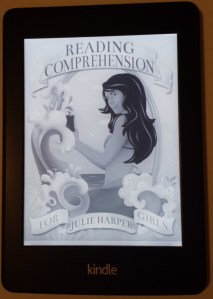
As you can see above, I used a picture of the Kindle book cover (as seen on the Paperwhite) for Julie Harper’s new release, Reading Comprehension for Girls, for this post. The cover was designed by Melissa Stevens (at theillustratedauthor.net).

It includes 48 fun short stories divided in 3 parts. Each story is followed by 4 multiple choice questions; answers can be found in the back. The print edition has 130 pages.

Chris McMullen

Copyright © 2014 Chris McMullen, Author of A Detailed Guide to Self-Publishing with Amazon and Other Online Booksellers

  • Volume 1 on formatting and publishing
  • Volume 2 on marketability and marketing

New Kindle Fire HD Kids Edition (& 4 More)

KINDLE FOR KIDS

Amazon released five new Kindles, including the new Kindle Fire HD Kids Edition.

(The other four new Kindles include a low-priced Fire, a new Fire HDX, an inexpensive Kindle with Touch, and a new Kindle Voyage said to be, “Our most advanced Kindle—passionately crafted for readers.”)

Amazon says, regarding the Fire HD Kids Edition, “If they break it, we’ll replace it. No questions asked.” It comes with a 2-year worry-free guarantee.

It’s an HD tablet with a 6″ display. It also comes with some enticing features:

  • Kid-proof case for durability. Choose blue, green, or pink.
  • Parental controls. This helps with age-appropriate content, limiting screen time, and educational goals, too.
  • One year of Amazon FreeTime Unlimited. (Not to be confused with Kindle Unlimited.) This is 5000 kid-friendly movies, books, TV shows, apps, and games from Disney, Nick Jr., Sesame Street, and more. I also see Spider-Man, Superman, Spongebob Squarepants, Curious George… It’s all good stuff.
  • Two-year worry-free guarantee.

The bad news is that it’s available for pre-order. The release date is October 21, 2014.

GOOD FOR AUTHORS

Children’s authors who have Kindle editions benefit from this, as it encourages more parents to let their children use Kindles.

Keep in mind that many kids will mostly be using Amazon FreeTime Unlimited, which does not include Kindle Unlimited.

But some will be looking for reading material outside of Amazon FreeTime Unlimited.

And as the kids get older, they may get into the habit—the Kindle reading habit. And they may gain Kindle reading time.

Some parents will also realize the value of Kindle Unlimited: A huge library of bedtime stories, reading books, homework help, etc. for $9.99 per month. This may benefit KDP Select authors.

Chris McMullen

Copyright © 2014 Chris McMullen, Author of A Detailed Guide to Self-Publishing with Amazon and Other Online Booksellers

  • Volume 1 on formatting and publishing
  • Volume 2 on marketability and marketing
Follow me at WordPress, find my author page on Facebook, or connect with me through Twitter.

Children’s Categories & Marketing @ Kindle

Kindle Age

INTRODUCTION

This is a two-part post:

  1. First, I will discuss a cool new feature that Kindle Direct Publishing (KDP) just introduced to help categorize children’s Kindle books.
  2. Next, I will share an idea to help market children’s Kindle books.

AGE & GRADE LEVELS

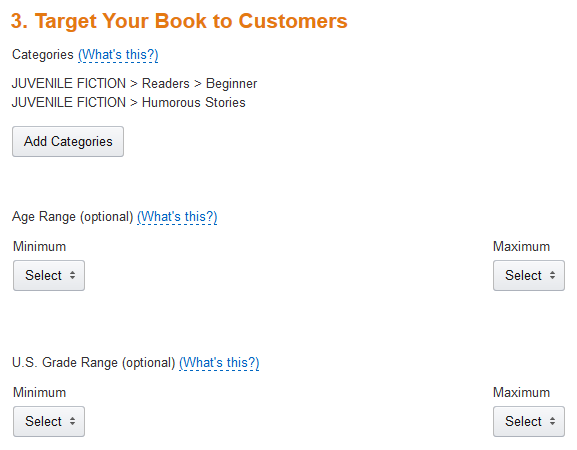
As of now, Step 3 of the KDP publishing process allows you to select an Age Range and a separate US Grade Range.

Tip: Open up your children’s, tween, and teen Kindle books on your Bookshelf and update Step 3. You’ll need to republish for this to take effect.

This will help give your juvenile book added visibility on Amazon:

  • Your book will show up when customers select one of the age group or grade level filters in Amazon search results.
  • You no longer need to waste a crucial keyword to get listed in the children’s age group categories. Tip: If you used a keyword to accomplish this in the past, you can now change that keyword to something else, if you wish.
  • These age group and grade level settings apply to the Schools and Teaching store.
  • These settings are supposed to apply to the Children’s Kindle Book stores for both Amazon.com and Amazon.co.uk.

What about CreateSpace paperbacks? Well, it wouldn’t hurt our chances if several authors suddenly made this request. Hint, hint.

KDP has a table with suggestions for the different age groups: Click here to view it.

I love these new age group and grade level options at Kindle. I’ve been hoping for this for years, and I’m probably one of many authors who’ve requested it in my interactions with KDP. It’s a great opportunity for children’s e-book authors.

MARKETING IDEA

As you may know if you follow my blog, I had the opportunity to talk to members of the Kindle Educational Team a few weeks ago.

They are hoping to see more educators and authors who would like to educate via books publish helpful educational content on Kindle. They have recently reached out to authors to hear our perspective from the publishing end. These new age group and grade level options are one step toward accomplishing this.

So here is my idea:

Education covers many topics. One subject relates to most juvenile fiction stories: English. This includes reading, reading comprehension, writing, vocabulary, grammar, and so on.

Suppose you have a collection of short stories, poems, novellas, novel, or other children’s fictional work for children, tweens, or teens. If so, there is a simple way to improve the marketability of your children’s book:

  • Create some teacher- or parent-oriented resources for your book. I’ll list a few examples below to get your brain churning.
  • You could include these in your book, or you could add a page to your book describing free educational resources available on your blog or website, which parents or teachers could use to get educational value out of your stories. The latter option has the advantage of giving readers a reason to visit your blog and follow you (plus it doesn’t make your book resemble a textbook for kids just looking to enjoy fiction).
  • Your stories are still marketable as stories, but now they are also marketable as educational resources to parents, teachers, homeschool instructors, libraries, and other educators. The free resources become an added marketing tool.

Here are a few ideas for creating educational resources to go along with your story:

  • Add vocabulary definitions and exercises relating to your content.
  • Write questions that assess reading comprehension for your story.
  • Come up with essay questions relating to your book.
  • Make creative writing questions stemming from your story or characters.
  • Create a grammar worksheet to go along with your content.
  • For historical novels, you may be able to add history lessons and exercises.
  • For science fiction novels, you might be able to come up with related science questions and exercises.
  • If your protagonist is bilingual, there is an opportunity for language lessons.
  • If you can find ways that your book relates to one or more school subjects, this gives you more opportunities.

READ TUESDAY

You may be aware that I launched an event in 2013 called Read Tuesday, which debuted in December. You can check out the website here: readtuesday.com.

Read Tuesday is a Black Friday event just for books. One big goal of the event is to help inspire reading.

In 2014, I would like to add a special page highlighting juvenile books that include educational resources (either in the book itself, or free resources that readers can find on the author’s blog or website). So if you have such a book and you’re willing to participate in Read Tuesday 2014 (which requires having your book on sale that day), in addition to listing your book in the Read Tuesday catalog, there will be a special page to showcase juvenile books with free educational resources available. I think this may be a good way for Read Tuesday to help promote reading.

Chris McMullen

Author of A Detailed Guide to Self-Publishing with Amazon and Other Online Booksellers

  • Volume 1 on formatting and publishing
  • Volume 2 on marketability and marketing
Follow me at WordPress, find my author page on Facebook, or connect with me through Twitter.

Comments

Click here to jump to the comments section:

https://chrismcmullen.wordpress.com/2014/06/03/childrens-categories-marketing-kindle/#comments

Educating Kindle Customers

eReaders

Motivation

Most Kindle owners don’t fully understand what their Kindle devices can or can’t do.

Some customers leave negative reviews, where if they had simply known how to best utilize their devices, this negative experience might have been avoided. (There are also Kindle e-books that could be formatted better. In this post, I’m focusing on the former, not the latter.)

Some customers have implausible expectations for what a book might do. If they had reasonable expectations, they might be more easily satisfied with their purchases.

Authors have three choices:

  • Blame Amazon. Customer buying and reading experiences with Kindle will remain unchanged.
  • Ignore it. Nothing improves this way, either.
  • Help educate Kindle owners. In your marketing and even in your books, you have the opportunity to improve prospects for customer satisfaction.

You don’t need to setup a class to help educate Kindle owners:

  • Mention relevant notes in your Kindle e-books or even in the description. For example, if you have pictures that may look better zoomed in, you could explain that many e-readers (don’t assume the customer is using a Kindle) have a zoom option, then as an example you might mention how to zoom in on the Kindle Fire.
  • Include a short Kindle tutorial on your website. It needn’t be comprehensive; it could simply highlight a few important points that many Kindle customers aren’t familiar with. Focus on points that relate specifically to your books.
  • If a point may be particularly important for Kindle customers who buy your book, when you mention your book, you could include a short tip that may help Kindle owners get the most out of your book. Then you’re not just advertising your book, you’re also providing free help.
  • Have you read a book or tutorial that shows you how to make the most of your Kindle Fire? Review the book on your blog. Post a link to the book or tutorial on your sidebar.

Examples

Here are a few examples of things that some Kindle customers don’t know:

  • You can download a free app, Kindle for PC, to read any Kindle e-book, even if you don’t own a Kindle device. Suppose you publish a book full of colorful images. You might mention in the description that it’s best read on a device that supports color, then suggest Kindle for PC (with brief instructions, or where to find them, for how to download this free app and read a book with it) for those with b&w devices.
  • Did you know that you can double-tap on an image in the Kindle Fire to enlarge it? Then you need to click on the X to resume reading.
  • It’s possible to enable automatic book updates. From Amazon’s homepage, when logged in, place your cursor over Hello, Your Name, Your Account near the top right. Click Manage Your Content and Devices. Find Automatic Book Update on the left. Note: This doesn’t provide an update whenever the publisher (who may be the author) uploads a revised file. The publisher must first contact KDP, then KDP must verify that improvements were made, and KDP must decide it’s worth notifying customers. If you update your book and succeed in persuading KDP to notify customers of the update, you might want to let your fans know about this and how to get the update.
  • Want to clear the furthest page read? Visit your Kindle Library (similar to setting automatic book updates, explained in the previous step—simply pick this option from the list instead). Use the Actions button at the right.
  • Try not to laugh, but some customers actually don’t know that you can return a Kindle e-book in 7 days if you’re unhappy with the experience. Authors see returns (sometimes, too many) in their KDP sales reports, and therefore assume that all customers know how to return e-books. Yet many don’t realize that this is possible. Is this something you wish to advertise? Good question! On the one hand, if you already have too many returns, you may feel reluctant to encourage more of them. On the other hand, think of those customers who review books based on the first few pages. A percentage of those reviews are from customers who didn’t realize that they could have returned the book (while many also are from customers who already did return the book, or, worse, didn’t even buy it). Note that there appears to be some threshold, where if you return “too many” e-books you may lose this returnability option.
  • I was reading a Kindle e-book once where all of a sudden every other page was blank. At first I wondered how anyone could publish a novel with intermittent blank pages. Then I deduced that it wasn’t actually formatted that way. I powered my Kindle off, then when it restarted, the book didn’t have blank pages anymore. It surely wasn’t the publisher’s fault, and the problem turned out to be easy to fix at my end.

Authors, Too

It’s not just readers who may benefit from some Kindle education. Many authors can use this, too.

Keep in mind that some authors don’t react well to unsolicited advice given specifically to them. But most don’t mind learning something that was posted on social media (so long as they don’t suspect that their book was the motivation for the post). Yet there are some authors who openly ask for advice.

Try to learn what your options are before you publish. For example, did you know about the Kindle Comic Creator (which might be relevant for picture books other than just comics)?

About Me

Chris McMullen, Author of A Detailed Guide to Self-Publishing with Amazon and Other Online Booksellers

  • Volume 1 on formatting and publishing
  • Volume 2 on marketability and marketing

Follow me at WordPress, find my author page on Facebook, or connect with me through Twitter.

Kindle e-book Prices and Royalties

Prices

What Is the Best Kindle Price?

That’s the million-dollar question. The answer also varies from book to book.

A recent article from TechCrunch points out that the $9-10 price range is the most profitable list price for e-books in the United States, evaluating sales data for all books—i.e. it includes both traditionally and indie published e-books. Click here to check it. It’s short and makes some informative points for both US and UK pricing.

However, the article doesn’t make a few points that may be particularly significant for indie authors:

  • Thousands of traditionally published e-books are priced at $9.99 and sell frequently because the authors are quite popular. Think about it: If a hardcover is selling dozens of copies per day at $35 or if a trade paperback is selling frequently at $25, then $9.99 is an enticing e-book price.
  • Many e-books that would be priced between $10 and $20 are selling at $9.99 because the publisher actually makes a greater royalty with a $9.99 list price. Kindle offers a 70% royalty on books with a list price of $9.99, so the royalty on a $9.99 e-book can be as high as $6.99 (it will be somewhat lower due to the 15 cents per Mb delivery fee). A Kindle e-book priced at $19.99 draws the same royalty of $6.99 because the royalty rate is 35%. Think about it: Would you rather sell your book at $9.99 or $19.99 if either way the royalty will be $6.99? Therefore, the $9-$10 price range is selling many, many more e-books than other price ranges above and below this—it’s kind of like ten price ranges in the same slot.
  • Technical nonfiction—especially, textbooks—tends to sell for higher prices.

I’m not advocating cheap e-book prices. I’m just warning that e-book prices of $7.99 to $9.99 might not turn out to be as profitable as this article might suggest for newbie fiction authors.

Low Prices

The article also shows that many e-books sell at low prices. One reason is that there are tens of thousands of books selling for free, 99 cents, $1.99, and $2.99. These are very popular price points, especially among indie authors. New authors often feel that they have a better chance to get discovered with a more enticing price. Others use this strategically, hoping that readers will get hooked and check out the author’s other books.

There is something important to note about low prices:

  • Kindle e-books priced 99 cents to $2.98 earn a 35% royalty. A 99-cent e-book earns a royalty of 34 cents and a $1.99 e-book earns a royalty of 69 cents.
  • A Kindle e-book priced at $2.99 which qualifies (public domain books, for example, do not) for the 70% royalty and has a small delivery fee earn royalties of up to $2.09.
  • In this case, you would have to sell 6 times as many e-books at 99 cents as you would at $2.99 or you’re losing profits.
  • Similarly, you would have to sell 3 times as many e-books at $1.99 as you would at $2.99 just to break even.
  • Amazon seems to have made recent changes to the sales rank algorithm to factor in list price. This would make sense, as Amazon would prefer to sell 100 books at $2.99 than 100 books at 99 cents.
  • Books enrolled in KDP Select can benefit from Countdown Deals. Books priced under $2.99 aren’t eligible for Countdown Deals.

Perception

Most authors expect to sell more books at lower prices and fewer books at higher prices, but it doesn’t always work out that way. Many customers believe that you get what you pay for, and this perception affects the economics of e-book sales. Even if you do sell more e-books at a lower price, you might make more profit at a higher price (since you draw less royalty per sale at the lower price).

Some authors have actually raised their prices from $1.99 to $299 or $2.99 to $3.99, for example, and started selling books at a higher frequency. This doesn’t happen for all books, but it does happen for some.

It depends in part on the value that your book provides, how it appeals to the target audience, and on the buying habits of your specific subgenre or subcategory.

There are many customers who have been disappointed with e-books that they purchased for 99 cents to $2.99, who now shop for e-books priced from $3.99 to $6.99.

Another factor is marketing. If you market your book effectively and reach potential readers on a personal level, they may be willing to spend more money on your book.

Suggestions

Here are some things to consider when deciding on the price of your Kindle e-book:

  • Research books that are very similar to yours, including top sellers. Buyers will know what the typical price range is. If your book seems underpriced, they might wonder what’s wrong with it, and if it seems overpriced, it might not seem to be worth the money.
  • Consider the length of your e-book and the value it provides. Customers like to feel that they are receiving good value for their money.
  • Most e-book buyers want to save at least 50% off the print price.
  • Some buyers will also purchase both print and e-book editions through MatchBook. If you use MatchBook, set your list price high enough that the MatchBook price may seem like a compelling option.
  • A boxed set may help to create the perception of value. The $5.99 to $9.99 price point may be more profitable for a boxed set than for a single volume by a new fiction author. Ideally, the individual volumes would be priced so as to help the boxed set seem like a good value.
  • Technical nonfiction books that provide significant content are generally worth more to buyers.
  • If you succeed in selling multiple print books per day priced $20 or higher, you have much better prospects for selling e-books at a $9.99 list price.
  • Authors who will be signing up for Kindle Select have an incentive to price their e-books between $2.99 and $9.99 in order to take advantage of the Kindle Countdown Deal. This allows you to create a short-term sale to help stimulate sales.
  • Amazon’s algorithm for sales rank may currently factor in the list price. Only Amazon knows for sure, but some authors have expressed recently that this seems to be the case now, and this is consistent with my observations, too.
  • If you have several similar books for sale, a compelling price on one book may help to generate interest in your other books.
  • If you have a series, offering the first book cheap may help to hook readers in the series.
  • How professional does the book look, in terms of both content and formatting? A higher price does command higher expectations.
  • What is the demand for your book? If the content is very specialized, this may warrant a somewhat higher price.
  • What are your specific objectives? Is your goal to draw the most royalty? Is your goal to maximize your readership? Is your goal to get on a bestseller list? When a higher price may draw a greater net profit, if you’re more focused on sales than royalties, then a lower price may fit your objectives better.

Publishing Resources

I started this blog to provide free help with writing, publishing, and marketing. You can find many free articles on publishing and marketing by clicking one of the following links:

Chris McMullen, Author of A Detailed Guide to Self-Publishing with Amazon and Other Online Booksellers

Follow me at WordPress, find my author page on Facebook, or connect with me through Twitter.

Which Should Come First—Kindle or Paperback?

First

Unless you have a book where Kindle formatting is impractical, you should make both Kindle and paperback editions of your book.

Benefits of the Kindle Edition

  • You can make the Kindle edition much more affordable. If your price is $2.99 or higher, you can still draw a high royalty (70% minus delivery costs).
  • Many customers only read e-books.
  • It’s much cheaper for you to send out review copies.
  • There is no extra charge for color.

One reason not to create an e-book is if you have a book where this is impractical, such as a workbook where the reader needs to write down answers.

You should also consider publishing your e-book with Nook, Smashwords, Kobo, etc. The only reason not to do so if you feel that the benefits of enrolling in KDP Select outweigh the benefits of having your e-book available with several e-book retailers.

Benefits of the Paperback Edition

  • Some customers prefer to read print books.
  • Amazon will show your Kindle edition as a percentage off compared to the paperback edition (once the two editions are linked together).
  • Kindle’s new MatchBook program encourages the sale of both editions.
  • It’s convenient to edit your writing with the printed proof.
  • You get to experience the incredible joy of holding your baby in your hands.
  • Local bookstores and other retailers might be willing to stock your book. If nothing else, your friends and family will believe you really are an author.

Which Should You Publish First?

Once you decide to make both Kindle and paperback editions, you must decide which edition to publish first.

Most authors simply publish each edition as soon as it’s ready. Some authors prefer to format e-books and have the Kindle edition ready first; others love the art of formatting pages and have the paperback edition ready first.

That’s not necessarily the best course. Suppose you had both editions prepared, but neither was published yet. What’s the best thing to do? Should you release them simultaneously? Or is there a reason to publish one edition first?

Some authors who plan this—rather than simply first publish whatever happens to be ready first—choose to arrange preorders for the paperback edition using Amazon Advantage. They use preorders as part of their strategy for building buzz for the book’s release, and to help foster a strong sales rank and prospects for early reviews when the book is released. They then release the Kindle edition when the paperback goes live.

Once you have both Kindle and paperback editions available, you can have them linked. This creates an interesting possibility that was recently mentioned in the CreateSpace community forum: If your Kindle edition is available for sale now and linked to a paperback edition that’s on preorder, any reviews left by Kindle customers should, theoretically, show on your paperback’s product page, since the reviews are linked together. (Paperback customers can’t review the paperback edition until it goes live.)

There are two good reasons not to release both editions simultaneously:

  1. You gain visibility by having a book in the Last 30 Days and Last 90 Days categories on Amazon. This is based on your publication date. (Tip: Don’t enter any publication date at CreateSpace. That way, your book’s publication date will be the day you click Approve Proof. This maximizes your book’s visibility with the new release search filters.) Release one book 90 days prior to the other and you get 180 days of new release visibility out of one book.
  2. You have the opportunity to create double-buzz. Build buzz for one edition. Then a month after its debut, you have two months to build buzz for the other edition if it’s going live 90 days after the first.

You could release the Kindle edition first. At the same time, setup preorders for the paperback edition. Arrange the paperback edition to go live 90 days after the release of the Kindle edition. Make the publication date of the paperback edition when it goes live, so you get a total of 180 days visibility in the Last 90 Days category.

If you’re one of those authors who can publish two books per year, you can use this method to always have a book listed under Last 90 Days.

Publishing Resources

I started this blog to provide free help with writing, publishing, and marketing. You can find many free articles by clicking one of the following links:

Chris McMullen, Author of A Detailed Guide to Self-Publishing with Amazon and Other Online Booksellers

Follow me at WordPress, find my author page on Facebook, or connect with me through Twitter.

Kindle Countdown to the New Year

54321

I love KDP’s new Kindle Countdown Deal tool. I did a couple of preliminary tests with it when it first came out in November, 2013. I used it with several e-books on Read Tuesday, December 10. I even ran a couple of free promos on Read Tuesday so I could compare the results to the Countdown Deals. I used the Countdown Deal once again after Christmas, when e-book sales are usually on the rise.

What is it?

Let’s begin with what it isn’t. It’s not a cure-all for any e-book that doesn’t sell. If your e-book isn’t selling, the Countdown Deal probably isn’t the answer. Instead, you need to reassess whether the content, writing, and packaging are marketable. At least one of these areas needs to be improved to get your book selling.

If you have a marketable book, the Countdown Deal can help to stimulate sales. A short-term sale price can help you create added interest in your book, especially if you market the promotional price effectively.

Here are the main details of the new Kindle Countdown Deal:

  • If your Kindle e-book is priced from $2.99 to $24.99 in the US or £1.93 to £14.99 in the UK, you can put your e-book on sale for as little as one hour or as many as 7 days consecutively in a 90-day KDP Select enrollment period. (Many e-books with a $2.99 price in the US have a UK price below £1.93. If so, you need to republish and raise the UK price to £1.93 before running a Countdown Deal in the UK.)
  • Customers will see both the sale price and the list price during the promotion, so they will know exactly how much they are saving. There will also be a countdown timer, showing customers when your sale ends, which helps to create a sense of urgency.
  • The sale price must be at least $1.00 off in the US and £1.00 off in the UK and must end with .99.
  • Your e-book must be enrolled in KDP Select, which requires publishing the e-book edition of your book exclusively with Kindle. Your e-book must be enrolled in Select for at least 30 days before you can run a Countdown Deal.
  • If you change your list price, you must wait 30 days before running a Countdown Deal. You must also wait 14 days after the promotion to change your list price.
  • You must schedule your Countdown Deal at least 24 hours in advance of the day on which your promotion would begin. You need 24 hours notice to cancel a Countdown Deal.
  • Note that you can only run a single Countdown Deal in a 90-day enrollment period, even if your first Countdown Deal didn’t use the full 7 days. (This is in contrast to the free promo, where you can run up to five separate one-day promotions or use them all at once.)
  • If your book is on the 70% royalty plan, you will still earn 70% after subtracting the delivery fee even if your sale price is $0.99 or $1.99. However, if you have a large file size, which is typical if there are several images, you might actually earn more money during the Countdown Deal on the 35% royalty plan. In fact, your royalty could be zero on the 70% plan. Unfortunately, KDP doesn’t show you in advance what your Countdown Deal royalty will be; you need to figure this out yourself. On the 70% royalty plan, subtract the delivery fee (find this in Step 2 of the publishing page) from the promotional price, then multiply by 0.7. Compare this to 0.35 times the promotional price for the 35% royalty rate. You can switch plans by republishing before (it must go live 24 hours before the day your promotion starts) and again after the promotion (but then you earn 35% for sales for a day before and the period after your promotion while your e-book is being republished).

Comparing the Countdown Deal to the free promo

Kindle’s Countdown Deal solves many problems that the free promo suffers from:

  • Since customers are paying money for your e-book, most of your customers will actually read your e-book. A huge problem with the free promo is that many people who take the e-book for free never get around to reading it.
  • Since customers are paying money for your e-book, most shoppers will actually read your blurb, check out reviews, and explore the Look Inside prior to making a purchase. Another huge problem with the free promo is that many shoppers don’t bother seeing if the e-book actually appeals to them since it’s free.
  • Customers are more likely to be in your e-book’s specific target audience. This means they are more likely to have reasonable expectations for your genre. The free promo attracts customers from outside your genre, who then compare apples to oranges. This sometimes shows up in critical reviews.
  • Unfortunately, there are many outspoken individuals who strongly loathe freebies. Some, with mean spirits, actually ‘buy’ freebies with the preconceived idea of slamming them. By running a Countdown Deal, your e-book won’t attract the freebie haters, and if someone does wish to slam the e-book, at least they must make the purchase first if they want it to show as an Amazon Verified Purchase.
  • You earn royalties during the Countdown Deal. You don’t earn one penny during a free promo. The hope of the free promotion is that some customers will actually read the e-book, like it, and help spread the word. It’s a big risk. The Countdown Deal has the same benefits, without the risk. Sales during the Countdown Deal affect your paid sales rank, whereas a free promo only affects your free sales rank. Your paid sales rank actually slides during a free promo, but will most likely rise during a Countdown Deal.
  • There are fewer freebies saturating the market with the introduction of the Countdown Deal. There are also fewer Kindle e-books priced at 99 cents and $1.99 because those e-books aren’t eligible for a Countdown Deal. More Kindle e-books now have a regular price of $2.99 and higher. This helps everyone create a better perception of value. Those e-books that are on sale during a Countdown Deal can only be on sale for up to one week out of 90 days, so most of the time they are not cheap.
  • Websites that link to Kindle e-books through Amazon Associates are discouraged from promoting freebies, but have an incentive to promote Countdown Deals. It would be smart to search for sites that promote Countdown Deals for your genre. It’s a win-win situation, since they can earn money through Amazon Associates by promoting your e-book.

My experience

I ran a Countdown Deal on several e-books during Read Tuesday, a Black Friday type of sale just for books on Tuesday, December 10. I actually ran my promotions from December 9 to December 11. I sold more e-books on average on the 9th and 11th, but had the greatest surge in sales on the 10th, the day in which Read Tuesday was being promoted. On December 10, my sales of e-books for the month doubled what they had done all together from the 1st to the 9th. Several other authors also ran Countdown Deals on Read Tuesday. Of those who have shared their results with me, all but one had similar successes, and some had a far better yield than I had.

A Countdown Deal can be highly effective for a marketable e-book that is promoted effectively.

I ran a couple of free promos on December 10, also, so that I could compare the two programs. I did get a few sales of those e-books after the free promos ended, but those sales paled in comparison to the Countdown Deals.

In early November and late December, I also tested the Countdown Deal on a couple of other e-books (you can only run one Countdown Deal on a given e-book in its 90-day enrollment period in KDP Select). On these occasions, I didn’t promote the sale. I did this with one of my better sellers, with the result of increasing the sales frequency by a factor of 3.4. Trying this also with a couple of e-books that ordinarily don’t sell much, I confirmed that a Countdown Deal isn’t the solution to an e-book that lacks marketability.

You still need to promote your sale

You will certainly get the most out of your Countdown Deal if you effectively market your promotion. As already mentioned, you should search online for websites that actively promote Countdown Deals. If they use Amazon Associates, they have an incentive to help you promote your e-book, so don’t be too shy to search and ask.

There are also several websites that specialize in announcing e-book promotions, e.g. by emailing readers who are subscribed to daily newsletters. For example, check out these sites: BookBub, Ereader News Today, Kindle Books & Tips, Book Gorilla, Book Blast, and Pixel of Ink. You want to learn about stats to help you with your decision. For example, the BookBub pricing page provides data for subscribers by genre, average downloads, and average sales.

The exclusivity drawback

You must enroll your Kindle e-book in KDP Select in order to take advantage of the Countdown Deal tool. This requires publishing your e-book exclusively with Kindle during the 90-day enrollment period. You can’t publish your e-book with Smashwords, Nook, Kobo, Apple, or any other e-readers besides Kindle during this period. However, you may publish a paperback edition of your book with CreateSpace, for example; the exclusivity clause only pertains to electronic versions of your book.

It’s also possible to initially enroll in KDP Select, then 90 days later opt out and publish your e-book with every e-reader. This allows you to test the water; the 90-day period also gives you a chance to prepare your e-book for the other e-reader formats.

Some e-books sell very well on Nook, Kobo, Sony, or Apple, while others sell primarily on the Kindle. The only way to know for sure is to try it out. If your e-book sells very well with Nook, for example, you probably don’t want to enroll in KDP Select. However, if your e-book rarely sells anywhere but Kindle, you might as well take advantage of the program. Select also has other benefits, like earning royalties on borrows from Amazon Prime members.

Attention, Amazon: You need a Countdown Deal for CreateSpace paperbacks, too

It would be very cool to have a Countdown Deal for CreateSpace paperbacks. This would solve a major problem. The Expanded Distribution channel limits how low you can set the list price for a CreateSpace paperback. If you want to run a short-term promotion, you can simply lower your list price temporarily. However, if you have Expanded Distribution, you might need to temporarily disable it in order to make a compelling sale price.

Amazon and CreateSpace could get together, potentially, and create a Countdown Deal that only lowers the Amazon sale price, but not the list price or Expanded Distribution price, during the promotion. If you like this idea, please feel free to contact Amazon and CreateSpace with your suggestion. The more authors who suggest this, the more likely they will consider the idea.

Presently, the Countdown Deal only applies to Kindle in the US and UK. Hopefully, they will add this to Australia, Canada, and other websites for Kindle sales soon.

Happy 2014

I started this blog to provide free help with writing, publishing, and marketing. You can find many free articles by clicking one of the following links:

Chris McMullen, Author of A Detailed Guide to Self-Publishing with Amazon and Other Online Booksellers

Follow me at WordPress, find my author page on Facebook, or connect with me through Twitter.

Chance to Improve a Kindle Pricing Issue

Change

When you run a Kindle Countdown Deal, if you have a paperback edition linked to the Kindle edition, the paperback product page shows the regular list price of the Kindle edition, and not the sale price.

Why not? Wouldn’t showing the sale price improve the chances of getting a sale?

Is Amazon trying to push paperback sales? Does Amazon figure that customers who have a Kindle will check out the Kindle page anyway, then when they see the even lower price, this will help stimulate a sale? Is Amazon hoping the customer will buy both editions, taking advantage of MatchBook? Or did Amazon simply overlook this pricing issue?

Would you rather have the paperback product page show the sale price of the Kindle edition?

If you’d like to see a change, the best way to proceed is to voice your opinion. Be clear and concise, and avoid triggering KDP’s auto-responses (e.g. if you mention that your paperback edition is published with CreateSpace, KDP might send you a message that you need to contact CreateSpace).

I contacted KDP to point out this issue and suggest changing it to show the sale price of the Kindle edition on the paperback page. Their response stated that the paperback product page shows the regular Kindle price because the CountDown Deal is not presently available for paperbacks. (What does that have to do with the price of tea in China?) KDP did say that they understand the issue and will forward my suggestion to their business team, who can make such decisions.

I’ve submitted dozens of suggestions to Amazon, CreateSpace, Kindle, and AuthorCentral over several years. A few of them have actually been implemented. To be clear, they didn’t implement my suggestion. Several other customers made a similar suggestion. That’s the key. One voice is likely to be lost in the wind. When changes have occurred, I’ve heard from many other customers who had submitted similar suggestions. So if you want to improve the chances of a change occurring, you must voice your own opinion.

Do you have other suggestions? If you keep them to yourself, they probably won’t make a difference. (Don’t make all of your suggestions at once. Spread them out here and there.) Here are a few other things that you might consider:

  • A total at the bottom of the KDP month-to-date sales report.
  • Consolidating KDP sales reports for other countries into a single report.
  • Showing the subtitle in the cart at CreateSpace so you can see exactly what you’re buying (if you have multiple books with similar titles and only the ending is different, you can’t tell which it is when checking out).
  • Give us the option of 35% or 70% on CountDown Deals without having to republish a couple of days in advance (if you have a large file size, you might actually draw a larger royalty from a CountDown Deal at the 35% rate).
  • Show us what the royalty will be while we’re scheduling a CountDown Deal (you’d hate to find out later that you only made one penny per sale, for example). (I love math, so this doesn’t bother me, but I’m thinking this would be convenient for some.)
  • Allow UK authors to order proofs from CreateSpace printed from the UK instead of the US (Amazon UK orders are fulfilled that way, so why not proofs?). (Again, this doesn’t affect me as I live in the US.)
  • Any other issues you come across and would like to see improvement. Tell others about the issue and encourage them to send in suggestions if they feel the same way.

Don’t flood Amazon with tons of suggestions all at once. Please don’t tell them that I sent you. 🙂 I didn’t. You have a mind of your own. Do what you feel is best.

Love books? Check out Read Tuesday, a Black Friday event just for books (all authors can sign up for free) on Tuesday, December 10: website, Facebook page, Twitter

Chris McMullen, author of A Detailed Guide to Self-Publishing with Amazon and Other Online Booksellers, Volume 1 (formatting/publishing) and Volume 2 (packaging/marketing), Facebook page, Twitter

Volumes 1 and 2 will be on sale on December 9 thru 11 as part of Read Tuesday on December 10. These books haven’t been on sale all year, so this is a rare opportunity. The Kindle edition of Vol. 1 will be $1.99 (60% off from $4.99) in the US and 1.99 pounds (37% off from 3.14 pounds) in the UK, while Vol. 2 will be $0.99 (80% off from $4.99) in the US and 0.99 pounds (70% off from 3.25 pounds) in the UK. The paperbacks will also be 40% off ($5.99 instead of $9.99) at CreateSpace:

Kindle Countdown Deals—Better than the Original KDP Select?

Countdown

Amazon’s Kindle Direct Publishing (KDP) sent out an email announcement today about the new Kindle Countdown Deals—a new promotional tool for KDP Select users.

This looks very promising. It will entice some authors who’ve left to switch back to KDP Select; and any who have been contemplating leaving KDP Select may be swayed to stay.

The drawbacks to the KDP free promo are well-known:

  • You don’t earn any royalties for your promotion.
  • The freebies affect your free rank, but not your paid rank. So your sales rank goes up while your book is free.
  • Changes in Amazon Associates’ policies have greatly discouraged sites from promoting the freebies.
  • People who loathe the KDP Select freebies can take out their frustrations by leaving one-star reviews, and they don’t even have to buy or read the book to do this and get it to show as an Amazon Verified Purchase.
  • Many customers from outside your target audience are attracted to the free price; since they aren’t familiar with your genre, they’re less likely to leave a favorable review.
  • When the book is free, many shoppers won’t bother to read the description and check out the free sample, so they are more likely to be disappointed with your book.
  • An abundance of freebies and 99-cent books makes it difficult to create the perception of value.

The new Kindle Countdown Deals solves these problems:

  • Your book won’t be free—but it will be at least $1.00 less than the list price. So you don’t have to worry about not earning royalties during your promotion.
  • You can even earn 70% if your sale price is lower than $2.99, but you do have to contend with the usual delivery fee. Your book must have the 70% option to begin with, of course, for this to apply.
  • Websites can promote your discounted book through Amazon Associates without having to worry about the penalty for linking to freebies.
  • You will have paid sales during the promotion, so this should affect your sales rank, unlike free promotions.
  • If anyone wants to slam your book, at least they’ll have to pay for it if they want it to show as an Amazon Verified Purchase.
  • Shoppers are more likely to read your description and check out the Look Inside, so they are less likely to be frustrated with a book that’s really not for them (provided that your packaging is clear).
  • Customers are more likely to be in your target audience since they actually have to pay for your book.
  • There won’t be as many free books because many authors who ordinarily use the free promotion tool will be using the countdown tool instead (you must choose one or the other for any 90-day period). Similarly, many of the books that are always 99 cents will now be $2.99 or higher for 83 out of every 90 days. Amazon has given everyone an incentive to choose a higher list price.

Here are some more notes about the new countdown tool:

  • You can use the tool for up to 7 out of every 90 days, with as many as 5 price increments.
  • You can only schedule one Countdown Deal per 90-day enrollment period. (You can schedule one in the US and another in the UK). Unlike the free promo, you can’t run two or more separate sales. The only way to use all 7 days is to use them all at once. See https://chrismcmullen.wordpress.com/2013/12/07/kindle-countdown-deal-limit-one-per-90-days/
  • The regular list price must be between $2.99 to $24.99 (or 1.99 to 14.99 pounds).
  • The promotion can be as short as one hour or as long as one week.
  • You must wait 30 days after joining KDP Select and since you last changed your regular list price.
  • It looks like you can schedule the promotion without having to republish (like you do for ordinary price changes).

Some people are infamous for complaining about too many free and 99-cent books. Some of these people are already talking about how the new countdown program will drive even more books to the bottom. But that’s crazy!

The new countdown program encourages the books at the bottom price point to move up!

The minimum regular list price must be $2.99 in order to be eligible. The books that participate in the countdown won’t be free. The books that are 99 cents through the countdown program will only be 99 cents for 7 out of every 90 days. Right now they are 99 cents for 90 out of 90 days.

Many authors are already doing special short-term promotions. Now there is a tool for this, they can earn 70% instead of 35% royalties during their promotions, and all customers will see the discount at Amazon, even if they hadn’t heard about the author’s promotion.

If you have several pictures and your book is on the 70% option, the delivery fee may be significant. What you want to determine is whether your royalty would be greater at 70% or 35% for the discounted price (because of the delivery fee, if the file size is large, it may actually be greater at 35%). Note that you can’t change the royalty plan during the promotion or for fewer than 24 hours prior to the promotion. So you must change this, if needed, 24 hours before the promotion (and then change it back afterward, if desired). This would be the case if you normally earn a greater royalty at 70%, but would earn a better royalty at 35% during the promotion. If you have several pictures, you should check into this.

You still need to promote your sale if you want the promotional tool to be effective. Just dropping the price won’t have nearly the impact as effectively marketing the promotion.

This also looks like a great tool for Read Tuesday—a Black Friday type of event just for books.

Click the following link to learn more about the new countdown tool:

https://kdp.amazon.com/self-publishing/help?topicId=201298260&ref_=pe_445910_34749920

Publishing Resources

I started this blog to provide free help with writing, publishing, and marketing. You can find many free articles on publishing and marketing by clicking one of the following links:

Chris McMullen, Author of A Detailed Guide to Self-Publishing with Amazon and Other Online Booksellers

  • Volume 1 on formatting and publishing
  • Volume 2 on marketability and marketing
Follow me at WordPress, find my author page on Facebook, or connect with me through Twitter.

Kindle MatchBook has Launched at Amazon (Updated)

Just Launched

Update: It looks like Amazon has updated Kindle MatchBook to display an advertisement about Kindle MatchBook on the top of the page for print books, where there is a corresponding Kindle edition enrolled in the MatchBook program.

Note: As of October, 2019, the Matchbook program has been canceled.

Today Amazon launched the new Kindle MatchBook program. There is an advertisement for it on Amazon’s homepage, presently, and a very brief email was sent out to authors who had already signed up for it.

The idea behind the MatchBook program is to allow customers who purchase a print edition of the book to receive a significant discount off the Kindle edition of the same book (it may even be free).

MatchBook only applies to books where the same edition is available both in Kindle and in print (i.e. paperback or hardcover).

Not all books are in the MatchBook program. The publisher (or author, if self-published) must manually enroll the book in the program. Some publishers may opt not to do this. The discount is also at the publisher’s discretion, provided that it is a minimum of 50% off the Kindle edition’s list price (and must be free, 99 cents, $1.99, or $2.99).

You can learn more about the new Kindle MatchBook program by clicking the following link, which goes to a Kindle Direct Publishing (KDP) page:

https://kdp.amazon.com/self-publishing/help?topicId=AVJCUBZXDNUM4

If the Kindle edition offers MatchBook, you’ll see one of three things near the top of the Kindle edition page:

  • Nothing at all if you already own the Kindle edition. Why frustrate you by showing you that you could have bought it for less by waiting for MatchBook to come out? If you want to see the MatchBook offer, log out of Amazon first.
  • An offer to buy the Kindle edition at the discounted MatchBook price if you already own the print edition of the same book.
  • A note that you could buy the Kindle edition at the discounted MatchBook price if you also purchase the print edition if you don’t already own the print edition.

There are a few important things to note here:

  • If you try to give the book as a gift, you must pay the full list price. Apparently, the MatchBook price doesn’t apply to gifting. That’s too bad, as it would be a nice incentive for someone to buy the print edition to keep and the Kindle edition to gift. However, you can keep the Kindle edition and give the print edition away as a gift (or try to resell it used, perhaps).
  • It looks like you can only buy one Kindle edition at the MatchBook price. This may help to prevent possible abuse.
  • The print edition page now includes an advertisement about the MatchBook program at the top of the page if the Kindle edition of the same book is enrolled in the MatchBook program.

A cool thing about MatchBook for authors is that if you ordinarily earn the 70% royalty rate on a sale, you still earn 70% if the MatchBook price is below $2.99.

Note that if you make the MatchBook price free, MatchBook sales won’t affect your book’s paid sales rank. Instead, they will affect your book’s free rank. This is what KDP told me after a week of research. If you discover otherwise, please share the news. 🙂 (It will be interesting if your book toggles between free and paid sales ranks with a free MatchBook price, since some customers will still be buying the book at the list price because they don’t own the print edition.)

It doesn’t look like the month-to-date sales report will help you see how many MatchBook sales you have, but you should be able to see it in the six-week report. Unfortunately, it will be a while before any MatchBook sales appear in a six-week report since the program started today.

Chris McMullen, author of A Detailed Guide to Self-Publishing with Amazon and Other Online Booksellers, Vol. 1 (formatting/publishing) and Vol. 2 (packaging/marketing)