If your KENPC dropped with v2.0, what should you do?

Background image from ShutterStock.

Background image from ShutterStock.

RECENT CHANGES TO KENPC

(Please also take the survey at the bottom of this post, regarding how your KENPC has changed. You can view the results after you take the survey.)

As of February 1, 2016, Amazon changed the way that they calculate KENPC for pages read for KDP Select books borrowed through Kindle Unlimited and Amazon Prime.

To check your KENPC v2.0, go to your KDP Bookshelf and click the Promote & Advertise button.

According to Amazon, on average the change is within ± 5%, but some books are outside of 5% (I’ve heard a couple upwards of 30%).

Many authors are reporting the changes in their KENPC on Kindle Boards, the KDP community forum, and all over the internet.

I have several books, and most of mine are virtually unchanged.

But while I’ve heard from others whose KENPC remained the same, only a few authors are reporting an increase, while several authors are reporting a drop of 5% or more (like 10% to 15%) or occasionally much more (like 20% to 30%).

Perhaps authors who see a large drop are more likely to show up to a community forum and provide feedback, or are more likely to blog about it.

It’s a general rule that people are more likely to take time to express a complaint than to take time to offer praise.

If we believe Amazon’s report that on average the change to KENPC is less than ±5%, then a drop of 10% or less shouldn’t happen to the majority of books.

If your KENPC remained the same, if anything it seems like KENPC v2.0 should help you out a little.

If your KENPC increased, you should jump for joy.

But…

IF YOUR KENPC DROPPED, WHAT SHOULD YOU DO?

You should look for a proactive solution to your situation. I will offer a couple of suggestions.

If complaining relieves a little stress, well I suppose there is a little good in that. But just complaining, that’s probably not going to solve your problem. (Discussing the problem with others and thinking about the issue critically, however, might lead to a helpful solution.)

If your KENPC v2.0 is exactly 1 page, but used to be multiple digits, it may be a mistake. At least two authors have reported that their novels’ KENPC were reduced to 1 page. That’s most likely just a glitch in the system. If that happened to you, contact KDP support and cross your fingers. (This is a good reason to check your KENPC. Make sure it didn’t happen to you.)

First, you should project what impact this change might make on your royalties.

  • Find the percentage change: (new KENPC – old KENPC) divided by (old KENPC) times 100%. Example: (380–400)÷400×100%=–5%. (The minus sign means it dropped. If your KENPC increased, then your percentage will be +, in which case you should be happy.)
  • How many pages were read in December for that book?
  • Multiply the percentage change by the number of pages read by that book in December and divide by 100%. Formula: (% change) × (# pages read) ÷ 100%. Example: –5%×8,000÷100%=–400.
  • Multiply by $0.0046 (based on the recent per-page rate in the US). Example: –400×$0.0046=–$1.84.

How significant is this number to you? (Suggestion: Compare it to your overall royalties.)

Realize that this projection is based on previous per-page rates. If the KENPC has dropped for most books, on average (that’s a big IF), it’s possible that the per-page rate will go up a bit. But it’s probably not realistic to expect the per-page rate for February to go up by more than 5% (unless other factors contribute to the change), since on average the KENPC hasn’t changed by more than 5%. But you can’t bank on the per-page to increase. It might not.

The main thing you can control is whether or not to uncheck the auto-renewal box for KDP Select (and then you must still wait for the enrollment period to end before you publish your e-book elsewhere). If you’re losing money because either (A) your KENPC has dropped significantly or (B) the per-page rates have dropped significantly (but remember, we don’t “know” what the per-page rates might look like following this change), then the big question to ask is…

Could you make more money by publishing with Nook, Kobo, Smashwords (or Draft2Digital), Apple, etc. than you are bringing from borrows through Kindle Unlimited and Amazon Prime?

That’s a tough question to answer, and varies from book to book. I know authors who have opted out and quickly returned, but I also know a few authors who found success outside of KDP Select. It helps if you have a marketing plan to reach customers who read books on Nook, Kobo, etc. (but it’s not easy to do).

A few other things to consider:

  • Every borrow through Kindle Unlimited or Amazon Prime helps your sales rank.
  • Most Kindle Unlimited customers probably won’t find and buy your book if it’s not in Kindle Unlimited.
  • The KDP Select Global Fund is currently $12M for February, and the pot has steadily increased every month. Kindle Unlimited does have a large reader base.
  • Kindle Unlimited customers are, in general, supportive to indie authors.
  • But there are also now 1.2M books in Kindle Unlimited, with nearly 50,000 added in the last month. It’s also getting more competitive. But there were also 96,000 books added to the Kindle Store last month, so sales are even more competitive.
  • About half the books added to the Kindle Store are exclusive to Amazon, so there may be reduced competition at Nook, Kobo, etc. (It may also be harder to break into some markets at those venues.)
  • Each audience is different. What you really want to know is whether you can successfully reach your audience beyond just Kindle.

I’m afraid the only surefire way to “know” how your book would do outside of Kindle is to try it out. It might work out, it might not.

But there probably is a magic number, where if your royalties for borrows drops too much, you’ll be willing to try it out.

If you had an extreme drop in KENPC, like 20% or more, and you really want out of KDP Select, you might consider contacting KDP support. Amazon usually provides an opt-out clause when there are significant changes to the terms. While most books are seeing smaller changes, if you experienced a steep change, you might be able to persuade support that you weren’t prepared for such a drastic change, and ask if you could please opt out immediately. Well, it can’t hurt to ask, if that’s what you want.

One other thing you might do is see if you can learn why your KENPC dropped. It may not be easy. You’ll need data from other authors. Besides just comparing KENPC’s, you’ll need to find out about the nature of the book. For example, are there many quotations or short paragraphs in books that saw a significant drop in KENPC (I’m not suggesting this is the case; I’m saying you would need to think of possible explanations and test them out; this is just one you would want to test). One trick is you also want data from authors’ whose KENPC increased, to see if the same theory will explain all of the data.

But even if you succeed in learning why the KENPC changed the way it did, it may not be possible to use this knowledge to increase your KENPC. There probably isn’t a simple solution, if KENPC v2.0 successfully prevents people from gaming the system. But if there happened to be some factor that penalizes books for some particular feature and you happened to learn what that was, well you could benefit from that.

Many books tend to see a drop in both sales and borrows once they reach a certain age on the market, and the solution is usually to keep writing and publishing, and learn effective marketing strategies. Whether or not you remain in KDP Select, writing and publishing more books as well as marketing are the keys to long-term success.

(My KENPC’s are almost identical to what they had been, so I feel fortunate. As I said, not everyone’s KENPC has dropped, and I’ve even heard of a few increases.)

DID AMAZON INCREASE ITS PROFITS BY REDUCING THE KENPC?

The KDP Select Global Fund for February is $12M.

No matter how Amazon calculates KENPC, determines KENP pages read, or how much Amazon pays per page in February, Amazon is still paying out at least $12M in royalties for books borrowed through Kindle Unlimited and Amazon Prime.

So this does not appear to impact profits for February.

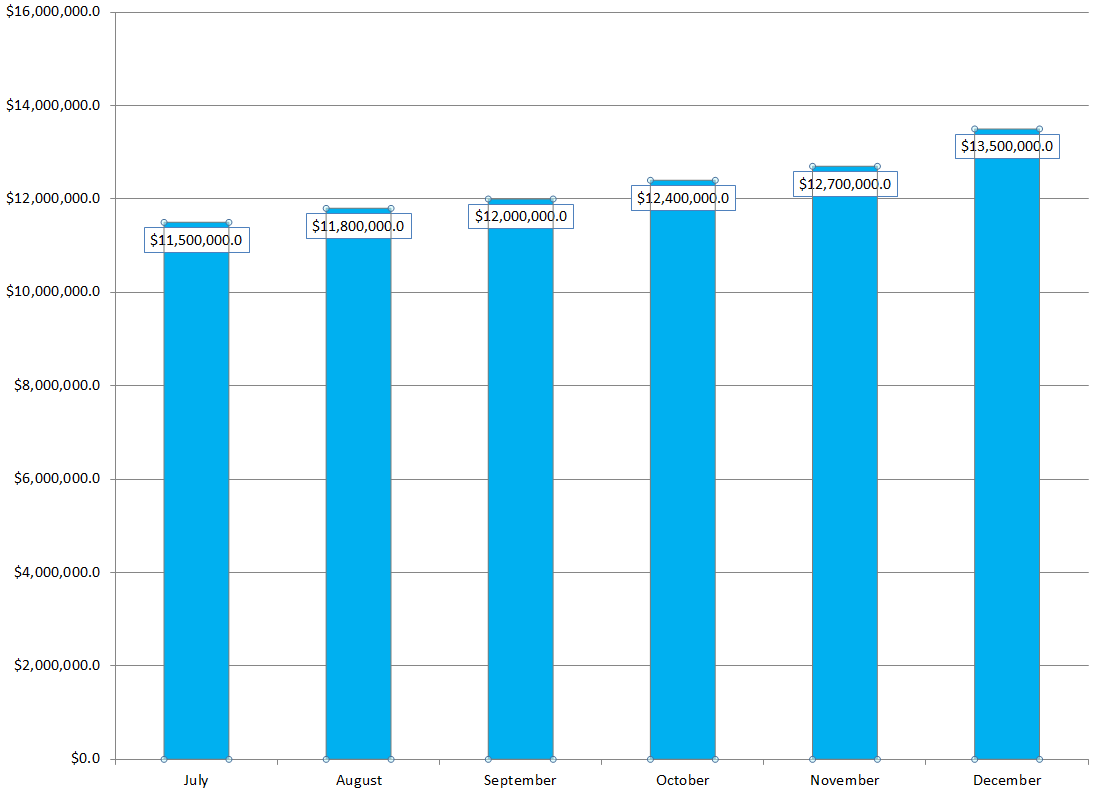
The KDP Select Global Fund has steadily increased from $11.5M to $13.5M from July thru December of 2015.

The KDP Select Global Fund has committed $12M for February, which makes sense, as December and January are likely to benefit more from holiday Kindle sales.

But there are some things that we don’t know:

  • We don’t know what the KDP Select Global Fund will do starting in March. It’s possible that the KDP Select Global Fund will start diminishing. But then again, that’s always been possible.
  • We don’t know how many customers subscribe to Kindle Unlimited. If Amazon is selling more subscriptions at a faster rate than the KDP Select Global Fund is increasing, then Amazon is increasing its profits. But they could have been doing that all along. How are we to know?
  • It’s possible that the KENPC has dropped a few % overall so that Amazon could prevent the per-page rate from dropping further (or maybe even increase it a little). But the number that affects Amazon’s profits is the KDP Select Global Fund. Whether they increase or decrease the KENPC, they are still paying $12M overall in February. Changing the KENPC just affects the per-page rate and how the $12M is distributed; it doesn’t impact Amazon’s share at all.

Here’s my own personal opinion: KENPC v2.0 was introduced to help prevent authors from gaming the system, and it unfortunately affects everyone’s books in different ways.

(It’s also possible that Amazon is losing money on Kindle Unlimited, at least directly. This program might be a loss leader. Once customers get in the habit of coming Amazon, they start buying other products at Amazon, too.

That’s an important consideration. The main thing Amazon probably wants to do with Kindle Unlimited is keep both readers and authors engaged. Amazon may make much more profits by getting both readers and authors in the habit of visiting Amazon regularly than it could make by adjusting KENPC or per-page rates.)

PLEASE TAKE THIS QUICK KENPC SURVEY

Have multiple books? You can take the survey once for each book.

Write happy, be happy. 🙂

Chris McMullen

Copyright © 2016

Chris McMullen, Author of A Detailed Guide to Self-Publishing with Amazon and Other Online Booksellers

Click here to view my Goodreads author page.

  • Volume 1 on formatting and publishing
  • Volume 2 on marketability and marketing
  • 4-in-1 Boxed set includes both volumes and more
  • Kindle Formatting Magic (coming soon)

Follow me at WordPress, find my author page on Facebook, or connect with me through Twitter.

Comments

Click here to jump to the comments section.

KENPC v2.0 Amazon KDP Changes Normalized Page Counts (February 1, 2016)

Images from ShutterStock.

Images from ShutterStock.

KENPC v2.0 February 1, 2016

Amazon KDP changed how it determines the Kindle Edition Normalized Page Count (KENPC).

This affects Kindle e-books enrolled in KDP Select, which can be borrowed via Kindle Unlimited and Amazon Prime.

KDP Select books borrowed through Kindle Unlimited or Amazon Prime pay by the page read, where a Kindle Edition Normalized Page (KENP) is determined based on the book’s KENPC.

(This has no impact on royalties earned through sales, just borrows.)

On February 1, 2016, the method that Amazon uses to compute the KENPC changed.

The new value of KENPC is called KENPC v2.0.

Visit your KDP Bookshelf and click the Promote and Advertise button next to a title to see what its new KENPC is.

According to Amazon, on average the KENPC has changed by 5% or less.

I checked several of my books, which had KENPC’s ranging from 170 to 2039, and the KENPC v2.0 was nearly identical to the original KENPC.

So my books were virtually unaffected by this. I’m curious about your experience with the KENPC change. Is it significant?

One notable change reported by Amazon is that books with a KENPC exceeding 3000 will now be capped at 3000. (When a customer reads 100% of those extremely long books, the author actually earns more from a single book read than the monthly subscription cost.) This only affects a few books, like encyclopedias (which could be broken down into smaller pieces…).

If you want to read the KDP help page describing KENPC v2.0, you can find it here:

https://kdp.amazon.com/help?topicId=AI3QMVN4FMTXJ

Write happy, be happy. 🙂

Chris McMullen

Copyright © 2016

Chris McMullen, Author of A Detailed Guide to Self-Publishing with Amazon and Other Online Booksellers

Click here to view my Goodreads author page.

  • Volume 1 on formatting and publishing
  • Volume 2 on marketability and marketing
  • 4-in-1 Boxed set includes both volumes and more
  • Kindle Formatting Magic (coming soon)

Follow me at WordPress, find my author page on Facebook, or connect with me through Twitter.

Comments

Click here to jump to the comments section.
Warning Messages for Errors in Amazon Kindle e-Books

Quality Control Amazon

KINDLE E-BOOKS WILL HAVE ERROR MESSAGES

This rumor has been going around for a week or so. When I first saw this rumor, my first thoughts were:

  • Where is the PROOF?
  • Why hasn’t Amazon provided any information about this?
  • Let’s get more information, preferably from Amazon itself, before we PANIC and WORRY.

This morning I learned that Amazon HAS provided much updated information about quality issues, right on their KDP help pages:

Click here to view the KDP help page describing error messages.

ACCORDING TO AMAZON KDP

A few quotes from this KDP help page are quite illuminating.

This new quote appearing on the KDP help page provides evidence that, in some cases, Amazon will, in fact, post error messages on the product page:

“A moderate amount of Distracting or Destructive Issues can result in the book remaining available for sale, but with a temporary quality warning displayed on the detail page of the book on Amazon.com until corrections are made.”

The KDP help page includes this quote in the opening paragraph:

  • “If readers tell us about a problem they’ve found in your book, we will make sure you know about it.”
  • So we see that Amazon will be contacting authors/publishers to notify them about problems that readers have reported.

Note that the same sentence also ends by saying that Amazon will “point you in the right direction to get the problem fixed.” This suggests that there won’t be instant action, but that Amazon KDP will contact the author/publisher, giving the author/publisher a chance to resolve the problem.

But if the author/publisher doesn’t resolve the problem, here is the worst-case scenario, also quoted from the KDP help page:

  • “Because Critical Issues significantly impact the reading experience, any Critical Issue will result in the book being removed from sale until the correction is made.”
  • This quote specifically refers to Critical Issues, as determined by Amazon.
  • Authors/publishers will want to communicate with Amazon and work to resolve any issues to Amazon’s satisfaction to avoid CFQI (customers facing quality issues) notices and to avoid having the book removed from sale.
  • Authors/publishers will also want to ensure that formatting, spelling, and grammar are correct before publishing.

I know there is much concern among authors regarding SPELLING mistakes. Take some comfort in this quote from the KDP help page:

  • “Sometimes improper or dialectic spellings are intentionally used by the author. These are not considered errors. Common examples would include character dialogue. Spelling differences which occur between US and British English are not considered errors.”
  • So we shouldn’t be worried about spelling differences between the US and the UK.
  • And we shouldn’t be worried about made-up names.
  • Note that it doesn’t say that a few typos will be considered a Critical Issue. Maybe there are, and maybe there aren’t, cases where typos may be considered a Critical Issue. But the help page doesn’t clarify this. It is clear that Amazon wants you to correct any known typos. But the help page doesn’t spell out exactly what the consequences will be for not fixing them. (Maybe a customers-facing-quality-issues notice. But that’s just speculation right now.)

Here is a sample of the kinds of errors that Amazon is looking at:

  • typos
  • unsupported characters
  • image quality (like unreadable text)
  • table issues (like content that goes off the page on some devices)
  • links (like those that don’t function properly)
  • even “disappointing content” is on the list
  • see the complete list here: https://kdp.amazon.com/help?topicId=A1MMQ0JHRBEINX

BUT WHAT AMAZON HASN’T SAID (YET)

This KDP help page doesn’t say:

  • that any notices will be posted on the product page (that could happen; it just isn’t mentioned on the help page at this point)
  • except for Critical Issues, what will happen (e.g. if there are a few typos, it doesn’t outline exactly what will or won’t happen)
  • whether or not things like typos can be construed as Critical Issues (maybe they can, maybe not; the help page does mention a few specific Critical Issues, but doesn’t clarify this with regard to spelling)

Will they post error messages on the product page? Under what circumstances will they do this? Under what conditions will they remove a book from sale?

This remains to be seen to some extent. It does state that Critical Issues will result in taking down the book until the issues are resolved. But otherwise, we are left to speculate.

It seems reasonable that Amazon would first contact the author/publisher, allow a reasonable period for the issues to be resolved, and allow for a possible response with a detailed explanation.

A few authors have reported receiving emails from Amazon regarding spelling mistakes. We know that Amazon has sent emails about spelling mistakes for the past few years, but a few authors who have received them recently seem to make it look like the nature of the email has changed recently. But I guess we won’t know for sure until (A) Amazon announces such a change publicly or (B) we happen to receive one of those emails.

ABOUT TYPOS AND SPELLING MISTAKES

Don’t panic yet over all the worst-case scenarios that might pop into your head.

Let’s see how it goes first.

If you’re a UK writer and you’re worried about American readers complaining about differences in spelling (and vocabulary), you shouldn’t be. It says very clearly on the KDP help page that these aren’t considered spelling errors.

If you’re a fantasy author and you’re worried about made-up names for monsters you’ve created, at this point I see no reason for you to panic.

This probably isn’t the same thing as the list of possible spelling mistakes that you receive when you upload your content file. Maybe Amazon will use an automated spellchecker to aid in their assessment, but it won’t be purely automated: The KDP help page specifically refers to mistakes that “readers tell us about,” so readers will be involved to an extent.

It also appears that a human being will be involved from Amazon’s end, to verify the issues and to send an email notification to the author/publisher.

Sure, a human being can misinterpret something. But it won’t do any good to panic now. Let’s not think of all the ways that a human being might misinterpret an author’s intentions.

How many typos is too many? Does it really matter if it’s 5, 15, or 25 typos in 50,000 words?

If Amazon discovers and verifies that there are mistakes in your book, why wouldn’t you fix them? Every typo that gets fixed benefits readers…

IS THIS GOOD OR BAD?

The benefits are clear:

  • Improve customer satisfaction.
  • Improve the perception of Kindle e-books.
  • Improve the self-publishing brand.

In comparison, I think the “bad” may seem relatively minor:

  • In most cases, it just causes a minor inconvenience to the author to make the changes and resubmit.
  • In rare cases, it might be more involved. For example, a richly formatted book created from a PDF using the Kindle Textbook Creator might require more work to fix a few typos.
  • If an author shelled out big $$ for professional e-book conversion and just has a .mobi or epub file to work with, it might not be so easy to fix a few typos. It depends: Some professional formatters are quite reasonable and oriented around author satisfaction.
  • There is possible abuse, but I think overall Amazon will be reasonable. Amazon’s goal is clearly to improve customer satisfaction, but without significantly disrupting the authors who supply valuable content.

Realize that we don’t know all the details yet.

Right now, what we know from Amazon is posted on this KDP help page, and it doesn’t answer every question that we might have.

And some of the rumors out there include details that aren’t addressed on that KDP help page.

It seems reasonable that (except for Critical Issues) Amazon KDP would first notify the author/publisher of the issue, and give the author/publisher a reasonable chance to correct the problem before taking any drastic action.

The customer is paying money for Kindle e-books, and we all want the customers to have positive reading experiences that encourage them to read more Kindle e-books.

And as readers ourselves, we want to have positive reading experiences when we read Kindle e-books.

That seems like a reasonable goal, and I expect Amazon to be reasonable in helping authors reach that goal.

SUGGESTIONS

Find out which email address you have associated with your KDP publishing account. Monitor this email address. Periodically check that you’re not missing important emails in your SPAM filter. If any of your books have quality issues, you should expect to hear something from Amazon KDP.

Periodically check the KDP community forum, Kindle Boards, or another place where authors often share their experiences. This way, you might learn from the experience of any other authors who deal with quality notices from Amazon KDP.

Don’t worry about the what-if’s. Focus on writing and marketing. Try to write, format, and publish the best book you can.

Write happy, be happy. 🙂

Chris McMullen

Copyright © 2016

Chris McMullen, Author of A Detailed Guide to Self-Publishing with Amazon and Other Online Booksellers

Click here to view my Goodreads author page.

  • Volume 1 on formatting and publishing
  • Volume 2 on marketability and marketing
  • 4-in-1 Boxed set includes both volumes and more
  • Kindle Formatting Magic (coming soon)

Follow me at WordPress, find my author page on Facebook, or connect with me through Twitter.

Comments

Click here to jump to the comments section.

How to Improve Amazon (a View from the Publishing Side)

Image from ShutterStock.

Image from ShutterStock.

HOW AMAZON CAN IMPROVE

I love Amazon. As a customer, as a reader, as an author.

Yet, I see ways that Amazon could be even better.

Although I use Amazon frequently as both a reader and author, most of this post is from the publishing perspective.

I don’t intend for my post to come across as a complaint or criticism. Rather, I love Amazon, and I’m thinking, “How could I love Amazon even more?”

DOES AMAZON CARE?

Yes. I know this because I and other authors have made several suggestions in the past, and Amazon has already made significant improvements.

  • KDP authors now have access to pre-orders.
  • KDP reports have improved significantly.
  • For weeks toward the end of 2015, Amazon had a large banner advertisement on their homepage announcing Countdown Deals.
  • The Kindle Textbook Creator now supports hyperlinks.
  • KDP authors can now send emails through Amazon to their Amazon followers when they publish a new Kindle e-book.

I could go on. And on.

I’ve shared my suggestions directly with Amazon in the past (and will share this post with Amazon, too).

One time, I even posted an extensive article on my blog about how authors can optimize a particular Kindle feature, and a couple of weeks later I received a phone call from a Kindle representative who had discovered my article and wanted to discuss my ideas. (Just one example of how Amazon has knocked my socks off.)

Amazon does pay attention. And Amazon is strongly oriented around customer satisfaction. That’s Amazon’s key to long-term success.

1 MEDIATE PUBLISHING SERVICES (COVER DESIGN, EDITING, FORMATTING)

First of all, did you know that Amazon now offers services like painting your house, cleaning your home, mounting your television, mowing your lawn, fixing your computer, and much more? Amazon connects local top-rated professionals to customers in select cities. Customers pay Amazon, and Amazon offers a Happiness Guarantee.

150,000 books were published on Amazon in the last 30 days. That’s a rate of 1.8 million books per year. Very many of those books were self-published through KDP or CreateSpace.

Just imagine how many authors are interested in:

  • cover design
  • editing
  • formatting
  • translation
  • book promotion

And much more. We’re talking millions of dollars in author/publisher expenses.

Where do authors and publishers go for these services now? They go off Amazon.

One of Amazon’s big marketing rules is don’t drive traffic off Amazon hoping to drive it back onto Amazon later. Amazon wants to keep people on Amazon as much as possible. Kindle Unlimited and Amazon Prime keep customers at Amazon. Discussion forums keep readers and authors engaged on Amazon.

But many authors/publishers are leaving Amazon to find publishing services.

Authors can get limited services from CreateSpace, but it’s fairly expensive, it lacks interaction with the actual designer, and the file format of the result usually isn’t portable.

Amazon has a golden opportunity to implement something like the new Amazon Services, but for self-publishers, only it would be online and worldwide (not local, like painters and yard crews). Amazon would connect authors/publishers with cover designers, formatters, editors, translaters, book promotion services, etc.

Authors/publishers would:

  • Gain access to valuable publishing services.
  • Be able to pay through Amazon.
  • Benefit from the trust factor of having Amazon mediate the arrangement.
  • See feedback from other author/publishers to help judge quality.

Much like Amazon Seller Central, Amazon could measure the service provider’s performance in similar ways, with defect rates, turnaround time, response time, feedback ratings, etc. This way, service providers who provide top-notch service tend to be more visible.

Amazon could even put the cover designer or editor’s name by the books they’ve designed (not in the usual place by the author’s name, but, say, the cover designer could be listed underneath the thumbnail, and if you clicked on the designer’s name, it could take you to the designer’s portfolio and ask if you’re interested in having a cover designed). This could showcase designer’s works, and even provide marketing for them.

Something like “Amazon Publishing Services” (not provided by Amazon itself, but by connecting authors/publishers to service providers on Amazon) would encourage more authors to use professional services, perhaps even improving the overall quality.

Amazon could obviously limit any services it doesn’t want to sell (anything related to reviews, for example).

With Amazon taking a share of the cut for mediating this, and with 1.8 million books (and growing) published each year, this could be big for Amazon, too. But it would also be yet another marketing strategy for Amazon, i.e. how to keep more people onsite, rather than driving authors offsite to seek services.

On top of that, Amazon could offer paid advertising options to the service providers.

You could still self-publish for free, which Amazon likes to advertise. These would be optional services. Which some authors are seeking already from other sites. Amazon could be that site.

2 BETTER BOOK LAUNCHES

Amazon has improved in this area with pre-orders and messages to Amazon followers, but there is room for much more.

The big problem is that each Amazon product is built in stages:

  • It can take days (or if you get unlucky, even weeks) for the Look Inside to appear.
  • And sometimes that Look Inside doesn’t look the way the author predicts.
  • And maybe even the book description didn’t turn out as expected (the most important info might be after the Read More link).
  • Or maybe the book is listed in the wrong category.
  • Editions take a couple of days to link together.

This is absolutely backwards:

  • Very often, a book has its best exposure shortly after it is published.
  • Very often, the product page looks its best weeks after it is published.

Shouldn’t Amazon make it easy for authors/publishers to launch their books with the product page looking absolutely perfect?

Wouldn’t this improve customer satisfaction? Shouldn’t most customers, buying the book shortly after release, get the best possible product?

Customers pre-order books. Authors build up large followings and generate book buzz, driving much traffic to the book when it’s released. Books get extra exposure when published through the New Release filters.

So let’s make the product page perfect when the book goes live.

It’s simple, really:

  • There need to be two publishing buttons: (1) I’m ready to create the product page. (2) I’m ready to publish.
  • Creating the product would make the book only visible by a direct link provided to the author. It wouldn’t show in customer searches. It wouldn’t be available for purchase (not even pre-order).
  • The author could preview the product page. It would be built in stages as usual.
  • The difference is, the author could wait until the product page is complete before publishing, and the author could revise the description or content file, trying to get that product page perfect before publishing. Editions could get linked before the book goes live.
  • When the author hits the publish button, it would leave the product page as it is, except it would make the book available for sale and appear in customer searches.

3 END-OF-BOOK OPPORTUNITIES

Amazon wants more organic book reviews from customers who actually read the book.

So when the customer reaches the end of the content (i.e. before wandering into the back matter):

  • Amazon should make it easy to review the book on Amazon right then and there. (It’s not the same thing as rating the book on Goodreads.) Select the stars, leave a comment. The book is fresh on your mind. Afterward, the reader will be busy with other things (life!).
  • If the review is favorable (4 or 5 stars), Amazon should also ask the customer (both options could be presented together) if he/she would like to see similar books by the author. Again, if the book satisfied the customer, it only makes sense to try to satisfy the customer further.

These things are currently done via nag emails. But they may come days later. And customers are bombarded with emails.

The end of the Kindle e-book is a perfect opportunity to offer the customer further satisfaction while the current book’s satisfaction is fresh on the customer’s mind. When is a better time?

Note that Amazon has made some improvements toward this. But not every reader is experiencing the same options (which may also depend on the device). For example, some readers are seeing an opportunity to Follow an author on Amazon when they open the book (and maybe that would be better placed when the reader finishes the book, as that reader is more likely to want to read more by the same author; at the beginning of the book, the reader doesn’t yet know if he/she wants to follow the author, if that’s the reader’s first experience with that author).

4 OFFER TO TRANSFER GOODREADS REVIEWS

Amazon bought Goodreads. But what is Amazon doing with it?

I keep waiting for Goodreads to send me an email, asking me:

  • “Would you like to automatically transfer all of your Goodreads reviews to Amazon? (Don’t worry, we’ll prevent duplicates in case you’ve already reviewed some of the same books at Amazon.)”
  • Option 1: Yes, I would. Thank you very much.
  • Option 2: Let me select which books I’d like to transfer reviews for.
  • Option 3: No thanks.

How about when I post a new review to Goodreads? “Check this box to automatically post the same review at Amazon.com.”

Why make readers who want to post to both sites do twice the work?

That doesn’t seem very customer friendly…

5 RECRUIT INDIE AUTHORS FOR PRIME DAY

I think the first ever Amazon Prime Day had room for improvement.

Amazon has hundreds of thousands of indie authors who self-publish through KDP and CreateSpace.

Amazon’s indie authors provide content for millions of readers.

And most of those indie authors are readers, too.

So it seems like a natural fit to try to involve indie authors and make them a big part of Amazon Prime Day.

Here is one example:

  • Send an email invitation to all KDP Select authors.
  • “Would you like to discount your book on Prime Day? Don’t worry, it won’t use up your Countdown Deal or free promo days.”
  • Give instructions for how to offer a discount for Prime Day.

The more people get involved in Prime Day, the greater will be the customer interest.

Also, last year, they sold out of Kindles almost instantly. They need to create stronger interest in other products on Prime Day. Get indie authors involved in Prime Day, and millions of customers will be looking for book deals.

6 OFFER DISCOUNT CODES

Right now, you can gift a book, or if you enroll in KDP Select, you can run a Countdown Deal or run a free promo. (Did you know that when you gift a book to someone, they can use that money for anything? They don’t actually have to buy your book.)

But you can’t give anyone a discount code for your book.

It would be great to create a coupon code for 30% or 50% off, for example.

Authors would find effective ways to use discount codes, like sending them out to a large email following when a new book is released. It would be a compelling incentive to follow authors: “Follow me and I’ll give you a discount code for my next book.”

It doesn’t even have to cut into Amazon’s profits. Authors could choose to take it out of their share. If that’s the only way to make discount codes happen, it’s better than nothing, and many would use such a tool.

Many authors are earning 70% royalties on Kindle e-books. Surely, they would be willing to part with a share of that to create a discount code.

In that case, Amazon would generate more sales without a loss in profit.

7 IMPROVE COUNTDOWN DEALS

Okay, I wrote a whole post on this a few months ago. And emailed Amazon. And Amazon advertised Countdown Deals on their homepage for a few weeks. (I can’t take credit for that: I’m sure many other authors have contacted Amazon, asking Amazon to make Countdown Deals more compelling.) But I wanted to note that Amazon has made improvement with regard to this.

But I still feel that authors could get more out of Countdown Deals.

Right now, authors really need to advertise their Countdown Deals externally, through paid or free book promotion sites like BookBub, E-reader News Today, and a host of others.

So authors are again going offsite. And customers are going offsite. Again: Amazon’s marketing know-how says it’s better not to drive traffic offsite to try to get back onsite later. It’s far better to encourage everyone to stay on Amazon.

But Countdown Deals, the tool as it is now, motivates authors to go offsite, and customers are attracted offsite by those book promotion services. Now they may make it back to Amazon, but surely Amazon would prefer to keep customers (and authors!) onsite as much as possible.

First of all, the name Countdown Deal doesn’t sound compelling to customers. When I browse the Kindle Store on my computer, at the top of the left column, I see Kindle Deals, which includes:

  • Kindle Book Deals, up to 85% off
  • Kindle Daily Deals
  • 50 Kindle Books for $2 each
  • Kindle Countdown Deals
  • Sign up for Deals (this is for Kindle Daily Deals)

On this list, Countdown Deals is the one name that sounds like a dud.

Imagine if the name were “Kindle Countdown Deals, up to 90% off” (or whatever the greatest percentage off is that day) or “Kindle Countdown Deals, starting at 99 cents.” Surely, the marketing geniuses at Amazon could come up with a more compelling name, or a better way to find the most compelling Countdown Deals and promote them on Amazon.

Amazon wants authors to join KDP Select, and Amazon wants readers to browse through the Kindle Deals, so more compelling Countdown Deals would help with this.

And Amazon wants customers and authors to stay on-site. So if Amazon could make Countdown Deals more effective (maybe not for every book, but at least for some books) without having to go offsite, this would be a plus for Amazon. Amazon should be trying to persuade customers to sign up for its own email promotional lists, rather than going offsite to BookBub, for example. (And Amazon is now trying to populate Amazon followers for authors, and Amazon does have a promotional email for Kindle Deals. Why not one for Countdown Deals?)

Here’s an example of how they could help:

  • When you search for a book on Amazon, there is an option to sort by Kindle Unlimited. They make it easy to find Kindle Unlimited books.
  • Why isn’t there a sort-by option for Kindle Countdown Deals (but with a more compelling name)? Right next to Kindle Unlimited, that would be a great place for it.

Some customers borrow books, some customers buy books. The Kindle Unlimited sort-by option is great for customers who borrow. A Kindle Countdown Deals option would be great for customers who buy.

8 GET MORE OUT OF MATCHBOOK

Matchbook has great marketing potential. If the same book is published in print and Kindle, the author/publisher can create a Matchbook offer, allowing a customer who first buys the print book to then buy the Kindle edition at a discount.

But Amazon really doesn’t promote Matchbook. And when Matchbook is available, it’s virtually in fine print. Literally: I’ve encountered dozens of authors who knew it “should” be on the page, but even though they were specifically looking for it, they were unable to find it. Just imagine being a customer who doesn’t know about it.

It’s almost like Amazon added this feature by popular demand, but really doesn’t care about it. (This wild speculation probably isn’t true. Note the word ‘almost.’)

Here are a couple of examples of how Matchbook has great marketing potential:

  • Some nonfiction books are great to have in print for highlighting, annotations, bookmarks, etc. But it would also sometimes be handy to have the same book available as an e-book that you could pull up on your cell phone, for example. You don’t always have a print book with you, so it would be nice to consult when you don’t. With Matchbook, you can buy both editions.
  • Buy the novel in print and on Kindle using Matchbook. Give the print edition as a gift, read the Kindle edition yourself, for example.

But the problems are:

  • Most customers don’t even know about Matchbook.
  • Most customers who have heard of Matchbook don’t think of the benefits of Matchbook on their own.
  • It’s not easy to find Matchbook information even if you know it’s supposed to be there.
  • Nobody is promoting Matchbook and its benefits to customers.
  • Many authors don’t even know about Matchbook.
  • Most authors who know about Matchbook set a Matchbook offer for their books, but don’t feel that it does much good. (Right now, authors really need to do some effective marketing to educate customers about it and how it could help them.)

Amazon could get more out of Matchbook:

  • Make the Matchbook information much more prominent, both before the sale, and immediately after the sale (right then, offer the Kindle edition to go along with it).
  • Make it work both ways. Right now, the customer has to buy the print edition first. So if the customer buys the Kindle edition first, Amazon has no interest in selling the print edition to go along with it? Whatever the customer would save by buying the print edition first, offer the same discount on the print edition after the Kindle edition is purchased.
  • Promote the benefits of Matchbook to customers. Marketing by educating.

9 UPDATES TO KINDLE E-BOOKS

To be fair, there is an inherent challenge for Amazon with this.

From the author/publisher side: The author publishes a Kindle e-book, believing (hopefully!) that his/her masterpiece is perfect. Sometime later, the worst has happened: an embarrassing mistake is discovered. The author promptly corrects the mistake. Unfortunately, several customers already have the book. The author wants everyone who already has the book to receive an instant update automatically. But it’s not so simple: The author must first convince Amazon that the correction is significant enough to warrant either (A) automatically updating the file or (B) notifying customers of updates.

From the reader’s side: The reader may have already added notes, highlighting, bookmarks, etc. Then one day, the reader opens the book, and all of those notes have vanished. Why? Because the author sent an automatic update. Maybe the reader would prefer to have the version with the mistakes so as to retain the notes.

It’s the reader’s point of view that causes Amazon to sometimes only notify readers that an update is available instead of automatically updating the book. But not all readers receive those notices, and not all readers figure out how to request the update.

But there is a simple solution:

  • When an author revises a book, give the author the option to check a box that he/she would like to let the reader know that an update is available. The author describes the nature of the updates. That way, the reader knows if it’s just a few typos or just to resolve a formatting issue on iPads, for example.
  • Amazon doesn’t automatically update the book. Amazon doesn’t even notify readers of the update.
  • Here’s what should happen: The next time the reader opens that book, Amazon shows the reader a message. The message indicates that an updated version of this book is now available. It outlines the nature of the revisions. It warns the readers that any notes the reader may have made, for example, will vanish. Now the reader gets to decide.

Then the reader wouldn’t have to do any work to get the update; it’s easy. The reader gets to decide, not have the book updated automatically. And if the reader never opens the book again, well the update didn’t matter, so why bother telling the reader that there had been any “problems”?

10 FOOLPROOF FORMATTING

Amazon has made great strides to help authors format picture books for Kindle by introducing the Kindle Kids’ Book Creator and the Kindle Textbook Creator.

From a formatting perspective, a few of the things that the Kindle Textbook Creator does are quite amazing (the way it handles a variety of images, and results in a relatively small file, for example). I’m not saying it’s the ideal way to format a typical e-book (it’s not); it’s specifically for textbooks rich with images, equations, and formatting.

What I mean is, the brilliant minds that produced the Kindle Textbook Creator could surely come up with a fairly foolproof way for authors to design other kinds of books, like novels and basic nonfiction.

The novel is the easiest kind of Kindle e-book to format well. But only if the authors knows some basic Kindle formatting rules. And there are a few subtle things that could improve the design, but many authors don’t know about them.

There are novels with variable indent sizes, for example, where the author wasn’t aware that Kindle would indent differently (much, in some cases) from the way Word displays indents on the monitor.

Formatters look at a novel written in Word and know that if they see THIS, they do THAT to make it come out right on Kindle. An experienced formatter could basically write a computer program (surely, some do, at least for a portion of the work) to take a typical novel written in Word and transform it into a fairly Kindle-ready file. So why hasn’t Amazon KDP put a programming/formatting team together to produce a Kindle Novel Creator?

The software might ask the author to load the work in chapters of text, title each chapter, automatically produce a hyperlinked table of contents that will work with device navigation, automatically not indent the first paragraph of each chapter, automatically and consistently indent all other paragraphs (and strip out any tabs, repeated spacebars, repeated Enters, and all the other common formatting problems), optionally create perfect drop caps (assuming Kindle could pull this off), and that’s the bulk of the book right there. It would need to deal with section breaks, treat italics properly, be able to deal with stand-alone quotations, maybe insert a map or other picture, and add front/back matter, but it wouldn’t take much to produce a fairly foolproof, author-friendly way to format a novel for Kindle.

Amazon has three reasons to do this:

  • improved customer satisfaction
  • advertise to authors how easy it is to publish with Amazon for free (well, they already advertise this, but they could deliver better)
  • improve the perception of indie books (for which Amazon has over a million)

If Amazon made such a Kindle Novel Creator, it wouldn’t take much to also make a Kindle Nonfiction Creator. Nonfiction tends to have more bullet points, alternative formatting preferences, more complex formatting needs, but it wouldn’t take much to accommodate the basics.

They could even make a Kindle Poetry Creator, an easy way to help with one of the great formatting challenges for Kindle.

Technology could take Amazon beyond just formatting.

Amazon has a Cover Creator tool at both KDP and CreateSpace. I think this has room to grow. It should be improving once or twice per year. And some design tips should be growing to go with it. It’s in Amazon’s interest to make it easy to pull off a nice cover.

How about editing? A business on the scale of Amazon could come up with (or find) a great automatic editing tool to catch most of the common kinds of mistakes. I’m not saying it would be perfect (and it would surely flag a few things that authors did on purpose). But there are some kinds of spelling, punctuation, and grammatical mistakes out on the market, which shouldn’t be on the market at all. Amazon currently provides a list of possible spelling mistakes, but there is potential to go way beyond that.

Such automated editing help wouldn’t make authors foolproof at writing, or even at editing. But it could eliminate many common mistakes that influence reader perception of authors. And it could take some books that are already very well-written, and iron out a few obvious wrinkles to make them nearly perfect. Help is better than no help.

I keep saying that Amazon is strongly oriented around customer satisfaction. Guess what? Authors are Amazon’s customers, too. We pay for advertising through AMS. We buy proofs and author copies at CreateSpace. Most authors are also avid shopper and/or avid readers. But aside from what we pay in money, we pour a ton of TIME into writing and publishing books, supplying valuable content to Amazon. No matter how you look at it, authors are customers, too. (Let me add that I’ve interacted with Amazon KDP, the Kindle team, and CreateSpace many times over the years, and even back when I literally was a nobody-author, they have always treated me very well.)

11 REVIEWS: SURELY, THERE IS A BETTER WAY

I can hear them over at Amazon right now: “Improve the review system. Gee. Why didn’t we think of that?”

Everybody (and their uncle, too!) has suggested that the review system should improve, and just about every suggestion is different.

But almost everybody does agree on one thing: It could be better.

Two aspects of customer reviews absolutely don’t make any sense to me:

  • Why does Amazon permit any spitefulness in the review? That goes against everything I’ve said about Amazon being customer oriented. Only one customer benefits by leaving that spite up, and that’s the person who wrote it. Hundreds (or millions, in some cases) of customers are inconvenienced by having to read that. Doesn’t Amazon wish to create positive customer experiences, with a positive ambiance at Amazon? Don’t remove the review: Just remove the spiteful part, and add a note: “Review was edited to remove spiteful remarks.” That will discourage further spite. Can’t we offer criticism without some of the outright spiteful remarks that we, as customers, sometimes find when reading customer reviews?
  • Why does Amazon permit any spoilers in a review? Does Amazon want to sell the book or movie, or not? How can you possibly let a review spoil the ending for potential customers? There is a simple fix: Either insert a Read More link where the spoiler would begin, or hide the review and put a Spoiler Alert link there. Then customers who don’t mind having the story spoiled can click the link to read more. That would also discourage readers from including spoilers in their reviews.

Amazon has improved the customer review system substantially over the years:

  • Most people now know that Amazon almost never removes a critical review, but blocks and removes very many favorable reviews (suspected of coming from friends or family of the author, but occasionally penalizing an author for interactive marketing). Amazon faced a huge crisis years back, when the WSJ and NYT highlighted problems with the review system, and this change greatly improved the perception of the review system.
  • More recently, Amazon introduced machine learning into the review system. Machine learning favors organic reviews, helpful reviews, and Verified reviews, for example. It helps with the order of reviews, and will probably improve over time.

One more way Amazon could improve the review system is take a public stance against foolish authors who try to slam the competition (and invariably wind up shooting themselves in the feet, as they would gain sales through customers-also-bought lists when more customers buy similar books). Many authors/publishers would love to see Amazon make public progress toward eliminating some of the one-star review abuse. This would bring nice balance to the removal of four- and five-star reviews (which occasionally aren’t from friends or family members of the author).

12 MORE WAYS FOR AMAZON TO IMPROVE

  • There is a high demand for the boxed set bundle, as opposed to the boxed set book. Why should authors create a boxed set? Amazon can just bundle them all together. Well, Amazon is starting to bundle series together and show series to customers, but the bundle doesn’t offer any savings. Let series authors create a special bundle price. Maybe they could also add a cool bundle cover image and a special description for the bundle page, without having to publish a separate bundle. Personally, I’d rather buy 3 books as a bundle at a discount, receiving them as separate books on my Kindle, than buying one mammoth bundled file; but I want the bundled series at a discount, not full price. It seems like Amazon could sell more bundles if they had upfront substantial savings, and if this option were shown on the page of book 1 in the series.
  • Make the categories at KDP and CreateSpace match the categories on Amazon. This will help prevent books from getting listed in the wrong category, leading to negative customer experiences. Stop using special keywords to get into certain categories (example: if you use the word “zombies” as a keyword without knowing better, you automatically get listed in Children’s & Teen’s Horror Characters/Zombies, but what if your book isn’t really suitable for those readers?). Example: If you spend months writing a novel that involves swords and magic, wouldn’t you be crushed if your book didn’t show up in the Sword & Sorcery category (because you didn’t know you needed these 5 keywords to get into that category: sword, sorcery, magic, dragon, quest)? Why not make it easy for authors/publishers to put their books in the right category, and help customers find the kinds of books they’re looking for? What is the good reason that the KDP categories can’t be the same as Amazon’s browse categories?
  • Make more subcategories available to help readers find exactly the kinds of books they’re looking for. Then don’t allow books to show up in subcategories where they don’t belong. Several years ago, there were actually more subcategories available. A few books are still listed in them, but new books can’t get into them (which makes it really easy for those older books to hold onto that coveted #1 position). The problem was with books appearing across numerous categories where they really didn’t fit. It wasn’t helpful as a customer to go into a subcategory where most of the top matches weren’t what you expected. KDP authors are limited to choosing two subcategories anyway, so there really isn’t room for KDP authors to abuse this (if Amazon also fixed the keyword/category problem mentioned previously). It would be ideal for customers to have more subcategories, but where books don’t show up where they don’t belong.
  • Why only advertise the #1 bestseller. I love those new #1 bestseller in subcategory badges. (I’ve had some on my books, at least temporarily.) They’re really cool. But come on. Seriously, is #2 not good enough for anyone to buy? Amazon only wants to sell #1, not #2 and up? Why not expand this somewhat? Will customers really think, #5 bestseller in ____, gosh, that book must be lousy?
  • There is this perception that a book with a rank of 1,000,000 doesn’t sell, so once the book hasn’t sold for a few days and crosses this line, many customers won’t touch it, which makes it harder for its rank to rebound. There are many niche audiences in nonfiction, for example, where a rank of about 1,000,000 is actually fairly good, and if you average that for the year, you might sell nearly 100 copies (much better than the typical shopper thinks). You could have an average sales rank of 1,500,000 in Kindle and actually sell in the double digits (for one, ranks fluctuate). Or you could sell a hundred copies the first few month, and watch your rank quickly drop to 1,000,000 due to a dry spell. In print, you could actually sell about 10 copies in a year with an average sales rank near 5,000,000. But customers see 2,000,000 and think, that book doesn’t sell at all. My point: Does Amazon really want to discourage customers from buying books that fill a particular niche? My suggestion is only show sales rank data when it’s under a certain value, like 10,000 overall or top 100 in specific subcategories. That is, show sales rank if it helps sales, and don’t show sales ranks (like overall) when they don’t help sales. Some of those books in the millions are good (in fact, some sold very well a few years ago, but have slowed up since, and are still relevant, just not as popular). Amazon is growing and growing. Someday, if you don’t sell multiple copies every day, you’ll be above 1,000,000. Today’s 100,000 behaves like 20,000 from a few years ago, but the perception is slower to change. (Maybe Amazon could show both current and best sales ranks. It might say, 600,000 current, 14,000 on November, 2015. Hey, that book used to sell well. Not sure if this would help or hurt, but Amazon should try to find what helps and what hurts, and go with what helps.)
  • Add Author Central to Canada, Australia, and other countries where it isn’t already available. Why not? We’re waiting for it. Author Central was automatically added to India. If Amazon doesn’t want to add Author Central to Canada the same way it did for the United Kingdom, then why not automatically feed it into Canada from the US page like they did with India? Seems like an oversight.
  • Extend features available in the United States to the United Kingdom and other countries. For example, why can’t we use AMS in the United Kingdom like we can in the US? (I spent a bundle of money on 100 ads in 2015. Amazon could make more money from authors if they extended this to the UK, Canada, and more.)
  • Let the author adjust the ending of the Look Inside. How about that gripping point in the beginning of the novel, so suspenseful the reader would have to buy the book to find out what happens next. Who knows where that point is better than the author? Some short stories have no content showing in the Look Inside at all. Some mammoth books give dozens of pages away for free. Why not let the author set the Look Inside End Here point?
  • Improve Kindle royalty reporting: (A) Show both the number of borrows and the number of pages read (B) provide a reason for customer returns so authors can make their books better satisfy the customers (C) make it easy to find how many books sold in the past year or lifetime without having to download dozens of separate reports (D) provide tracking data (number of views, which keyword searches resulted in how many views, what is the sales/views conversion rate, how many customers opened the Look Inside, etc.) to help authors perfect their product pages to help Amazon sell more books. Also, information like sales over geographic location (like the BookScan data shows for print books) would help with marketing.
  • CreateSpace could improve in a few areas. It’s owned by Amazon, but it’s also kind of separate, i.e. it’s not as easy for Amazon to implement changes to CreateSpace as it is at KDP. But Amazon could surely motivate some changes. Let me be clear: I love CreateSpace. It has been very good to me. I’m just saying, I see a few areas where CreateSpace could be even better, but I feel it would take a push from Amazon for these changes to come about. (And CreateSpace has made improvements, like the new pod for Canada paying Amazon.com royalties, the matte cover option, and free Expanded Distribution.) Amazon could let CreateSpace authors advertise via AMS, and they could even set this up through AMS (on AMS’s site or on the one they have already for KDP Select), so CreateSpace really doesn’t need to get involved at all. Right now, if you want to advertise your CreateSpace book, you have to create a Kindle edition and advertise that instead (just imagine coloring book authors tempted to do this!). I sell 9 print books for every Kindle book, but I can only advertise on Kindle, not CreateSpace; for me, this is backwards (though I love AMS, and my Kindle sales have grown significantly). CreateSpace needs an easy pre-order option like KDP has, without having to go through Amazon Advantage (having to work with Advantage and CreateSpace separately creates all kinds of potential problems). CreateSpace could offer better worldwide distribution, and Amazon could help motivate more Expanded Distribution sales to certain markets (like sending representatives to schools to show teachers both Kindle and print academic solutions, while also recruiting teachers to self-publish educational content, or working with certain libraries, for example). CreateSpace could better compete with Ingram Spark (which is an expensive alternative, and CreateSpace seems like the optimal feed into Amazon) by finding some hardcover option and letting authors print inside covers, for example. (A spiral bound option would be useful, too, even at a somewhat higher cost.)
  • Why doesn’t the Look Inside use the newer Kindle formatting instead of the older formatting? The Look Inside is a valuable sales tool. Why not help authors/publishers easily produce a perfect Look Inside? It’s too common for authors to discover formatting issues in the Look Inside that don’t show in the preview (or even in the actual device when the preview file is side-loaded to it). Why is the Look Inside the hardest thing to format? Why does it interpret HTML more strictly than the actual device? This sales tool could help authors with sales more than it does now.

13 KEEP DOING THE THINGS AMAZON DOES WELL

With my suggestions, I don’t mean to imply that Amazon is doing poorly.

Actually, I feel that Amazon is doing many amazing things. That’s why I support Amazon both as an avid reader and shopper, and as an author/publisher.

But over the past 8 years, I’ve observed a few (!) things which I feel Amazon could do even better. (Really, a few. If I list all the things I love about Amazon, that would be a much longer list, and even more detailed.)

My list used to be much longer, but many of the other things that used to be on my list have already improved.

If you want to see something improve, you must at least make an effort to help it happen.

Amazon already does a number of things well. This is just the tip of the iceberg:

  • oriented toward customer satisfaction
  • hourly/daily royalty reporting (while not perfect, most publishers report quarterly or so, certainly not daily)
  • products can reach the market almost instantly
  • free tools for authors, like Author Central (but wouldn’t it be great to have it in every country?)
  • everyone gets a chance, with access to possible features like customers-also-bought lists

WHAT DO I WANT?

I want to be able to write another post, approximately one year from now, describing how Amazon absolutely knocked my socks off by making several of the things on this wish list come true.

Santa Claus, that’s what I want for Christmas this year. (Well, selling a million books this year would be pretty cool, too.)

I just want Amazon to grow from awesome to awesomer.

HAVE SUGGESTIONS FOR AMAZON?

Send them to Amazon.

Or share them in the comments.

Write happy, be happy. 🙂

Chris McMullen

Copyright © 2016

Chris McMullen, Author of A Detailed Guide to Self-Publishing with Amazon and Other Online Booksellers

Click here to view my Goodreads author page.

  • Volume 1 on formatting and publishing
  • Volume 2 on marketability and marketing
  • 4-in-1 Boxed set includes both volumes and more
  • Kindle Formatting Magic (coming soon)

Follow me at WordPress, find my author page on Facebook, or connect with me through Twitter.

Comments

Click here to jump to the comments section.

NEW: Share a Kindle Instant Preview

Instant Preview Link

KINDLE INSTANT PREVIEW

Better than a link.

Better than a cover.

Visitors can now start reading your book immediately, without having to leave your website.

It’s the new Kindle Instant Preview.

FEWER CLICKS

Every click loses traffic. It’s a fact of marketing.

Plus it’s hard to send people offsite. They’re busy doing one thing. “Hey! Stop what you’re doing. Go somewhere else instead.” Well, you might throw in a “PRETTY PLEASE.”

Now you can overcome both obstacles.

With Kindle Instant Preview, customers can read the sample of your Kindle book without having to leave your website.

If they like the sample, a direct link will take them to the purchase.

If they need a Kindle app, a link is included for that, too.

THERE’S MORE

Font sizes are adjustable, too.

Even better: Amazon will pay you to use Kindle Instant Preview.

You can use Amazon Associates when you use Kindle Instant Preview.

You then earn commissions on sales you drive from your website.

HOW TO USE KINDLE INSTANT PREVIEW

It’s easy.

Find your Kindle e-book on Amazon.

Look for the Embed link near Share and social media (FB, Twitter) icons near the pricing info.

Click Embed.

If your site gives you HTML freedom, choose the Embed option (instead of Link).

For example, with GoDaddy’s Website Builder, the last tool on the list is HTML.

Click the See More Options link. If the default size doesn’t work for you, here is where you can change it (but ensure that the aspect ratio remains the same).

Click the Add Amazon Associates ID link to earn money for sales that you drive to Amazon (even if the customer buys something else instead, like a Kindle Fire).

The Buy Button lets visitors go straight to purchase.

Even using Amazon Associates with it is easy. Once you sign up for it. Find your Tracking ID.

Instant Preview Open

SEE A SAMPLE OF KINDLE INSTANT PREVIEW IN ACTION

I put a Kindle Instant Preview of my book on the fourth dimension on my other website.

You can check it out by clicking either the image or the link below:


When you get there, find what looks like the front cover of my book on the fourth dimension.

Note the Read Preview button at the bottom (and the Buy button).

Click the image itself if you want to see what happens.

ANY DRAWBACKS?

Unfortunately, it doesn’t seem to be working with fixed format books.

So if you used the Kindle Kids’ Book Creator or the Kindle Textbook Creator, for example, it may not work for you.

Write happy, be happy. 🙂

Chris McMullen

Copyright © 2016

Chris McMullen, Author of A Detailed Guide to Self-Publishing with Amazon and Other Online Booksellers

Click here to view my Goodreads author page.

  • Volume 1 on formatting and publishing
  • Volume 2 on marketability and marketing
  • 4-in-1 Boxed set includes both volumes and more
  • Kindle Formatting Magic (coming soon)

Follow me at WordPress, find my author page on Facebook, or connect with me through Twitter.

Comments

Click here to jump to the comments section.

Relevance: The Key to Advertising/Marketing

Relevance

RELEVANCE

Many advertising and marketing concepts can be understood, and then applied, by considering this one word: relevance.

And what a difference relevance can make.

Yet, very often, the advertiser or marketer hasn’t given this concept due consideration.

In your wildest dreams, your audience is anyone who has a head.

But in reality, you throw your money away with such thinking.

Unless maybe you’re selling hairbrushes.

But even then, you’re wasting money showing your advertisement to people who are bald, strongly prefer combs, or don’t care about their appearance.

Let’s look at some specific examples of how the word relevance impacts advertising and marketing. (Many of the examples are specific to self-published books, but the same principle can be generalized to the sale of other kinds of products or services.)

BOOK COVER DESIGN

Can you imagine walking into a covenant to sell a book about how to plan the perfect spring break vacation?

Well, it’s not much different when 80% of your audience glances at the cover of your sci-fi thriller and expects it to be a western.

(If you’re thinking about the movie Cowboys & Aliens right now, you’re totally missing the point!)

If it looks like a western, it probably is a western, so if you’re looking for sci-fi, why waste your time checking it out?

When there are other sci-fi books that actually look like science fiction.

The most important goal of book cover design is to create a cover that is relevant to your specific target audience.

WRITING <—> MARKETING

There are two ways to approach the combination of writing and marketing that have good prospects for success.

If you can execute your approach well.

  • You can find an existing target audience* and write a book relevant for that audience. (Where you are interested in the topic and have the right experience to write it.)
  • Or you can write what interests you (and where you have the right experience), then find the audience relevant for what you’ve written and market to that audience.†

* You don’t have to write for the most popular audience. It can be a niche audience and still be quite successful.

† The latter carries more risk. The worst-case scenario is that the audience perfect for your book doesn’t even exist. It happens…

AMAZON MARKETING SERVICES

Billboard advertising doesn’t make sense for most books. Even though many people do read, only a fraction read any particular genre, and some of those readers are biased towards certain authors or subgenres, so that the majority of the people who see the billboard advertisement result in wasted impressions. On top of that, the sale of a single book usually results in a low royalty, so you can’t afford wasted impressions.

But if you sell automotive parts and advertise on a billboard overlooking a highway, nearly 100% of your audience drives a car, so even though many prefer to get their service done by a dealer or a mechanic, the advertisement is more effective because of the greatly improved relevance.

On top of that, most advertising largely involves branding, which requires repeated impressions over a long period of time. With advertising, the importance of relevance gets compounded through this repetition.

Where should you advertise your product (or service)? Think long and hard about where it would be highly relevant to show your product.

One reason to use Amazon Marketing Services (AMS) to advertise products that you sell on Amazon has to do with relevance:

  • Customers are already there browsing for similar products.
  • You’re not trying to persuade them to stop what they’re doing, leave one site, and visit another site.

To get the most out of AMS, focus on relevance.

For example, when advertising a KDP Select self-published Kindle e-book through AMS:

  • All else being equal, Amazon is more likely to show AMS ads that generate and maintain a high click-through rate. That’s a strong indication of relevance.
  • Precise targeting makes your ad more relevant to the customers who view it.
  • A cover that conveys the precise subgenre/subcategory and content at the tiny size shown in the ads is a big plus.
  • The short marketing pitch shown with the ad can also help to convey relevance.
  • Thus, relevance can help you generate impressions without raising your bid sky high.
  • Ultimately, the blurb, the rest of your product page, and the Look Inside must also be relevant to convert clicks into sales.

CONTENT MARKETING & SEO

I use a free WordPress blog. I will soon pass 300,000 views (if I haven’t already), as I average 500 to 800 visitors per day finding my blog through search engines.

Yet I don’t employ any SEO “tactics.”

My goal has always been simple: Provide helpful content to anyone interested in self-publishing.

If the content is relevant to your audience, you have a strong organic marketing edge with much potential for long-term success.

Relevant content will naturally include the right keywords and keyphrases, lead to recommendations and referrals, generate followers, and encourage discussion.

You can blog successfully with short articles. What matters is that the content is relevant and helpful.

Trying to “fool” search engines into thinking that an article is relevant when it’s not won’t lead to long-term success.

THE DREADED BLURB

To help close the sale, the blurb needs to implicitly convince the customer (with help from the Look Inside) that the content is relevant to the buyer.

It must reinforce the subgenre/subcategory and content conveyed by the cover, title, category, and keywords.

The style of writing and storytelling must also be relevant to the customer.

It needs to be the kind of story and characters that the customer wants to read.

Without giving the story away. Because once the customer knows the story, it’s no longer relevant.

Fiction blurbs need to be short, while nonfiction blurbs should highlight important points with bullets, since the customer doesn’t want to waste time—not yet sure if reading the blurb is relevant or not.

Write happy, be happy. 🙂

Chris McMullen

Copyright © 2016

Author of A Detailed Guide to Self-Publishing with Amazon and Other Online Booksellers

  • Volume 1 on formatting and publishing
  • Volume 2 on marketability and marketing
  • 4-in-1 Boxed set includes both volumes and more
  • Kindle Formatting Magic (now available)

Kindle Unlimited Pages Read & Global Fund Trends from July, 2015 thru December, 2015

KU Trends Jan 2016 GF PR

KINDLE UNLIMITED FOR DECEMBER, 2015

First, let’s look at the Kindle Unlimited payments for December, 2015. Then we’ll look at trends for the past six months.

What did Kindle Unlimited pay for pages read in December of 2015?

Kindle Unlimited paid $0.00461 per KENP page read in the United States in December, 2015. That’s a 6.3% drop compared to $0.00492 per page in November.

However, this was compensated as…

The KDP Select Global Fund was $13.5M for December, 2015. That’s a 6.3% increase.

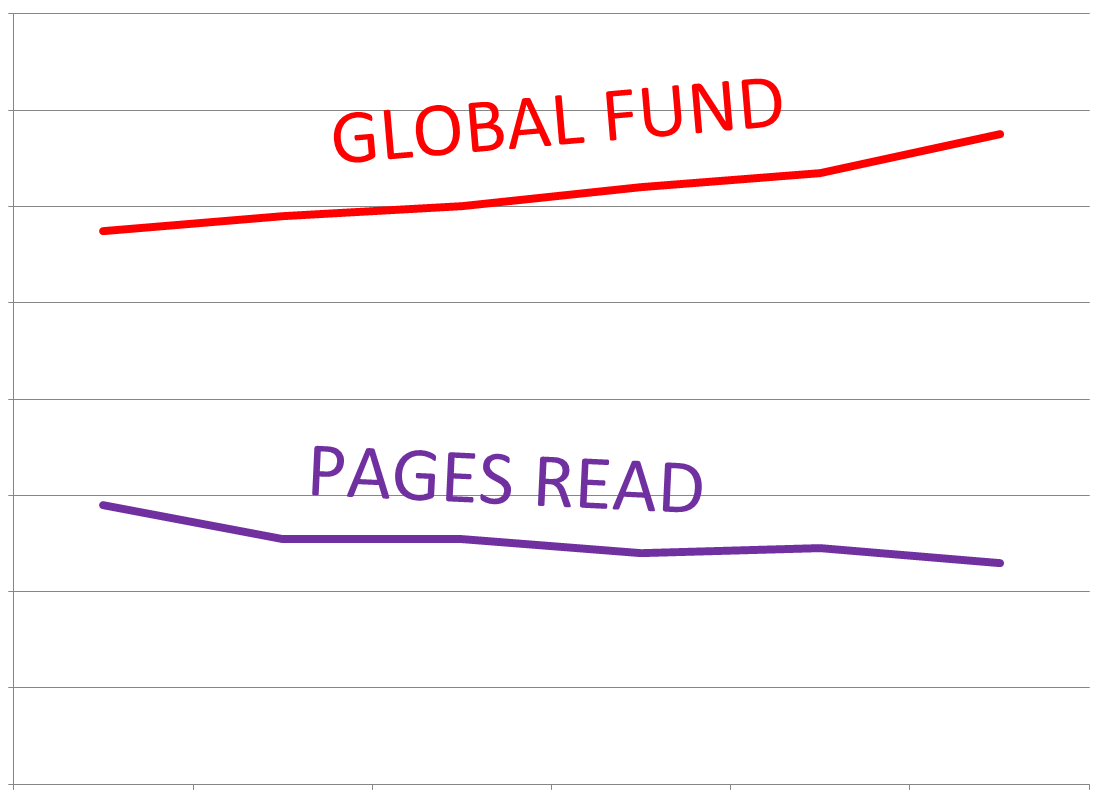
The KENP pages read continue to drop somewhat, while the KDP Select Global Fund continues to increase significantly.

This suggests that:

  • More readers are joining Kindle Unlimited and/or on average they are reading more pages.
  • More books are having more pages read each month, on average.
  • Kindle Unlimited is continually increasing its share of the total e-book market.
  • But while Kindle Unlimited readers and pages read are on the rise, they payment per page has been dropping.

The holiday season may have impacted both the payment for pages read and the KDP Global Select Fund.

According to a December 1 press release, Amazon had a record Black Friday weekend for the sale of Amazon devices, over 3 times the previous year. Amazon had several new devices out and really pushed them.

So perhaps Kindle Unlimited subscriptions and pages read were both pushed upward considerably during December, and if so, perhaps the payment for pages read will settle down a little in the near future.

Another important figure to keep in mind is that over 40,000 books are added to Kindle Unlimited each month. There are now approximately 1.2M books in Kindle Unlimited.

More books means greater selection, which may help to attract more customers. (Indeed, the Global Fund trends suggest this is happening.)

The competition probably helps more than it hurts, e.g. through customers-also-bought lists. When customers finish one Kindle Unlimited book that they enjoy, they tend to search for another like it.

KINDLE UNLIMITED BREAKDOWN BY COUNTRY

Here is a breakdown of how much Kindle Unlimited paid per page read in various countries:

  • United States: $0.00461 per page (US dollars). That’s a drop of 6.3% from November’s payment of $0.00492.
  • United Kingdom: £0.00306 per page (British pounds). That’s also a drop of 6.4% from November’s £0.00327.
  • Germany: €0.00389 per page (Euro). That’s a drop of 8.5% from November’s €0.00425.
  • France: €0.00429 per page (Euro). That’s a drop of 6.3% from November’s €0.00458.
  • India: ₹0.1008 per page (Indian rupees). That’s a drop of 6.2% from November’s ₹0.1075.

It pretty consistently dropped about 6.3%.

KINDLE UNLIMITED PAGES READ TRENDS JULY THRU DECEMBER, 2015

The following graph and table show the trends in Kindle Unlimited payments for KENP pages read from July, 2015 thru December, 2015.

KU Trends Jan 2016 PR

  • $0.0058 per page in July, 2015
  • $0.0051 per page in August, 2015
  • $0.0051 per page in September, 2015
  • $0.0048 per page in October, 2015
  • $0.0049 per page in November, 2015
  • $0.0046 per page in December, 2015

KDP GLOBAL SELECT FUND JULY THRU DECEMBER, 2015

The following graph and table show the trends in the KDP Select Global Fund from July, 2015 thru December, 2015.

KU Trends Jan 2016 GF

  • $11.5M in July, 2015
  • $11.8M in August, 2015
  • $12.0M in September, 2015
  • $12.4M in October, 2015
  • $12.7M in November, 2015
  • $13.5M in December, 2015

Write happy, be happy. 🙂

Chris McMullen

Copyright © 2016

Chris McMullen, Author of A Detailed Guide to Self-Publishing with Amazon and Other Online Booksellers

Click here to view my Goodreads author page.

  • Volume 1 on formatting and publishing
  • Volume 2 on marketability and marketing
  • 4-in-1 Boxed set includes both volumes and more
  • Kindle Formatting Magic (coming soon)

Follow me at WordPress, find my author page on Facebook, or connect with me through Twitter.

Comments

Click here to jump to the comments section.

What to Do about Reviews Disappearing from Amazon (Proactive Solutions)

Review Removed

REVIEWS REMOVED FROM AMAZON

It’s a well-known fact: Amazon blocks and removes numerous four- and five-star reviews, but almost never removes a one- or two-star review.

You have two choices:

  • Get upset about it.
  • Find a proactive way to make the most of it.

I have proactive suggestions for:

  • Customers who have had their reviews removed.
  • Authors who have seen reviews vanish without even so much as a puff of smoke.

Suggestions for customers are first. If you’re an author, just scroll down to your section.

If you’re concerned about the WHY, I’ll address this at the end of my post.

SUGGESTIONS FOR CUSTOMERS WHOSE REVIEWS DISAPPEARED FROM AMAZON

(A few customers think that when they click the star rating at the end of a Kindle book that they are reviewing it on Amazon, when instead they are rating the book on Goodreads. A few customers think they’ve submitted a review, but what they’ve actually done is just reach the intermediate page where they check their review before submitting it. The first step is to make sure that you’ve properly and fully submitted a review.)

Why did you write the review in the first place?

  • You felt strongly about the book.
  • You felt that the book deserved recommending.
  • You wanted to help other customers make wise shopping decisions.

So, you typed up a review and submitted it to Amazon, but discovered later that the review was gone. (Wait a minute. No, wait a day or two. Sometimes, when you post a review, there is a delay of 1-2 days before it shows up.)

That doesn’t prevent you from accomplishing your original goals.

Here are some proactive suggestions:

  • Recommend the book to people you know. Word-of-mouth recommendations are like GOLD. They can be better than writing a review on Amazon. If your goal was to recommend the book, nothing is stopping you from doing so.
  • Review the book on Goodreads. It’s the next best thing to reviewing it at Amazon.
  • Contact the author. Not to complain about the missing review. Authors appreciate feedback and hearing from fans. Offer to let the author use your positive comments on his blog, in the front matter, or anywhere else the author might be able to benefit from a review snippet. Reviews have many other potential uses besides sitting on the Amazon product page.
  • Do you have a blog, Twitter account, or Facebook account? Share your review with your followers. Since Amazon DIDN’T publish your review, they can’t prohibit you from sharing it.
  • Follow the author on Amazon. Just visit one of the author’s books, scroll down to the author’s biography, visit the author’s author page at Amazon, and click the big yellow Follow button on the top left. If you liked the book, you might appreciate having Amazon send you an email the next time the author publishes a book.
  • Follow the author’s blog, social media, or email newsletter. You can be one of the author’s fans.
  • Review the book on Barnes & Noble, The Book Depository, or other retailer where the book is sold.

Although you could contact Amazon to ask why your review was removed, this really isn’t proactive. You’re probably going to get a vague response, if any. You’re probably not going to convince Amazon that they made a mistake and reinstate your review. Most likely, you will waste both your time and Amazon’s.

(If your review violated any of Amazon’s guidelines, before posting your review elsewhere, you should first read the other site’s review guidelines to ensure that you’re not violating them.)

SUGGESTIONS FOR AUTHORS WHOSE REVIEWS DISAPPEARED FROM AMAZON

Very often, the author doesn’t even know that it happened. Amazon automatically blocks many reviews, such that they are gone before the author has a chance to see them.

And if the author “knows” that a review was blocked by Amazon, chances are that the author has some connection with the reviewer and Amazon “knows” of this connection.

Here are some proactive steps that authors can take regarding customer reviews disappearing from Amazon:

  • If a customer informs you that they posted a review, but Amazon blocked or removed it, you can offer the suggestions that I listed above (like posting the review on Goodreads).
  • If the reviewer has any authority, experience, or expertise relevant to your book, you may be able to include it in the Editorial Reviews section on your Author Central page.
  • With the customer’s permission, you might be able to use a review snippet in your front matter, back matter, on your blog, etc.
  • If the reviewer is an author in a related genre, they might be willing to write a foreword, for example.
  • If you were able to see the review before it was removed, or if the customer contacted you directly, you may still benefit from the feedback.
  • Thank the customer for trying. Thank the customer for contacting you. THANK the customer if he or she does any of the alternatives that I suggested in the previous section.

Contacting Amazon to complain about it probably won’t be helpful. Amazon will only offer an explanation to the customer, not to the author, and the explanation given to the customer will probably be vague. You’re probably not going to convince Amazon that they made a mistake and get them to reinstate the review.

Arguably, the best way to get reviews is to (a) write the book as well as you can, and polish it as well as you can (b) learn how to market your book effectively. The more sales you earn through marketing, the more likely customers will leave the variety of genuine reviews typical of Amazon customers, and those are probably the best reviews that you can get. You might only get about 1 review per 100 sales, on average.

(Friend, family, and recruited reviews invite their share of problems, aside from potentially being blocked and removed by Amazon. For one, if you have a lot of reviews, but the sales rank and publication date don’t suggest many sales, this may look suspicious to wise shoppers. For another, reviews that just praise the book without offering explanations or examples tend not to carry much weight. Yet another reason is that it may seem suspicious if there doesn’t seem to be any balance to the customer reviews.)

WHY DOES AMAZON REMOVE FIVE-STAR REVIEWS

Friend and family reviews (and worse kinds of reviews) plagued Amazon several years ago. Things got so out of hand that there were prominent articles featured in the Wall Street Journal and the New York Times. This prompted Amazon to take action. It’s estimated that millions of reviews were removed, and many more have since been blocked.

It’s much better now, from the customer’s perspective, than it had been just before Amazon began blocking and removing suspected customer reviews.

Yes, there are a few casualties, i.e. reviews that shouldn’t be removed. In order to market their books effectively, indie authors must interact with customers online and offline, and those online interactions occasionally confuse Amazon into removing a review that they really shouldn’t have removed.

Another perspective comes from sales, both short-term and long-term sales.

Amazon doesn’t want recruited reviews to FOOL customers into buying BAD books, as that would cripple long-term sales.

Authors seem to think that they need more GOOD reviews to sell more books in the short-term, but this may not actually be the case. Amazon has the real DATA. Maybe, in general, Amazon not only sells more books in the long-term, but even sells more books in the short-term with their current block-and-remove suspected favorable reviews policy. We can speculate. Amazon has the actual data. And Amazon is highly effective at selling books. Amazon is highly effective at selling indie books, too.

But again, it doesn’t help to get upset about it or complain about it. Find something proactive that you can do instead.

Write happy, be happy. 🙂

Chris McMullen

Author of A Detailed Guide to Self-Publishing with Amazon and Other Online Booksellers

  • Volume 1 on formatting and publishing
  • Volume 2 on marketability and marketing
  • 4-in-1 Boxed set includes both volumes and more
  • Kindle Formatting Magic (now available)

How to Wrap Text around Images with Adobe PhotoShop (Tutorial)

The text in the above image was wrapped in PhotoShop.

The text in the above image was wrapped in PhotoShop.

WRAP TEXT AROUND IMAGES IN PHOTOSHOP

There is a little ‘trick’ to wrapping text around an image in Adobe PhotoShop.

You won’t find an automated option that identifies itself as text or image wrap.

But you can wrap text around a picture in PhotoShop with a few easy steps.

I will show this step by step, with illustrations, specifically for Adobe PhotoShop Creative Cloud 2015 for Windows, but the same principle applies to other versions (although the specific steps may be somewhat different).

0 START WITH THE IMAGE AND TEXT

The following image shows the text and image, but not yet wrapped as desired.

The text layer is presently in front of the image layer.

Don’t worry. We’ll fix that in the following steps.

Text Wrap PhotoShop Text

1 FIRST REMOVE THE TEXT BOX

The real ‘trick’ is that you don’t want to use an ordinary text box.

So let’s remove it. Well, you probably want to copy and paste the text into another file, so you can retrieve it later.

But then remove the text box from the PhotoShop file.

Just click on the text layer and delete it.

2 ADD A RECTANGULAR PATH INSTEAD

It’s easy:

  • Click on the Rectangle shape tool on the sidebar (which appears on the left by default; it’s about the 6th tool from the bottom). It may be hidden behind the Line tool (or Ellipse, Polygon, or Custom Shape). If so, click on the icon and hold your mouse there until the other options show up.
  • Before you draw the rectangle, click the dropdown menu that currently says Shape to change it to Path instead. (The third option is Pixels. We want Path.) You can find the dropdown menu in the illustration below (look for Path).
  • Now that you’ve changed it from a “shape” to a “path,” draw a rectangle on the screen. Place your cursor where you want the top left corner to be, then drag your cursor down to where you want the bottom right corner to be, and when you release your mouse, you will see a rectangle. You want the rectangle to be approximately the right size to hold your text.

Text Wrap Snip

The following illustration shows where I inserted my rectangular path (but I made the rectangle much bolder than it really is in order to help you see it).

Text Wrap PhotoShop Pic

3 SUBTRACT A PATH OVER THE IMAGE

Again, it’s easy:

  • First, exit the Rectangle tool so it knows that you want to make a new path (and not continue working on the previous one). Just click on the top tool from the toolbar on the left (the Move tool or the Artboard Tool), for example. Don’t use that tool. You’re just letting PhotoShop know that you’re finished with the previous step.
  • Now grab one of the shape tools. You might grab the Rectangle tool again (just like we did in Step 2), or you might pick the Ellipse tool if your image looks more like an oval or circle than a rectangle or square.
  • Again, you want to set it to Path (not Shape), just like Step 2.
  • But now you also want to select the option for Subtract Front Shape. You find this on another dropdown menu. Look at the Shape menu shown in Step 2 above. Click the icon just right of where it says “Shape” and beneath the word “View.” (The name of this icon is Path Operations. Just hover over an icon to find out what it’s called.) Then select “Subtract Front Shape.”
  • Now use the shape tool to create a rectangular or oval (depending on which Shape tool you chose) path around the image. In my case, I made a square around my image. See below (but remember, I made the rectangles appear bolder than they really are so that you can see them easily).

Text Wrap PhotoShop Pic 2

4 ADD YOUR TEXT TO THE RECTANGULAR PATH

Now you just need add your text to the first rectangular path:

  • Again, exit the Shape tool, like you did in the beginning of Step 3.
  • Grab the Horizontal Type tool.
  • You don’t want to insert an ordinary text box.
  • Instead, you want to add the text to the large rectangular path that you created in Step 2.
  • Place your cursor anywhere inside the large rectangular path (fully inside the path). When you position the cursor correctly, the icon will change appearance so that it has a circular outline around it. That’s when you want to paste the text. Make sure it pastes into the rectangular path, and doesn’t create an ordinary text box.

If done correctly, the text automatically wraps around your subtracted path, as in my example below. (My “subtracted path” was the smaller rectangle created in Step 3.)

The text in the above image was wrapped in PhotoShop.

The text in the above image was wrapped in PhotoShop.

You may want to go into the character or paragraph settings and spruce up the typography.

One issue with wrapping text around a picture is that it makes the text width significantly smaller. This can lead to large gaps in justified text, for example. One way around that is to use left alignment (ragged right) instead. Otherwise, you need to learn a little about the art of typography to improve the design of the text. (Possible solutions include hyphenation, kerning, scaling, and other typographical tricks. That’s a topic for another post…)

Write happy, be happy. 🙂

Chris McMullen

Copyright © 2015

Author of the Improve Your Math Fluency series of workbooks and self-publishing guides

Book + Hook = Sales (Marketing Recipe for Authors)

Book Hook

BOOK MARKETING TIPS

Is your book full of hooks?

If you don’t understand the question, don’t worry. I’ll explain it shortly.

After I ask a different question.

Why did you read this article?

I realize that you haven’t committed yet. At any moment, you could walk away.

And so could customers when they check out your book. Remember that.

The hooks make the difference:

  • Did the title or image with this post grab your attention?
  • Did it make a promise, like more book sales?
  • Obviously, the beginning held your interest long enough for you to reach here.

YOUR BOOK NEEDS HOOKS

What is a hook?

A hook is something that catches your potential reader’s attention, arouses a reader’s curiosity, or engages your reader’s interest, for example. Anything that encourages potential customers to read your book effectively serves as a hook.

Your book should have several hooks:

  • Your title can actually have three hooks. (1) One hook comes from making a catchy title, a phrase that snaps the customer out of a trance. (2) Another hook conveys what the book is about, so when the customer reads the title, the customer knows the genre or subject. Be sure to put the right bait on your hook. (3) Any keywords in your title, subtitle, or series name help to hook readers through keyword searches. But you must balance this with 1 and 2. Also, shorter titles tend to sell better in fiction.
  • Your cover is another hook. For every 1000 or so customers that see your book cover, 1 may actually check out your book. It could be 1 out of 100. Or it could be 1 out of 10,000. But the difference can be huge. A cover also has multiple hooks. (1) What kind of book is this? That’s what every customer wants to know without having to work for it. Make it so easy that a customer can tell at a glance. (2) Even subconsciously. The right color scheme and font actually impact shopping behavior. It’s worth a little research. (3) Reinforce the title by making the most important keywords stand out even on a tiny thumbnail.
  • Your blurb is all about hooks. A customer reading your blurb is not committed. Not even to the first line. (1) The first line of your blurb can send 90% of your potential customers out the door. It’s your pick-up line. Pick this book up, please. But you have to be subtle. You need to arouse curiosity. Wake the customer from a trance, but use language the customer wants to hear. Make your blurb the dream date the customer has been yearning for. (2) You need to reinforce the subgenre or subcategory. The customer isn’t sure what kind of book this is. The title and cover create expectations. Don’t forget to make this clear in the blurb. Early in the blurb. (3) Concise is your friend, especially for fiction. Short sentences. Short blurb. Yet containing all the info the customer wants to know: What subgenre (implicit, but clear)? Engaging content (show it by example). What features will sell your book? Make these features—no, make the benefits of these features—clear, but be concise. For nonfiction, bullet points help break a long description into easy to identify points. (4) Cut out the material that customers don’t need to know, so only the hooks remain. For example, does the customer really need to know the names of multiple characters when just checking the book out? (5) Whatever material remains, make it seem more engaging. Trim and engage. Repeat. (6) Don’t spoil fiction. Definitely, don’t give away the ending. But don’t give away anything if you can avoid it. You don’t want the customer to feel like he or she already knows what will happen at some stage. Not knowing can help you sell books. There are words for this: Curiosity. Suspense. They are sales tools.
  • Your Look Inside is that last hook between the customer and a sale. Or walking away. And again, it should be full of hooks. Minimize the front matter to essentials that help sell your book, so the customer can reach the “hooks” without distraction. (1) The opening line is like the first line of your blurb. Many shoppers don’t get past that first line. (2) The customer isn’t committed to your book. The beginning needs to arouse curiosity and engage interest. Come out with your best stuff. Will a non-committed shopper read a lengthy build-up? You want the beginning to be so good that the customer clicks the magic Buy Now button. (3) Send a consistent message. The title and cover create expectations for a particular subgenre or subcategory. The blurb must reinforce the same message. And the Look Inside must also make this clear. Tell the customer (implicitly), “Yes, you’re in the right place. Now please make yourself at home.” (4) What will sell your book? Suspense? Curiosity? Fascination with a character? Language that flows well? Comb through your Look Inside to remove stuff that may inhibit sales, so that what remains will hook the reader.
  • It doesn’t end there. You don’t just want a purchase. You want the reader to continue onto the next chapter. You want the book to deliver on its promise so that the customer is already hooked on your next book. So that the customer helps you hook new readers. Word-of-mouth hooks are among the best hooks in the business. And the hardest to get.
  • Even the back matter can contain a hook: A captivating sample of one of your other books.
  • Let me back up a bit. Wise choice of keywords (or keyphrases) and categories can help you throw more hooks out into the sea of readers.
  • Hooks are everywhere. If people discover your blog, you want your blog to hook new readers, right? Well, then, your blog needs to be full of hooks. All of your marketing should have hooks. Even a catchy strapline—a phrase or sentence that helps create interest in your book (and also convey the right expectations)—can be used anywhere, even in daily conversations.

PRACTICE HOOKING (!)

(I really hope you don’t take this the wrong way!!)

Practice hooking your readers.

A great place to practice is with social media.

Every blog post, tweet, or Facebook post is an opportunity to practice hooking readers.

Learn how to write a title that achieves all of its three goals.

Learn how to find images that attract the right audience.

Learn how to say a lot in a little by learning how to use tweets effectively.

Social media offers a great way to practice, experiment, and learn the art of hooking readers.

But also practice from the other side. Practice getting hooked. Practice trying not to get hooked, and find yourself getting hooked despite that.

Check out successful books. Books that don’t sell because of name recognition or preexisting fan bases. Find new indie books that grow quickly, for example. Discover books with great hooks.

That can help you learn the art of hooking readers. See what kinds of hooks other authors use to hook their readers.

MARKETING WITH BOOK HOOKS

Think of writing as fishing.

You’re just one of millions of fishermen.

  • Location matters. You want to fish in a spot where there are plenty of fish. So you want to write a book that will attract readers. So write it with the customer in mind. What does the customer want? This question impacts your choice of topic, how you begin your book, how you write your book, how you package your book, etc.
  • There are a million fishing poles out there. You need lures and bait that will attract fish to you. Your title, cover, blurb, and Look Inside need effective hooks.
  • Authors wait patiently for readers to find their books. You need readers. You need them to discover your book. You need them to want to read your book once they discover it. The hooks on your product page and the hooks in your online and offline book marketing all help readers discover your book and decide to read it.

Write happy, be happy. 🙂

Chris McMullen

Copyright © 2015

Chris McMullen, Author of A Detailed Guide to Self-Publishing with Amazon and Other Online Booksellers

Click here to view my Goodreads author page.

  • Volume 1 on formatting and publishing
  • Volume 2 on marketability and marketing
  • 4-in-1 Boxed set includes both volumes and more
  • Kindle Formatting Magic (coming soon)

Follow me at WordPress, find my author page on Facebook, or connect with me through Twitter.

Comments

Click here to jump to the comments section.