Twice as Nice! Kindle now has Preorders, too!

Twice

Kindle Preorders!

On the same day that Kindle Unlimited downloads are reported to pay $1.81, we discovered that Kindle has enabled preorders for e-books.

Here is the Kindle Direct Publishing (KDP) help page on this: https://kdp.amazon.com/help?topicId=A3P7F81795P0RA&ref_=kdp_EB_PREORDER_phl.

Here is how to do it:

  • Log into KDP.
  • Go to your Bookshelf.
  • Add a new book or edit an existing book that you haven’t already published before.
  • Proceed to publish your book as usual.
  • In Step 4, choose “Make my book available for preorder.”
  • Select a date.

Notes:

  • Only new books can be made available for preorder.
  • Customers won’t be able to sample books while they are available for preorder.
  • A new reporting feature tells you about preorders and cancellations.
  • If your preorder creates a long window of slow sales, it could adversely impact your sales rank compared to having all those sales on day one; but if you generate many preorders, your book will come out of the gate running, which may help. Preorders can also help you generate buzz for your new release.
  • You have even more reason to preview your book carefully on every device and get excellent editing. You want your book to be perfect right out of the box. You won’t have the luxury to make many changes. Problems can lead to many early returns and negative reviews.
  • You can make your print book available for preorder using Amazon Advantage. There is a great thread on the CreateSpace community forum with instructions for how to do this.

Chris McMullen

Copyright © 2014 Chris McMullen, Author of A Detailed Guide to Self-Publishing with Amazon and Other Online Booksellers

  • Volume 1 on formatting and publishing
  • Volume 2 on marketability and marketing

Follow me at WordPress, find my author page on Facebook, or connect with me through Twitter.

WOW! Kindle Unlimited Paid $1.81 in July, 2014 (Updated)

Fourth Quarter Pic

Kindle Unlimited

KDP Select historically paid approximately $2 per Amazon Prime borrow.

Kindle Unlimited allows customers to download multiple books, whereas Amazon Prime used to allow only one borrow per customer.

Also, Kindle Unlimited readers don’t need to read their books on a Kindle device.

So there was much concern that Kindle Unlimited may pay much less than the usual $2 per borrow.

Well, the results are in, and Kindle Unlimited paid $1.805 per download/borrow.

Three factors helped out:

  1. Amazon added $800,000 to the July, 2014 KOLL fund, bringing the total to $2 million for the month.
  2. Then Amazon added another $785,000, bringing the KOLL fund up to $2,875,000 for July, 2014. That’s more than double the usual fund.
  3. Customers had to reach the 10% mark of the book before authors would receive royalties for Kindle Unlimited downloads.

The August, 2014 KOLL fund will again be $2 million.

Although July was a partial month, it also received a big boost of activity as the program was new and many customers were trying it out and using their free trial periods.

Update: In August and September KOLL paid $1.54 and $1.52, respectively; while in October, it paid $1.33. It’s up to $1.39 for November, 2014 and $1.43 in December.

I had been predicting significantly less, yet I’m very happy to have been wrong. 🙂

Chris McMullen

Copyright © 2014 Chris McMullen, Author of A Detailed Guide to Self-Publishing with Amazon and Other Online Booksellers

  • Volume 1 on formatting and publishing
  • Volume 2 on marketability and marketing

Follow me at WordPress, find my author page on Facebook, or connect with me through Twitter.

Bookmarks (Better than Business Cards for Authors)

bookmark 001b

Bookmarks

I ordered bookmarks from Overnight Prints and I’m very pleased with the results.

  • The images and text printed wonderfully (be sure to use 300 DPI).
  • I’m pleased with the quality of the cardstock.
  • The 2″ x 6″ size works for me.
  • I ordered double-sided bookmarks with rounded corners.

There are many sites that print bookmarks. I appreciated that Overnight Prints specifically mentioned bookmarks on the site (i.e. I didn’t have to choose a custom product to create something that was shaped and sized like a bookmark).

I may have supported Amazon by ordering bookmarks from CreateSpace, but CreateSpace would only create bookmarks for the book, more or less following some template; they wouldn’t allow me to create a bookmark for a series of books, for example. I wanted the freedom of design for my bookmarks.

The design for my bookmarks was created by artist Melissa Stevens (she also made my covers and website banner).

In addition, I ordered some business cards and magnets.

I’ll be using the bookmarks much more than anything else.

A bookmark is basically a business card that will actually be used.

Do you know anyone with a drawer full of business cards? Or who throws business cards away? Sure, a business card fits in a wallet, but if you receive dozens of business cards, you’re not going to have every one of those in your wallet (along with your id, credit cards, photos, and cash).

Readers use bookmarks. The ‘trick’ is to create a bookmark that doesn’t look like an advertisement. It needs to appeal aesthetically so that it actually gets used.

Now when that person finishes the current book, what will he or she do? Answer: Ask, “What should I read next?” And the answer is right before his or her eyes! Hey, maybe I’ll check out the book from this bookmark.

Don’t just stick them on windshields or pass them out at the mall. You want your target audience to find your bookmarks.

(Okay, so I know a zombie author who ‘accidentally’ left some bookmarks in popular novels like hers on a shelf in a store. I might add that this author has sold a LOT of books.)

When you interact with people in your target audience, include bookmarks. I suppose that you could even include one in books you give away through contests.

Anytime you’d be inclined to hand out a business card, consider a bookmark instead.

I’m not saying business cards are useless. I did order some of these, too, and I will use them.

When I ordered my business cards, there was an option to also order magnets of the same size. I have one sitting on my refrigerator presently.

The magnets were slightly curled upon arrival, but that seems to be natural (maybe they don’t like Louisiana heat and humidity). It’s easy to fix by adhering them to the refrigerator for a while (and since that’s likely how they’ll be used, it doesn’t matter much that they’re curled).

The magnets are somewhat more expensive and may not be as useful and effective as bookmarks, but they’re still cool to have… and I’m sure I can find people who appreciate having them.

(Despite the name “overnight,” when you place an order, you receive a variety of shipping options—the slower ones save you money.)

bookmarks 001b

Chris McMullen

Copyright © 2014 Chris McMullen, Author of A Detailed Guide to Self-Publishing with Amazon and Other Online Booksellers

  • Volume 1 on formatting and publishing
  • Volume 2 on marketability and marketing

Follow me at WordPress, find my author page on Facebook, or connect with me through Twitter.

Comments

Click here to jump to the comments section:

https://chrismcmullen.wordpress.com/2014/08/09/bookmarks-better-than-business-cards-for-authors/#comments


Gone Fishin’

Sorry, I was out of town this week.

I didn’t expect to be away from WordPress, though.

Unfortunately, my laptop refused to access the internet from the first day.

I’m back now, though.

I’ll have some new posts coming soon.

I’ll also see how much I can catch up reading blogs in my WordPress reader.

(Actually, I wasn’t fishing at all. The expression seemed to fit, except for that key point…)

AUTHORS Don’t be TWITS when TWEETING and making Online ‘Friends’!

Some words of Twitter wisdom from a huge supporter of authors, the Story Reading Ape.

Chris The Story Reading Ape's avatarChris The Story Reading Ape's Blog

As someone who makes online contact with authors on a daily basis, there are a few things that actually IRK me (not a pretty sight), so please excuse me while I arrange this soapbox more comfortably and elaborate further.

These irk-making issues are not unique to me and have been expressed by many people – including many non-irk making authors – so unless you want to LOSE potential readers, fans and friends, you need to STOP doing the following IMMEDIATELY on Twitter, Facebook, LinkedIn, Google+, Goodreads, Shefari, Librarything, et al:

Making your first contact with the immortal words:

Get my books at ***************

LIKE my FB Page at ***************

Follow my Website / blog at ***************

And similar well meant (?), but self-centred sayings!!!!!

Think about it for a few moments – WHY did this person start Following / Liking / Send you a Friend / Connection Request?

Is it…

View original post 513 more words

30 Tips to get more exposure for a book

A good variety on this list. 🙂

authors promotion's avatarAUTHORS PROMOTION

Excerpt from my book How To Promote and Market Your Book by Madi Preda

30 Book Marketing Tips:a recruiting
I have included a variety of tips and I am sure that you will find something on the to do list that you can do to build your brand and sell your book.

1. Create a testimonial page on your website.
2. Offer advanced reading copies ARC.
3. Ask fans to post their reviews on your Facebook page.
4. Ask fans to post their reviews on Amazon.
5. Ask fans to post their reviews on Goodreads.
6. Offer bloggers advanced reading copies.
7. Set up a virtual book tour.
8. Create your street team.
9. Create seasonal videos: Mother’s day book, Summer Reads, Have Fun in the Sun, Autumn fall, Santa’s Book Recommendation, Spring-new reads, etc.
10. Register as an author on Amazon, Goodreads, AuthorsDen, Google Authorship.
11. Create a book…

View original post 276 more words

Learn Much about Self-Publishing by… Blogging

Blog First

Hands-on Self-Publishing Experience

Blogging at WordPress can teach you more about self-publishing than you might realize.

Think about this, and strive to get the most out of it.

It would be wise to blog before self-publishing for the hands-on experience every authorpreneur needs to be successful.

But even if you’ve already self-published, it’s not too late to make the connection between blogging and indie publishing.

Here are several ways that blogging at WordPress can help you become a more successful authorpreneur:

  • Crafting the title. You have to write titles for your blog articles, so you get plenty of experience trying out titles and seeing how much attention your posts get. The title is a very important part of your book. Without blogging, most authors would have no experience or practice writing titles and seeing what interest they stimulate. Study the titles of articles from popular bloggers.
  • Content popularity. Writing about different topics, you can see which seem to be more popular or less popular among bloggers. The best way to learn what people like is through first-hand experience.
  • Keywords and categories. Gain experience choosing categories and tags for your articles at WordPress. You’ll need to choose categories and keywords when you publish. For your blog, you can type phrases in Google to see how popular they are, and for your book, you can try phrases out at Amazon’s home page. When you come across popular blog articles similar to what you write, check out the tags and categories that they used.
  • Cover design. Preparing or linking to images in your posts gives you some feedback regarding how to attract an audience visually. You also see images that evidently attract much attention to popular blog articles. The more you prepare your own images, the more you learn little tips.
  • Look Inside. In the WordPress reader, people only see a short sample. Bloggers strive to learn how to use the beginning of the article to create interest in the article. Similarly, at Amazon, you need to write an engaging blurb and Look Inside.
  • Writing practice. Blogging offers writing practice for self-published authors. You can even try out a new style or genre, with real readers to offer feedback.
  • Build your brand. At WordPress, you strive to build your blogging brand. This will carry over to becoming an authorpreneur, where you need to develop brands as an author and for your books.
  • Learn about marketing. You get firsthand experience trying to market your blog, which will carry over to book marketing. You get to see what other authors do in the way of marketing. Plus, blogging helps you build helpful relationships that can help you with your marketing when your book comes out. Some of your followers will serve as your initial fan base, too.
  • Monitor traffic. WordPress shows several stats that help you analyze your blog traffic. This can help give you a sense of the potential of your blog to help with marketing—a small percentage may be your initial fan base, but more importantly, the search engine traffic helps you see what frequency of outside visitors discover your website daily. The number of likes per post gives you some idea of your active following, which can pale in comparison to your total following; the search engine traffic is the number with the greater potential.
  • Get support. Relationships that you build on WordPress can support you with advice, reblogs, feedback, and more when you begin your self-publishing journey.
  • Explore formatting options. You have to format your posts here at WordPress. As you try new things in your articles, you gain some formatting experience. An e-book formats much like a webpage.
  • Test an idea. Got an idea that you want to test out? Try a sample on your blog and get some feedback.
  • Meet your audience. A thin slice of your WordPress following will include readers from your target audience. These interactions are golden.
  • Device management. Over time, you happen to view your blog from your pc, laptop, a friend’s iPad, a cell phone, etc. This gives you some idea about how various things format on different devices. That’s good experience for the challenge of formatting e-books that read well across all devices.
  • Analyze stats. Stats at Amazon are pretty limited—royalties, sales rank, reviews. You get many more stats here at WordPress—countries, views, likes, follows, shares, comments, etc. Such data can be valuable. You could even make a graph of your blog views for the month and compare it with your sales graph to see if there may be any correlation.
  • Website development. Indie publishers need to have websites, Facebook author or book pages, author profiles, etc. The experience you gain transforming your blog into a website will help you anytime you need to create a webpage or website.
  • SEO. You write articles hoping to pull in traffic from search engines. You gain experience with SEO as you try out categories, experiment with how to include keywords in headings and body text, etc.
  • Grow a following. You’ll develop a following here at WordPress. Setup an author page at Facebook and link to it at the end of your posts, and feed your WordPress posts into Facebook (but don’t also feed Facebook into WordPress or you’ll get double posts). Similarly, feed your blog into Twitter (but don’t feed from Twitter to WordPress or Facebook, or again you’ll get double or triple posts). Create profiles at Google Plus and LinkedIn, and your WordPress traffic can help you grow a following everywhere.
  • Build connections. Meet fellow authors, editors, graphic designers, small publishers, and more in your WordPress interactions. Indie authorship is a supportive community, for the most part.
  • Create buzz. When you release a book, your blog will help you create buzz for it.

Of course, there are many other benefits to blogging. For example, you can make some great online friends, and you can find some excellent material to read for free here at WordPress. Arguably, friendships and great reading material are the BEST parts of WordPress.

Chris McMullen

Copyright © 2014 Chris McMullen, Author of A Detailed Guide to Self-Publishing with Amazon and Other Online Booksellers

  • Volume 1 on formatting and publishing
  • Volume 2 on marketability and marketing

Follow me at WordPress, find my author page on Facebook, or connect with me through Twitter.

Comments

Click here to jump to the comments section:

https://chrismcmullen.wordpress.com/2014/08/03/learn-much-about-self-publishing-by-blogging/#comments

Does Front and Back Matter Matter?

Matter

Front & Back Matter

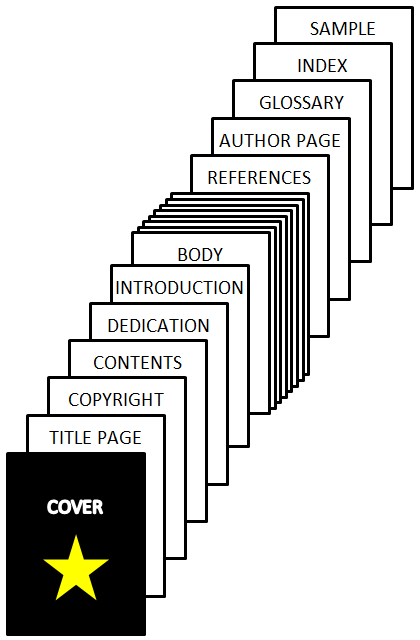
Here are some points to consider when preparing the front and back matter for your self-published book:

  • Back matter can get in the way of an important page in your e-book. The very end encourages the customer to review the book.
  • Include your blog and social media url’s on your author page (with hyperlinks for your Kindle e-book). Add a note that gives readers a reason to visit your sites (e.g. free interactive map).
  • Series authors can include a short sample of the next volume at the end of each book.
  • A reader might close the Look Inside, bored with a prologue, never reaching Chapter 1, which might grab attention better. Ask yourself if you really need that prologue.
  • Use the table of contents wisely. Chapter 1, Chapter 2, etc. is a wasted opportunity. Create short names that catch interest for fiction or that reveal content for nonfiction.
  • The more front matter you add, the longer it takes to reach Chapter 1. Ask yourself which sections you really need.
  • Short e-books might have very little writing sample to offer if there is much front matter.
  • If there is virtually no front matter, that might seem odd to the customer. Didn’t the author use other books as models?
  • Front matter must look professional to make a good impression. Nobody studies a copyright page, but when they pass by, if it doesn’t look right, it leaves an impression.
  • Publishers lead off with all kinds of too-good-to-be-true quotes. This might have merit from a well-known source, not necessarily otherwise (though they could—it really pays to know your target audience well).
  • Arguably, the most important part of the book is in Chapter 1. Come out punching with your best stuff. Unfortunately, a slow build can cost new readers. Make it easy to reach the first chapter.
  • You don’t have to have the exact same front and back matter in both your print book and e-book. An index, for example, isn’t necessary in an e-book, which doesn’t have page numbers for one, and where customers can simply search for keywords for another.
  • At CreateSpace, page number is a consideration. It can affect whether or not you can use spine text (minimum 102 pages, 130 recommended), the minimum inside margin, or how much the book costs to produce. Every page you add costs you money (unless you have fewer than 24 pages for color or 102 pages for black and white). So think about what front and back matter you really need. But if you’re between 100 and 130 pages, extra pages help you with better spine text potential. If you may be selling copies in person or to bookstores, you want front matter that looks professional and helps sell the book; and you don’t want to be missing sections that they expect to see.
  • Something cool in the front matter can attract attention, if done right. It could be a nontrivial effect with formatting or professional design marks, for example, but it has to look like it belongs there. For an e-book, add a short GIF image (important with text, since the background may not be white) with a publisher logo beside a few lines of text. You ordinarily see images below and above text, not wrapped beside it, so it could be that professional touch that makes the difference. See my example below (the logo was designed by Melissa Stevens).

Math Fluency

Chris McMullen

Copyright © 2014 Chris McMullen, Author of A Detailed Guide to Self-Publishing with Amazon and Other Online Booksellers

  • Volume 1 on formatting and publishing
  • Volume 2 on marketability and marketing

Follow me at WordPress, find my author page on Facebook, or connect with me through Twitter.

Comments

Click here to jump to the comments section:

https://chrismcmullen.wordpress.com/2014/08/03/does-front-and-back-matter-matter/#comments

Good News for Indie Authors

Good News

July, 2014 Author Earnings Report

Check out the July, 2014 author earnings report:

http://authorearnings.com/report/july-2014-author-earnings-report

It has some good news for self-published authors:

  • Indie authors found success with the Amazon bestseller lists, topping the Big 5 numbers in some statistics.
  • Indie authors drew in good revenues from bestselling e-books.

Also worth noting:

  • The Big 5 e-books made more revenue for Amazon than indie e-books, even though indie e-books drew more author revenue.
  • It’s worth reading the note about DRM being a bad idea. See the graph to see which price ranges this affects most (in some cases, the difference is slight; for others, it’s significant).
  • Check the graph that sorts data by genre. You can see that indies do well in more genres/subjects than just romance.
  • The charts also include small and medium publishers.

Successful Indie Authors

Here is a recent article from Yahoo Finance, highlighting recent indie author successes:

http://finance.yahoo.com/news/independent-romance-writers-get-the-last-laugh-%E2%80%94-all-the-way-to-the-bank-213437913.html?soc_src=mediacontentsharebuttons

While this article looked specifically at romance writers, the previous report showed that indie are having success in other genres and subjects, too.

The big thing to remember is that there are millions of books to choose from:

  • You need a cover that attracts your target audience. If it attracts the wrong audience, it will cost you much traffic. If the cover doesn’t look quite right, it’s a lost opportunity.
  • The blurb and Look Inside are your only sales tools at the point-of-sale. They need to be immaculate. They need to engage the reader immediately and keep it throughout.
  • It’s worth perfecting the content. Word-of-mouth sales are golden. You need excellent ideas that will attract readers, and a writing style to match.
  • Market for long-term success. Real success takes much time and patience to build up.

Chris McMullen

Copyright © 2014 Chris McMullen, Author of A Detailed Guide to Self-Publishing with Amazon and Other Online Booksellers

  • Volume 1 on formatting and publishing
  • Volume 2 on marketability and marketing

Follow me at WordPress, find my author page on Facebook, or connect with me through Twitter.

Comments

Click here to jump to the comments section:

https://chrismcmullen.wordpress.com/2014/08/03/good-news-for-indie-authors/#comments

What Makes People Buy Self-Published Books?

The million-dollar question, along with some million-dollar answers. Authors, you really want to check this out. 🙂

Tara Sparling's avatarTara Sparling writes

In this post, I discussed the findings of a scientifically incontrovertible study (of myself) on the factors which influenced me when buying a self-published book.

The findings surprised me (which surprised me, because I was surveying myself). I found that I knew what made me buy a self-published book when it was in front of me, but not what put that book in front of me, unless I was browsing by genre (e.g. today I feel like reading a romance set in Ulaanbaatar: therefore I will now search specifically for such a story).

It was still hard to know what put those books in front of my eyes in order to buy them; to quote one of the commenters on that post – this is the thorny issue of “discoverability”. How will we find these books in the first place?

So I did the unthinkable, and asked some other people…

View original post 640 more words