How to Format a Textbook or Workbook for Kindle

FORMATTING A TEXTBOOK FOR KINDLE

I’ve published several workbooks and a few textbooks in both print and Kindle, and I’ve written a few detailed articles about using Amazon’s free Kindle Textbook Creator.

Today’s article adds something new: I’m using my experience to compare three different methods of formatting a textbook or workbook as a Kindle eBook.

Let’s suppose that you wrote a textbook or workbook using Microsoft Word and have already formatted it as a print-ready PDF, and now you wish to convert it to an eTextbook for Kindle.

There are three viable ways to go about this:

  1. Simply run your PDF through Amazon’s free Kindle Textbook Creator. Like magic, in a few moments you will have a KPF file that you can preview within the Kindle Textbook Creator and then upload to KDP. This is by far the most convenient option for the author or publisher. However, a book that looks good on paper and runs through the Kindle Textbook Creator is often inconvenient to read, especially on smaller screens, and the eTextbook won’t be available across all devices. If the customer must pinch-and-zoom frequently to read the text, this will become tedious quickly.
  2. Modify your Word file and create a new PDF file optimized for the Kindle Textbook Creator. This isn’t as convenient for the author, but it’s not too inconvenient, really. Once you convince yourself that it’s worthwhile and get started, it isn’t that bad. The benefit is that it can improve the customer’s reading experience. Back in Word, you can set all of your page margins to zero, since that just wastes space on a Kindle device. As a result, it makes the text slightly easier to read. If it’s viable, you can consider significantly increasing the font size and reformatting the pages to accommodate the change (as it will alter the page layout significantly). If the text is large enough, customers may be able to read your eTextbook on more devices without using pinch-and-zoom. Also, if you have images that include text, see if it may be viable to make the text larger in those images.
  3. Create a reflowable eTextbook. Most Kindle eBooks are reflowable. The few exceptions include fully illustrated children’s books, comic books, and richly formatted eTextbooks. All novels and text-heavy nonfiction books are reflowable eBooks, meaning that the customer can adjust the font size, font style, and line spacing. If it’s formatted well, this can make for the optimal reading experience. The main reason that eTextbooks are often formatted as fixed-format rather than reflowable format is that it’s much more convenient to run a PDF through the Kindle Textbook Creator than it is to reformat a textbook as a reflowable eBook. Plus, a richly formatted textbook presents more formatting challenges: If you don’t navigate the reflowable Kindle design challenges well (including bullet points, equations, callouts, sidebars, multiple columns, tables, figures, and page layout), any formatting mistakes can make the result worse than what you would get with the Kindle Textbook Creator.

EXAMPLE 1: REFLOWABLE VS. KINDLE TEXTBOOK CREATOR

In my first example, I will compare options 1 and 3.

My most recent math workbook, Fractions Essentials Workbook with Answers, includes 20 chapters and 256 pages.

Each chapter begins with a concise review of essential concepts and fully-solved examples with explanations.

There are several equations that wouldn’t format well in Kindle without turning them into pictures.

Every chapter ends with a set of practice exercises.

At the back of the print edition is an answer key with the answer to every problem plus intermediate steps, hints, and explanations.

This definitely qualifies as a richly formatted textbook.

I formatted this book two different ways:

  • I ran my print-ready PDF through Amazon’s free Kindle Textbook Creator.
  • I converted my Word document into a reflowable eBook using the same methods described in my Word to Kindle Formatting Magic book (to be published later in February, 2018, hopefully). I also moved the answers to the end of each chapter instead of putting them all at the back of the book. This makes it easier for the reader to find the answer key in the eBook (and I also added each chapter’s answer key to the active table of contents).

After creating both versions of the eTextbook, I decided to publish the reflowable version.

Above, you can see two sample pages of the preview of the KPF file shown in the Kindle Textbook Creator.

Here are a few features that I like about the version I created with the Kindle Textbook Creator (shown above):

  • It was quick and convenient for me to make.
  • The pages are well-defined. Sometimes, it’s nice to control the page layout and make content “fit” on a page. An entire problem set or example can be made to fill all of the space on a page.
  • I can refer to figures, equations, or sections by page number (like “see page 94”).
  • The Look Inside would look fine on Amazon, basically showing how the book looks on printed pages.

Here are a few features that I don’t like about the Kindle Textbook Creator version (shown above):

  • It’s inherently much harder to read. On many devices, some of the content requires using pinch-to-zoom, which would be inconvenient for customers.
  • Customers can’t adjust the font size, font style, or line spacing. This is the main limitation with trying to make a fixed format book easily readable.
  • The eTextbook wouldn’t be available on all devices. This limits your audience (and occasionally upsets customers).
  • It’s not as easy to make hyperlinks work. Plus, the last time I tested internal hyperlinks (like for an active table of contents), the hyperlinks didn’t work in the published eTextbook. Device navigation does work though (and you can enter the table of contents for device navigation directly in the Kindle Textbook Creator). Unfortunately, a few customers are used to finding a page of clickable hyperlinks, and either don’t know how to find device navigation or don’t want to do that (or have an older device).
  • It’s black and white. (But that’s my fault and would have been easy to fix. I could easily change the pictures to color in Word and create a new print-ready PDF.)
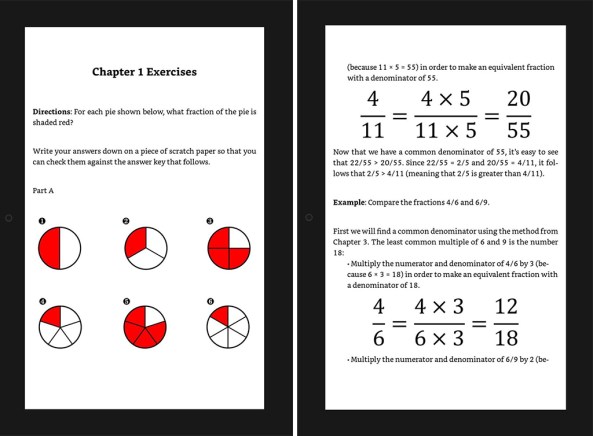
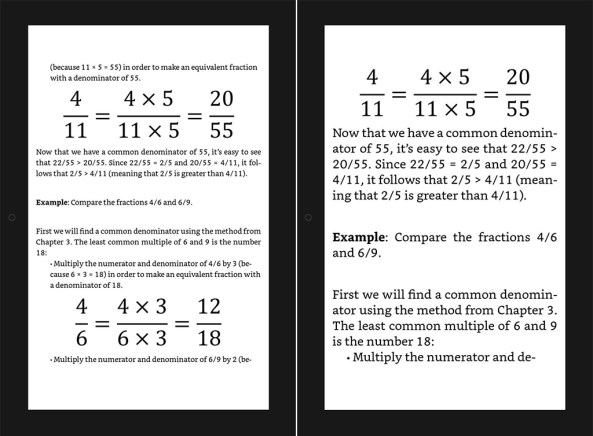
Above, you can see two sample pages of the preview of the converted MOBI file in the KDP previewer.

Here are a few features that I like about the reflowable version (shown above):

  • It’s easy to read on any device with any size screen.
  • For any equation that was too complex to simply type on Kindle, I reformatted the equation as a picture so that it would be easily readable across all devices (you can see the large equations in the picture above).
  • Customers can adjust the font size, font style, and line spacing to their liking. You can see this in the picture below, where I show the effect of adjusting the font size. The customer can’t do that when you use the Kindle Textbook Creator.
  • It’s available on every device, so any customer who owns a Kindle device, Android tablet, Android phone, PC, laptop, Mac, iPad, or iPhone can read the eTextbook.
  • Creating all kinds of hyperlinks, internal and external, is easy. Both kinds of hyperlinks work, and you can easily make an active table of contents with clickable hyperlinks.
  • A few pictures show in color on devices with color displays. Since I took the time to reformat all of the pictures for Kindle, I added color shading to the pie slices.

Here are a few features that I don’t like about the reflowable version (shown above):

  • It took much more time to format the eBook (but it wasn’t insurmountable).
  • Depending on the display size and the reader’s choice of font size, font style, and line spacing, you never know when a page break may occur. This can begin a new example at the bottom of a screen, or it can leave a lot of blank space when a large figure doesn’t fit on the current page, for example. Overall, I think it came out well in many cases, but this is the main design challenge with the reflowable format: You can’t control the pagination or page layout nearly as well as you can with fixed format.
  • The pictures don’t scale with font size. (It is possible to do that with SVG images, but not all devices support SVG, so you have to do that with media queries, which entails extra work, and even then some customers will still see it without scalable images.)
  • I had to find any references to specific page numbers and find another way to say where that section, figure, table, or equation is. (You could achieve this with hyperlinks though.)
  • Since I made equation pictures large enough to read on any device, in the Look Inside feature at Amazon, and with the default font settings of certain devices, I don’t like how the equation pictures have text that is much larger than the font size. As you can see below, in some cases it is more pronounced than others: It varies with the customer’s choice of font size. But I felt that easy readability on any device was important: That was a major benefit of choosing the reflowable layout.
EXAMPLE 2: REFLOWABLE VS. KINDLE TEXTBOOK CREATOR VS. OPTIMIZED KTC

This example will compare eTextbooks made using all three options:

  1. Simply run your PDF through Amazon’s free Kindle Textbook Creator.
  2. Modify your Word file and create a new PDF file optimized for the Kindle Textbook Creator.
  3. Create a reflowable eTextbook.

This time, instead of adding sample pictures of each case to my article, I will include a link to an example at Amazon.

You can explore Amazon’s Look Inside for free, or you can read the free sample using a free Kindle app (like Kindle for PC or Kindle for iPad) or a Kindle device. The free sample will let you better preview how it looks as an eBook. (You don’t need to buy the book to see how it looks.)

For Option 3, you can click the Free Preview button in the picture. Unfortunately, for Options 1 and 2, this button doesn’t work in Amazon’s Free Preview picture. However, you can view the free preview by clicking the hyperlink below the figure to visit Amazon and then viewing Amazon’s Look Inside.

Note that the Look Insides of Options 1 and 2 look fine when you view them on a PC, laptop, or other device with a large screen.

However, if you read these eBooks on most Kindle devices or the actual eBooks with one of Amazon’s free reading apps, then the text for Option 1 is much harder to read.

The text for Option 3 is easy to read on any device or app, though it doesn’t come out as good in the Look Inside. That’s one of the misleading quirks of Amazon’s Look Inside feature displaying a Kindle eBook as a scrollable webpage on a PC or laptop display. It’s surprising that they don’t show all Kindle Look Insides for reflowable eBooks using Page Flip or the way that you see Option 3 when you click the Free Preview button. While that isn’t perfect, it portrays a reflowable eBook more realistically.

Option 1: Simple PDF conversion using the Kindle Textbook Creator.

For the following book, I took the print-ready PDF and simply ran it through the Kindle Textbook Creator with minimal changes.

This is the most convenient option for the author, but it’s not as easy for the customer to read.

Trigonometry Essentials Practice Workbook with Answers

Option 2: Optimized Word file for the Kindle Textbook Creator before creating a PDF.

For the following book, I zeroed the page margins, changed the page size and aspect ratio, and significantly enlarged the font size. After this, it took some time to improve the page layout.

Then I ran the new PDF file through the Kindle Textbook Creator.

The result is easier to read across all devices without having to pinch-and-zoom.

However, as with all fixed format eBooks, the customer can’t adjust the font size, font style, or line spacing, and with the Kindle Textbook Creator, the eTextbook isn’t available across all devices and apps.

Learn or Review Trigonometry: Essential Skills

Option 3: Converted Word file to reflowable format.

For the following book, which I just published two days ago, I invested a great deal of time converting my Word document to a reflowable Kindle eBook (following the instructions in my book, Word to Kindle Formatting Magic, to be released later in February, 2018, hopefully).

It wasn’t as convenient for me, but the result is readable across all devices, the eBook is available across all devices, and the customer can adjust the font size, font style, and line spacing. Plus, there is an active table of contents with clickable hyperlinks that work.

Fractions Essentials Workbook with Answers

Write happy, be happy. 🙂

Chris McMullen

Copyright © 2018

Author of A Detailed Guide to Self-Publishing with Amazon and Other Online Booksellers

  • Volume 1 on formatting and publishing
  • Volume 2 on marketability and marketing
  • 4-in-1 Boxed set includes both volumes and more
  • Kindle Formatting Magic (coming soon)

Follow me at WordPress, find my author page on Facebook, or connect with me through Twitter.

Do Something Cool with Your Book Covers

BUILD WITH BOOK COVERS

If you’re an author who has a book cover with visual appeal, here is your chance to raise that visual appeal to a higher level.

Build something cool with your book cover.

Although designing a cover that has strong visual appeal is a challenge, building with a book cover is much easier than it looks.

First of all, you could keep it two-dimensional, and simply use copy/paste to create rectangular blocks. Anything that you can build by stacking together blocks, you could build with your cover.

You don’t have to work with rectangles. You could crop your cover to other shapes.

But even three-dimensional images are relatively easy. There are apps that can help you achieve three-dimensional rotations, and some common picture software programs have this feature built-in.

You could even do this with Word. (Though Word is common and it’s easy to do with Word, one drawback will be limited DPI, in case you’re planning to print the results. You can make the page size 20″ x 20″ in Word with zero margins to maximize the picture size, then later transfer the picture to real picture-editing software to create a smaller image with higher DPI than what Word offers.)

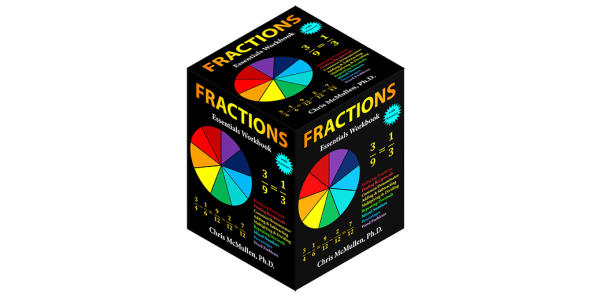
In recent versions of Word, select the picture, go to the Format tab, look for Picture Effects, and choose 3-D Rotation. If you make 3 copies of your cover, you can put the right combination of 3 of the presets together to make a cube. (However, if your cover isn’t square, you’ll need to squeeze the aspect ratio for the “top,” or add a border to the cover to make it square before you start like I did with my astronomy cover above. For rectangular covers, you can make the top piece square after unlocking the aspect ratio in the Size options and then making the width equal the height.)

In the picture above, I rotated my algebra cover two different directions and pasted them together. If I had only used two, I could have added a top or bottom to make a cube, but I wanted to show that the cube isn’t your only option. Use your creativity. You can make anything from dominoes to pyramids.

You can see a pyramid that I created above. That’s the cover for my Kindle Formatting Magic book, which will be published later this month (hopefully), which was designed by Melissa Stevens at www.theillustratedauthor.net. Once you make a box out of your cover, you can use copy/paste and stack the boxes together to make just about anything.

Illustrator Melissa Stevens made the shapes that you see above using a variety of my book covers. She also designed the header for my self-publishing blog using the covers for my self-publishing books. One of the pictures shows a boxed set, which is something you can make when you have a few related books.

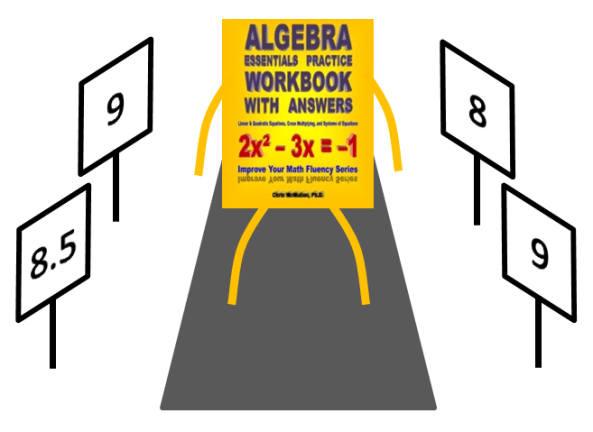
Below I have a simple picture of one of my book covers walking down a runway like a model. The judges are holding up scores to judge it (not that there’s much to judge on that cover, as it just consists of text—but that’s a funny thing about covers: especially with nonfiction, something simple like that can be effective).

Another cool thing you can do is take a picture of a city (but be careful, some of the stock photos that you see of big cities have limitations on their usage) and add your book cover to it. For example, Chris the Storyreading Ape (thestoryreadingapeblog.com) made the picture below using the cover for my mathematical puzzle book.

BOOK MARKETING OPPORTUNITY

Of course, the book cover itself can help with (or hinder) book marketing.

But if you make something cool with your book cover, it provides an additional opportunity.

I don’t mean to suggest that if you create a box out of your book cover that your book will suddenly become a bestseller.

I’m saying that there are ways that you could use this effectively, depending on your creativity and marketing skills (but even if they’re lacking, you might get a little traffic from it).

The big problem with book marketing is that you want everyone in the world to learn about your book, but it’s really hard to find strangers who are receptive to marketing that basically says, “This is my book, would you please buy it?”

Thousands of authors are blogging, tweeting, interacting on Facebook, advertising, writing articles, and everything else that they can think of that they might be willing to try to help spread the word about their books. Some marketing is more effective than others.

Simply reminding people that you’re an author and that you wrote a book, or simply telling that your book is the best read ever has limited effect.

Authors strive to find other ways to catch readers’ interest, hoping that once the reader becomes interested, they’ll notice that they’re authors and then be willing to check out their books. This is the heart of book marketing, combined with author branding.

So making something cool with your cover is another way to possibly catch readers’ interest with a cool visual display. Getting people to notice that visual display, well that’s another part of marketing, where you try to widen your reach.

You can use your book cover creation in a variety of ways:

  • in a blog, tweet, or post
  • to make a bookmark (a handy marketing tool, something that may actually get used by readers)
  • add it as a secondary picture on your author page
  • wear it on a t-shirt and see if it sparks any conversations about your book

Some authors have the creativity and marketing insight to really take advantage of a strong visual display, but at the very least, it might help get a short spur of interest.

Write happy, be happy. 🙂

Chris McMullen

Copyright © 2018

Author of A Detailed Guide to Self-Publishing with Amazon and Other Online Booksellers

  • Volume 1 on formatting and publishing
  • Volume 2 on marketability and marketing
  • 4-in-1 Boxed set includes both volumes and more
  • Kindle Formatting Magic (coming soon)

Follow me at WordPress, find my author page on Facebook, or connect with me through Twitter.

Recent Changes to CreateSpace and Kindle Direct Publishing Paperbacks

CreateSpace and Kindle Direct Publishing

Recent Updates to Paperback Features

Amazon has recently added new features to KDP’s paperback self-publishing option:

  • You can now order printed proofs from KDP. This is a vital step toward ensuring that your book is ready to publish.
  • You can similarly order author copies from KDP. This makes it viable to stock your book in local stores and libraries, and creates marketing opportunities like advance review copies, paperback preorders (through Amazon Advantage), press release packages, paperback giveaways, and book signings.
  • UK and Europe authors should be particularly excited, as KDP introduced a new feature that you can’t get at CreateSpace: author copies and proofs printed and shipped from Europe.

The first two changes simply bring KDP up to speed to make it a viable alternative to CreateSpace and Ingram Spark.

But the last change offers authors in the United Kingdom and continental Europe something that they can’t get from CreateSpace.

Meanwhile, CreateSpace has also experienced some changes:

  • CreateSpace will be eliminating paid services in a few months. I don’t see this as an issue really, as I’ll explain below.
  • Links to the CreateSpace eStore now redirect traffic to Amazon.com. Most authors are completely unaffected by this, as most authors get almost all of their paperback sales from Amazon.com anyway. The rare author who was capable of not only generating traffic to their eStore but who could also get many of those customers to overcome the CreateSpace shopping hurdles (like having to create a new account and pay for shipping) will need an alternative, such as BookBaby’s BookShop, Lulu’s storefront, or their own website with payment features.
  • Books automatically receive distribution to Amazon.ca (Canada) within 30 days if the Amazon.com sales channel is enabled. This isn’t that new (although it’s not as well-known as it could be), but I mention it because it’s a distinct advantage that CreateSpace currently retains over Kindle Direct Publishing.

Regarding CreateSpace’s paid services, in many ways it was always better to find a third party. Some third parties offer a portable file or a finished product that lets you edit your own file in the future, whereas CreateSpace’s services required paying for corrections in the future. Some third parties are also more flexible, offer economic (or even free) samples of their work, and offer better communication with the actual editor or designer. If you do thorough homework on finding a third party, it may turn out better than what CreateSpace offered. The main advantage CreateSpace had for their paid services (like copyediting or cover design) was the backing of Amazon’s name and their satisfaction guarantee. If you’re looking for paid services from a print-on-demand publisher, one option is BookBaby.

Does this mean that KDP is the better POD option now?

It depends on your needs.

Here are advantages that Kindle Direct Publishing currently has over CreateSpace:

  • Convenience: You can use a single account, you get consolidated reporting for both paperbacks and Kindle eBooks, and the setup of both print and Kindle editions occurs on the same site.
  • UK and Europe: You can order printed proofs and author copies and have them printed and shipped from within Europe. This feature isn’t available at CreateSpace, though hundreds of authors have asked for it.
  • Japan: You gain distribution to Amazon.co.jp (Japan).

Here are advantages that CreateSpace retains over KDP:

  • Distribution to other countries: CreateSpace offers better Expanded Distribution. For one, CreateSpace offers distribution to Canada (and those sales are reported and paid as Amazon.com sales, not at the lower Expanded Distribution royalties, which is a nice bonus) and to Mexico.
  • Distribution to bookstores: CreateSpace offers expanded distribution to bookstores and non-Amazon websites. KDP doesn’t provide this option yet.

So which is better for you?

  • Most self-published authors sell almost all of their paperback copies on Amazon.com. In that case, KDP is now the better option.
  • If you ordinarily get significant sales through the Expanded Distribution channel, I would hold off on migrating your titles to KDP.
  • If you’re new to the self-publishing industry, I now recommend KDP over CreateSpace unless you have solid, thoroughly researched plans to use CreateSpace’s Expanded Distribution effectively to get your book stocked in local stores or libraries (though selling author copies rather than using the Expanded Distribution channel is in some cases the better way to achieve this—in that case, KDP works just fine, and gives you an advantage if you reside in the UK or continental Europe).
  • If you reside in the United Kingdom or continental Europe, KDP has the advantage of printing and shipping proofs and author copies from within Europe.

Another consideration is the future:

  • KDP has been adding features to their POD service, while CreateSpace recently removed the eStore option and will soon eliminate paid services.
  • It looks increasingly like KDP will eventually become CreateSpace’s equal sister company. (Perhaps the two companies will be consolidated, or perhaps all CreateSpace titles will migrate to KDP. I’m not worried about that, as I expect KDP to accommodate the transition well. They’ve gotten some experience with authors who have already made the transition.)

Kindle Direct Publishing is now one of the three major print-on-demand services, two of which are Amazon companies:

Ingram Spark is the main alternative to using an Amazon company. CreateSpace and Kindle Direct Publishing provide the natural feed to Amazon.com, and most indie authors sell their paperbacks primarily on Amazon.com. For the rare author who has thoroughly researched effective ways to take advantage of bookstore and library distribution possibilities, Ingram Spark may offer better worldwide distribution, and for the author who has a significant following outside of the United States, Ingram Spark may have an advantage. CreateSpace and Kindle Direct Publishing offer a more natural feed to Amazon.com, and they also make self-publishing more affordable (Ingram Spark has higher setup fees).

Two alternatives to the Big Three include BookBaby and Lulu. If you’re looking for paid services or if you’re one of the rare authors who could make effective use of an eStore, these options may be worth considering. For example, check out BookBaby’s editing options and BookBaby’s BookShop.

Write happy, be happy. 🙂

Chris McMullen

Copyright © 2018

Author of A Detailed Guide to Self-Publishing with Amazon and Other Online Booksellers

  • Volume 1 on formatting and publishing
  • Volume 2 on marketability and marketing
  • 4-in-1 Boxed set includes both volumes and more
  • Kindle Formatting Magic (coming soon)

Follow me at WordPress, find my author page on Facebook, or connect with me through Twitter.
Tips for the New Goodreads Giveaways

GOODREADS GIVEAWAYS

As you may have heard, Goodreads Giveaways have changed.

  • One change is that KDP authors can now give eBooks away.
  • Another change is that it now costs money to create a Goodreads giveaway.

If you’d like to learn more about these recent changes to the Goodreads giveaway program, click here to read my recent article about it.

In my current post, I will offer some tips for making the most of it.

EXPLORING THE GIVEAWAYS

First off, there is the question of how readers will find your giveaway. It’s worth exploring the giveaways as a reader would before you proceed to create a giveaway as an author. This will give you some insight into the process.

Unfortunately, when I visit the homepage at www.goodreads.com, I don’t see any mention of the giveaways there. But that’s okay. Experience shows that thousands of readers already know where to find them.

After I log in, I still don’t see the giveaways out in plain sight. But they are accessible. Hover your cursor over the Browse tab and you will find them fourth on the list. That’s one plausible way for a reader to discover them (aside from the thousands who already know exactly where to go).

Some readers have this page bookmarked in their browser: https://www.goodreads.com/giveaway. If anyone uses a search engine to find Goodreads Giveaways, this page will also come up that way.

Once they get there, there are a variety of ways that readers will search for giveaways. Here are some examples. I encourage you to explore these options.

  • By default, you see a list of Featured giveaways. If you were wondering whether or not it may be worthwhile to invest the extra $$$ for a Featured giveaway, browse through this list and check out the stats. Look where it says Availability, and compare the number Requesting to the Start Date. For the amount of money it costs to be Featured, you should have some very high expectations for the number of requests. If you’re not seeing it, I suggest going for a basic giveaway instead.
  • Some readers like to click the Ending Soon tab. Why? Because if they win, they will find out before they forget all about it. If they don’t win, they might still remember the book, and perhaps they will think to go check it out at Amazon. This section is handy for authors, too. Look at the number of requests on the Ending Soon page. This will show you how successful the giveaways tend to be. Today, for example, I see several with 500+ requests and a few with 1000+ requests, but these numbers will vary over time.
  • Another option is Recently Listed. Giveaways get the most exposure on the start date and end date.
  • The last option at the top is Most Requested. Today, I see giveaways that have received over 10,000 requests. These show the potential of a fantastic giveaway (combined with great marketing, and perhaps a great cover or an established name). Back to reality: If you’re thinking about hosting a giveaway, the numbers you see on average under Ending Soon offer more realistic goals.
  • Perhaps the best option is to Browse by Genre. Find the categories over on the right. This way readers can find the kinds of books that interest them. If your book seems to fit into more than one category, I recommend that you explore the giveaways that you see in various categories. This will help you decide where your book fits best, and which categories seem to be more popular.

GIVEAWAY TIPS

(1) Browse through active Goodreads Giveaways.

  • Check out the number of people requesting the book under Availability.
  • Note whether the Format is print book or Kindle eBook.
  • Browse through a few pages of results under Ending Soon to get an idea for the average popularity of a giveaway.
  • Look at the Most Requested books. Try to find some that aren’t popular because of a big author or publisher name. Check out the giveaway descriptions and author biographies: If these giveaways did something right, maybe they will inspire you. Check out the author’s social media pages to see where and how they shared their giveaways (though it may also have been announced via email newsletter).
  • Try to find books similar to yours. A good way to do this is to browse through the categories at the right. How are these giveaways doing? That will help you gauge your giveaway’s potential.

(2) Increase your exposure.

  • You get most of your giveaway traffic on the start date and the end date. However, the days in between matter: The more days your giveaway runs, the more in-between days you will have, and they can really add up. Let’s say your giveaway would get 500 views on the first day, 500 views on the last day, and 50 views per day in between. If you run a giveaway for one week, you get 1250 views, but if you run a giveaway for a month, you get 2400 views, which doubles your exposure. The more days your contest runs, the more views you get. (The drawbacks are that the longer the contest runs, the more people will have forgotten about it, and the longer it takes to get your reviews. However, a contest is primarily about exposure, and longer time equals longer exposure.)
  • Share your giveaway with many of the same ways that you normally market your book. You’re getting double exposure: People are learning about your book and they’re learning about your contest. Share your giveaway on Facebook, Twitter, and your other social media platforms. Share it on your blog or author website (you can start a Goodreads blog, too, by the way). Share it in your email newsletter. Etc.
  • If you advertise on Goodreads (there is an economical self-service option), you can draw additional attention to your giveaway. Of course, this is an additional expense on top of the cost to run the giveaway (and the cost to send out the books if you choose the print option). However, if you occasionally pay for advertising, now is an opportunity to advertise a contest instead of just advertising that you have a book. Again, it’s like a double effect: You’re sending the message that you wrote a book plus the message that people can win a prize.

(3) If you run an eBook giveaway, educate readers and contestants.

  • You don’t have to own a Kindle eBook to read a Kindle eBook that you win through a Goodreads giveaway.
  • Winners can read eBooks using the Kindle Cloud Reader, and Android device (phone or tablet), or iOS device (phone or tablet). (However, there are a few Kindle eBooks, such as those created with the Kindle Textbook Creator or Kindle Kids’ Book Creator, which aren’t available on all devices, notably phones. So if you used one of these publishing tools, you might want to check into the details first.)
  • In your marketing, you can concisely mention how a Kindle eBook can be read even if the winner doesn’t own a Kindle device. There are instructions on Goodreads’ FAQ page, for example: See the second link in Tip #6.

(4) More prizes reduces your overall cost per book, and they make the odds more appealing to contestants.

  • The setup cost is the same whether you offer 1 book or 100 books as the prize. (For a print book, you will also need to purchase author copies and pay for packing and shipping.) The more books you offer, the less the giveaway costs you per book.
  • If you’re offering a print book, I suggest that you not go overboard and offer way too many copies until you gain some experience with how it works and what kind of results you’re able to get. Author copies and shipping can get expensive (and become a hassle at the post office) if you offer a large number of prizes.
  • More prizes also make the contestant feel like the odds are better. Would you rather go to the trouble of entering a giveaway where the odds are 1 in 1000 or where the odds are 20 in 1000?
  • Only a percentage of winners post reviews (and then primarily on Goodreads, not as often on Amazon), so the more prizes you offer, the more reviews you are likely to eventually get. (There is no guarantee that you will get reviews though.)

(5) I.t…t.a.k.e.s…t.i.m.e.

  • The giveaway itself may run for weeks. The longer the giveaway, the more exposure, so if the contest runs for a month or more, you get more views and participation.
  • Reading takes time. Most winners don’t read the book cover to cover instantly. People are busy. They may have other books to read, too. It will take months for some readers to complete the book. (And not everyone may enjoy or appreciate the book enough to read it all the way through.)
  • Reviews take time. People are busy. Even after reading the book, it takes time to write a review.
  • What does this mean? If you publish your book and then run a contest, you should realize that it may take several months to fully realize any results that the giveaway may bring.
  • If, on the other hand, you run a contest months in advance of a book’s release, some readers may be ready to post reviews when the book comes out.
  • Another thing that takes time is packing and shipping books. If you run a print contest, order author copies well in advance (keeping in mind that Murphy’s law might make you waste time getting defective copies replaced by the publisher), and be prepared to spend time (and money) with packing and shipping.

(6) You can include a note with your print book. (But other than that, you’re not supposed to contact winners or entrants.)

  • A short thank-you note that doesn’t violate the Goodreads giveaway terms and conditions is appropriate. (Also check the FAQ’s. Note that it currently has 2 pages.) Note that there are probably reasonable expectations that aren’t specifically mentioned in the posted terms. Use discretion so that you don’t ruin your good standing with Goodreads.
  • You may include a link to your website, blog, Amazon author page, social media, etc. Tip: At Author Central, click on the Author Page tab and create an Author Page URL that will be easier to type than the default URL. For example, I made it so that readers can type amazon.com/author/chrismcmullen to reach my Amazon Author Page, which is easier to type than the default URL which is www.amazon.com/Chris-McMullen/e/B002XH39DS, which includes a hyphen and a jumble of numbers and letters at the end.
  • If you have an appropriate bookmark or business card, you may include it with your book. A nice looking bookmark (that doesn’t look like an advertisement) may actually get used, continually reminding the reader about you or your book, and it’s not too hard to find a place to get these printed economically (they come in handy for many marketing endeavors).
  • After thanking or congratulating the reader, you can politely mention that it would be great if they posted a review. Really, it’s not necessary, as Goodreads already encourages this, and readers loathe to be nagged about reviews (and you’re not allow to bug the winner).
  • Be careful: You want to clearly state that reviewing is optional (it is NOT required by Goodreads), and you want to ask for an HONEST review. Just like Amazon’s terms and conditions, you shouldn’t place any conditions on the review (any review that the winner may choose to write is unconditional).
  • Most readers naturally post a review at Goodreads if they write a review at all. If you’re hoping for a review at Amazon, then you might mention politely (one time) something like this:

Congratulations on winning my Goodreads giveaway. Reviewing is optional, of course. If you decide to write an honest review at Goodreads, Amazon, or anywhere else, I would be very grateful for your time and consideration. Thank you.

(7) It’s nice to hold a prize in your hands.

  • Obviously, it costs you less to send an eBook, but a print book has many advantages for a giveaway. Since there is a setup fee regardless of which format you use, you might want to spend a little more to get the best possible result for your investment.
  • For several years, Goodreads members have become accustomed to winning print books. People who have participated for years may be more likely to enter contests for print books.
  • When you browse through current giveaways, compare the number of requests for print books and Kindle eBooks. See if contests for print books seem to be more popular (all else being equal).
  • Print books provide a marketing opportunity. If your book is engaging enough to get read, it might get read in public. Other people might see your book being read on a bus, train, plane, park bench, restaurant seat, etc. And they might ask that person, “What are you reading?” They’re thinking, “That book sure has captured your interest. Maybe I will enjoy it, too.” So they might indeed ask a stranger about it.
  • You can include a short (appropriate) thank-you note as I mentioned in tip #6 with a print book, but not for an eBook.

(8) Deliver your prizes promptly. You want your winners to be excited about your book. Don’t disappoint them with a longer than necessary wait (for a print book to finally arrive in the mail).

For a print book, use reliable packaging. Make sure the address label can’t possibly fall off. You want the winner to receive your book, and to receive it in excellent condition.

POSSIBLE BENEFITS

Running a Goodreads giveaway comes with an expense. It also comes with possible benefits:

  • A few winners may eventually review your book somewhere. Most likely it will be Goodreads. Occasionally, but far less likely, it is also Amazon (but it won’t show as a Verified Purchase).
  • You should see a lot of activity with your book being marked as to-read. This was always the case, but now it is even more so, since it’s required for entry into the contest. If nothing else, this helps to draw a little interest to your book at Goodreads, as it shows some sign of a little popularity. (Of course, there are many other books that receive hundreds or thousands of to-reads this way. But there are also books that have very few to-reads, and yours won’t if you run a giveaway.)
  • Goodreads will notify your followers about your giveaway. If anyone has marked your book as to-read, Goodreads will notify them, too. This helps draw additional attention to your giveaway. These are new features.
  • Even more people see your book than enter the giveaway. Every time someone sees your book cover, reads your author name, or reads your giveaway or book description, it helps with branding, which is a huge part of marketing. Branding is a very long and slow process. Every little bit helps.
  • Some participants will check our your books and biography at Goodreads. You will get some attention. Maybe not as much as you hoped for, but you do generate a little activity.
  • Hopefully, a few people who saw your book, but who didn’t win it, will visit your book page at Amazon and consider buying it.
  • Between the winners who receive your book and any readers who don’t win but still buy your book, if they enjoy your book enough, they may help to spread the word about it. Word-of-mouth sales are the toughest type of sales to earn, but when you earn it, this can be the best kind of marketing that you can get. There is hope.

The question is whether or not the benefits will outweigh the expense. In regards to that, please read my disclaimer:

DISCLAIMER

Nowhere am I suggesting that a Goodreads giveaway will be successful for you.

Nor am I suggesting that they will be worth the cost for you.

Every book and author is unique, and just like with book sales, results will vary. It will work better for some than for others.

Rather, what I’m saying is this: If you decide to run a giveaway, the above tips are intended to help you make the most of it.

Good luck with your giveaway and with your book.

If you’re a reader and you enter a giveaway, I hope you win and enjoy your prize.

FOLLOW ME AT GOODREADS

https://www.goodreads.com/author/show/6970004.Chris_McMullen

Write happy, be happy. 🙂

Chris McMullen

Copyright © 2018

Author of A Detailed Guide to Self-Publishing with Amazon and Other Online Booksellers

  • Volume 1 on formatting and publishing
  • Volume 2 on marketability and marketing
  • 4-in-1 Boxed set includes both volumes and more
  • Kindle Formatting Magic (coming soon)

Follow me at WordPress, find my author page on Facebook, or connect with me through Twitter.

Wow: Kindle Unlimited Clears Half a Penny per Page (December, 2017)

KINDLE UNLIMITED UPDATE FOR DECEMBER, 2017

The Kindle Unlimited per-page rate finished 2017 with a Bang, paying over $0.005 per page read ($0.00506394 to be precise).

The per-page rate has climbed above half a penny per-page a few times in the past, but usually it is under $0.005.

Part of the explanation appears to be KENPC v3.0. Amazon KDP introduced the new KENPC calculation when the per-page rate had dropped to the low $0.004’s in July. The per-page rate has climbed steadily ever since.

Part of the explanation may also be that December is a very busy holiday sales month.

The KDP Select Global Fund also increased to $19.9 million. While the KDP Select Global Fund has consistently increased over the life of the Kindle Owners’ Lending Library, what’s different now is that for five months the per-page rate and global fund have both increased together. It’s a nice trend.

While it’s nice to see the per-page rate and global fund both rising, be prepared. The per-page rate is generally a bit of a roller coaster ride, and when it peaks above $0.005 per page, it may not last long. Be prepared in case it dips back below $0.005 per page, but be hopeful that it stays above $0.005.

The global fund tends to climb over time (with only an occasional exception), but history suggests that the per-page rate won’t continue to climb forever (though I’d love to see it prove me wrong).

Enjoy it while it lasts, hope it continues, and realize that it has been fairly stable in its oscillation between $0.004 and $0.005 ever since the per-page concept was introduced.

Really, neither the per-page rate nor the global fund are the points to worry about.

The trick is to get more people to read more of your books. 🙂

Copyright © 2018

Chris McMullen

How to Add X-Ray to Your Kindle eBook

X-ray picture licensed from ShutterStock.

X-RAY FOR KINDLE

Authors can add X-ray to their Kindle eBooks via KDP.

Here is how to do it:

  • Visit Kindle Direct Publishing at kdp.amazon.com.
  • After you login, visit your KDP Bookshelf.
  • Hover your cursor over the gray button with three dots (…) near the right of one of your book titles.
  • If available, you will see an option to Launch X-Ray. Click this link.
  • This will open the X-Ray page for your Kindle eBook, but you won’t be able to do anything yet.
  • Click the yellow button to Request X-Ray. The window will automatically close 20 seconds later and return you to your Bookshelf.
  • You should receive an email once X-Ray is prepared for your Kindle eBook. Although it says it can take a few hours, my emails came within minutes.
  • Now you need to return to your KDP Bookshelf and Launch X-Ray again with the gray (…) button. This time you will be able to do something.
  • I recommend the yellow Begin Tutorial button. It’s very quick and pretty effective.
  • Select the items on the left one at a time. If the item is irrelevant or you just don’t want it to show to readers, click No for the first question and it will be excluded. I had to do this for some terms because a few of the terms were not related to my book, but most of the terms were relevant.
  • Each item must be a character (like Harry Potter) or a term (like astrophysics). Check one.
  • Tip: Click the number of occurrences link and it will show you the terms in context. It’s pretty cool and can help you decide if it’s worth displaying to readers.
  • Either write a custom description or choose a relevant Wikipedia article. For many standard terms, it will automatically select a Wikipedia article. Beware that the article might not be a good fit for the term. It’s up to you to read the article to make sure, or select a different article (or instead enter your own custom text).
  • Click the button at the bottom so that it says Item Reviewed if you wish to keep it. Otherwise, select No for the first question. If it doesn’t say Item Reviewed, the changes won’t be published.
  • Sometimes, you may have a few terms linked together for the same item. In this case, if you click Remove, it won’t actually delete the term. What Remove does is separate the term to be its own item (you can find it somewhere on the list at the left, sometimes far from the other item). I had to do this for a few items.
  • Think: Are there any terms or characters that you would like to add which weren’t automatically included? If so, click the Add New Item link at the top of the list on the left. You won’t be able to see occurrences (or know how many there are) until you publish the changes (though once you publish the changes and they finally go live—it didn’t take too long for me, just a few minutes, but it can be longer—then you will be able to see the occurrences).
  • There may be a few standard terms for which you can’t click the button to say Item Reviewed. This happened to me with Albert Einstein, for example. If that happens, don’t worry. It will be included automatically. If you don’t want it included, click No for the first question (as with any other items that you don’t want displayed to readers).
  • MOST IMPORTANT STEP: Click the yellow button at the top right corner to Review and Publish X-Ray. Otherwise, all your effort will be wasted.
  • You should receive an email when the changes go live.
  • After I received my email (it only took minutes for me, but it can take longer), I opened my book on my Kindle Fire HD, and X-Ray was already enabled (even though I had purchased the book months ago, but only enabled X-Ray minutes ago—indeed, it already had definitions that I had just typed). Below I will describe a bit how it works. The picture below shows X-Ray in action.

First, I checked my product page. I scrolled down to Product Details, where I found X-Ray: Enabled. Click the little arrow next to Enabled to see which devices support X-Ray (there is also an elaborate list on one of the KDP help pages that I link to later in this article).

On my Kindle Fire HD 8.9″, when the book is open and the menu ribbon shows at the top of the screen, I see a little rectangle with an X, which is the X-Ray icon. When I click on that X-Ray icon, it opens a page with Notable Clips, People, and Terms. Click either People or Terms. I selected Terms.

One of my terms was Solar System. There were 52 mentions. I clicked on this item on the list. It doesn’t show me the text that I typed for Solar System (not yet). This just shows the paragraph in my book that mentioned that instance of Solar System. I clicked the link called Go to Loc 34 (the number will vary) in the bottom left corner. This brings me to that actual location in my book. Now on my touchscreen device, I placed my thumb on the first S of Solar, held my thumb down for a moment, and rubbed my thumb across the screen to the M in System. This highlighted the term Solar System, and the X-Ray window popped up, showing me the definition that I had typed for it in KDP. You can see it in the picture above. (You can’t see the highlighted term. I had to zoom in or you wouldn’t be able to see the X-Ray text well.)

The picture above shows how the X-Ray tool looks after you access it from your KDP Bookshelf.

Learn more about X-Ray for authors via the following KDP help page:

X-Ray for Authors

Also see the X-Ray Tips and Tricks page at KDP:

X-Ray Tips and Tricks

Write happy, be happy. 🙂

Chris McMullen

Copyright © 2018

Author of A Detailed Guide to Self-Publishing with Amazon and Other Online Booksellers

  • Volume 1 on formatting and publishing
  • Volume 2 on marketability and marketing
  • 4-in-1 Boxed set includes both volumes and more
  • Kindle Formatting Magic (coming soon)

Follow me at WordPress, find my author page on Facebook, or connect with me through Twitter.

Amazon’s Choice

AMAZON RECOMMENDS

For several months now, I’ve seen the Amazon’s Choice label beside select products in search results at Amazon.

So far, I haven’t seen it for book results. For example, I just searched for dictionary, but none were Amazon’s Choice.

Evidently, for the time being, it is just for certain types of products, which doesn’t include books.

Specifically, it appears to be for common everyday items.

As an example, when I searched for toothbrush, one of the top results was labeled as Amazon’s Choice (see the picture for this post).

HOW DO YOU GET YOUR PRODUCT LABELED AS AMAZON’S CHOICE?

According to Amazon’s Seller Central discussions, sellers can’t request this.

Rather, Amazon selects their “choice” based on ratings (not the same thing as reviews), price (“well-priced” products), and Prime shipping.

When you proceed to leave a product review, in addition to rating the product, you sometimes get the chance to rate it based on other criteria.

For example, if you leave a customer review for a pair of pants, you may be able to rate “How does the product fit?”

So if Amazon has data on other types of ratings for a product, it’s possible that the product rating (the stars left with reviews) may not be the only rating to make a difference.

FEATURED PRODUCTS

Obviously, having a product labeled as Amazon’s Choice is a huge advantage.

But it’s not the only way that products get featured on Amazon.

Being the bestseller in a category or subcategory also gets a product featured in search results (even for books).

The Bestseller label that appears in search results is just as prominent as the Amazon’s Choice label.

The Amazon’s Choice label says, “Amazon recommends this product.”

The Bestseller product says, “Customers prefer this product.”

Even the “small guys” can get featured in a variety of ways.

On most product pages, you can find “Customers Also Bought” lists.

When you purchase a product, you find other product recommendations.

In general, Amazon recommends products (via Customers Also Bought lists, for example) that have good ratings, are priced “well” (not necessarily the cheapest, but affordable may help), have a proven track record of organic sales (as opposed to referrals from external websites), and have a history of customer satisfaction (Amazon tracks customer satisfaction metrics, a point that is made clear in the Seller Central help pages).

ADVANTAGE, YES; BUT IT ISN’T EVERYTHING

Obviously, not every customer will go with Amazon’s Choice.

It’s certainly a big advantage for a product to be featured on Amazon (whether it’s Amazon’s Choice, a Customers Also Bought list, or some other way).

But it’s not the only criteria.

In fact, on several occasions I have discovered products that were Amazon’s Choice, but which weren’t the Bestseller in their category.

It is possible for similar products to compete with Amazon’s Choice, at least to a degree.

Sometimes, customers purchase many similar items at once.

I sometimes wind up purchasing Amazon’s Choice, but I sometimes prefer a different product.

I’m a customer who tends to take my time making a decision.

I like to look at a variety of products, then give my favorites a closer inspection.

One thing I like about Amazon’s Choice is that I trust Amazon more than a review left by someone I don’t know.

I still read some reviews to get an idea for the kinds of things that have appealed (or not appealed) to other customers.

But all other things being equal, I’m more apt to trust Amazon’s Choice.

The good news for other sellers is that very often, all other things aren’t equal.

Sometimes another product has a feature that I’m looking for. Sometimes another design appeals to me more.

There are many different factors that go into buying decisions. Amazon’s Choice, though it is prominently placed, is just one factor.

YOUR CHOICE

It’s ultimately your decision.

It’s interesting to compare perspectives.

Do you like Amazon’s Choice as a customer? If you were selling a product on Amazon, how would you feel about it?

Write happy, be happy. 🙂

Chris McMullen

Copyright © 2018

Author of A Detailed Guide to Self-Publishing with Amazon and Other Online Booksellers

  • Volume 1 on formatting and publishing
  • Volume 2 on marketability and marketing
  • 4-in-1 Boxed set includes both volumes and more
  • Kindle Formatting Magic (coming soon)

Follow me at WordPress, find my author page on Facebook, or connect with me through Twitter.

That Book is a Monster

Image licensed from Shutter Stock.

MONSTER BOOK PROJECTS

There is one book that I’m wrapping up now that has grown and grown and grown… turning into a monster.

In a good way. But it has been very time consuming.

It’s a good thing that I really love to write.

That’s why, in 2017, I didn’t blog nearly as much as in previous years. I’ve been busy with a seemingly never-ending project.

Actually, a few very large book projects.

One, which I’m in the process of completing, is Kindle Formatting Magic.

The other is a series of physics workbooks/study guides.

Both projects wound up growing much, much larger than I had originally envisioned.

It has taken much more work than I had planned, but it has been worth it.

If you’re a writer, have you become involved in any monstrous book projects?

Or perhaps as a reader there is a monstrous book or series that you appreciate.

KINDLE FORMATTING MAGIC

You may have noticed that my Kindle Formatting Magic book has been “coming soon” for several months now.

When I first added that note to my blog, the book was nearly complete and I was expecting to publish it in a matter of weeks.

But I realized that I wasn’t happy with the organization of the book.

So I reorganized it and completely rewrote it.

That took a long time, but then I reorganized it and completely rewrote it yet again.

Third time’s a charm.

Now it really is “coming soon,” though by that I mean it’s still a matter of weeks. But this time it will be a few weeks or more, certainly not a year.

The book feels “right” now. It hadn’t before.

Once I finally got it to feel “right” to me, it continued to grow.

I realized that I needed to add a few more chapters beyond what I had intended.

And I have spent a great deal of time putting together over 100 pictures to visually demonstrate important problems and solutions with Kindle formatting.

On top of that, I’ve been editing, revising, re-editing…

Speaking of which, over the course of this project, there have been numerous changes to Kindle Direct Publishing, including the nature of the previewer and Kindle conversion, the steps and organization of the publishing process, and the organization and content of the KDP help pages.

Which has added several revisions to my revisions.

This book has grown into a monster, but I’m taking my time. Having already put so many additional months into this book, I want it to feel as “right” as possible before it hits the market.

Almost done.

It’s a good feeling to be almost done. I’m enjoying it.

Being completely done will be a nice feeling too.

This will be far and above my best formatting book ever.

PHYSICS WORKBOOKS

If I had only been working on my formatting book, I would have finished months ago.

But I also spent much of 2017 completing my series of physics workbooks/study guides.

There are three volumes, each 300 to 500 pages. (This includes space for students to work out the solutions to problems.)

Originally, I planned for my physics workbooks to include problems for students to solve along with answers.

But they grew into so much more.

I added material to each chapter to help students understand the main concepts. I added definitions. I added full step-by-step examples for how to solve similar problems. I added tables to explain the symbols and units relevant to each chapter.

This took much time, but I believe it has made my physics workbooks much more useful.

Many of my physics students have remarked that I can make difficult concepts seem clear, and that I can make the math seem easy.

So I worked hard to try to incorporate this into my physics workbooks.

On top of this, I decided to do more than simply tabulate the answers to the problems at the back of the book.

First, I put the final answer to each problem on the same page as the problem. This way, students don’t have to hunt for answers in the back. They can check if their solution is right or wrong immediately. I want students to gain confidence by solving problems correctly, but if their solution is wrong, I want them to know it so they can seek help.

In the back of the book, I typed up numerous hints to every part of every problem, and give intermediate answers to help students see where they went wrong.

The “hints and intermediate answers” section practically walks the student through the entire solution.

Again, it was much more work than I had originally planned, but I believe it has made my workbooks much better.

Just in case that wasn’t enough, I also typed up full solutions to every problem with explanations, creating three new books.

They aren’t really intended to be solutions manuals, even though they are. These are presented as fully solved examples.

Some students prefer to have fully solved examples to read, while other students prefer to have a workbook to help them practice solving problems.

Then I have two versions of every book, one that includes calculus and one that doesn’t (I call those trig-based).

I finally completed the physics series a few months back, and now I’m finishing up my formatting book.

Sometime early in 2018, I will be able to pursue something new.

It won’t be a book monster. I need a little break from mammoth book projects. I’m looking forward to working on a project that’s more focused.

Write happy, be happy. 🙂

Chris McMullen

Copyright © 2017

Author of A Detailed Guide to Self-Publishing with Amazon and Other Online BooksellersVolume 1 on formatting and publishing

  • Volume 2 on marketability and marketing
  • 4-in-1 Boxed set includes both volumes and more
  • Kindle Formatting Magic (coming soon)

Follow me at WordPress, find my author page on Facebook, or connect with me through Twitter.<<<<
gt;

Video

Amazon Nailed This Holiday Commercial – “Give”

I never thought I’d be praising a commercial, but I absolutely love Amazon’s “Give” holiday commercial.

(@Amazon video shared via YouTube.)

Chris McMullen (author)

Hope, Fear, and… Shopping for Books at Amazon

SHOPPING AT AMAZON

When browsing for a book (or other product) at Amazon, it’s amazing how much hope, fear, and other emotions factor into the shopping experience.

Whether you’re a customer, an author, or an Amazon seller, it may be worthwhile to take a moment to try to understand the psychology of Amazon sales.

Imagine yourself staring at a book detail page at Amazon.com, considering a book that caught your attention.

There are two types of criteria that may influence whether or not you purchase the book:

  • You may apply logical reasoning.
  • You may be influenced by your emotions.

For most customers, both aspects may factor into the purchase decision. Some customers generally rely much more on one aspect than the other.

It may not even be a conscious decision. Many people are influenced by emotional responses without even realizing it. Sometimes the emotional aspect is subtle. Sometimes it may impact us on a subconscious level.

Also, note that logical reasoning can’t decide everything. Sometimes, after a person who relies heavily on logic applies logic as far as he (or she) can take it, the person still isn’t sure. In that case, the person might use some emotional aspect to break the tie (or flip a coin).

If you’re a customer, you might learn to make wiser buying decisions by trying to understand how various aspects of the product page may influence you emotionally.

If you’re an author or an Amazon seller, you may wish to better understand how sales psychology may benefit you both short-term and long-term. (Note that what benefits you in the short-term may hurt in the long-term. They don’t always go hand in hand.)

A LITTLE SALES PSYCHOLOGY

Let’s break down an Amazon product page, considering how each element may influence a customer’s buying decision.

  • Book cover (or product photo). This may send a strong visual signal, but may also suggest subtle emotional responses. You might think that the main message should be “Look at me,” but it’s actually better for the signal to be “Wow, that looks appealing.” An effective image does more than this: the subtler messages can carry influence. A picture can send a “positive” signal, inspiring the customer be in a better emotional state. A picture can have a “professional” tone. It can strive to earn “trust.” It can say “I look like the type of product you’re looking for.”
  • Reviews. Many reviews (both good and bad) carry marketing influence. Good reviews play on customers’ hopes, while critical reviews play on customers’ fears. Most of the time, it isn’t intentional, but of course there are both good and bad reviews that have been written with the intent of playing on hopes or fears. As a customer, it’s a challenge to glean helpful information from reviews without being influenced on an emotional level. As an author or Amazon seller, you must consider that many customers are skeptical to some extent about customer reviews. One possible fear is that the seller recruited reviews, so if the first 20 reviews are all glowing and the last 10 reviews are mostly bad, that by itself may act to “confirm” a customer’s fear that the seller recruited good reviews for a not-so-good product. In addition to customer reviews, there may be quotes from editorial reviews, and there may be review quotes in the description or Look Inside. There is another important aspect of reviews: If a product page plays on customer hopes by making a product seem better than it actually is, customer reviews help to offset this marketing tactic. Reviews are a strong reason that all authors and sellers should focus on long-term success (writing a great book or delivering a great product helps to get favorable reviews in the long run).
  • Description. Marketing copy is one of the most challenging forms of writing—and the proof of its effectiveness isn’t when several people tell you how impressed they are with what you wrote, but in what percentage of customers who read it proceed to purchase the product. An effective product description must be concise because most customers won’t read a long description in full (and if the description is long, most customers won’t even bother to click the Read More link to see the remainder of it). The few sentences that customers can see before the Read More link appears is valuable real estate: There is so much an author or seller needs to accomplish with a minimum of words. In terms of marketing influence, sellers want to create “customer engagement,” “arouse curiosity,” “inspire interest,” and perhaps even “create a sense of urgency” (but you’re not supposed to mention limited-time offers or pricing here). But the description also needs to provide valuable information about what to expect from the book (or other product). It may also need to create a sense of professionalism and trust. It needs to help create appeal. On top of that, the words need to flow well, be a good fit for expectations, and avoid spelling and grammar mistakes. There is one thing that a description shouldn’t do: It shouldn’t give the story away.
  • Title. Even the title can carry emotional influence. Have you ever read a title that had a little jingle that you got a kick out of, maybe put you in a good mood? The title needs to reinforce the visual message that the book cover (or product phot) sends. With fiction books, very short titles tend to be more effective (1 to 3 words). That’s partly because the eye is drawn to a short title in search results, and partly because many customers just look at the first few words when looking at search results. A title can help to create appeal (or just the opposite). Appeal is an important criteria, since appeal helps to put the customer in a happier state when making a purchase decision.
  • Look Inside. This can be the most valuable real estate on the product page. The customer must already be interested in order to be looking inside. This means that every other aspect of the product page has done its job: Now it’s up to the Look Inside to close the deal. The Look Inside has one important job to do: It just needs to send the message, “This book is everything you hoped it would be—based on the cover, description, title, and reviews—and MORE.” If it sends that message, the customer will almost certainly Buy Now. (But again, if the rest of the book doesn’t live up to the expectations created by the Look Inside, this will be exposed in customer reviews, and fewer customers will Look Inside in the future.) The Look Inside contains visual elements and writing, both of which need to help deliver the right messages. As with the description, the Look Inside must engage the customer and arouse curiosity (but without giving the story away), and like the book cover, the Look Inside needs to send the right visual signals.
  • Bio. A biography (or about me) section is a chance to demonstrate expertise or knowledgeability, but it’s also a chance to show humanity, individuality, and professionalism. For authors, if you can write an interesting biography, that bodes well for having written an interesting story (since very often readers aren’t interested in biographies). A picture that accompanies the biography offers another opportunity to send the right visual message.
  • Colors. There is even a psychology for interpreting colors. For example, a good cover designer selects a color scheme that is appropriate for the subject matter or story. Certain colors are better for attracting males or females, some colors work better for romance while others work better for mystery, some colors suggest professionalism, and some colors convey emotions (like happy or sad). Amazon uses color in text labels, prices, stars, buttons, and other elements of a product page. The prices are in red, which not only stands out well against a white background but may aid in creating a buying impulse (many stores use red for one of these two reasons: let’s assume they are using it for contrast and to catch attention, and if it happens to help a little to create a buying impulse, it’s just a happy bonus for the store).

We humans don’t always make the best decisions. Even humans who spend their lives solving very difficult problems quite skillfully can be prone to making a stupid everyday decision.

If humans tended to be better decision-makers, a lot of successful talk-show hosts would be out of business!

So when you’re shopping for a product, try to think about how you might make a wiser purchase decision. Try to think of which factors may be trying to influence you emotionally. Try to force yourself to rely somewhat more on logical reasoning and somewhat less on emotions.

Or forget it… just act impulsively and enjoy the splurge. You know you want to. 😉

If you’re an author or Amazon seller, try to think about how your Amazon product pages might influence customers emotionally. Don’t try to think of ways that you might take advantage of this in the short run because such ploys tend to backfire in the long run (killing sales later): For example, if the product page plays on the customer’s hope that it’s the most amazing product ever, disappointed customers will post critical reviews (which will play on future customers’ fears) and will return the product (and Amazon uses customer satisfaction metrics in its algorithms).

So you don’t want to oversell a product, making it seem way better than it is. But you do want to make it sound as good as it is. If it does deliver on customer hopes, the product page should show this.

You can also think about how your product page delivers both visually and in words important messages, such as “professional,” “positive,” “trust,” “expertise,” “creative,” or a particular subject matter or topic (like “romance” or “country”).

What is your customer hoping to get from your product? Among these hopes, what does your product actually deliver? You want to show the customer that your product delivers on the right hopes, and you want to disclose when it doesn’t deliver on other hopes.

What does your customer fear he or she may get from your product? You need to apply a similar reasoning here.

Write happy, be happy. 🙂

Chris McMullen

Copyright © 2017

Author of A Detailed Guide to Self-Publishing with Amazon and Other Online Booksellers

  • Volume 1 on formatting and publishing
  • Volume 2 on marketability and marketing
  • 4-in-1 Boxed set includes both volumes and more
  • Kindle Formatting Magic (coming soon)

Follow me at WordPress, find my author page on Facebook, or connect with me through Twitter.